
Hisense AX3120Q
4.1Editor score
4K HDR video pass through
Up-firing 3.1.2 speaker array
Dolby Atmos and DTS:X
Wireless 6.5-inch subwoofer
HDMI eARC single-cable setup
A soundbar with 4K pass through can improve dialogue, broaden the soundstage, and connect to a television through one convenient HDMI cable. The most important feature is not simply 4K support, however: reliable video passthrough, compatible surround formats, useful controls, and a subwoofer that suits the room all deserve equal attention.
We compared the supplied specifications for ten soundbars, focusing on channel layouts, wireless bass and surround options, object-based audio, HDMI connections, Bluetooth, voice or app control, room calibration, and physical design. The list includes compact all-in-one systems as well as larger configurations with wireless subwoofers and rear speakers, covering different room sizes and listening priorities.
Each pick below highlights the features that distinguish it, while the comparison table makes the core specifications easier to scan. Product specifications and available offers can change, so confirm the current listing, television compatibility, included accessories, and exact video-pass-through format before making a final purchase.
4.1Editor score

4.5Editor score

4.4Editor score
As an Amazon Associate we earn from qualifying purchases.
This side-by-side overview compares channel configurations, bass hardware, surround formats, and connection features across all ten soundbars, helping you identify the system that best matches your television, room, and viewing habits.




The JBL Bar 500MK2 is the most complete all-in-one option in this guide, combining a 5.1-channel system, a wireless 10-inch subwoofer, Dolby Atmos, MultiBeam 3.0, and PureVoice 2.0. Its 4.5 rating reflects a strong balance of cinematic features, useful calibration, flexible music support, and one-cable HDMI operation.
We may earn a commission when you buy through this link, at no additional cost to you.
Its standout connection feature is HDMI eARC with 4K Dolby Vision passthrough, allowing compatible video and uncompressed Dolby Atmos audio to travel over one HDMI cable. The 750-watt maximum system output and generously sized wireless subwoofer should provide the scale needed for action films, while MultiBeam 3.0 works to spread sound throughout the room rather than confining it to the television's width.
The trade-off is physical scale. This is not a discreet solution designed to disappear beside a compact television, and the included subwoofer will need suitable floor space. Automatic calibration helps optimize the result for walls, furniture, and room reflections, but those features cannot completely compensate for an undersized or cluttered listening area.
This is the strongest recommendation for a buyer who wants a complete home-theater package rather than a small upgrade bar. It suits medium or large rooms, movie viewers, gamers, and listeners who want dedicated bass, extensive object-based sound, robust dialogue processing, and broad streaming compatibility from a single system.
HDMI eARC carries compatible television audio and video through the system while supporting 4K Dolby Vision passthrough. This reduces cable clutter and makes the soundbar a natural central hub for a television, streaming player, or game console.
MultiBeam 3.0 expands the apparent soundstage, while PureVoice 2.0 automatically optimizes dialogue according to scene conditions and overall volume. The result is designed to remain intelligible during quiet conversations and explosive action sequences.
We may earn a commission when you buy through this link, at no additional cost to you.
The Bose TV Speaker takes a deliberately simple approach, offering a compact all-in-one bar for viewers who primarily want clearer television sound. It has a 4.3 rating, two angled full-range drivers, enhanced dialogue, a dedicated remote, and support for HDMI, optical, and AUX connections without requiring a separate subwoofer.
We may earn a commission when you buy through this link, at no additional cost to you.
Its greatest advantage is placement flexibility. At just over two inches tall, it can sit in front of a television without blocking much of the screen or interfere with a television's infrared sensor, and wall mounting is possible with compatible brackets sold separately. The included remote adds a dialogue mode and bass boost, while Bluetooth allows music and podcast streaming from phones or other devices.
Compared with the multi-driver and object-based systems elsewhere in this list, the Bose is limited in channel expansion and surround processing. Bass extension also requires the Bose Bass Module 500 or 700, plus the appropriate connection cable, all of which are separate purchases. Buyers should verify video behavior and supported 4K passthrough details for their exact television and source-device combination.
Choose it for a bedroom, apartment, office, or smaller living room where simplicity, compact dimensions, and clear speech matter more than cinematic bass or overhead effects. It is a sensible front-of-television upgrade for everyday viewing, though movie enthusiasts seeking a more expansive soundstage should look toward a bundled subwoofer or surround system.
The low-profile enclosure and angled drivers are designed to improve the sound presented to a television viewer. A dedicated dialogue mode can make news, interviews, and quiet scenes easier to follow without changing the entire system.
HDMI, optical, AUX, and Bluetooth cover a broad range of source devices. Automatic selection of the first powered-on input also makes the bar straightforward for households that switch between television and mobile audio.
We may earn a commission when you buy through this link, at no additional cost to you.
The Hisense AX3120Q stands out as a value-oriented way to add cinema-style sound and confirmed 4K HDR passthrough. Its 3.1.2-channel layout includes five front-firing drivers, two up-firing speakers, and a wireless 6.5-inch subwoofer, while Dolby Atmos and DTS:X provide height-oriented effects.
We may earn a commission when you buy through this link, at no additional cost to you.
The 4.1 rating reflects a capable package rather than a flawless one, but the specification list is unusually generous. Bass can extend down to 40Hz, the subwoofer can be positioned away from the main bar, and seven EQ modes provide quick adjustments for films, news, music, and other content. HDMI eARC also carries high-quality television audio over one included cable.
Its main limitation is that height effects come from up-firing drivers rather than a full set of independent rear speakers. The 3D presentation will depend on room boundaries, ceiling reflections, speaker placement, and the source mix. It also lacks dedicated room calibration in the supplied specifications, so careful placement remains important.
This is a strong recommendation for buyers who want explicit 4K HDR passthrough, wireless bass, and upward-firing object audio without moving to a large premium package. It is especially appealing for apartments, bedrooms, and medium-size rooms where a full five-speaker system would be impractical.
Two up-firing speakers attempt to reproduce overhead effects for compatible Dolby Atmos and DTS:X content. Their success depends on compatible source material, a suitable ceiling height, and placement away from nearby walls or cabinets.
The wireless 6.5-inch subwoofer can be moved from beside the soundbar to a corner or concealed position. That flexibility makes it easier to balance visible design, cable management, and low-frequency performance.
We may earn a commission when you buy through this link, at no additional cost to you.
The TCL S65K is the most fully realized surround package in this roundup, combining a main soundbar, a wireless subwoofer, and wireless surround speakers for a 5.1-channel presentation. It carries a 4.4 rating and adds Dolby Atmos, DTS:X, a built-in center channel, Bluetooth streaming, and AI Sonic automatic room calibration.
We may earn a commission when you buy through this link, at no additional cost to you.
Unlike systems that simulate every effect from the main enclosure, the S65K gives the rear channels their own wireless speakers. Those units can be positioned around the listening area, making a wider and more convincing soundstage possible. The dedicated center channel focuses on voices, while the 6.5-inch wireless subwoofer and Bass Boost supply the low end. AI Sonic calibration adjusts the system to the room and listening position.
The trade-offs are setup complexity and a lack of explicit 4K pass-through wording in the supplied listing. Users must place and connect several components, and compatibility with a particular television, source, and HDMI feature set should be confirmed before purchase. A sophisticated system also cannot overcome poor placement or an overly reverberant room.
The S65K is a compelling premium choice for a dedicated entertainment space where rear-speaker placement is possible. It is particularly suitable for viewers who value genuine surround separation, room calibration, and dedicated dialogue output rather than a simple compact bar.
The wireless rear speakers can reproduce effects behind the listener instead of relying entirely on virtual processing. Correct placement gives movie sound more directional depth and helps music and games feel less compressed.
AI Sonic Auto Room Calibration is designed to tailor the output to the room's layout and listening position. It is particularly useful when speakers, furniture, and room dimensions create an uneven acoustic profile.
We may earn a commission when you buy through this link, at no additional cost to you.
The TCL S55H offers a balanced 2.1-channel system with a wireless subwoofer, Dolby Atmos, DTS Virtual:X, and AI Sonic room calibration. Its 4.4 rating makes it one of the stronger-rated options here, while the 220-watt maximum output is intended to deliver room-filling sound in apartments, bedrooms, and small-to-medium spaces.
We may earn a commission when you buy through this link, at no additional cost to you.
The included subwoofer handles low-frequency material while the main bar focuses on dialogue and midrange detail. A one-time calibration process through the TCL app adjusts the output to the room and listening position. Connections include HDMI eARC or ARC, optical, Bluetooth, and AUX, allowing the system to serve televisions, projectors, games, and mobile music sources.
This is not a discrete surround system: its cinematic height and surround effects are generated by the main speakers rather than separate rear units. The sound may therefore be less expansive than the TCL S65K, and users should verify the precise 4K video passthrough capabilities of their television and source components before relying on the bar for a full home-theater chain.
Choose the S55H when you want a complete soundbar-and-subwoofer package, a clean installation, and room-aware tuning without managing multiple rear speakers. Its included HDMI cable, remote, power cord, and wall-mount hardware make it a particularly accessible all-in-one option.
AI Sonic calibration adjusts the system's balance to the unique layout and listening position. The process reduces the need to rely entirely on trial-and-error when placing the bar and subwoofer.
HDMI eARC or ARC, optical, Bluetooth, and AUX make the S55H useful beyond a modern smart television. This flexibility also allows the system to serve as a conventional home-theater speaker for older components and connected mobile devices.
We may earn a commission when you buy through this link, at no additional cost to you.
The Samsung HW B400F is a compact 2.0-channel model that includes its subwoofer inside the main enclosure. Its 4.0 rating reflects a straightforward approach centered on balanced sound, expanded listening, dialogue enhancement, and convenient Samsung television integration rather than a large cinema-style speaker package.
We may earn a commission when you buy through this link, at no additional cost to you.
The built-in woofer removes the need for a separate subwoofer and its associated placement decisions, making the B400F attractive for smaller rooms and simpler installations. Surround Sound Expansion aims to broaden the presentation, while the automatic dialogue feature raises voice clarity. The television remote can control power, volume, and sound effects, and a night mode lowers the volume while minimizing bass.
Its limitations are apparent when compared with models offering up-firing drivers, discrete rear speakers, or larger wireless subwoofers. The supplied specifications also provide less detail about advanced surround decoding and 4K passthrough, so compatibility should be checked directly with the intended television and source device. The integrated design also has less low-frequency scale than a dedicated subwoofer system.
This soundbar is best for a bedroom, secondary living area, kitchen television, or compact media console where a single unit is much easier to accommodate than a multi-speaker package. It is also a natural fit for Samsung television owners who want one remote to handle common functions.
The integrated subwoofer keeps the installation to one main bar and avoids a separate low-frequency unit. This can be especially useful where floor space is limited or a visible subwoofer would be inconvenient.
Night mode lowers overall volume and minimizes bass, helping reduce disturbance to other household members. It complements the dialogue enhancement feature for late-night films, news, and streaming programs.
We may earn a commission when you buy through this link, at no additional cost to you.
The JBL BAR5.0 combines a five-channel MultiBeam array with virtual Dolby Atmos processing and four passive radiators. It carries a 4.2 rating, and its most relevant advantage for this guide is explicit 4K pass through paired with Dolby Vision, allowing compatible high-resolution video to reach the television without unnecessary format limitations.
We may earn a commission when you buy through this link, at no additional cost to you.
MultiBeam is intended to produce a wide soundstage from a single enclosure, while the passive radiators add low-frequency output without requiring a separate subwoofer. That combination can be practical for apartments and medium-size rooms where one bar is much easier to position than a multi-component theater. AirPlay, Chromecast, Alexa integration, and other smart-home features make it convenient beyond television use.
The system is constrained by the lack of discrete rear channels and a dedicated external subwoofer. Virtual surround effects cannot create the same directional separation as physically positioned speakers, and bass output will be less substantial than systems built around a large wireless subwoofer. Buyers should also confirm that their television, source, and desired HDR format support the full pass-through chain.
Choose the BAR5.0 for a streamlined setup that prioritizes a wide front soundstage, built-in bass, smart streaming, and confirmed high-resolution video passthrough. It is well suited to viewers who want more scale than a compact two-speaker bar without turning a living room into a full surround-speaker installation.
Five channels and MultiBeam processing work together to expand the apparent width of the sound. Although the rear effects are virtual, the bar can create a more enveloping presentation than a basic two-channel television speaker.
AirPlay and Chromecast are built in, reducing the need for an external streaming device in many setups. The result is a convenient way to move from television viewing to phone, tablet, or compatible streaming-service playback.
We may earn a commission when you buy through this link, at no additional cost to you.
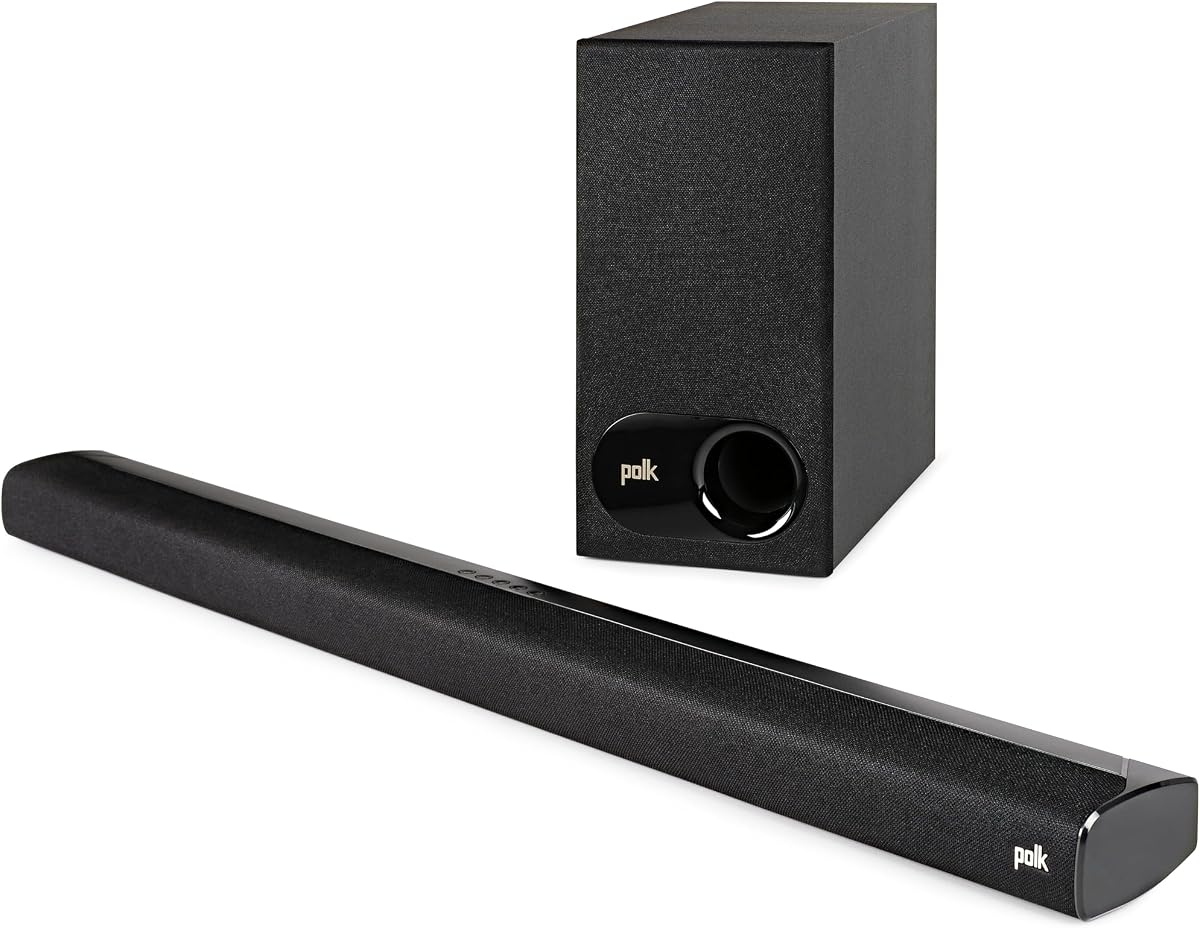
The Polk Audio Signa S2 is a straightforward 2.1-channel system built around a slim main bar, five full-range drivers, and a wireless subwoofer. Its 4.4 rating is among the strongest in the group, and the product is particularly useful for buyers who want more bass and clearer voices without a large speaker array.
We may earn a commission when you buy through this link, at no additional cost to you.
At just over two inches tall, the main enclosure is designed to fit beneath a television without obstructing the lower edge of the picture or infrared sensor. It can also be wall-mounted. VoiceAdjust is intended to maximize vocal clarity and reduce perceived voice delays, while Dolby Digital decoding processes compatible television and streaming content.
The system has no up-firing height drivers or dedicated rear channels, so its surround presentation is less elaborate than that of the TCL S65K, JBL Bar 500MK2, or Hisense AX3120Q. The supplied listing mentions HDMI and optical connectivity but does not explicitly specify 4K passthrough formats, making television and source-device verification especially important.
The Signa S2 is a good match for a living room where visual simplicity, a low-profile bar, and a separate wireless subwoofer matter more than overhead effects. Its included HDMI and optical cables and straightforward setup also make it approachable for first-time soundbar owners.
VoiceAdjust is designed to improve the balance of vocal content against music, effects, and background noise. That focus is valuable for daytime news, scripted television, and films with restrained dialogue.
The slim soundbar can sit neatly in front of or below a television, while the wireless subwoofer supplies low-frequency impact. This separates the visual bulk of the main unit from the larger bass component.
We may earn a commission when you buy through this link, at no additional cost to you.
The LG S40TR creates a 4.1-channel home-theater system from a main bar, wireless subwoofer, and wireless rear surround speakers. It has a 4.3 rating, and its strongest selling points include broad room coverage, television integration, Dolby and DTS compatibility, and several ways to refine the presentation.
We may earn a commission when you buy through this link, at no additional cost to you.
The Smart Up-Mixer can use all available speakers to create a wider soundstage from two-channel material, while the rear speakers provide more direct surround placement than a virtual-only system. Clear Voice Plus analyzes output to improve the realism and clarity of center-channel conversations. AI Sound Pro adds automatic processing, and the WOW Orchestra feature can combine audio from an LG television and the soundbar.
The system has more parts to place and connect than an all-in-one model, so it demands more attention during setup. The supplied specifications do not explicitly identify supported 4K pass-through video formats, and Dolby Audio should not be assumed to mean every Dolby Atmos configuration without checking the listing. Audio processing can also change the intended balance of a soundtrack.
The S40TR is a strong option for LG television owners who want wireless rear speakers, a separate subwoofer, and integrated remote and app control. It works best in a room with enough space to position the rear speakers behind or beside the main listening position.
The WOW Interface lets an LG television remote adjust volume, sound mode, connection status, and other settings. WOW Orchestra can also combine the television's speakers with the soundbar for a unified presentation.
The wireless rear speakers reduce cable runs while allowing genuine placement behind the audience. This can produce more convincing directional effects for films, live events, and games than a single-enclosure virtual-surround design.
We may earn a commission when you buy through this link, at no additional cost to you.
The Hisense HS2100 is a practical entry-level 2.1-channel system that combines two front-facing speakers with a wireless subwoofer. Its 4.1 rating reflects a capable foundation, including 240 watts of maximum audio power, DTS Virtual:X processing, HDMI ARC, Bluetooth 5.3, and six sound modes.
We may earn a commission when you buy through this link, at no additional cost to you.
The included subwoofer handles low-end frequencies while the front speakers project high and midrange content, giving movies and games more weight than the television's built-in speakers. DTS Virtual:X is intended to create a more spacious presentation, and the remote's EQ presets offer quick adjustments for movies, music, sports, games, and other content.
Compared with the Hisense AX3120Q, it lacks up-firing height channels, 4K HDR pass-through is not explicitly stated, and the connection uses HDMI ARC rather than eARC. It therefore represents a more basic route to improved television audio. Users who rely on advanced object-based audio or require the latest high-resolution video features should verify compatibility carefully.
Choose the HS2100 for a bedroom, office, apartment, or smaller entertainment area where a wireless subwoofer and easy setup are priorities. It offers a meaningful upgrade over television speakers without requiring rear speakers, ceiling reflections, or a complicated calibration process.
HDMI ARC carries television audio through one included cable and allows the soundbar to be controlled with one remote. The setup is designed to be approachable for users who do not want to manage a complex receiver or home-theater controller.
Six EQ modes let listeners move quickly between content types without manually altering multiple settings. The wireless subwoofer also provides a useful low-frequency foundation for action films, games, and music.
We may earn a commission when you buy through this link, at no additional cost to you.
The right soundbar depends on your television, source devices, room dimensions, and tolerance for visible speakers. Use the following factors to separate genuinely useful features from specifications that add little to the daily viewing experience.
4K pass through means the soundbar can relay compatible video to the television while carrying audio back from it, but the practical result depends on the complete chain. Check the soundbar's supported HDMI video formats, HDR types, refresh rates, and gaming features, then confirm that the television and source device support the same standard. A feature such as 4K Dolby Vision passthrough is more useful when it matches the format used by the television and streaming device.
Prioritize the official specification, manual, and compatible-device list over a generic statement that a product supports 4K. The soundbar must also support the television's return-audio function, particularly eARC when the goal is an uncomplicated single-cable installation.
Channel counts describe the intended output structure, but they do not guarantee an equally cinematic result. A 2.1 system may be excellent for dialogue and television, a 3.1.2 model adds upward-firing height channels, and a 5.1 package with independent rear speakers can reproduce surround effects more directly. Virtual processing can widen stereo or simulate overhead sound, but the result depends heavily on the room and source material.
Choose the configuration that matches both your space and your expectations. Separate rear speakers require room for placement, while virtual systems are easier to install but may not create the same directional separation.
A wireless subwoofer can deliver more perceptible low-frequency impact than an integrated driver, but a larger subwoofer is not automatically better in every space. For a compact bedroom, a modest wireless unit may be sufficient, while a large living room or dedicated theater benefits from more driver area and greater output. Placement near a wall or corner can also add useful low-frequency reinforcement.
Consider the main bar's dimensions, available floor space, nearby furniture, and whether a visible subwoofer is acceptable. Integrated-bass models offer the simplest installation, while separate wireless units generally provide more separation between dialogue and deep bass.
HDMI eARC is the most convenient option for a modern television because it supports high-quality return audio and allows compatible devices to share a remote. HDMI ARC is also widely useful, while optical audio can serve older televisions or external source components. Optical and AUX connections do not carry video, so a separate television link remains necessary for picture and those sources.
A good remote, mobile app, or television-remote integration can make everyday adjustments much easier. Look for basic functions such as power, volume, input selection, dialogue mode, and sound presets rather than paying attention only to unusual one-touch features.
Dialogue-focused modes can make speech easier to understand, especially during action scenes or at lower listening levels. Automatic room calibration goes further by measuring or modeling the room and adjusting frequency, level, and timing to reduce the effect of reflections and poor placement. These tools are most useful when speakers cannot be positioned perfectly.
Look for a dedicated center channel, voice-enhancement processing, or calibration accessible through a simple setup process. Also consider whether the system provides useful control after setup rather than requiring repeated manual adjustment whenever the content changes.
Bluetooth is common across the category and allows phones, tablets, and computers to stream music or podcasts directly. Built-in AirPlay, Chromecast, Spotify Connect, Tidal Connect, or Roon Ready can make a soundbar more useful as a primary home audio system, although each platform has its own setup and account requirements.
Decide whether the soundbar will mainly serve television content or also function as a everyday music speaker. If music is a priority, look for robust Bluetooth, direct app support, flexible equalization, and a stable way to resume playback after switching back to television.
Soundbar height matters because a thick enclosure can cover the bottom of a television or block its remote sensor. A slim model is easier to place in front of a screen, while a large system with a subwoofer and rear speakers needs more deliberate layout planning. Wall mounting can recover shelf space but requires suitable brackets, secure installation, and room for cable routing.
Review the actual dimensions supplied with the soundbar and compare them with your television stand. Also consider whether wireless rear speakers will be visible and whether their placement can avoid cabinets, doors, and narrow walls.
Some systems include an HDMI cable, optical cable, remote, batteries, power cords, and wall-mount hardware, while others require these items to be purchased separately. The Bose TV Speaker, for example, includes an optical cable but lists its HDMI cable and optional bass-module connection cable as separate accessories. The Hisense AX3120Q and TCL S55H include an HDMI cable, with the latter also listing a wall-mount kit.
Check the box contents before ordering to estimate setup costs and effort. Confirm that a compatible television remote can control essential functions, and verify whether a separate subwoofer or rear speakers are included rather than merely compatible.
Begin by identifying the soundbar's primary HDMI input and connecting it to the matching eARC or ARC input on the television. Power the television and soundbar before selecting the appropriate television input, then use the soundbar's remote or app to complete the initial setup. Update any available firmware, select the correct source, and keep the soundbar unobstructed rather than immediately covering every control or driver with a cloth.
Position the main bar near the television at ear level or slightly below it, with the front facing the primary seating area. Place a wireless subwoofer near a wall or corner if it is already included, then allow the system to run any calibration routine before making manual adjustments. Rear speakers should sit behind or to the sides of the listening position, while the main bar and subwoofer should not be crammed into the same narrow cabinet.
For care, dust the enclosure gently with a soft, dry cloth and keep liquids away from the drivers and controls. Do not use harsh cleaners, abrasive pads, or excessive moisture. Check the subwoofer and rear-speaker connections periodically, update software when prompted, and keep ventilation openings clear. If a cable, port, or speaker produces crackling, buzzing, or intermittent loss of signal, power the system down, reseat the connection, and consult the manufacturer's support instructions.
No. A soundbar may support 4K video while limiting particular HDR formats, color spaces, refresh rates, or gaming features. Check the official specifications and compatible-device list for the soundbar, television, source device, and cable. The most reliable approach is to match the source's output format to a format explicitly supported by both the television and soundbar.
HDMI eARC is not always necessary, but it simplifies the installation by sending television audio back to the soundbar through the same cable and supporting advanced audio formats. Standard HDMI ARC, optical audio, and other connections can also carry television sound. If using optical or AUX, you will need a separate cable for the television picture.
Passthrough sends a compatible 4K signal from the source through the soundbar to the television without changing its resolution. Upscaling converts a lower-resolution signal to a higher output resolution. The latter may improve the appearance of some content, while the former is important when preserving the picture quality delivered by a streaming device, disc player, or game console.
Not entirely. Virtual surround can create convincing width, height, and enveloping effects from a single bar, particularly with compatible object-based audio. Independent rear speakers provide more direct separation and directional placement. The best choice depends on room size, source material, installation tolerance, and whether cinematic precision or a simpler setup matters more.
No. Integrated-bass models such as the Samsung HW B400F can provide a noticeable upgrade over television speakers without adding another component. A wireless subwoofer generally offers stronger and deeper low-frequency output, which is especially noticeable with action films, games, and music. The best choice depends on room size, available space, and how much bass you actually want.
Connect the soundbar to the television's eARC or ARC HDMI input, select the matching television input, and configure the soundbar's source and control settings. Use the supplied remote or app for initial setup, then enable a suitable dialogue or sound mode. If a game console or disc player is involved, verify its resolution, refresh rate, HDR, and video-pass-through support.
It can, particularly when a soundbar is close to walls, furniture, or a corner, or when a subwoofer is difficult to place. Calibration can adjust level, frequency response, and timing to reduce the effect of reflections and improve consistency between listening positions. It cannot correct poor placement, overly soft furnishings, or a room with severe acoustic problems, so physical setup still matters.
For movies and games in a medium or large room, independent surround channels and a capable subwoofer usually provide a more noticeable cinematic upgrade. For news, talk shows, and everyday television, dialogue clarity and balanced output may matter more. Consider the content you watch most often, room size, and the placement of the included or optional speakers.
The JBL Bar 500MK2 is the most complete overall recommendation, combining confirmed 4K Dolby Vision passthrough, a large wireless subwoofer, Dolby Atmos, MultiBeam 3.0, dialogue optimization, and automatic calibration. The Hisense AX3120Q offers the most compelling value-oriented package, with explicit 4K HDR passthrough, up-firing height speakers, and a wireless subwoofer, while the TCL S65K is the most complete premium surround arrangement with separate rear speakers.
Prioritize compatibility before features. Confirm the television, source device, HDMI format, HDR type, refresh rate, and video-pass-through support as one connected chain. Then choose based on room size, bass requirements, speaker placement, dialogue needs, and control preferences. A compact system may be ideal for a bedroom, while a dedicated viewing room benefits from a subwoofer and true rear channels.
Product listings, accessories, firmware, and available offers can change, so review the current product page and manufacturer documentation before ordering. The final check should include room dimensions, included cables, remote-control compatibility, subwoofer or surround-speaker placement, and the exact 4K and HDR formats supported by every device in the setup.