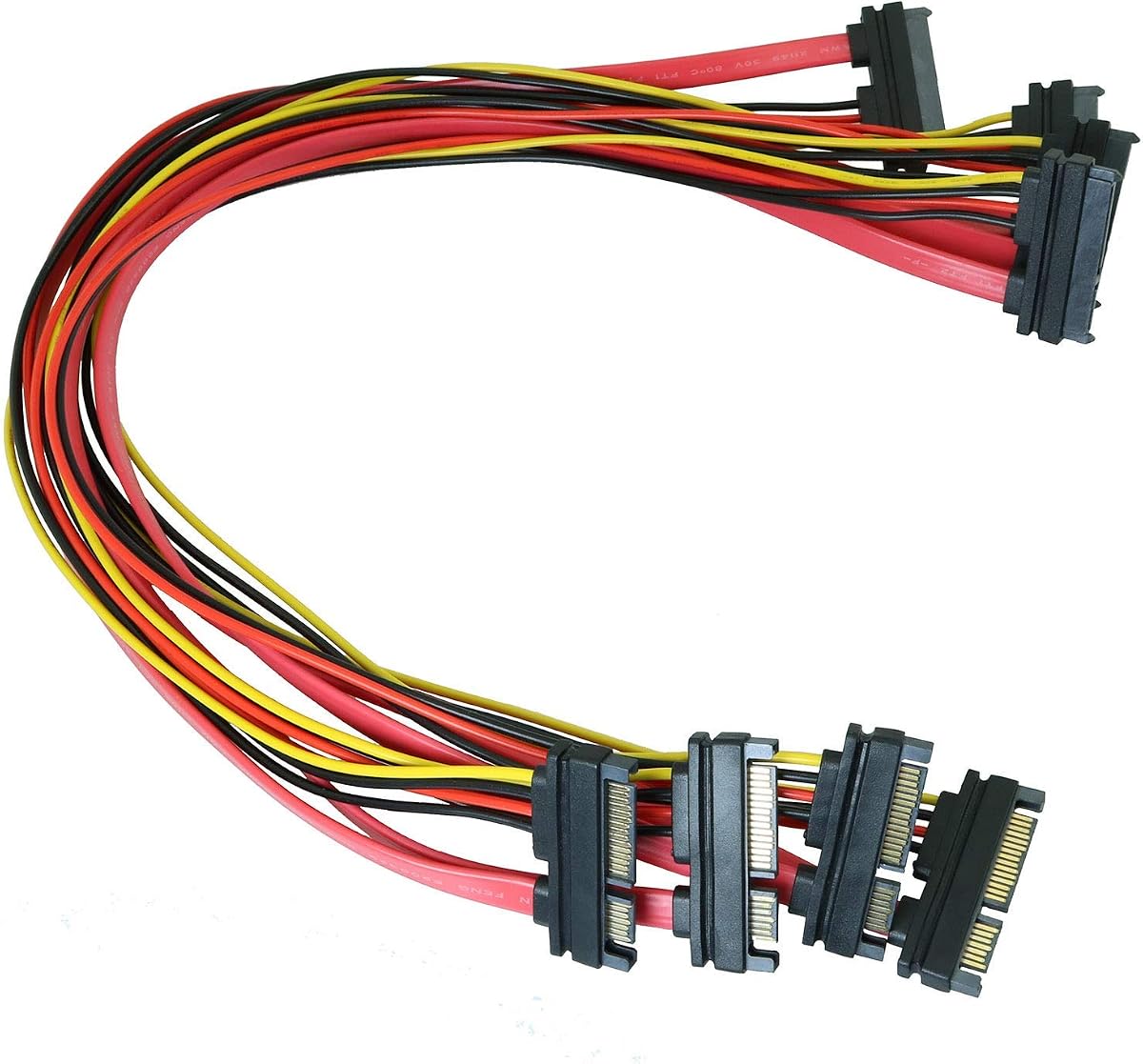
4PCS 50cm SATA 22 Pin Combo Extension
4.9Editor score
Four combined data power cables
Compact 50cm cable length
Copper conductor construction
Slim design improves airflow
A SATA male to female cable extends an existing internal storage connection, helping a hard drive, SSD, optical drive, or backplane reach its motherboard or power supply. The right cable must match the connector configuration, provide the necessary data or power conductors, and fit comfortably inside the intended chassis.
The products in this guide include 7-pin data-only extensions, 15-pin power-only extensions, and 22-pin combined SATA data and power cables. We compared their stated connector types, lengths, conductor construction, shielding, supported devices, and included quantities, while noting the practical differences between data, power, and combo designs.
Each pick represents a distinct use case, from compact multi-drive installations to repair benches and longer chassis runs. Ratings and technical details reflect the supplied product information, while availability and prices can change, so readers should confirm connector compatibility and current listing details before ordering.
4.9Editor score

4.8Editor score

4.8Editor score
As an Amazon Associate we earn from qualifying purchases.
This side-by-side comparison highlights the key differences among data-only, power-only, and combined 22-pin SATA extensions, with each product considered for connector type, length, construction, and intended installation.


The MEIRIYFA 22Pin SATA Power Extension Cable has a 4.6 rating and combines seven-pin SATA data with 15-pin power in one cable. Its male-to-female arrangement is intended to extend an existing 22-pin connection to compatible hard drives, SSDs, optical drives, and other SATA-interface devices, making it a practical choice when both signals need extra reach.
We may earn a commission when you buy through this link, at no additional cost to you.
The cable uses an oxygen-free thick copper core with aluminum foil and multilayer shielding to reduce transmission loss and interference. Its 50cm flat profile is easy to route behind a drive cage or along the edge of a compact case, while the two-cable pack provides useful redundancy for systems with more than one storage device.
The main limitation is that a combined 22-pin extension is less versatile than a simple 7-pin data cable. It cannot replace a 15-pin power lead for a device that exposes only power, and users should not force it into ports with a different shape. The stated 50cm length also requires enough room to bend without loading the connector.
This is a good general-purpose option for a desktop or server chassis where SATA drives need both power and data extended from an existing combined interface. It suits builders who want one cable to manage instead of routing separate data and power leads, particularly when a small number of matched cables are needed.
Combining data and power reduces the number of separate leads connected to a 22-pin SATA device. The flat sheath can be tucked behind drives or routed through narrow spaces without adding the bulk of two unrelated cables.
The stated oxygen-free copper core and layered shielding are intended to limit transmission loss and interference. These features are particularly relevant in compact cases where cables may run close to other components.
We may earn a commission when you buy through this link, at no additional cost to you.
This four-pack of 50cm SATA extensions has a 4.4 rating and focuses on 7-pin male-to-female data connections. It is intended to extend a SATA hard drive or optical drive connection to a compatible device or motherboard position, giving installers more freedom when the original cable cannot reach.
We may earn a commission when you buy through this link, at no additional cost to you.
A notable strength is the quantity: four cables support multiple drive positions, replacement needs, or portable use across different systems. The product information also describes improved signal integrity, reduced crosstalk, and space-saving use inside a CPU unit, which can be helpful when drives, cards, or other components need frequent removal.
This is a data cable rather than a combined 22-pin solution, so a separate SATA power connection is still required for a hard drive or SSD. The generic listing also provides fewer details about shielding and conductor materials than some competing products, which means buyers should judge the cable primarily by its 7-pin fit, 50cm length, and intended data-extension role.
It is best for system builders or technicians who routinely swap drives and need several inexpensive extension options. For a multi-drive desktop, a single 50cm lead may solve the routing problem more neatly, but the four-pack is stronger when several machines, drive bays, or replacement configurations need coverage.
Four matching cables make it easier to address several drive positions at once or keep a spare available. The quantity also suits repair benches where cables are moved among systems rather than permanently installed.
The 50cm extension adds reach between a drive and its data connection. That extra distance can make it easier to position a drive, route a lead, or remove a storage device without reorganizing the entire cable layout.
We may earn a commission when you buy through this link, at no additional cost to you.
The Coolgear 12-inch male-to-female SATA extension has a 4.3 rating and is designed to lengthen SATA I or SATA II data cables. Its relatively short reach makes it a sensible option for tight cases, drive cages, and service benches where a full 20-inch cable would be unnecessary.
We may earn a commission when you buy through this link, at no additional cost to you.
Construction details provide a clearer technical basis for the recommendation. The cable uses a 26AWG solid tinned copper conductor, shielding, an 80C PVC jacket, robust connector housings, and gold-plated contacts, all intended to support stable signal transmission and durability in demanding work areas.
The specified compatibility is the main constraint. It is described as supporting Serial ATA 150 and 300, so buyers needing a SATA 600 connection should verify requirements and consider the StarTech option listed later in this guide. It also carries data only and does not extend a drive's power connection.
This cable is a good match for technicians, compact builders, and users repairing older SATA installations. It is especially useful when a drive is close to the correct port but needs just enough extra distance for a secure connection or smoother removal and replacement.
At 12 inches, the cable adds useful distance without the excess length that can complicate airflow or cable management. It is a practical choice for tight drive arrangements and nearby connectors.
The 80C PVC jacket, robust connector housing, and shielded 26AWG conductor are presented as durable features for repair and maintenance environments. These details make the cable more relevant to technicians than to casual users.
We may earn a commission when you buy through this link, at no additional cost to you.
The Coolgear 20-inch 7-pin extension offers a longer alternative to the 12-inch model and carries a 4.3 rating. It is intended to extend SATA I or SATA II data connections for hard drives and other compatible SATA devices when a larger chassis requires additional distance.
We may earn a commission when you buy through this link, at no additional cost to you.
The cable shares the same technical construction described for the shorter Coolgear option: a shielded 26AWG solid tinned copper conductor, 80C PVC jacket, robust connector housing, and gold-plated contacts. That combination is intended to minimize signal loss, crosstalk, and heat-related concerns while maintaining a dependable connection.
Twenty inches is useful for reaching between distant drive bays, but it can create excess cable inside a small enclosure. Users should preserve a natural bend, avoid tightly wrapping the lead around sharp components, and ensure the extension does not obstruct fans or make drive removal difficult.
This product is best for larger desktop cases, server-style storage arrangements, and technicians who need more reach than a short patch cable provides. It is less suitable for compact systems or modern SATA 600 installations unless the full system requirements have been independently confirmed.
The 20-inch length can bridge a larger distance between a hard drive and the existing SATA data connection. It gives builders more freedom in arranging a spacious case or a less conventional drive layout.
Shielding, tinned copper wiring, and gold-plated contacts are all listed as contributors to a stable link. The design is aimed at installations where a dependable data connection matters during repeated service or drive changes.
We may earn a commission when you buy through this link, at no additional cost to you.
The 4PCS 50cm SATA 22 Pin extension has a 4.9 rating, the highest among the listed products, and combines seven-pin data with 15-pin power. Its male-to-female design makes it suitable for extending a connected SATA interface to compatible hard drives, optical drives, and similar devices.
We may earn a commission when you buy through this link, at no additional cost to you.
Four matching cables offer strong flexibility for multi-drive builds, maintenance work, or keeping spares available. Copper is the stated conductor material, while the thin combined profile is designed to reduce clutter and improve airflow inside a computer or server chassis.
The important caveat is endpoint compatibility. A 22-pin combination cable cannot be used as a conventional 7-pin data extension or a standalone 15-pin power extension, so users should inspect the device and source connection before purchasing. In a very small enclosure, the 50cm lead may also need more routing care than a shorter option.
For a builder who wants several combined SATA extensions at a moderate length, this is the strongest overall recommendation in the guide. It balances high customer feedback, useful quantity, broad device relevance, and a slim profile without requiring a separate data cable and power cable for each matching 22-pin device.
The combined 22-pin format carries SATA data and power through one cable. This simplifies routing to devices that already present a matching combined interface and reduces the number of separate leads in the enclosure.
Four cables are enough to cover several drive positions or to support future expansion. A spare extension can also be useful in a service environment where cables are moved between systems.
We may earn a commission when you buy through this link, at no additional cost to you.
The J&D 15 Pin SATA Power Extension has a 4.8 rating and is designed to extend the power connection between a host power supply and SATA devices. The 10-inch length is short enough for compact installations but still provides enough flexibility to reduce connector strain or reach a more convenient routing path.
We may earn a commission when you buy through this link, at no additional cost to you.
Its 18 AWG oxygen-free copper construction and braided shielding are intended to support durability and reliable power delivery. A locking connector mechanism is included to help prevent accidental disconnections, which is useful during operation or when a case is moved and cables experience movement.
This extension is compatible with SSDs, hard drives, optical drives, and PCIe Express devices that use the appropriate 15-pin SATA power connector. It does not carry SATA data, so the drive's data cable must connect separately. Users should also confirm the device's power specification rather than assuming every SATA-labeled accessory is interchangeable.
It is an excellent choice for a clean two-drive or multi-drive installation where existing power leads do not reach conveniently. The two-pack, compact length, and locking ends make it especially practical for system builders, while the short cable avoids the excess routing associated with longer power extensions.
The locking connector mechanism is intended to reduce accidental disconnections during operation. That makes the cable more useful in systems that may be moved, serviced, or exposed to routine cable disturbance.
At 10 inches, the lead provides modest extension without a large loop of excess wire. It can make a drive connection easier to reach while remaining convenient to tuck into a compact chassis.
We may earn a commission when you buy through this link, at no additional cost to you.
The ChenYang SATA III 22Pin extension has a 4.6 rating and combines data and power in a compact 30cm cable. It is aimed at extending a matching 22-pin connection to 2.5-inch and 3.5-inch drives while supporting the stated SATA III 6Gbps data rate.
We may earn a commission when you buy through this link, at no additional cost to you.
The product information specifies 12V and 5V power wiring, including red and yellow conductors and two black ground wires. This level of detail helps buyers distinguish it from a 7-pin data-only extension and confirms that the cable is designed as a complete combined SATA lead for compatible 22-pin equipment.
Its main strength is also the reason it will not suit every setup. A 30cm cable is excellent for a close-fit chassis, but it may not provide enough reach in a larger tower, and a 22-pin male connector cannot fit a drive with separate 7-pin and 15-pin sockets. Only one cable is included.
This is a good choice for compact SATA III installations with a matching combined interface and a modest routing gap. It offers a short, tidy solution where a 50cm extension would be excessive and where modern data-transfer capability is desired.
The 30cm length minimizes unused cable in a tightly packed case. Because data and power share one connector, it can also simplify connections to a device with a matching 22-pin port.
The stated SATA III 6Gbps capability makes this extension more appropriate for contemporary storage systems than options explicitly limited to SATA I and SATA II. Device and controller requirements should still be confirmed before installation.
We may earn a commission when you buy through this link, at no additional cost to you.
The COMeap 24-inch SATA Power Extension has a 4.8 rating and pairs a braided exterior with a 15-pin male-to-female configuration. It is intended to connect a computer power supply to hard drives, SSDs, optical devices, and other equipment using the appropriate SATA power interface.
We may earn a commission when you buy through this link, at no additional cost to you.
Its 18 AWG tin-coated copper wiring is specified for compatibility with 3.3V, 5V, and 12V power voltages between SATA drives and power supply connections. The approximately 60cm cable provides considerably more reach than a compact patch, while the braided jacket gives it a more substantial appearance suited to a visible or frequently handled installation.
A self-adhesive strip of tape is included, which can help secure a section of the cable inside a chassis. The package includes only one extension, however, and the cable does not provide a data path. Buyers should also follow the stated warning and confirm that the endpoint uses a SATA power port rather than a visually similar but electrically different connector.
This is a strong premium-style option for larger cases, tidy visible builds, or installations where a long, reinforced-looking power lead is preferred. It is best suited to users who already have a suitable SATA data connection and need more reach or a more organized appearance from the power side.
The braided jacket is designed to give the extension a more finished appearance and help it remain manageable during routing. It is especially suitable for a clean desk setup or a chassis where cables remain visible.
At 24 inches, the cable can bridge a larger distance than the shorter power options in this guide. The included adhesive tape offers a simple way to hold a section in place after the route has been planned.
We may earn a commission when you buy through this link, at no additional cost to you.
The StarTech 0.3m SATA Extension Cable has a 4.5 rating and provides a 30cm 7-pin SATA data extension. Its listed support for Serial ATA 150, 300, and 600 gives it broader stated generation coverage than the Coolgear options limited to SATA I and SATA II.
We may earn a commission when you buy through this link, at no additional cost to you.
The cable follows the familiar SATA data connector pattern, with SATA power and receptacle connections described in the specification. Its compact 30cm length is a useful middle ground: longer than a short patch for drive positioning, but shorter than the 50cm and 24-inch options that can create excess routing in smaller systems.
As a 7-pin data extension, it does not solve a drive's power-routing problem and cannot connect directly to a 15-pin power socket. The product information is concise and does not highlight the conductor or shielding details offered by several competitors, so compatibility is the primary consideration for this pick.
It is a good general-purpose option for builders who need a little more data-cable reach, especially with SATA 600 equipment. The red housing also makes the connection easier to identify inside a crowded case, while the measured length supports tidy routing.
Support for SATA 150, 300, and 600 makes this a versatile data extension for systems using common internal SATA standards. It avoids the older-generation limitation stated for the Coolgear 7-pin options.
Thirty centimeters offers additional reach without the full length of a 50cm cable. That balance works well for compact desktop cases where a few extra centimeters are needed but substantial excess cable is not.
We may earn a commission when you buy through this link, at no additional cost to you.
The Slimline 20-inch 22-pin SATA extension has a 4.6 rating and combines seven-pin data and 15-pin power. Its 49.5cm stated length provides a practical amount of reach for drive cages, backplane adapters, and internal-to-external SATA arrangements.
We may earn a commission when you buy through this link, at no additional cost to you.
The defining feature is the slimline cable design. A lower-profile lead can be easier to fit behind tightly packed drives or through narrow routing gaps than a bulky combined cable. Since the product information specifically mentions backplane adapter and internal-to-external applications, it is aimed at installations where space and flexible routing matter.
As with other 22-pin products, compatibility must be checked carefully. A male 22-pin plug is intended to meet a corresponding female 22-pin connection, so it is not a substitute for separate 7-pin and 15-pin leads when the device uses different sockets. Only one extension is included, and the listing provides limited conductor detail.
This cable is a good fit for a compact desktop or multi-drive server with matching combined interfaces and limited internal clearance. It is particularly attractive when slim routing is more valuable than having several cables in the package.
The slimline form is valuable behind crowded drive cages, where connector depth and cable thickness can restrict installation. It helps preserve room for airflow and makes a combined connection easier to tuck away.
The stated suitability for backplane adapters and internal-to-external arrangements makes the extension useful beyond a conventional motherboard-to-drive connection. Users should still verify that both endpoints expose the matching connector type.
We may earn a commission when you buy through this link, at no additional cost to you.
The correct SATA extension begins with connector type, but length, data capability, power construction, and physical fit determine whether it will work well in a particular system.
Match the extension to the endpoint, not merely to the drive. A drive may use separate seven-pin and 15-pin sockets even when the source side offers a combined connection, and backplanes can use a different layout. Choose the cable that physically and electrically matches both ends.
Choose the shortest cable that provides comfortable reach. Avoid creating tight folds, and make sure the cable can be disconnected without bending the drive or power supply.
For a modern internal drive setup, favor a clearly stated 6Gbps-capable data path. Older-generation support may be sufficient for legacy equipment or a service bench.
Look for stated wire gauge, robust connectors, and a secure locking fit. If multiple high-current drives are planned, distribute loads sensibly and confirm the power supply can support the complete configuration.
Favor a cable with documented shielding when the installation is compact or electrically busy. Keep data leads away from direct contact with moving fans and sharp chassis edges.
Look for a firm, keyed fit and positive retention. Never force a connector that does not align, since doing so can damage the cable, drive, or motherboard header.
Choose a profile that fits the available channel and keep unused cable out of airflow restrictions. A neat route improves serviceability as well as reliability.
Match pack size to the number of planned connections. For a repair bench or a system with several drives, a multi-pack can be more useful than one premium-looking cable.
Before installation, shut down the computer, disconnect the power supply, and wait for internal components to become safe to handle. Identify the SATA connection that needs additional reach, inspect the male and female ends, and confirm that the connector type matches the source and device. A 7-pin cable, 15-pin cable, and 22-pin cable may look related, but their shapes and functions are not interchangeable.
Connect the extension firmly in the appropriate direction while supporting the nearby drive or port. Route the cable with a natural bend, keeping connectors straight and avoiding sharp edges, fan blades, hot components, and areas where a case panel could press against the wire. For power extensions, verify that the latch is fully engaged; for data cables, avoid twisting the plug while inserting it.
After assembly, reconnect the power supply and boot the system to confirm that the storage device is detected and the connection remains stable. Keep the extension supported, replace any cable that is crushed, sharply bent, or discolored, and avoid modifying its connectors. Periodic visual inspections are especially important in systems with multiple drives, hot-swapping service routines, or frequently opened cases.
A 7-pin SATA cable carries data only, a 15-pin SATA cable carries power only, and a 22-pin SATA cable combines data and power. The correct choice depends on the ports at both ends. A combined cable cannot replace separate data and power connections when the device uses separate sockets.
Yes, but only when both the source and device use matching 22-pin combined interfaces. The 22-pin products in this guide carry seven-pin data and 15-pin power through one lead. A 7-pin extension or 15-pin extension handles only one of those functions.
The best length is the shortest one that provides comfortable routing. Around 10 to 12 inches works for close connections, 20 to 24 inches suits larger cases, and 30 to 50cm options cover moderate gaps. Measure the actual cable path and allow extra room for bends and connector clearance.
A cable rated for SATA 6Gbps is generally suitable as a connection path for older SATA devices, although the drive and controller will continue operating at their own supported limits. Compatibility also depends on connector type and system support, not only the advertised transfer rate.
An extension is unnecessary when the existing cable reaches comfortably without strain. It becomes useful when a drive bay is too far from the connector, the original cable cannot bend safely, or an installation requires more flexible positioning. Adding unnecessary length can make cable management harder.
They can be safe when the connector type, voltage, and data standard match the equipment. A 15-pin power extension should connect to compatible SATA power ports, while a 7-pin data extension should match the SATA data interface. Never force a connector or use a visually similar port with a different pin arrangement.
A properly matched, well-constructed extension should not inherently reduce normal performance, but excessive length, poor connections, interference, and unsupported data standards can contribute to instability. Use the shortest practical cable, maintain a clean installation, and confirm that the extension supports the drive's required SATA generation.
One extension normally serves one connection, so multiple drives require matching extensions for each cable path. Multi-packs are useful for multi-bay systems because they provide several matched leads. A single drive still needs both a data connection and a suitable power connection, even if those functions are carried by separate or combined cables.
The 50cm four-pack of 22-pin combined extensions stands out as the most versatile overall choice, offering a 4.9 rating, four matching cables, and a slim profile for multi-drive systems. The J&D 15-pin power extension is ideal when the problem is specifically power reach, while the COMeap 24-inch braided cable provides longer routing and a more finished appearance.
Prioritize connector type before length or construction. A perfect data cable cannot substitute for a power extension, and a 22-pin combo lead is not suitable for separate drive sockets. After confirming the endpoint, select the shortest practical length, check the stated SATA generation for data cables, and consider shielding, locking connectors, and pack quantity for the installation.
Ratings, product details, and availability can change over time, so check the current listing before buying. Also review the current cost, customer feedback, connector images, and device requirements to ensure the selected SATA male to female cable remains the right fit for the system.