
Zoom LiveTrak L6max
4.5Editor score
Twelve inputs, fourteen tracks
Clip-free dual conversion
Real-time noise reduction
Flexible battery power
Explore the best mixer for live performance with 10 expert-reviewed options compared for channels, audio quality, effects, recording, and connectivity.
A mixer for live performance must combine dependable signal control with the features a musician actually needs under pressure. The right model depends on the size of your ensemble, the instruments involved, whether you record the show, and how much room you have for cables and signal processing.
This guide compares 10 mixers across channel count, microphone and instrument connectivity, EQ, effects, wireless playback, recording, monitoring, portability, and stage-focused control. It includes analog consoles, compact multichannel mixers, digital live-performance systems, and a dedicated backing-track player rather than treating every product as the same type of device.
Each selection shows where it fits best: the Yamaha MG10 suits straightforward live mixing, the Zoom LiveTrak L6max emphasizes recording, and the M-Live B.Beat Evo manages multitrack backing tracks. Ratings, features, and availability can change, so confirm the current listing and system requirements before buying.
4.5Editor score

5.0Editor score

4.6Editor score
The comparison covers analog mixers, digital recording consoles, and a stage-oriented backing-track system, with particular attention to the number and type of inputs, mix-processing tools, stage connectivity, recording capabilities, and convenience for live performers.


The Yamaha MG10 is a compact analog mixer built around straightforward live sound control, and its 4.6 rating reflects its suitability for rehearsals, small stages, worship sets, and straightforward band mixing. It does not overwhelm the performer with menus or screen-based workflows. Its 10-channel layout, XLR connectivity, and familiar fader-and-knob design make it approachable for users who want direct control over a live signal.
We may earn a commission when you buy through this link, at no additional cost to you.
The mixer’s most meaningful strength is its clean foundation. Discrete class-A D-PRE preamps are designed to provide a natural, full sound, while high-pass filters help reject unwanted low-frequency noise. Three-band EQ on the mix channels gives performers practical tonal control, and the one-knob compressors are especially valuable when one sound is taking over the mix. They can make a vocal more consistent, a snare tighter, a guitar more lively, or a bass line punchier without requiring extensive experience with compression.
The trade-offs are purposeful rather than accidental. The MG10 is a standalone analog mixer, so it has no USB interface, computer recording, media player, Bluetooth, or onboard digital effects. A performer who wants to capture a show or trigger backing tracks will need separate equipment. It also offers a fixed set of processing rather than the deep scene recall and expandability associated with a digital console. For a straightforward live mix, however, those omissions can also be advantages because they keep the signal path and operation simple.
This is the strongest general recommendation for a musician who needs an uncomplicated live mixer with dependable preamps, practical EQ, useful compression, and robust construction. It is especially well suited to a small ensemble using microphones, DI boxes, and conventional analog connections. Choose the MG10 when dependable hands-on mixing matters more than recording, media playback, or automated effects. It delivers the core tools of live mixing without turning the surface into a complex digital workstation.
Independent channel gain, high-pass filters, three-band EQ, and one-knob compression give performers a useful processing chain without requiring a separate rack of outboard equipment. The layout is especially valuable when a musician needs to react quickly during a rehearsal or intimate performance.
The impact-resistant, powder-coated metal chassis is designed for mobility and regular handling. Plus-48V phantom power supports condenser microphones, while XLR connectivity keeps the setup conventional and easy to troubleshoot.
We may earn a commission when you buy through this link, at no additional cost to you.
The Depusheng DX8 is an eight-channel analog mixer with a strong emphasis on connecting modern devices to a live performance. It carries a 4.2 rating and is aimed at singers, small ensembles, karaoke performers, and mobile presenters who want more source flexibility than a basic analog console. USB, flash-reader, MP3, and Bluetooth options allow music and playback duties to sit alongside microphone and instrument mixing.
We may earn a commission when you buy through this link, at no additional cost to you.
Its channel architecture supports XLR and unbalanced quarter-inch connections, with per-channel 48V phantom power for condenser microphones. A three-band EQ on every channel provides familiar tone shaping, and the 10-segment stereo output meter gives a visible indication of the master level. Accurate LED peak indicators are particularly valuable for users who want to notice overload before it becomes a problem during a live set.
The mixer’s very thin, rugged chassis is easy to pack, but that same emphasis on compactness can make the control surface feel busy. The product combines analog mixing with USB, media, and wireless playback functions, which increases versatility but also creates more modes to understand. Users should verify whether a particular computer or playback workflow is required for their setup rather than assuming every USB operation will behave identically across systems.
The DX8 is a good fit for a performer who needs Bluetooth music, USB playback, and conventional live mixing in one portable surface. It is less compelling for someone seeking a pristine minimal analog signal path or extensive multitrack recording. Still, for rehearsal rooms, karaoke, small presentations, and pop-up performances, its source options and clear metering make it a versatile and accessible choice.
Bluetooth streaming, MP3 playback, flash-reader support, and USB connectivity let performers move between prerecorded material and live inputs. Built-in transport controls reduce the need to reach for a separate player during a set.
A 10-segment stereo meter and per-channel peak indicators help performers watch signal levels more carefully. That visibility is essential when combining vocals, instruments, and wireless sources in a compact live environment.
We may earn a commission when you buy through this link, at no additional cost to you.
The M-Live B.Beat Evo is a purpose-built stage device for musicians who depend on backing tracks, click, video, lyrics, and show control. Its 5.0 rating reflects an unusually complete approach to modern live performance, combining up to 16 mono or eight stereo tracks in one compact enclosure. Unlike a conventional channel mixer, it is designed to consolidate the playback and control system a working musician would otherwise assemble from several devices.
We may earn a commission when you buy through this link, at no additional cost to you.
Multitrack playback supports WAV, MP3, OGG, AAC, and stems with 24-bit processing and a stated signal-to-noise ratio of 107 dB. That makes the device relevant to performers who need separated stems, synchronized backing parts, or click tracks. The free PC and Mac app supports playlist and show creation, while wireless lyric and score control through the Prompter App reduces the need for a second screen at the side of the stage.
Its limitations are definitional rather than defects. The B.Beat Evo does not present the familiar bank of channel strips, EQ knobs, and conventional input routing expected from a live mixer. Users who need to shape every microphone and instrument with onboard EQ and compression will still require an analog or digital mixer. The system is most valuable when the priority is reliable track management, click, media synchronization, and output control rather than hands-on channel mixing.
Choose the B.Beat Evo for solo musicians, duos, worship leaders, theater performers, and bands that rely on prerecorded parts. Six balanced outputs, two line inputs, independent headphone monitoring, dedicated click detection, and footswitch control provide a stage-oriented foundation. It is our top recommendation for live performers trying to replace a computer, sound card, and separate backing-track player with a consolidated dedicated system.
The device consolidates multitrack playback, click, mixing, video, and show control into one stage unit. That can simplify setup, reduce the number of items near the performer, and make rehearsals more repeatable when every show is prepared in the same app.
MP4, MOV, AVI, and image playback can remain synchronized with music and be sent through HDMI at up to 1920×1080. This makes the system useful for performances where lyrics, score videos, visuals, and music must all advance together.
We may earn a commission when you buy through this link, at no additional cost to you.
The Zoom LiveTrak L6max is a hybrid mixer and recorder for musicians who want to capture a performance while controlling its live balance. Its 4.5 rating reflects a feature-rich platform with 12 channels, 14 simultaneous tracks, flexible power, and multiple workflow options. It sits between a straightforward analog console and a computer-based recording setup, which makes it especially relevant to rehearsals, small gigs, podcasts, and mobile recording sessions.
We may earn a commission when you buy through this link, at no additional cost to you.
The input layout consists of four combo inputs with Hi-Z support and eight line inputs across the 12 channels. Those combo connections are useful for microphones, instruments, and line sources, while Hi-Z support makes guitar and bass integration more convenient. Recording to SD cards up to 2TB removes the immediate need for a nearby computer and allows performers to preserve multitrack material directly from the stage.
Dual AD converters on channels one through four are intended to capture audio across a broad range of levels, and built-in real-time noise reduction targets hum, hiss, and background noise. These processing tools are useful in imperfect rooms, but they should be treated as transparent starting points rather than replacements for good microphone placement, gain staging, and isolation. The MIDI-locked sound pads also open the door to samples, jingles, and electronic performance effects.
The acceptable trade-off is complexity. A musician seeking only a simple analog fader mixer may find the L6max feature-heavy, and the recording workflow takes more preparation than patching a microphone into a basic console. Even so, performers who want a durable, portable, self-contained way to mix and record will find it compelling. AA batteries, USB bus power, or a mobile battery pack make it especially suitable for rehearsals and performances away from a reliable outlet.
Direct multitrack recording to SD cards creates a self-contained alternative to a laptop-based session. Musicians can preserve separate source tracks, make a rough live balance on the console, and complete the polished mix later.
The ability to run on AA batteries, USB bus power, or a mobile battery pack supports location-based rehearsal and performance. It also provides a practical fallback when venue power is unavailable or inconvenient.
We may earn a commission when you buy through this link, at no additional cost to you.
The 16-Channel 99 DSP Mixer is a feature-rich console for live shows, karaoke, rehearsals, and small events that require more input capacity than a basic mixer. Its 4.6 rating and 16-channel layout make it attractive to performers combining several microphones, instruments, DI boxes, and wireless systems. The surface goes well beyond basic level control with per-channel EQ, dedicated mute buttons, 99 effects, and a seven-band master graphic EQ.
We may earn a commission when you buy through this link, at no additional cost to you.
Bluetooth, USB playback, and a digital media display make it possible to incorporate stored music into the same live mix. The mixer’s controls allow playback functions such as play, pause, and track skipping directly from the panel. Each input has independent gain, a three-band EQ, a fader, and a mute control, which should help users move quickly when one source needs to be isolated or its level adjusted.
The tradeoff is size and feature density. A 16-channel surface occupies more room than an eight- or ten-channel model, and some musicians may not need the 99-effect library or master graphic EQ. A long wireless range of up to 33 feet is useful when the mixer is near the stage, but it should not be treated as a substitute for a reliable digital audio connection in a crowded RF environment. Buyers should also check their actual cable and microphone requirements before purchase.
This mixer makes the most sense for a group that needs substantial channel capacity and enjoys having effects, media playback, and master tone shaping in one box. It is well matched to live mixing, karaoke, DJ-style source transitions, rehearsal rooms, and small venues. Those wanting a minimal analog path may prefer a smaller unit, but performers who value quick access to mute, EQ, effects, and Bluetooth sources will find this configuration capable and convenient.
Sixteen independently controlled channels provide room for a larger number of microphones and instruments. Individual gain, EQ, fader, and mute settings simplify source management when many performers need separate control.
The 99 DSP effects include familiar tools such as reverb, delay, and ambience. A separate seven-band graphic equalizer provides broad control over the final output, adding tonal shaping beyond the per-channel three-band EQ.
We may earn a commission when you buy through this link, at no additional cost to you.
The AVE-100 is a vocal effects processor rather than a general-purpose live mixing console, and it serves a different but highly specialized purpose. Its 4.2 rating reflects a broad collection of tools for singers, including pitch correction, harmony, reverb, delay, key detection, anti-feedback processing, and a loop recorder. It can enrich a solo performance, support a singer who wants to build harmonies, or solve specific vocal problems without a large rack of outboard gear.
We may earn a commission when you buy through this link, at no additional cost to you.
Its standout feature is automatic key detection through the KeyLearn function. Once it detects the key of a backing track, the processor can help select appropriate harmony intervals. Unison, plus-third, and plus-sixth modes cover common musical choices, while adjustable pitch correction allows the performer to decide how much processing feels natural. Reverb and delay add depth, and dedicated effect pads provide quick access during a live performance.
The key limitation is that the AVE-100 is not a substitute for a mixer. It focuses on vocals rather than providing the full complement of channel strips, master faders, and multi-instrument routing that a band may require. A user will still need another mixer to balance a complete band. Automatic features also require accurate source material and sensible adjustment; they are starting points that should be checked against the song, key, and performer’s range.
This is a compelling companion for vocalists who want harmonies, corrective effects, looping, and anti-feedback assistance in a stage box. The XLR input supports 48V phantom power for condenser microphones, while the 6.35 mm connection accepts instrument and line-level sources. It is equally relevant to streaming and recording, but for live use its most valuable qualities are the effect pads, automatic key awareness, and dedicated vocal processing. Add it to a mixer when vocals need specialized treatment.
The KeyLearn function detects the key of a backing track and helps the performer select appropriate harmony intervals. This can make rehearsed multivoice arrangements more repeatable during a live show.
Intelligent anti-feedback processing helps manage unwanted feedback, while the loop recorder supports layered vocal ideas and short recorded passages. Reverb, delay, and pitch correction can be adjusted to suit the performance rather than used as fixed presets.
We may earn a commission when you buy through this link, at no additional cost to you.
The FULUODE CT-80S is a thin eight-channel mixer designed for karaoke, band rehearsals, small events, conferences, and other situations where portability and wireless playback matter. Its 4.4 rating reflects a useful combination of conventional microphone and instrument inputs, Bluetooth, MP3 and USB support, 48V phantom power, and a visible LED display.
We may earn a commission when you buy through this link, at no additional cost to you.
Each channel has a three-band EQ, and the mixer supports wired or wireless microphones as well as instrument connections. The integrated media player displays song information and accepts MP3 or USB sources, while Bluetooth 5.0 offers a convenient way to stream from a phone. A large LED screen also supports connection to digital effect peripherals, giving users a central reference for the performance workflow.
The product’s 1.57-inch chassis is easy to transport, but that slim form comes with a trade-off in surface space and overall channel capacity. Eight inputs may be adequate for a singer, a compact ensemble, or a mobile sound system, yet it offers less flexibility than the 10-, 12-, and 16-channel selections in this guide. The product is also specified for 110V power with an American plug, which is a key practical detail for users in other regions.
Choose the CT-80S if portability, wireless source access, and karaoke-style playback are priorities. It is especially appealing for mobile entertainers and small venues where every piece of equipment must be easy to carry. The protective film on the display should be removed carefully during setup so it does not obscure the screen. Within its segment, it offers a balanced mix of analog channel control and convenient modern playback.
Bluetooth playback, MP3 support, and a song-name display give performers a quick way to move between tracks. Built-in media controls reduce reliance on a separate phone or music player during casual and karaoke performances.
The 1.57-inch profile makes the mixer easier to carry between rehearsal rooms, small venues, and home setups. The low-profile design should still be paired with a stable surface and suitable stands for reliable operation.
We may earn a commission when you buy through this link, at no additional cost to you.
The 6-Channel Bluetooth Mixer is a compact analog-style console for karaoke, small live sets, rehearsal rooms, streaming, and basic recording. Its 4.3 rating reflects a practical set of features: four XLR inputs, quarter-inch line connections, 48V phantom power, three-band EQ, 16 DSP effects, USB playback, and Bluetooth streaming. It fits users who need more than a two-channel mixer but do not require a large multichannel surface.
We may earn a commission when you buy through this link, at no additional cost to you.
The four XLR inputs can accept dynamic or condenser microphones, with 48V phantom power available for condenser models. The two stereo quarter-inch channels expand the input options for instruments, wireless receivers, and line sources. Each channel offers gain and three-band EQ, allowing performers to shape the basic tonal balance. The built-in 16 effects include practical tools such as delay and reverb for vocals and instruments.
The most notable trade-off is the product’s emphasis on operation being performed correctly. It is a traditional analog mixer, and the supplied information specifically warns that an operational mistake may result in no sound. Users should follow the manual, verify the selected input mode, and check mute and routing settings before a performance. Although the device is described as a USB audio interface for recording, buyers who require dependable multitrack capture should verify the exact recording workflow in advance.
This mixer is a sensible option for a solo acoustic performer, a small duo, a DJ, or a karaoke host working with a limited number of sources. Its four microphone inputs are more useful than many similarly compact alternatives, and the media functions add value when background tracks or wireless devices are part of the set. Choose it for straightforward small-venue duties rather than a full band requiring many separate instrument and vocal channels.
The four XLR channels can accommodate vocal and instrument microphones, while the stereo quarter-inch inputs cover line-level sources. That makes the console practical for a small number of performers without requiring a larger board.
Bluetooth and USB media functions allow prerecorded content to be mixed with live sources, while 16 DSP effects add reverb and delay. The USB interface is intended to support recording, though users should confirm compatibility and workflow before relying on it for a critical show.
We may earn a commission when you buy through this link, at no additional cost to you.
The MD-10 is a ten-channel stage mixer that combines independent channel control, a large display, wireless and USB playback, extensive effects, and intelligent noise reduction. Its 5.0 rating and stage-focused feature set make it a strong candidate for performers who want more visual guidance and more processing options than a basic analog mixer provides.
We may earn a commission when you buy through this link, at no additional cost to you.
Every input has its own gain and three-band EQ, so microphones and instruments can be balanced separately. The large LED screen displays effect parameters, giving users a more informative way to select and adjust Hall, Plate, Room, Delay, Chorus, Pitch Shifter, Distortion, and other effects. A nine-band equalizer with real-time monitoring broadens the final tone-shaping options, while extended fader travel helps with finer level adjustments.
The tradeoff is a learning curve. A performer who wants immediate access to a handful of basic controls may find the menu-driven display and large effect library more involved than necessary. Intelligent noise reduction can help reduce floor noise and hum, but it should be used carefully so it does not alter wanted instrument character. USB playback of lossless files and wireless connection offer convenience, yet the artist still needs to prepare and test media files before the event.
The MD-10 is well suited to small venues, churches, clubs, conference rooms, rehearsals, and general stage work. It is particularly attractive to a user who appreciates seeing detailed settings while mixing. Ten channels provide enough capacity for a compact band or several microphones and instruments, while the 99 effects, nine-band EQ, and noise reduction create room for both straightforward and more developed live mixes.
The large LED display makes effect selection and parameter adjustment easier to understand during setup. A performer can check the active setting rather than relying entirely on memory or a printed list.
The 99-effect library spans acoustic spaces, delays, modulation, pitch processing, and distortion. Combined with the nine-band graphic equalizer, it provides considerable shaping potential for stage output and room-specific correction.
We may earn a commission when you buy through this link, at no additional cost to you.
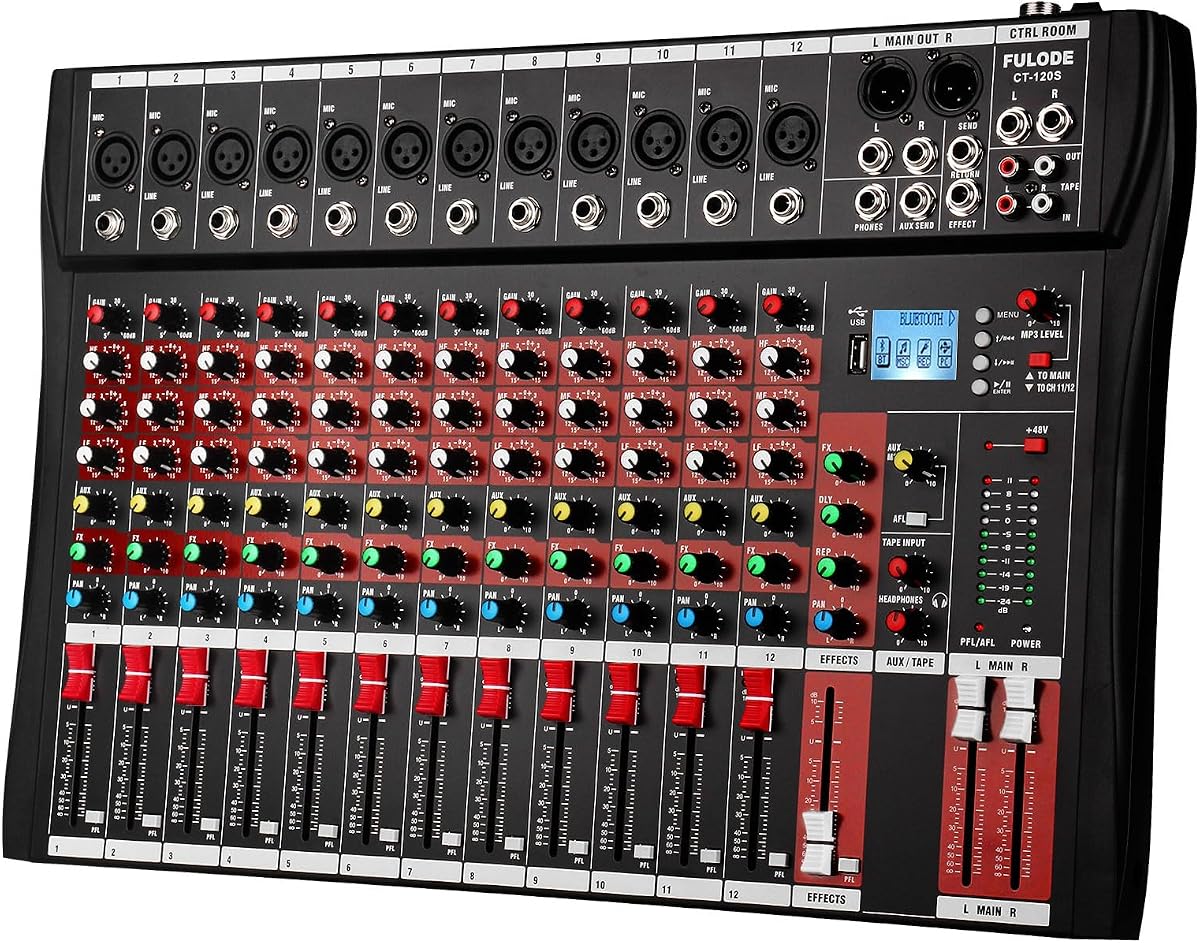
The FULUODE CT-120S is a portable twelve-channel mixer for karaoke, small band performances, campus events, conferences, and rehearsals where a dozen inputs are more useful than a very small console. Its 4.4 rating reflects the balance it offers between channel capacity, wireless media access, and a thin physical format.
We may earn a commission when you buy through this link, at no additional cost to you.
Each of the 12 single inputs includes a three-band EQ, and the mixer provides 48V phantom power for compatible condenser microphones. Bluetooth 5.0, MP3, and USB playback make it easy to incorporate stored tracks, while the large LED display shows song information and can be used with connected digital effect peripherals. The board also supports wired and wireless microphones and instrument connections, giving it flexibility for mobile entertainment.
Its main limitation is the absence of a deeper digital workflow. There is no indication of multitrack recording, scene recall, extensive routing, or a large master EQ, so users should not expect the flexibility of a sophisticated digital console. The unit is specified for 110V with an American plug, an important consideration for performers traveling internationally or using voltage-conversion equipment. The LED display also arrives with a protective film.
For a performer who wants twelve channels in a relatively thin and transportable mixer, the CT-120S is compelling. It is best suited to situations where live microphones, instruments, and occasional prerecorded music need to be combined without a large console. The three-band channel EQ and phantom power address the essentials, while Bluetooth and USB playback make the unit especially convenient for karaoke, mobile DJ-style work, and recurring small-event setups.
Twelve independently controlled channels give a compact band or multi-microphone event more room than an eight-channel board. The 1.57-inch profile also makes the mixer easier to transport between engagements.
Bluetooth 5.0, MP3, USB, and a song-information display keep stored music within the live workflow. This is particularly convenient for karaoke hosts, event performers, and rehearsals built around backing tracks.
We may earn a commission when you buy through this link, at no additional cost to you.
The right live mixer is the one that fits your ensemble, signal sources, performance environment, and need for recording or media control. Begin with channel requirements, then prioritize the features that will make setup and live operation easier.
Count every source that needs its own control, not just the number of musicians. A lead vocal, backing vocal, acoustic guitar, electric guitar, bass, keyboard, and playback track can require a surprising number of inputs. Microphones, DI boxes, wireless receivers, stereo playback devices, and line-level sources should all be included in the calculation. Leave room for a guest performer, an instrument that was not originally planned, or a spare input if the console offers it.
XLR is the standard choice for balanced microphone connections, while quarter-inch sockets commonly accept instruments and line-level sources. Some live mixers use combo sockets that accept both XLR and quarter-inch plugs, which can reduce the need for adapters. Check whether stereo inputs occupy two mono channels or use a dedicated stereo pair, because that affects the usable channel count. Also verify the output format required by your amplifiers, powered speakers, recording interface, or stage box.
Condenser microphones generally require 48V phantom power, while most dynamic microphones do not. A live mixer that offers per-channel or selectively switchable phantom power gives you more control than a console that powers every microphone input together. Check the mixer’s documentation to learn whether phantom power applies to individual channels, groups, or the entire board. Correct gain staging should be established before engaging phantom power, and only compatible microphones should be connected.
A three-band EQ is the most broadly useful tone-control system for live performance. Low frequencies can clear mud from a vocal mix, the midrange can address presence or harshness, and high frequencies can add articulation or brightness. Look for high-pass filters if the mixer supports them, because rejecting rumble and handling noise can make a simple vocal mix cleaner. A graphic EQ on the master output can help with room problems, but it is not a substitute for sensible channel mixing.
Compression can make vocals and instruments more consistent, while a few well-chosen reverb and delay effects can add depth. The number of effects is not automatically a measure of quality. Consider whether the most important controls remain accessible during a performance, whether effects can be selected clearly, and whether they can be bypassed. A single compressor on a critical vocal may be more valuable than dozens of processing algorithms that are difficult to identify under stage lighting.
A mixer with USB audio may support convenient recording, but a product description alone does not reveal whether capture is stereo, multitrack, or dependent on computer software. The Zoom LiveTrak L6max is the clearest recording-focused option here, with up to 14 simultaneous tracks and direct SD card storage. The M-Live B.Beat Evo is designed for multitrack backing-track playback rather than conventional live channel capture. Analog mixers can feed a separate recorder, but that requires additional outputs, cables, and setup.
Bluetooth playback is convenient for streaming from a phone, while USB and MP3 support can provide more predictable local playback. Check whether wireless control is required. Some products only accept audio over Bluetooth, while the M-Live system provides app-based show, lyric, and score control. For critical performances, maintain a local backup and test the wireless environment before the event, particularly in venues with congested radio spectrum or many competing systems.
A mixer used for live performance must survive transport, setup, and repeated operation. Thin-profile units can be easier to carry between engagements, while a rugged metal chassis may suit a fixed rehearsal room or heavily traveled rig. Consider not only the weight and footprint but also stand compatibility, cable reach, visibility of controls, and the space needed to operate the faders. A highly featured mixer that is difficult to transport or see may be less effective than a simpler unit with a clear layout.
Begin with the source and output. Connect microphones, instruments, and media players while the mixer is powered down, then confirm that every output is routed to the correct amplifier or speaker. Turn channel gain down before enabling 48V phantom power, bring the master fader to zero, and power the system in a controlled sequence. Set input gain to leave a useful amount of headroom, then use the faders to establish the overall balance instead of using gain as the primary volume control.
Build the mix in stages. Start with the most critical vocal or lead source, add instruments according to their role in the arrangement, and add effects only when the dry sound is already balanced. Use high-pass filters to remove unnecessary low-frequency energy, set EQ with intent, and engage compression lightly enough to preserve natural dynamics. Write down important settings or photograph the panel after rehearsal so the same sound can be reproduced at the next show.
For digital and recording-oriented equipment, create a separate session or show file for each project and retain local backups of every audio file. Test Bluetooth, USB, SD card, footswitch, app, and video synchronization functions before relying on them. After the performance, power down in the proper order, disconnect cables without pulling on the connectors, keep the mixer away from moisture and excessive dust, and inspect connectors, knobs, and faders for looseness or wear.
Count each independently mixed source rather than each performer. A typical band may need a vocal, instruments, playback, and spare inputs, so a ten- or twelve-channel mixer can be appropriate. Consider wireless receivers and stereo sources carefully because they may occupy more than one physical channel. If a larger ensemble or frequent guest additions are likely, choose extra capacity now.
Not always. Reverb, delay, and other effects can be valuable, but the number of onboard algorithms matters less than whether you can select and control them clearly. Some performers prefer dedicated external processors, while others want fewer boxes to carry. Consider whether the mixer offers enough control over level, bypass, and effect return for a live environment.
Yes, provided it supports the recording method and track layout you need. Check whether capture is stereo, multitrack, or dependent on a computer connection, and confirm the storage format and software compatibility. Devices such as the Zoom LiveTrak L6max can record multiple tracks directly to SD cards, which can simplify a mobile recording setup.
A dedicated player is often better when the priority is synchronized multitrack backing tracks, click, video, lyrics, and show control. A conventional mixer remains necessary when you need live microphone and instrument channel control. Some performers use both, with the backing-track player handling media and a separate mixer balancing the live band.
Phantom power supplies the voltage required by most condenser microphones. A live mixer with per-channel control makes it easier to use condenser and dynamic microphones on the same board. Confirm that a channel’s gain is properly set and that only compatible microphones receive phantom power before engaging it.
USB playback is generally more predictable when the files are prepared and tested in advance, while Bluetooth is more convenient for streaming from a phone. Bluetooth can be affected by interference and connection behavior, so critical performances should include a local fallback. Test the actual device, file format, and operating procedure during rehearsal.
No. A better mixer is one that provides the needed inputs, clean gain, accessible controls, dependable outputs, and features you will actually use. A simpler model can outperform a feature-heavy unit when it is easier to operate, more portable, or better matched to the ensemble. Evaluate the complete signal path rather than feature count alone.
Place the mixer where controls are easy to see and reach, and label channels consistently from left to right. Arrange cables to prevent strain, keep power and signal routes separate where practical, and secure the console on an appropriate stand. Record or photograph the final settings after a successful rehearsal and keep a printed patch plan for quick recovery.
The Yamaha MG10 is the strongest all-around recommendation for a musician who wants dependable analog live mixing with clean preamps, practical three-band EQ, and convenient one-knob compression. The Zoom LiveTrak L6max stands out for performers who need simultaneous mixing and multitrack recording, while the M-Live B.Beat Evo is the leading choice for synchronized backing tracks, click, video, and show control rather than conventional channel mixing.
Prioritize channel count, connector compatibility, phantom-power control, and the speed of the controls you will use under pressure. Bluetooth, large effect libraries, master graphic EQs, and recording features can be valuable, but only if they support the actual show. For a compact band, a mobile entertainer, a karaoke host, and a backing-track-focused artist, the right choice differs considerably even when every product can technically accept a microphone.
Before purchasing, verify the current listing, included accessories, power requirements, software compatibility, and the specific connections used by your performers. Product ratings, features, availability, and pricing can change, so treat this guide as a structured comparison rather than a permanent product record. Test the selected mixer with the real signal chain before a critical performance.