
AULA S99
4.2Editor score
Three-mode wireless connectivity
Retro 96% green design
Programmable macro keys
Our Creamy Keyboards guide compares ten wireless, wired, membrane, and mechanical models for sound, layout, build, customization, comfort, and everyday use.
Creamy keyboards appeal to anyone who wants typing that sounds soft, feels controlled, and looks more refined than a conventional office board. The ideal model balances a mellow acoustic profile with responsive switches, useful connectivity, and a layout that suits the desk. A pleasant sound alone is not enough; comfort, stability, and customization also deserve attention.
This guide compares ten keyboards built around membrane or mechanical construction, including compact, 96%, and full-size layouts. The assessment considers switch type, acoustic dampening, hot-swappable support, wireless options, key programming, RGB lighting, battery capacity, and practical desk footprint. It also separates feature-rich premium designs from straightforward budget models and compact options.
Each review explains the strongest reasons to consider a particular board, along with compromises that may affect your choice. The top picks highlight especially compelling combinations of construction, features, and user rating, while the full comparison shows how the alternatives differ. Product specifications and availability can change, so confirm current details and prices on the linked listing before purchasing.
4.2Editor score

4.6Editor score

4.8Editor score
The table below compares the ten shortlisted keyboards by construction, layout, connection options, and defining customization features. It makes differences between membrane and mechanical models easier to identify before you consider the full reviews.

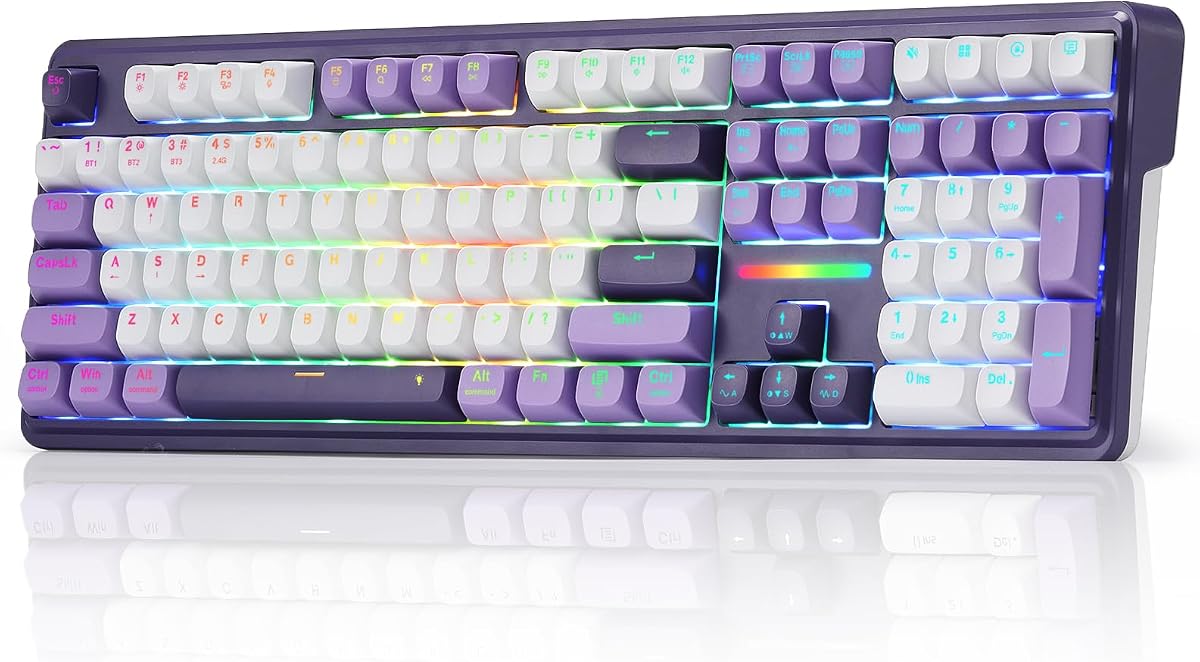


The AULA S99 is a retro-styled wireless keyboard built around a 96% membrane design. It earns a 4.2 rating and stands apart with its green finish, full numeric keypad, rotary control, and flexible three-mode connection. It is not a mechanical model, yet it targets users who value a creamy visual identity, convenient everyday features, and a practical balance of functions.
We may earn a commission when you buy through this link, at no additional cost to you.
Its strongest advantages are versatility and usable space-saving. Bluetooth 5.0, 2.4GHz wireless, and USB-C wired modes allow it to move among computers, tablets, and mobile devices. The 99-key format retains a number pad while reducing the footprint of a traditional full-size board. A dual-purpose knob handles volume, audio, and lighting adjustments, while three programmable keys and full-key macro support provide meaningful customization for games and shortcuts.
The important trade-off is the membrane mechanism. AULA explicitly notes that the keyboard does not support hot-swapping, so buyers cannot refine the feel or sound by changing mechanical switches. Its 4.2 rating also suggests that it may not satisfy users who place the highest priority on switch consistency or a substantial, premium acoustic profile. It should be judged as a stylish and capable membrane board rather than a mechanical enthusiast model.
Choose the S99 if you want a colorful, retro keyboard with a number pad, flexible connectivity, and useful macro controls without moving into the mechanical category. It is a strong fit for casual gaming, home offices, and mixed desktop use. For switch enthusiasts, the AULA F75 reviewed later is the more upgradable option, but the S99 remains the most approachable entry in this list.
The green finish, typewriter-inspired appearance, and 96% layout give the S99 more personality than a standard office membrane keyboard. Keeping the numeric keypad while reducing overall size makes it useful for desks where a full-size board would feel restrictive.
Bluetooth, 2.4GHz, and wired modes make the keyboard easy to share across devices. The rotary knob, three shortcut keys, and macro programming add useful control for entertainment, productivity, and gaming.
We may earn a commission when you buy through this link, at no additional cost to you.
The AULA F75 White & Brown is a compact 75% mechanical keyboard built around pre-lubed linear switches. Its 4.6 rating reflects a strong balance of creamy acoustics, sturdy construction, wireless flexibility, and customization. The 81-key layout preserves dedicated arrow keys while freeing substantial desk space, making this a versatile choice for gaming, office work, and compact setups.
We may earn a commission when you buy through this link, at no additional cost to you.
Its five-layer filling, extended silicone pad, and PCB single-key slotting are designed to reduce harsh contact and cavity noise. Pre-lubed stabilizers and linear switches contribute to a smooth, low-clack profile, while hot-swappable sockets accept three-pin or five-pin switches without soldering. Bluetooth 5.0, 2.4GHz, and USB-C connections can manage up to five devices, and the 4000mAh battery supports extended wireless work.
You will need to download the AULA driver for full macro, lighting, and music-rhythm customization, and the 75% format means the numeric keypad is unavailable. The keyboard does offer N-key rollover, a Windows-key lock, RGB effects, and a multifunction knob that changes between gaming and office behavior. Those are sensible omissions or trade-offs for anyone prioritizing footprint and switch flexibility.
This is the most balanced recommendation in the guide for a buyer who explicitly wants a creamy mechanical experience. It combines a refined pre-lubed setup with hot-swapping, multi-device connectivity, and useful gaming controls. Choose it when sound, feel, and adaptability matter more than retaining a number pad. First-time mechanical keyboard owners also have an easy upgrade path once they learn more about switch types.
The gasket-style internal arrangement, five filling layers, and pre-lubed components work together to soften sharp impact. The result is better suited to shared rooms and long sessions than a high-pitched, hollow mechanical board.
The 75% layout reduces the desk footprint while retaining arrow keys, full-key programmability, N-key rollover, and Windows-key locking. Those details make the F75 practical for games as well as daily typing.
We may earn a commission when you buy through this link, at no additional cost to you.
The HUO JI E-Yooso is a white 96% mechanical keyboard designed for users who prioritize acoustic refinement and a number pad. It carries a 4.6 rating and uses a wired USB-C connection. Its most impressive feature is the layered sound-control structure, which combines a gasket mount, silicone damping, and thicker sound-absorbing foam to create a clear, creamy sound profile.
We may earn a commission when you buy through this link, at no additional cost to you.
Pre-lubed linear switches produce smooth, responsive movement, and the hot-swappable PCB accepts both three-pin and five-pin components. Switch and keycap pullers are included, so changing the setup does not require soldering. Full anti-ghosting and N-key rollover improve reliability during rapid inputs, while the 99-key layout measures 39 by 13.5 by 4 centimeters and preserves the numeric keypad without the footprint of a standard full-size board.
The main limitation is connectivity. There is no Bluetooth, 2.4GHz mode, or rechargeable battery, so this is not the right choice for a flexible multi-device desk. Its software-based customization is also less prominent than the extensive QMK, VIA, or web-driver features offered by several competitors. The basic RGB controls, 15 effects, eight solid colors, and adjustable brightness are nevertheless useful.
Buy the E-Yooso if you want a dedicated desktop keyboard, a number pad, and a soft mechanical sound without paying for wireless hardware. It is especially convincing for writers, programmers, and office users who remain tethered to one PC. For a similar sound with more device flexibility, compare the AULA F75; for richer firmware customization, consider the YUNZII B98 PRO.
Gasket construction, five foam layers, and a silicone dampener are intended to absorb harsh vibration and hollow resonance. The result is a more natural and creamy presentation than a basic tray-mounted mechanical keyboard.
The board keeps 99 keys, including a numeric keypad, in a relatively compact enclosure. Full anti-ghosting and N-key rollover also make it dependable for sustained typing and rapid gaming inputs.
We may earn a commission when you buy through this link, at no additional cost to you.
The YUNZII B98 PRO combines a refined beige aesthetic, 96% layout, and extensive enthusiast customization. It has a 4.8 rating, making it the highest-rated product in the guide. The keyboard uses pre-lubed milk switches, a gasket mount, five-layer filling, tuned stabilizers, and double-shot PBT keycaps to create the soft, consistent feel associated with premium creamy boards.
We may earn a commission when you buy through this link, at no additional cost to you.
Its strongest differentiator is QMK and VIA firmware support. Users can remap keys, record macros, create RGB profiles, use phrase typing, and switch between saved layers. Tri-mode connectivity includes Bluetooth 5.0, 2.4GHz, and USB-C, with support for up to five devices and an 8000mAh battery. The 96% format retains 100 keys and a number pad, while the adjustable stand and Cherry-profile caps support comfortable positioning.
It also offers an unusual stylistic feature: interchangeable knob designs, including a playful three-dimensional cat knob and a round metal knob. The default function controls multimedia volume, and the keyboard includes a battery-level indicator. These extras do not define the core experience, but they add character to a board that already has extensive practical functionality. The main trade-off is complexity, since QMK and VIA features take more setup than standard shortcut-based controls.
This is the premium choice for enthusiasts who want a creamy mechanical sound, wireless convenience, and serious firmware-level control. It suits advanced gamers, programmers, creators, and dedicated hobbyists. Buyers who want the same broad physical feature set but less customization complexity should look at the SOLAKAKA A99 Pro, while the AULA F75 is the simpler, more compact alternative.
QMK and VIA support goes well beyond basic media keys. Remapping, macros, layers, phrase typing, and saved profiles allow the board to handle complex game commands or repetitive productivity tasks with fewer interruptions.
The five-layer filled structure, pre-lubed switches, tuned stabilizers, and PBT caps work together to suppress harsh vibration. Swappable knobs add a distinctive design element without interfering with the core 100-key layout.
We may earn a commission when you buy through this link, at no additional cost to you.
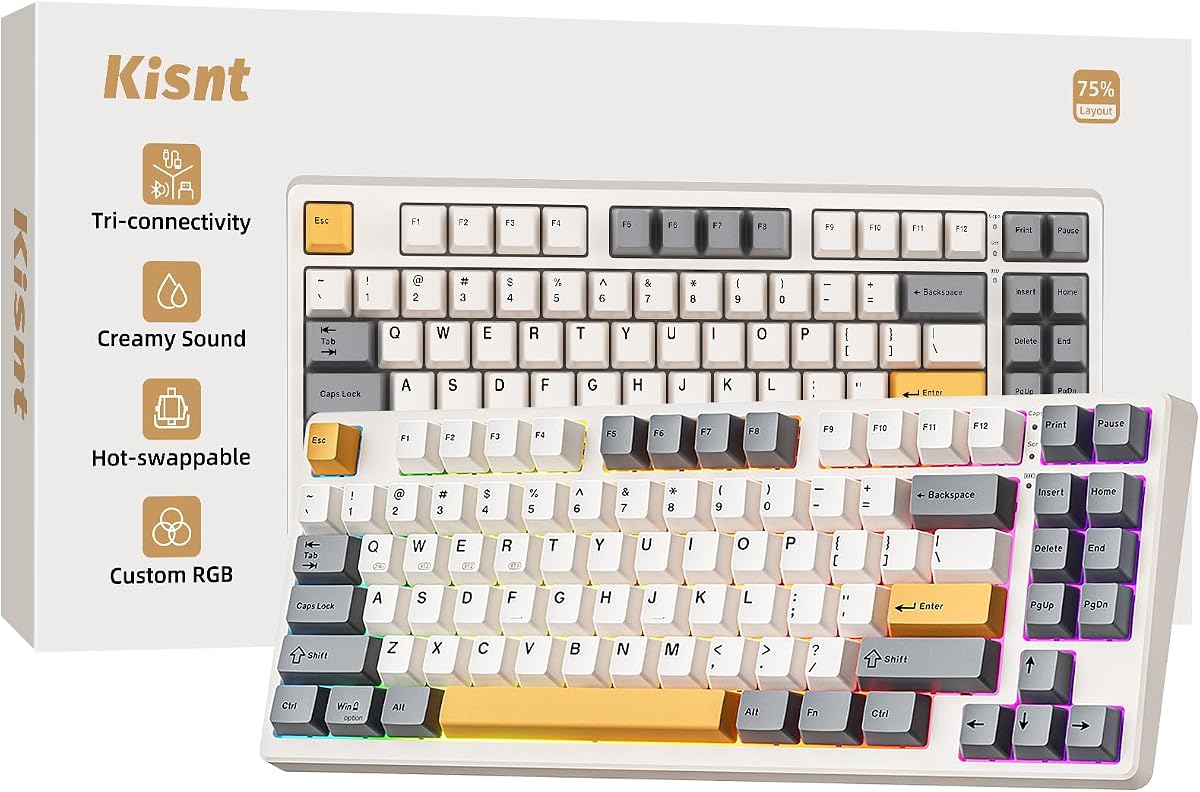
The Kisnt KN85 is a compact 85-key wireless mechanical keyboard made for desks where mouse space matters. It has a 4.6 rating, a retro beige appearance, and a 75% layout that retains F1 through F12, arrow keys, and shortcuts. Its pre-lubed Bsun linear switches and gasket-mounted construction produce the soft, marbly thock emphasized by the manufacturer.
We may earn a commission when you buy through this link, at no additional cost to you.
The KN85 offers USB-C, 2.4GHz, and Bluetooth 5.0 connectivity, including three separate Bluetooth channels. The stated latency figures are 2 milliseconds over USB, 5 milliseconds over 2.4GHz, and 11 milliseconds over Bluetooth, making the different modes useful for gaming, general computing, and mobile work. A 4000mAh rechargeable battery supports wireless use, and users may continue typing in wired mode while charging.
Its sound and feel can still be adjusted because the hot-swap platform accepts three-pin and five-pin switches. RGB lighting is programmable through shortcuts and companion software, with macro and key-remapping options available in the Windows driver. That driver limitation is important for buyers who also use macOS and need advanced configuration. The board also lacks a number pad, so frequent numeric entry would require an alternative solution.
Choose the KN85 for a small desk, laptop-centered workspace, or minimalist setup where low latency and a soft mechanical tone matter. It is a particularly good fit for users who want the 75% format but do not need the more elaborate layer and macro system of the YUNZII B98 PRO. The manufacturer's guidance to use a wrist rest is sensible for anyone spending long sessions typing.
The 85-key arrangement removes the number pad while retaining function and arrow keys. Its 13.68 by 5.51 by 1.77-inch footprint is intended to free up room for mouse movement and keep compact workspaces visually uncluttered.
USB, 2.4GHz, and three Bluetooth channels support several systems with simple switching. The relatively low stated latency makes the board practical for gaming as well as writing and office tasks.
We may earn a commission when you buy through this link, at no additional cost to you.
The Redragon K745 PRO is a full-size 108-key wireless keyboard that combines a complete traditional layout with a gasket-mounted, creamy feel. Its 4.6 rating reflects a balanced approach to gaming features, switch flexibility, and construction. Unlike compact alternatives, it keeps the number pad and adds four dedicated hotkeys for frequently used functions.
We may earn a commission when you buy through this link, at no additional cost to you.
Those hotkeys arrive assigned to mute, calculator, screen lock, and desktop commands, but the bundled software allows them to be reassigned. The keyboard also supports custom lighting, macros, and keybindings. Tri-mode connectivity covers USB-C, Bluetooth, and 2.4GHz, allowing users to move among a PC, laptop, or tablet without repeatedly pairing the device.
Internally, the five-layer dampening and gasket mount are intended to provide a cushioned, silky response. The upgraded hot-swap socket accepts almost any three-pin or five-pin switch, giving new owners room to change the feel over time. Translucent PBT keycaps allow the RGB lighting to shine through while resisting the greasy shine often associated with ABS caps. The 104-key main section supports accurate anti-ghosting behavior during rapid combinations.
The main issue is footprint. A 108-key design takes up more room than the 75% and 96% alternatives, and the broad feature set may be more than casual users need. Nevertheless, it is a strong choice for someone who values a full number pad, physical hotkeys, wireless switching, and a soft gasket feel. It is especially suitable for mixed gaming and office desks that do not need extreme physical customization.
The complete 108-key arrangement preserves dedicated number-pad input and adds four configurable action keys. It provides the traditional layout without forcing users to depend on an on-screen number pad.
The gasket mount and five-layer dampening soften the initial keyboard sound, while the hot-swap sockets allow users to replace included switches. This is useful for tailoring the board to personal preferences.
We may earn a commission when you buy through this link, at no additional cost to you.
The SOLAKAKA A99 Pro is a feature-rich wireless mechanical keyboard with an LCD and a multifunction metal knob. It earns a 4.5 rating and combines a 96% layout, full hot-swapping, five-layer cushioning, RGB lighting, and substantial battery capacity. The display distinguishes it from most competitors by showing the date, time, battery level, connected system, and current connection mode.
We may earn a commission when you buy through this link, at no additional cost to you.
The metal knob is more versatile than a simple volume roller. Rotation, short presses, and long presses can be used to manage time, system selection, lighting modes, colors, brightness, and volume. The web driver expands the control set with key mapping, sensitivity settings, macros, sleep timing, image display, and music-rhythm lighting. It can save up to five devices and work across Windows, macOS, Android, and iOS through Bluetooth 5.0, 2.4GHz, or USB-C.
The acoustic and physical design is similarly advanced. Five cushioning layers, a PCB single-key slotting process, and internal noise-dampening cotton create a softer, creamier result. Full hot-swappable sockets accept three-pin and five-pin switches, and the included LEOBOG star vector switches are pre-lubed. The 97-key layout keeps a number pad, while double-shot PBT keycaps and an 8000mAh battery support long-term use.
The compromises are practical rather than fundamental. The web driver must be accessed through a wired connection, and managing the display, knob, RGB effects, and settings can be more involved than required. The listed battery endurance is approximately 61 hours with backlighting and 170 hours without it, with actual results depending on settings. Choose the A99 Pro when you want a premium interface and extensive control in a creamy wireless mechanical package.
The LCD provides system, connection, time, date, and battery information without opening software. That visibility can be particularly helpful when moving the keyboard among several devices during a busy workday.
The metal knob supports rotation and different press durations for display, lighting, media, and system functions. It provides quick physical access to settings that would otherwise require layered shortcuts or software menus.
We may earn a commission when you buy through this link, at no additional cost to you.
The AULA 99 Key is a pink 96% membrane keyboard that combines a gaming-oriented feature set with a compact number-pad design. It has a 4.2 rating and appears intended for users who want a cheerful desk accessory with wireless flexibility. The 99-key format preserves the numeric keypad while taking up less room than a conventional full-size board.
We may earn a commission when you buy through this link, at no additional cost to you.
Bluetooth 5.0, 2.4GHz, and wired USB modes allow the keyboard to work across Windows, Mac, Android, and iOS systems. A knob handles volume, connection mode, lighting brightness and speed, RGB modes, and colors. The keyboard also includes 16.8 million RGB colors, 16 preset effects, and three M-key shortcuts that can be remapped or combined into single commands.
Its main limitation is the membrane mechanism. As with the other AULA S99 model, it cannot be fitted with mechanical switches and does not support hot-swapping. That makes it less appealing for enthusiasts who want to tune switch feel or sound, and the 4.2 rating suggests some buyers may have mixed experiences. The foldable two-stage stand helps with positioning, but it cannot match the acoustic refinement of a heavily dampened mechanical board.
Buy the AULA 99 Key if a colorful membrane keyboard, compact number pad, and wireless RGB design suit your setup better than mechanical customization. It is a reasonable choice for casual gaming, general productivity, and shared devices. Those seeking a deeper creamy feel should step up to the AULA F75, while the pink finish makes this model especially relevant to buyers who want a keyboard to complement a playful setup.
The pink finish and adjustable RGB lighting create a more expressive option than most office keyboards. Macro support and the multifunction knob also make the membrane board useful for common gaming commands.
Bluetooth, 2.4GHz, and wired modes offer useful flexibility across major operating systems. The fixed membrane construction, however, means the core typing feel and sound cannot be upgraded.
We may earn a commission when you buy through this link, at no additional cost to you.
The AULA F75 White & Blue is a 75% wireless mechanical keyboard with pre-lubed LEOBOG Reaper switches. It has a 4.6 rating and shares the core strengths of the AULA F75 reviewed earlier: a compact 81-key format, layered sound control, hot-swappable sockets, RGB lighting, and flexible multi-device connectivity. The blue-and-white finish gives it a cleaner, more conventional appearance than many gaming boards.
We may earn a commission when you buy through this link, at no additional cost to you.
The five-layer filling, extended integrated silicone pad, and single-key PCB slotting work together to reduce sharp strike noise and support a softer, more elastic feel. Pre-lubed stabilizers and linear switches help create a smooth creamy sound. Bluetooth 5.0, 2.4GHz, and USB-C connections can switch among up to five devices, while a 4000mAh battery removes the need for a constant wired connection.
Gaming-oriented features include N-key rollover, Windows-key locking, full-key macro programming, and 16 lighting effects. The knob can switch between gaming and office modes, controlling brightness and effects in one mode and media functions in the other. Users who need advanced configuration must download the AULA driver, and the absence of a number pad makes this more appropriate for general gaming and compact productivity than heavy spreadsheet work.
Choose this version if you enjoy the F75 platform but prefer a blue-and-white visual treatment and Reaper switch character. It is a strong all-rounder for a compact desk and offers more authentic mechanical customization than the AULA membrane models. Compared with the White & Brown F75, the practical platform is similar, so switch feel, color preference, and the available configuration should guide the decision.
Pre-lubed linear switches and stabilizers reduce scratchiness and uneven spacing sounds. Multiple internal filling layers further soften the bottom-out, creating the low, controlled character associated with creamy boards.
Bluetooth, 2.4GHz, and wired connections support a broad device mix. The dedicated switching controls make it simple to move between a gaming PC, laptop, tablet, or phone.
We may earn a commission when you buy through this link, at no additional cost to you.
The Redragon K768 PRO is a 96% wireless mechanical keyboard centered on a large 8000mAh battery, a gasket-mounted feel, and straightforward controls. It has a 4.8 rating and sits in the upper half of this shortlist. Its 100-key layout retains a numeric keypad, while the relatively restrained knob and RGB design give it a versatile appearance suited to both work and gaming.
We may earn a commission when you buy through this link, at no additional cost to you.
Bluetooth, 2.4GHz, and USB-C modes allow the board to move among different systems without repeated pairing. The 8000mAh battery is the model’s defining feature, offering a larger capacity than many compact wireless alternatives. Precision-locked gasket covers and a custom linear switch produce a soft, cushioned response, while the upgraded socket accepts almost any three-pin or five-pin switch for future personalization.
The knob keeps everyday control simple by adjusting backlight brightness and media playback without requiring a collection of shortcut combinations. For deeper control, the software supports custom lighting effects, advanced macros, and personal keybindings. Fade-resistant PBT keycaps are paired with adjustable RGB lighting, offering a more durable alternative to gloss-prone ABS caps. The main compromises are the footprint of a number-pad layout and the need for software when moving beyond basic functions.
Buy the K768 PRO if long wireless runtime matters as much as creamy acoustics and gaming features. It is a persuasive option for hybrid workers, streamers, and gamers who would rather charge less often, while still retaining hot-swap flexibility. The YUNZII B98 PRO offers more advanced firmware and an even more playful knob system, but the Redragon is a cleaner, easier way to secure a high-capacity wireless mechanical setup.
The 8000mAh battery reduces the likelihood of interruption during long work or gaming sessions. Tri-mode connectivity preserves the option to use a low-latency 2.4GHz connection or a wired setup when needed.
A single knob handles brightness and media, keeping frequent tasks simple. Compatible software provides additional options for RGB effects, macros, and custom bindings when deeper control is desired.
We may earn a commission when you buy through this link, at no additional cost to you.
A creamy keyboard should deliver a soft, controlled sound without sacrificing responsiveness, layout utility, or build quality. The right choice depends on whether you value mechanical customization, wireless freedom, a number pad, or a particularly compact footprint.
Choose a membrane model for simplicity and a lower-complexity setup; choose a mechanical model for hot-swapping, richer tuning options, and a more substantial typing experience.
Look for several sound-control elements rather than relying on “cream” or “thock” terminology alone. Densely filled boards are generally a safer choice for shared rooms and late-night use.
Choose hot-swapping if customization matters or if you are unsure which switch type suits you. Stay with a fixed membrane design only when low maintenance and a simple feel are more important.
Pick 75% for maximum desk space, 96% for a balanced layout, and full-size for a dedicated number pad and complete function row. A smaller footprint does not automatically mean a more comfortable keyboard.
Choose wired for a single-station setup and maximum simplicity. Choose wireless for a flexible desk, then use 2.4GHz for gaming and Bluetooth for convenient device switching.
For frequent wireless use, prioritize a larger battery and the ability to turn off animated lighting. Use the supplied cable or a suitable 5V 1A source when a manufacturer provides specific charging guidance.
Choose standard controls for straightforward use and QMK, VIA, or mature driver software for advanced customization. Verify that your operating system is supported before purchasing.
Prioritize smooth pre-lubed switches for a creamy feel, durable PBT keycaps, and an adjustable angle. Test the expected switch weight before committing to extensive daily use.
Start by choosing the connection mode that matches your main activity. Use USB-C or the 2.4GHz receiver for a gaming PC when dependable responsiveness matters, and save Bluetooth for convenient switching among a laptop, tablet, and phone. Pair a new Bluetooth keyboard through the instructions supplied with the product, and make sure the correct Bluetooth channel is selected before attempting to type. The Kisnt KN85, for example, uses a dedicated pairing process for its three Bluetooth channels.
For mechanical boards with hot-swappable sockets, power the keyboard down before changing switches. Remove the keycap, align the replacement switch with the center and side pins, and press it gently until it seats. A switch and keycap puller are included with the HUO JI E-Yooso, and the SOLAKAKA A99 Pro also includes a puller. Keep the replacement switch within the stated three-pin or five-pin compatibility, and avoid forcing the connector.
To maintain the sound and condition, keep the keyboard away from drinks, dust, and direct heat. Clean keycaps with a soft, lightly dampened cloth, and avoid spraying liquid directly onto the switches or ports. Charge according to the manufacturer’s instructions, use a 5V 1A charger or a computer USB port when specified, and switch off animated lighting during long breaks. Firmware changes should be made through a wired connection when the software requires it, and custom profiles should be saved before updating or resetting.
A creamy mechanical sound is usually a soft, rounded, relatively low-pitch tone without sharp top-end clatter. It commonly results from linear switches, thorough lubrication, tuned stabilizers, gasket mounting, and several layers of internal dampening. No single component guarantees the result, because the plate, case, keycaps, PCB, and mounting arrangement all affect resonance. Switching one element can also change the balance of the entire sound.
They are generally quieter and less sharp than many unmodified mechanical keyboards, but they are not completely silent. Membrane models tend to produce a softer overall profile, while filled gasket boards reduce mechanical resonance. Your environment, typing intensity, and choice of switches still matter. A linear switch set and subdued RGB lighting can help, and a wrist rest may reduce impact noise during extended work.
A 75% keyboard is best when desk space and mouse movement are priorities. The AULA F75 and Kisnt KN85 retain arrow keys but omit the number pad. A 96% layout keeps a numeric keypad in a relatively compact body, making it more useful for accounting, spreadsheets, and data entry. If you rarely type numbers, 75% is usually cleaner; if numeric input matters, 96% offers the better compromise.
A 2.4GHz connection uses a dedicated USB receiver and generally provides lower latency, making it preferable for gaming. Bluetooth offers broader convenience because it can connect directly to many computers, tablets, and phones without a receiver. It may introduce more delay, although that varies by device and activity. Both are useful, and the best workflow is often to reserve 2.4GHz for gaming and Bluetooth for everything else.
A hot-swappable keyboard lets you remove and replace compatible mechanical switches without soldering them to the PCB. The sockets hold the switch pins securely and make it easier to change between linear, tactile, and clicky options. Compatibility varies, so check whether the board accepts three-pin, five-pin, or both. The AULA S99 and AULA 99 Key are membrane keyboards and do not provide hot-swapping.
No. Most models provide working media shortcuts, connection switching, lighting controls, and basic macro programming without requiring a driver. Software or a web-based control panel becomes important for detailed key remapping, custom RGB effects, advanced macros, profiles, and firmware settings. Operating-system support varies, so review the listed software requirements before choosing a board for a mixed Windows-and-Mac workflow.
The featured models are complete keyboards with their stated keycaps and switches already installed. Hot-swappable models include compatible pre-lubed switches, while tools for removing them and keycaps may also be included. Replacement switches and extra keycaps are not always part of the standard package, so check the listing and package information if you expect additional components. Fixed membrane models cannot be converted to mechanical switches.
A keyboard cannot guarantee faster typing, but a comfortable angle, consistent feel, accurate rollover, and reduced fatigue can make long sessions easier. Linear switches may suit people who prefer minimal resistance, while tactile switches can help some typists identify keypresses more clearly. The most important factor is comfort and consistency. Choose a layout and switch feel that match your habits rather than assuming a particular switch will improve performance.
The AULA F75 White & Brown is the strongest all-around recommendation because it combines a creamy pre-lubed mechanical setup, layered dampening, hot-swapping, RGB lighting, and three-mode connectivity in a practical 75% layout. The YUNZII B98 PRO is the premium option for buyers who want QMK and VIA customization, a large battery, refined construction, and a distinctive interchangeable knob. The AULA S99 offers the most approachable route into this category when a colorful retro design, number pad, and membrane feel are sufficient.
Prioritize the features you will use every day. Choose 75% for desk space, 96% for a compact number pad, and full-size for a traditional layout. Mechanical switch enthusiasts should look for hot-swappable sockets and layered filling, while casual users may be happy with a softer membrane design. Wireless users should also consider battery life, and buyers needing advanced macros should confirm firmware and operating-system support before ordering.
Ratings, software, lighting options, and product availability can change over time, and current prices may fluctuate. Review the latest listing details, warranty information, included accessories, and device requirements before making a final purchase. With those checks completed, the right creamy keyboard should fit your preferred sound, comfortable working style, and desktop layout.