
Vilros Raspberry Pi 4 Complete Starter Kit
4.7Editor score
4GB Raspberry Pi 4 Model B
64GB preloaded microSD card
Built-in case fan
Four included heat sinks
Storage bag and guide
Raspberry Pi 4 Kits compared for beginners, builders, and homelab users, covering performance, cooling, storage, connectivity, and ease of setup.
Raspberry Pi 4 Kits bundle a capable single-board computer with the case, power supply, memory card, cooling hardware, and cables needed to begin a project. A well-chosen kit reduces compatibility guesswork, while a sparse bundle can leave beginners searching for essential accessories.
This guide compares ten kits using the supplied specifications, customer ratings, included components, processor generation, memory capacity, cooling provisions, storage options, and intended use. It covers both Raspberry Pi 4 bundles and two newer Raspberry Pi 5 kits that may better suit demanding builds.
Each review explains what distinguishes its kit, where it offers the strongest value, and which trade-offs matter. Ratings reflect the information available in October 2026, while component availability and product listings can change, so confirm the current package contents before ordering.
4.7Editor score

4.8Editor score

5.0Editor score
The comparison below highlights the processor generation, memory, storage, cooling, and principal reason each Raspberry Pi 4 Kit is worth considering, making it easier to identify the bundle that matches your experience level and planned projects.



The CanaKit Raspberry Pi 4 4GB Starter PRO Kit is the most complete conventional Raspberry Pi 4 bundle in this group, earning a 4.8 customer rating. It combines a Raspberry Pi 4 Model B with 4GB of memory, a preloaded 32GB Class 10 microSD card, reader, case, cooling fan, heat sinks, power supply, display cable, and an inline USB-C switch. Few kits offer this many useful pieces without requiring a second shopping trip.
We may earn a commission when you buy through this link, at no additional cost to you.
Its main strength is balance. The 4GB configuration gives the board more headroom for desktop use, media applications, coding exercises, and lightweight servers than a 2GB model, while the 1.5GHz 64-bit quad-core processor provides ample performance for the Raspberry Pi 4 platform. The included case uses a high-gloss enclosure with an integrated fan mount, while the low-noise bearing fan and set of heat sinks provide both passive and active cooling options.
The power arrangement is particularly thoughtful. CanaKit includes a 3.5A USB-C supply with a noise filter, and the USB-C PiSwitch adds a convenient way to power the board without unplugging its cable. The six-foot display cable supports output up to 4K60p, making it suitable for a compact desktop or media setup. The microSD reader also means the card can be reflashed from a conventional computer when a newer Raspberry Pi OS image is desired.
The trade-offs are modest but real. A Raspberry Pi 4 is no longer the newest single-board platform, so buyers who need the strongest available processor or plan sustained demanding workloads may prefer one of the Raspberry Pi 5 kits listed here. The 32GB card also provides less room for large media libraries or multiple operating system images. Even so, this package remains the most versatile choice for a beginner, educator, tinkerer, or homelab enthusiast who values a ready-to-use bundle with generous cooling and practical accessories.
Overall, it is the easiest shortlist for most shoppers. The included storage, card reader, display cable, case, cooling system, filtered supply, and inline switch remove many compatibility decisions. It is particularly well suited to learning Raspberry Pi OS, assembling a retro-gaming machine, creating a small network service, or building a desktop replacement. For those goals, the 4GB PRO configuration offers the most persuasive package design without moving into a different Pi generation.
The kit goes beyond the bare minimum by including every item normally required to boot the board and connect a display. A preloaded card and USB reader also make it easier to test Raspberry Pi OS, update it, or recover the installation from another computer.
The case-mounted low-noise fan and included heat sinks provide two complementary ways to control heat. That matters for media playback, compilation workloads, background services, and any build expected to run for long periods rather than only for a short demonstration.
We may earn a commission when you buy through this link, at no additional cost to you.
The Vilros Basic Starter Kit for Raspberry Pi 4 has a 4.6 rating and is particularly appealing to buyers who want to see the board inside a transparent case. It includes a 4GB Raspberry Pi 4 Model B, a two-part clear ABS enclosure with a preinstalled fan, a compatible 3A power supply with an inline switch, four heat sinks, a micro-HDMI adapter, a neoprene storage bag, and a quickstart guide.
We may earn a commission when you buy through this link, at no additional cost to you.
The Raspberry Pi 4 specifications are the expected ones for this generation: a Broadcom BCM2711 system-on-chip with a 1.5GHz 64-bit quad-core Cortex-A72 processor, 4GB of LPDDR4 memory, 2.4GHz wireless networking, Bluetooth, Gigabit Ethernet, two USB 3.0 ports, two USB 2.0 ports, a 40-pin GPIO header, and two micro-HDMI connectors. It is a capable platform for coding education, media playback, retro games, lightweight automation, and small network services.
Thermal management is handled through the well-ventilated case, its preinstalled fan, and a separate set of heat sinks. The included adapter is important because the Pi 4 uses micro-HDMI rather than the full-size connector found on many older computers and displays. The neoprene bag provides a convenient place to keep the kit together when it is not in use, and the updated quickstart guide reduces the learning curve for first-time owners.
The main drawback is that the memory card is absent. A microSD card must be purchased separately and prepared with Raspberry Pi OS, which makes this less convenient for a complete beginner setup. The micro-HDMI-to-standard-HDMI adapter is also less tidy than a permanently attached cable when the system is moved regularly. Nevertheless, both omissions are understandable in a basic kit, and the savings may appeal to owners who already own compatible accessories.
This Vilros bundle is best for someone who values a visible, functional board design and already has—or deliberately wants to select—a microSD card. It also suits users planning to repurpose a spare card or run a customized image. For an out-of-box purchase with storage included, the higher-ranked CanaKit PRO bundle is more convenient, but this option remains a solid choice when the clear case and included bag are the priorities.
The clear enclosure makes it easy to inspect connections and component placement, while the preinstalled fan saves the user from installing a separate cooling assembly. The case's basic two-part construction also keeps the learning process approachable.
Dual micro-HDMI outputs, wired Gigabit Ethernet, wireless networking, Bluetooth, and four USB ports give the board enough flexibility for peripherals and displays. The included HDMI adapter makes it compatible with standard full-size HDMI connections.
We may earn a commission when you buy through this link, at no additional cost to you.
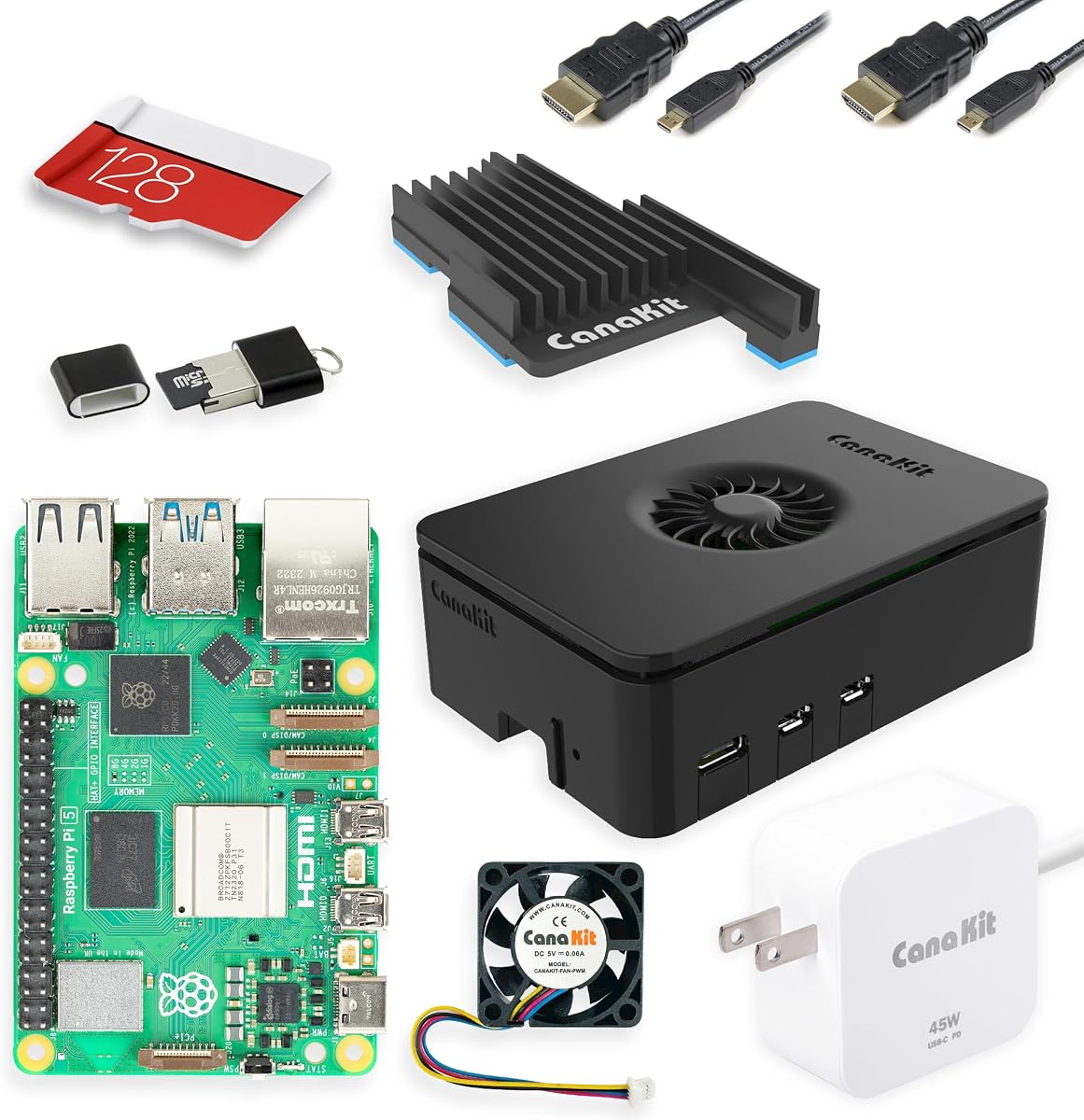
The CanaKit Raspberry Pi 5 Starter Kit PRO in Turbine Black is a premium choice for buyers seeking more performance than the Raspberry Pi 4 architecture can offer. It carries a 4.4 customer rating and packages a 4GB Raspberry Pi 5 with a 128GB microSD card, USB reader, turbine-style black case, low-noise bearing system fan, large black anodized heat sink, and a 45W USB-C power supply.
We may earn a commission when you buy through this link, at no additional cost to you.
Its 2.4GHz 64-bit quad-core processor and 4GB memory make it a better fit for compute-heavy projects, development environments, media workloads, and users who want a longer useful life from a new build. The generous 128GB card reduces the need for an immediate storage upgrade and comes preloaded with 64-bit Raspberry Pi OS. A USB microSD reader is included, allowing the operating system to be updated or replaced without a separate adapter.
Cooling is a major reason to choose this package. The combination of a large anodized heat sink, turbine-style case, and low-noise fan is appropriate for a board capable of higher sustained workloads. The 45W supply is also designed for the Raspberry Pi 5 platform, reducing ambiguity around power delivery when storage, peripherals, or an active cooler are connected.
There is one important categorization caveat: this is a Raspberry Pi 5 kit, not a Raspberry Pi 4 kit. It therefore does not directly satisfy a requirement for the older board, even though it is a logical upgrade for a buyer searching broadly for a complete modern Pi bundle. Its supplied specifications are less granular than those of several Pi 4 listings, and the kit does not state that it includes a display cable. The 4.4 rating is solid, though lower than several Pi 4 packages.
Choose this kit if you want a modern Raspberry Pi 5, substantial included storage, and a cooling-focused bundle rather than a minimal Pi 4. It is well suited to programming, advanced DIY, media, and projects expected to grow in complexity. If your goal is specifically to own a Raspberry Pi 4 Model B, the first-ranked CanaKit PRO kit is the more appropriate recommendation.
The Pi 5's 2.4GHz 64-bit quad-core processor provides a noticeable generation-over-generation performance advantage over the Pi 4. That extra capability is valuable for compilation, emulation, development, multitasking, and more demanding home-server tasks.
A preloaded 128GB card is unusually generous for a starter kit, while the large heat sink and case fan help the board sustain higher performance. The matching 45W supply completes a package designed around the Pi 5 platform.
We may earn a commission when you buy through this link, at no additional cost to you.
The CanaKit Raspberry Pi 5 Essentials Starter Kit is a 4GB Raspberry Pi 5 bundle designed for buyers who want a modern Pi without selecting every accessory individually. Its 4.4 rating places it alongside the other CanaKit Raspberry Pi 5 option, but the Essentials positioning suggests a more streamlined package than the PRO edition with its 128GB card, large heat sink, and 45W supply.
We may earn a commission when you buy through this link, at no additional cost to you.
The appeal begins with the processor generation. A Raspberry Pi 5 offers a 2.4GHz 64-bit quad-core CPU, providing substantially more processing headroom than the 1.5GHz Raspberry Pi 4. With 4GB of memory, it is suitable for programming, browser-based work, media playback, lightweight servers, smart-home duties, and educational projects that may grow beyond a simple demonstration.
The supplied product information identifies the package as a starter kit but does not enumerate its storage, case, cooling, power, and cable components. That makes careful package comparison especially important for buyers who cannot add separate components later. The vague specification should not be interpreted as proof that a particular accessory is absent, nor as confirmation that it is included.
Its limitations are therefore partly informational. The PRO listing gives a more vivid picture of what a complete CanaKit setup contains, while this listing offers a shorter description. Buyers who value explicit component lists should review the current package details carefully, especially regarding the microSD card, power supply, case, cooling hardware, and display connection.
This kit makes the most sense for a buyer who wants a Raspberry Pi 5 and values a concise starter bundle from an established kit supplier. It is a reasonable option for students and newcomers who can identify the remaining peripherals they need or trust the package to cover the essentials. For a Raspberry Pi 4 specifically, however, this is a platform alternative rather than a direct match.
The Essentials format is appealing when the goal is to obtain a working Pi 5 system quickly. A 4GB memory configuration provides a practical balance for everyday desktop use, coding, media, and multiple lightweight services.
Because the supplied description does not list individual accessories, check the current package contents carefully. Pay particular attention to whether storage, a compatible power supply, cooling hardware, and a display cable or adapter are included.
We may earn a commission when you buy through this link, at no additional cost to you.
The Vilros Raspberry Pi 4 Complete Starter Kit offers one of the strongest all-in-one Pi 4 packages, combining a 4.7 customer rating with a useful 64GB storage card. Its nine listed components include the Raspberry Pi 4 Model B, a case with an easy-to-connect built-in fan, a 64GB microSD card preloaded with Raspberry Pi OS, a compatible power supply with an inline switch, a five-foot micro-HDMI-to-HDMI cable, a USB card adapter, a neoprene bag, four heat sinks, and a quickstart booklet.
We may earn a commission when you buy through this link, at no additional cost to you.
The large preloaded card is the package's most immediately visible advantage over smaller bundles. It leaves considerably more room for applications, projects, media files, and system updates than a modest starter card. The reader means the operating system can be reflashed from a desktop or laptop, while the five-foot display cable connects the Pi's micro-HDMI output to a standard HDMI display without a loose adapter.
Its cooling approach is also well considered. A ventilated case with a preinstalled fan provides active airflow, and the four heat sinks with thermal stickers allow the user to improve passive heat transfer at key processor and memory locations. This combination helps the Raspberry Pi 4 operate more consistently under sustained workloads such as media decoding, software compilation, background services, and retro-gaming emulation.
The bundle does not include a keyboard, mouse, or monitor. That is reasonable for a compact computer kit, but first-time desktop users must plan to provide input devices and a display. The board is also a Raspberry Pi 4 rather than the latest generation, so buyers with unusually demanding compute needs may find the newer Pi 5 bundles more appropriate. Within the target category, however, the Pi 4 remains broadly capable and highly compatible with established accessories.
This is an excellent choice for a beginner who wants a generous card, conventional HDMI cable, storage bag, cooling system, and guide in one package. It is also convenient for organizations creating several identical workstations, since the components are coordinated and easy to deploy. Among Raspberry Pi 4 Kits, it is a particularly complete alternative to the first-ranked CanaKit PRO, with more storage space and a simpler direct display connection.
The 64GB preloaded card provides useful breathing room for projects, packages, media, and operating system updates. A USB adapter also makes it convenient to maintain more than one image or restore the installation when needed.
The coordinated case, fan, heat sinks, power supply, and five-foot display cable simplify assembly. The neoprene bag keeps the components protected and together, which is useful for workshops, classrooms, and portable demonstration setups.
We may earn a commission when you buy through this link, at no additional cost to you.
The CanaKit Raspberry Pi 4 Starter Kit with 2GB RAM is a 4.7-rated bundle for buyers who recognize the Pi 4 platform but do not need the extra memory offered by the 4GB version. It includes the Raspberry Pi 4 Model B, a preloaded 32GB Class 10 EVO+ microSD card, USB card reader, premium high-gloss case with fan mount, low-noise bearing fan, heat sinks, 3.5A USB-C power supply, six-foot display cable, and USB-C PiSwitch.
We may earn a commission when you buy through this link, at no additional cost to you.
It shares the thoughtful accessory strategy of CanaKit's 4GB PRO package. The power supply includes a noise filter, the case supports a system fan, and the inline switch permits convenient shutdown or power cycling. The six-foot display cable supports up to 4K60p, while the card reader eliminates one common early obstacle when installing or updating Raspberry Pi OS.
The processor is the familiar 1.5GHz 64-bit quad-core Raspberry Pi 4 design, and 2GB of LPDDR4 memory is sufficient for a range of focused tasks. It can serve as a coding platform, lightweight media player, retro-gaming console, network utility, or educational computer. It is also adequate for lightweight background tasks when several modest services run together.
The limitation is memory. Modern browser workloads, multiple concurrent applications, advanced development, and some server tasks can pressure 2GB sooner than 4GB. A larger project may also fill the 32GB card relatively quickly. Users with an existing collection of larger memory cards may mitigate both constraints, but first-time buyers should consider how their intended workload will evolve.
This starter kit is best for owners of modest Raspberry Pi 4 projects, learners, and buyers who want a polished, complete accessory set without paying for memory they may not use. It shares many of the strengths of the first-ranked 4GB PRO kit, including filtered power, effective cooling, preloaded storage, and an inline switch. The 4GB model is the safer all-around choice for heavier multitasking; this 2GB version serves focused builds especially well.
The case, fan, heat sinks, supply, card, reader, display cable, and inline switch form a practical standard kit. It gives users a coherent setup rather than a collection of unrelated add-ons.
Two gigabytes can be effective for dedicated media playback, retro games, simple scripting, and a limited number of lightweight services. Avoid it when several browser tabs, large projects, or memory-intensive applications are likely to run at once.
We may earn a commission when you buy through this link, at no additional cost to you.
The Vilros Raspberry Pi 4 4GB Basic Starter Kit distinguishes itself with a heavy-duty aluminum alloy enclosure and a 4.6 rating. It combines a 4GB Raspberry Pi 4 Model B with a fan-cooled case and a USB-C power supply featuring an easy-to-use on/off switch. The aluminum is intended to draw heat away from the board, while the preinstalled fan adds active airflow.
We may earn a commission when you buy through this link, at no additional cost to you.
The memory capacity is one of the kit's strongest conventional features. Four gigabytes gives users more room for browser use, media applications, coding, emulation, and several lightweight services than a 2GB Raspberry Pi 4. The processor remains the 1.5GHz 64-bit quad-core design, providing a familiar platform with a large body of compatible software and community knowledge.
The enclosure makes this kit appealing to builders creating a permanent installation rather than a temporary demonstration. Metal construction can feel more durable than a basic plastic case, and the integrated cooling design reduces the need to arrange separate cooling parts. The dedicated USB-C supply and its accessible switch are useful for a desktop or embedded setup where clean power control matters.
The most important omission is storage. The supplied information explicitly states that the SD card is not included, and users must provide and flash their own card before use. That makes this less convenient than the preloaded bundles from CanaKit and Vilros. A more protective case is also less suitable for projects requiring quick access to the GPIO header or very compact stacking arrangements, depending on the specific build.
Choose this kit for a sturdy, permanently installed Raspberry Pi 4 that will already have a suitable microSD card and perhaps a standard input setup. It is well suited to media servers, network utilities, retro-gaming systems, and controlled electronics projects. Beginners who want a true first-boot bundle should instead consider one of the listings with a preloaded card, reader, and clearer beginner package.
The aluminum shell provides structural protection and a path for heat to leave the board, while the preinstalled fan reinforces cooling under load. This integrated approach suits long-running systems better than an exposed board with minimal protection.
Four gigabytes remains a sensible amount of memory for a Pi 4 used as a lightweight server, media center, or general learning computer. It also provides a stronger foundation when users install more than one development tool or background service.
We may earn a commission when you buy through this link, at no additional cost to you.
The iRasptek Basic Kit for Raspberry Pi 4B is the budget-oriented choice in this guide and carries a 5.0 customer rating, the highest listed figure among the ten products. The package includes a 2GB Raspberry Pi 4B, a black ABS protective case, four heat sinks, a cooling fan, and a 5.1V 3A USB Type-C power supply with several protection features.
We may earn a commission when you buy through this link, at no additional cost to you.
This is a deliberately barebones bundle, but it covers the core physical needs of a compact computer. The case provides protection and its micro-gap structure supports lead management and heat dissipation. The fan uses a quiet bearing design, while the included heat sinks improve passive cooling. Together, these parts help the Broadcom BCM2711 processor maintain stable performance during education, automation, development, and home use.
The Raspberry Pi 4 itself supports HEVC 4K streams at 60 frames per second, two 4K displays, dual-band Wi-Fi, Bluetooth 5.0, Gigabit Ethernet, and high-speed USB transfers. The supplied description also identifies programming, smart-home automation, Kubernetes, edge-computing, and industrial applications as possible uses, reflecting the board's wide adaptability.
The main compromise is that a microSD card is not listed among the included components. The 2GB memory configuration is also modest by current standards, making the kit more appropriate for lightweight projects than intensive multitasking. Users needing more memory can select a 4GB or 8GB version elsewhere, but this specific package is 2GB. Those constraints make it less convenient for a complete first boot than a kit with preloaded storage.
For an experienced beginner or an organization supplying basic hardware, this kit is a practical way to assemble a Raspberry Pi 4 without choosing the case, fan, heat sinks, and compatible supply separately. The 5.0 rating is encouraging, although ratings alone cannot confirm long-term reliability or completeness. Add a properly prepared microSD card and the basics—display, input devices, and network access—and it can serve many educational, media, and automation projects.
The board, enclosure, cooling parts, and correctly sized USB-C supply form the essential foundation of a compact computer. It is a sensible starting point when a buyer wants control over storage and peripherals rather than a highly opinionated bundle.
The listed 5.1V 3A power unit includes a noise filter along with over-current, short-circuit, over-voltage, and surge protection. These safeguards are valuable for a device expected to remain connected to a display and peripherals.
We may earn a commission when you buy through this link, at no additional cost to you.
The PiShop Raspberry Pi 4B Starter Kit is designed around simplicity. Its supplied description identifies a 2GB Raspberry Pi 4 Model B, a 32GB SanDisk microSD card preloaded with Raspberry Pi OS, a USB-C power supply, an HDMI-to-micro-HDMI cable, a microSD card reader, and a printed quick-start guide. The components are presented as a hand-picked set intended to eliminate the need to research compatible parts.
We may earn a commission when you buy through this link, at no additional cost to you.
Its distinguishing feature is the preloaded software. The card is said to include applications for web browsing, office productivity, coding, and media playback, allowing a newcomer to explore the system without first downloading and flashing an image. The reader supports future card maintenance, while the guide and coordinated power supply reduce early setup friction.
This makes the kit appealing for students, gift recipients, and curious users who want a straightforward path into Raspberry Pi OS. The 2GB memory configuration can support basic browsing, programming exercises, media playback, a small server, or a smart-home controller. Many of the broad applications cited in the listing—desktop use, retro gaming, home serving, and coding—are realistic when the system is treated as a focused single-purpose computer.
However, the 3.0 customer rating is notably lower than every other product in the comparison, and the supplied information does not identify a case or cooling system. That omission matters because the Raspberry Pi 4 benefits from active and passive cooling during demanding work. A 2GB memory configuration further limits heavier browser sessions, development workflows, and concurrent services.
The kit is best for a first user who values a preloaded card and straightforward setup more than a high-end enclosure or maximum memory. Before ordering, confirm that the current package includes adequate cooling and that the 2GB configuration suits the intended workload. Buyers wanting a more established bundle with detailed components and stronger customer feedback should look to the CanaKit or Vilros alternatives.
Having Raspberry Pi OS and several introductory applications already on the microSD card reduces the number of steps between delivery and a useful desktop. It also gives beginners an easy way to start coding and experimenting immediately.
The supplied description does not list a case, fan, or heat sinks. Confirm those details before purchase, and plan to add active and passive cooling if the kit does not include them.
We may earn a commission when you buy through this link, at no additional cost to you.
The SANOOV Raspberry Pi 5 4GB Kit is a newer-generation alternative for shoppers who search for Raspberry Pi 4 Kits but ultimately prefer the performance of the Pi 5. It has a 4.8 customer rating and includes a 4GB Raspberry Pi 5 single-board computer, an aluminum active cooler with a high-performance PWM fan, a durable ABS case, and a screwdriver.
We may earn a commission when you buy through this link, at no additional cost to you.
The processor is the Broadcom 64-bit quad-core Arm Cortex-A76, paired with Gigabit Ethernet, IEEE 802.11ac Wi-Fi, Bluetooth 5.0, and Power over Ethernet support. The listing describes a performance increase of roughly two to three times the Pi 4 under suitable workloads, making this configuration attractive for AI experiments, programming, 4K playback, robotics, and other demanding projects.
The active cooler is a key detail. It combines an aluminum heat sink with a PWM fan to reduce operating temperature and limit thermal throttling during extended heavy loads. The cooler is stated to be compatible with Raspberry Pi OS, allowing the board to manage fan behavior through software. This makes the package well matched to the higher sustained performance available on the Pi 5.
The ABS enclosure secures with four screws, provides protection, preserves port and button access, and uses a layered design for disassembly. One important limitation is explicitly stated: the case cannot accommodate an M.2 HAT add-on board or solid-state drive. No microSD card is specified in the supplied bundle information, so a separate card is required. The package also lacks the extensive accessory inventory seen in several complete kits.
Choose this option for a modern, performance-oriented Raspberry Pi 5 build that prioritizes active cooling and a protective case. It is particularly relevant to robotics, IoT, retro-gaming, AI, and home-server projects. Buyers seeking the older Raspberry Pi 4 platform should not treat it as a direct substitute, and anyone planning to add an M.2 HAT should choose another enclosure or a different bundle.
The Pi 5 benefits from stronger cooling than a bare board typically receives, and the included aluminum-plus-PWM cooler is designed for sustained workloads. Software-controlled fan behavior can also keep the system responsive without unnecessary constant noise.
Four-screw construction and full access to ports and buttons make the ABS enclosure practical for a permanent build. The stated inability to fit an M.2 HAT or attached solid-state drive is the decisive constraint for storage-expansion projects.
We may earn a commission when you buy through this link, at no additional cost to you.
The right Raspberry Pi 4 Kit depends on whether you need a ready-to-boot system, a durable permanent build, a specific memory capacity, or a more current processor. Review these factors before comparing the listings.
If your project depends on a Raspberry Pi 4 Model B, a kit explicitly labeled for the Pi 4 will meet that requirement more directly. The Pi 4 uses a 1.5GHz 64-bit quad-core processor and remains highly capable for education, media, retro gaming, automation, and lightweight servers. A Raspberry Pi 5 offers a newer 2.4GHz processor in the featured bundles, delivering more headroom for AI work, compilation, emulation, and other demanding tasks. Choose by platform requirement rather than by the word Pi alone, and verify that any case, power supply, and operating system image are designed for the included board.
Memory determines how comfortably the board handles browser tabs, desktop applications, development tools, media tasks, and concurrent services. The 2GB configurations in this guide are appropriate for focused uses such as simple coding, retro games, lightweight media, and basic network projects. The 4GB models offer a more useful balance for general use and are the better default if the system may run multiple tasks. Buyers should avoid choosing 2GB when they expect several browser tabs, heavier compilation, a larger development environment, or numerous background services. A larger memory card can expand storage, but it cannot replace missing RAM for workloads that must remain resident in memory.
A preloaded microSD card removes the most common beginner obstacle: obtaining, imaging, and verifying removable storage. Kits with 32GB or 64GB cards are immediately usable, while the larger card offers more room for applications, files, and system images. A USB card reader is also useful because it lets the owner back up, reflash, or maintain the card from a standard computer. Several kits omit the card entirely. Those options can suit experienced users with spare cards, but they require a separate purchase and correct imaging before first boot.
The Raspberry Pi 4 benefits from a coordinated cooling approach. Heat sinks improve passive transfer from the processor and memory, while a case-mounted fan moves air across the board during sustained work. The best kits include both or allow a fan to be attached to the case. Active cooling is especially valuable for 4K media, emulation, software compilation, background services, and continuous operation. Metal cases can also help move heat away from the board, although they should still be paired with appropriate airflow. Buyers should check the case design carefully to ensure ports, GPIO access, and planned add-ons remain usable.
The power supply is not a minor accessory because an underpowered or noisy unit can cause instability, unexpected shutdowns, or peripheral problems. All featured Pi 4 bundles use USB-C power supplies rated at 3A or 3.5A, while the Raspberry Pi 5 packages use appropriately higher-capacity supplies. Kits with an inline on/off switch add convenience and make a clean shutdown routine easier. Filters and protection circuits are also useful. Buyers should avoid replacing a listed supply with an undersized unit and should use a cable that supports the required current without introducing excessive voltage drop.
A case should protect the board while preserving the ports, buttons, and GPIO connections needed by the project. Clear ABS cases make the board visible and are easy to assemble, while aluminum housings can feel more robust and assist heat transfer. Screw-secured enclosures suit permanent installations but may be less convenient when the board must be accessed frequently. Pay attention to the size of any storage, HAT, camera, or expansion hardware. For example, the SANOOV Pi 5 case cannot install an M.2 HAT, and some snap or layered designs may restrict stacking options.
A complete desktop setup still requires a display and input devices unless the Raspberry Pi is running headlessly. The Pi 4 uses micro-HDMI, so look for either a micro-HDMI-to-HDMI cable or a reliable adapter. A fixed cable is tidier for permanent installations, while an adapter can be useful with a multi-purpose display. Consider USB keyboard and mouse requirements, Ethernet, and any cameras, sensors, storage devices, or robotics hardware. Bundles that include only the board, case, cooling, and supply should be treated as computer kits rather than complete workstation packages.
A quick-start guide can shorten the path from unboxing to a working desktop, especially for younger users or first-time Raspberry Pi buyers. Larger kits may also include a storage bag, screwdriver, or other setup aids. Consider the workload named in the listing: general learning, desktop replacement, media, retro gaming, robotics, IoT, home serving, and edge computing all benefit from different memory and cooling levels. A specialized project may justify a Pi 5, while a classroom or simple learning station may be perfectly served by a 2GB Pi 4 with a preloaded card.
Begin by identifying every included component and checking it against the package description. If the kit includes a preloaded microSD card, insert it into the Raspberry Pi 4. Otherwise, create a standard Raspberry Pi OS image on a compatible card using a normal computer, then use the included reader where available. Connect the micro-HDMI output to a display, attach a keyboard and mouse if needed, and plug in the specified USB-C power supply only after the storage and peripherals are seated.
On the first boot, follow the supplied quick-start instructions, connect the Pi to the network, and update Raspberry Pi OS. Install only the software needed for the project and avoid unnecessary background services. Use the case and heat sinks correctly, confirm that the fan is unobstructed, and leave space around the enclosure. For a stationary system, use the inline switch or operating system shutdown command rather than repeatedly disconnecting power during normal operation.
For ongoing care, keep the board away from dust, direct heat, moisture, and unstable power sources. Check the fan and vents periodically, especially after adding a display or storage device. Create a backup of important files and maintain a separate copy of the operating system image. When changing case hardware or attaching a HAT, check compatibility and avoid placing connectors under strain. Finally, shut the system down cleanly and disconnect power before moving the board or changing removable storage.
Beginners should prioritize a Raspberry Pi 4 Model B, 4GB of memory when possible, a preloaded microSD card, a compatible USB reader, a suitable power supply, and both active and passive cooling. A quick-start guide and a micro-HDMI connection are also helpful. These features reduce compatibility problems and make it possible to reach a useful Raspberry Pi OS desktop with fewer additional purchases.
Two gigabytes is sufficient for lightweight coding, retro gaming, simple media tasks, and a small number of background services. Four gigabytes is the more comfortable option for browsing, desktop use, development, and multitasking. Buyers who expect the system to grow or run several applications concurrently should favor 4GB, while focused projects may work well with 2GB.
No. Several featured kits include a preloaded card and reader, while others require the buyer to supply storage. A kit without a card is not defective, but it is less convenient for a first-time user. Purchase a card that can hold Raspberry Pi OS and your project files, then image it correctly before attempting the first boot.
The board can boot without them, but both passive and active cooling are strongly preferable for sustained work. Heat sinks help transfer heat away from key chips, while a fan removes warm air from the enclosure. They become especially important during 4K media playback, emulation, compilation, and continuous server operation.
Only if the project is not specifically tied to Pi 4 hardware, dimensions, or accessories. A Raspberry Pi 5 offers stronger performance and a newer platform, but its case, power requirements, and connector arrangement can differ. Projects requiring the exact Pi 4 board should use a kit explicitly labeled for the Raspberry Pi 4 Model B.
The Raspberry Pi 4 uses micro-HDMI connectors. A micro-HDMI-to-standard-HDMI cable or a suitable micro-HDMI adapter is needed for a conventional display. The Vilros Complete Kit includes a five-foot cable, while the Vilros Basic Kit includes an adapter. Check which connection method your display and setup prefer.
They can be, provided the chosen memory and cooling match the workload. The 4GB Pi 4 configurations are generally more comfortable for browser-based coding and lightweight server tasks, while the Raspberry Pi 5 kits provide extra performance for demanding projects. Retro gaming also benefits from fast removable storage, active cooling, and compatible controllers.
No featured kit is documented as including a monitor, keyboard, or mouse. Vilros explicitly notes that these peripherals are not included with its Complete Kit. Treat a starter kit as the compact computer and its core accessories, then plan to add suitable display and input devices unless the project runs headlessly.
The CanaKit Raspberry Pi 4 4GB Starter Kit PRO is the strongest all-around choice because it combines 4GB of memory with a preloaded 32GB card, reader, cooling hardware, filtered USB-C power supply, inline switch, and display cable. The Vilros Complete Kit is an equally persuasive alternative for buyers who prioritize a larger 64GB card, a direct HDMI cable, and a storage bag.
When choosing, prioritize platform compatibility first, followed by memory, storage, and thermal design. A 2GB kit can be effective for dedicated light workloads, but 4GB is the safer general-purpose choice. Preloaded storage and a reader improve first-boot convenience, while heat sinks and a case fan support stable long-term operation. Pi 5 kits make sense for newer, more demanding builds, provided the project does not require a Pi 4.
Finally, check the current listing and package contents before ordering. Component configurations can change, and accessories such as storage cards, cases, cables, and power supplies vary between versions. A quick verification of the board model, included memory, cooling, power supply, and microSD card will help ensure the kit you select matches both your project and your experience level.