
THUSTAR 8MP Document Camera & Webcam 4K
4.4Editor score
Adjustable three-level LED lighting
A3-size capture coverage
Automatic focus and image reversal
Built-in dual microphones
A document projector for classroom use can transform worksheets, textbook pages, student work, demonstrations, and live objects into clear visual lessons. The right model should make information easy for students to see while remaining simple to position, connect, and control during a busy school day.
This guide compares document cameras, visualisers, overhead projectors, and conventional classroom projectors based on the supplied resolution, lighting, connectivity, capture-area, zoom, microphone, and compatibility information. It covers wired USB models, wireless cameras, short-throw displays, and larger-document visualisers for different teaching environments.
Each pick reveals how the product fits particular classroom needs, from portable live demonstrations to bright whole-room projection. Ratings and specifications provide a useful starting point, while current availability, software support, room conditions, and pricing should be confirmed before purchase because market details can change.
4.4Editor score
4.5Editor score

4.6Editor score
As an Amazon Associate we earn from qualifying purchases.
The comparison below separates true document visualisers from overhead and conventional classroom projectors, showing how each model approaches capture area, resolution, lighting, connectivity, portability, and whole-room display needs.




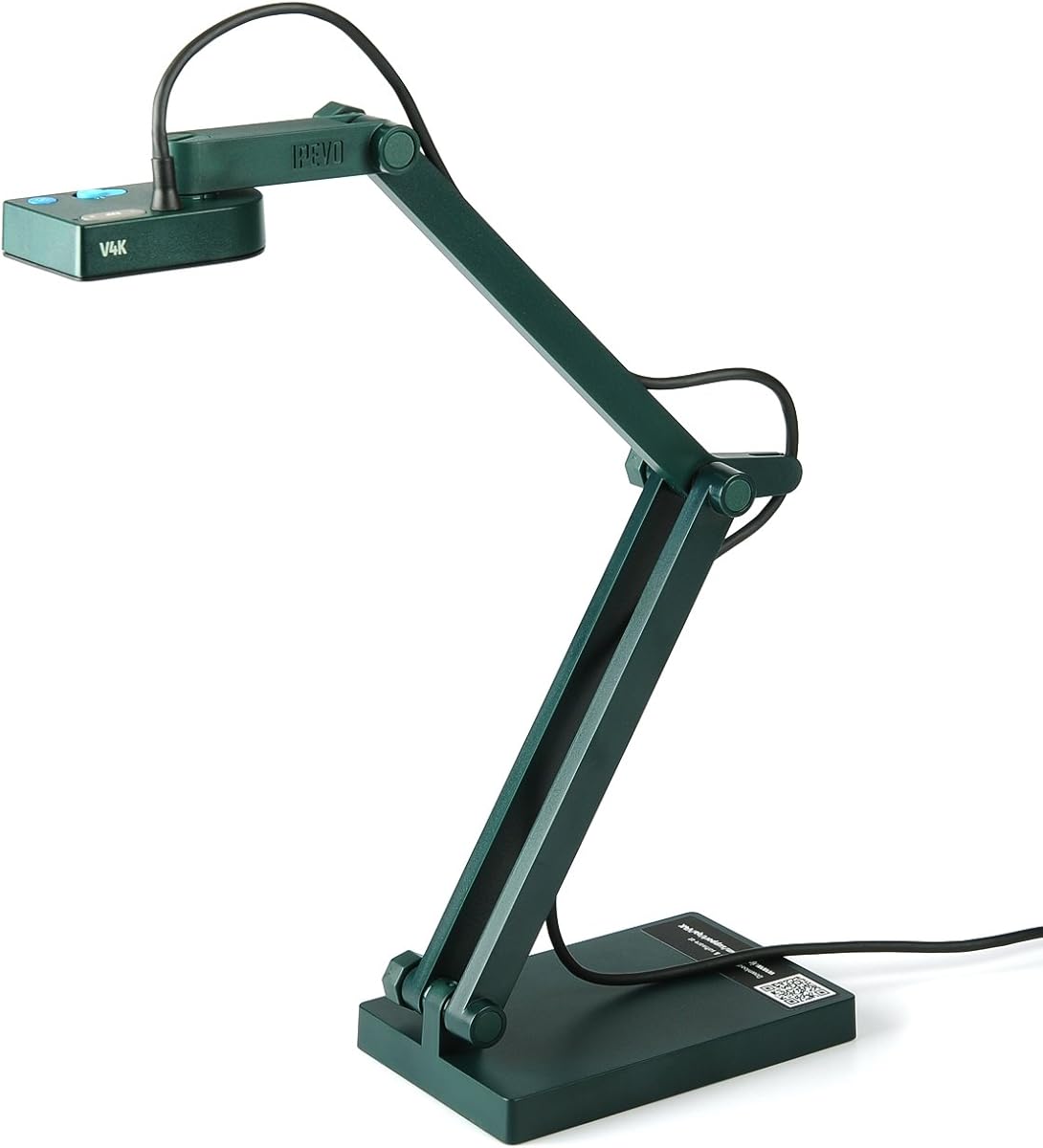
The IPEVO V4K Ultra High Definition 8MP USB Document Camera is a strong all-purpose classroom visualiser with a 4.5 rating. Its 8-megapixel sensor can capture images up to 3264 × 2448 pixels, giving teachers enough resolution for textbook pages, small print, demonstrations, and live video. The result is a capable visual tool without the complexity of a full projector system.
We may earn a commission when you buy through this link, at no additional cost to you.
The camera streams at up to 30 frames per second in full HD, which supports smooth live demonstrations and distance-learning sessions. Fast focusing helps it recover quickly when materials change, while the Sony CMOS sensor is designed to reduce noise and reproduce color in dim conditions. A multi-jointed stand allows the head to be repositioned for papers, vertical surfaces, and small objects, and the listed maximum shooting area is 13.46 × 10.04 inches.
Its main limitation is dependence on a wired USB connection to a compatible Mac, Windows, or Chromebook system. It does not provide the wireless freedom, internal battery, or direct TV connection of the IPEVO VZ-X. For teachers who already present through a computer, however, that focused design can be an advantage because it reduces configuration choices and keeps image capture direct and dependable.
This is the strongest general recommendation for classrooms that need detailed live capture, dependable focus, and flexible positioning. Teachers demonstrating art, science, writing, math, or everyday objects will benefit from the combination of resolution and reach. It is particularly suitable for schools standardized around USB-connected computers and conferencing applications such as live lessons, remote teaching, and web meetings.
The 3264 × 2448 maximum capture gives instructors room to show fine details that may be difficult for students to see on paper. Combined with the 8MP sensor, it is well suited to demonstrations where a whiteboard marker stroke, a small diagram, or a handwritten calculation must remain legible.
Full-HD streaming at up to 30fps helps keep movement more natural during live demonstrations. Compatibility with major computer platforms also makes the camera practical for lessons that combine a document feed with slides, browser windows, or conferencing software.
We may earn a commission when you buy through this link, at no additional cost to you.
The Apollo Horizon 2 is an open-head overhead projector rated 4.2, offering a traditional alternative to modern electronic visualisers. Its 10 × 10-inch transparent head gives teachers room to place worksheets, maps, drawings, and other translucent materials on the illuminated surface. The 2000-lumen output is intended to make that content visible in a classroom environment.
We may earn a commission when you buy through this link, at no additional cost to you.
The LCD display and VGA output distinguish the model from a purely analog overhead projector. VGA can provide a simple route to a classroom display, while USB is also listed, although the supplied data does not define the exact role of the USB connection. This makes the Horizon 2 potentially useful for schools that still maintain older presentation equipment and prefer a familiar physical stage for placing materials.
Compared with an 8MP camera, the Horizon 2 cannot provide the same digital zoom, autofocus, image enhancement, or direct video-recording flexibility. It also requires a physical overhead arrangement rather than a compact camera head that can be moved around the room. Transparent or translucent originals are therefore central to the experience, and teachers focused on small digital details may find a modern document camera more versatile.
Despite these limitations, the Horizon 2 is well suited to traditional classrooms that regularly display transparencies, worksheets, or large paper-based visuals. It offers a straightforward way to teach with physical documents and could appeal to institutions replacing an aging overhead projector without changing their entire workflow. It is less appropriate when wireless presentation, remote capture, or close-up digital imaging is central to the lesson.
The open 10 × 10-inch head gives teachers a visible staging area, making it easy to align paper by touch. That physical interaction can be intuitive for students accustomed to traditional overhead projection and for instructors who work frequently with transparencies.
VGA and USB connections support basic integration with classroom display systems. Teachers should verify the inputs available on the intended projector or interactive board before relying on the model for daily digital use.
We may earn a commission when you buy through this link, at no additional cost to you.
The IPEVO VZ-X Wireless 8MP Document Camera is the most flexible premium model in this guide, carrying a 4.6 rating. It supports Wi-Fi, HDMI, and USB, allowing teachers to move between a computer, iOS or Android device, Apple TV, television, projector, or monitor without being restricted to one classroom computer.
We may earn a commission when you buy through this link, at no additional cost to you.
Its 8MP Sony sensor captures 1920 × 1080 in Wi-Fi and HDMI modes and reaches near-4K quality at 3264 × 2448 in USB mode. HD video recording is supported at 1920 × 1080 and 30fps. A built-in LED lights the viewing area, while the listed maximum coverage includes both 16:9 and 4:3 arrangements, making it suitable for broad sheets, two-page layouts, and materials viewed from different orientations.
The standout classroom advantage is mobility. A stated battery life of 9–12 hours can cover a complete class or presentation session, while a wireless range of up to 33 feet lets instructors capture objects around the room. The swiveling head, multi-jointed stand, compact footprint, and body-mounted controls further support quick changes in height, angle, orientation, and image settings.
This camera is best for educators who teach from multiple locations, mix computers and mobile devices, or need untethered demonstrations. The extra connectivity options require some setup understanding, and a teacher wanting a simple fixed USB workflow may find a dedicated USB model easier to manage. Even so, the VZ-X offers the strongest balance of mobility, capture quality, battery life, and connection options.
Wireless operation and an 8MP camera allow a teacher to move away from a desk or podium. This is particularly useful for small-group instruction, science demonstrations, art instruction, and lessons that involve objects located beyond the reach of a fixed USB cable.
Wi-Fi, HDMI, and USB modes allow the teacher to choose between mobile use, direct display connection, and maximum USB capture quality. This makes the VZ-X more adaptable than single-mode visualisers in a mixed-device school.
We may earn a commission when you buy through this link, at no additional cost to you.
The THUSTAR 8MP Document Camera & Webcam 4K is a well-equipped budget choice with a 4.4 rating. Its 8MP sensor and up-to-30fps output are suitable for everyday classroom demonstrations, remote lessons, and video calls. At the same time, the built-in microphones, adjustable lighting, image reversal, and broad computer compatibility give it more utility than a basic webcam.
We may earn a commission when you buy through this link, at no additional cost to you.
A major strength is the 14-LED ring with three brightness levels. Teachers can compensate for dark rooms, reduce glare in bright rooms, or use the self-illumination as a fill light. The camera also provides manual brightness adjustment in ten-degree increments, one-touch autofocus, and the ability to capture objects as close as 3.94 inches. Its maximum covering area is listed as 16.5 × 11.6 inches, accommodating A3 paper.
The trade-offs are familiar for a wired visualizer. It must be connected by USB and does not offer Wi-Fi, HDMI, or battery-powered freedom. Some wording around the listed capture and coverage measurements is also less standardized than the more technical specifications elsewhere in this list. Nevertheless, the practical controls and flexible folding, multi-jointed stand support frequent repositioning without taking up much space.
For a classroom that wants an inexpensive, portable visualiser with better-than-basic lighting and microphone functions, the THUSTAR is a compelling recommendation. It should appeal to teachers using Zoom, Microsoft Teams, Google Meet, and similar tools on Windows, Mac, or Chromebook systems. Those wanting cable-free movement should consider a wireless model instead.
The three-level ring lamp is one of the THUSTAR's most useful classroom features. It can make pale paper easier to see in subdued rooms and provide more even illumination for small objects, while the separate brightness controls offer additional adjustment.
The folding design reduces storage space, and the multi-joint support allows the camera to be aimed at paper, flat objects, and raised demonstrations. That makes it easier for teachers to keep the visualiser available rather than locked in a cabinet.
We may earn a commission when you buy through this link, at no additional cost to you.
The INSWAN INS-2 UHD is built for teachers who regularly display large documents, artwork, two-page spreads, and detailed classroom materials. Its 4.4 rating is supported by a 13MP Sony sensor capable of recording 3840 × 2160 at 30fps, giving it one of the strongest conventional camera specifications in this guide.
We may earn a commission when you buy through this link, at no additional cost to you.
The multi-joint arm supports flexible positioning for documents up to A3 size. A built-in LED, included anti-glare sheet, dual-mode autofocus, brightness control, macro capture as close as 3.9 inches, and built-in microphone form a comprehensive presentation package. The supplied Documate software adds zoom, annotation, video recording, scanning, whiteboard tools, and optical character recognition.
Its main limitation is connectivity. It uses UVC plug-and-play operation rather than offering a wireless mode, and compatibility details vary across operating systems and devices. The listed support includes specified Windows versions, recent Mac versions, compatible USB-C iPads, and Chromebooks. It is also designed to work with tools such as Zoom, Microsoft Teams, and Google Meet, though teachers should verify the exact software workflow before purchase.
The INS-2 UHD is a strong choice for art instruction, architecture, technical diagrams, large worksheets, and exhibitions. It is especially compelling where fine 4K detail and a broad capture area matter more than mobility. Teachers who need to roam while presenting should choose a wireless camera, but fixed-station users will find this model feature-rich and precise.
The 13MP sensor and 3840 × 2160 output give art teachers more room to reveal pencil strokes, paint textures, and fine lines. The anti-glare sheet and built-in LED help preserve visibility while working on reflective or pale surfaces.
Documate expands the camera beyond basic visual capture with annotations, whiteboard tools, recording, scanning, zoom, and OCR. These features can reduce the need for separate teaching applications during supported Windows or macOS workflows.
We may earn a commission when you buy through this link, at no additional cost to you.
The Lumens DC166 stands apart through its combination of 6× optical zoom, 8× digital zoom, and support for multiple resolution modes. It is a traditional visual presenter rather than a modern live-streaming document camera, making it most relevant to teachers who work with interactive whiteboards and value precise magnification over wireless operation.
We may earn a commission when you buy through this link, at no additional cost to you.
The optical zoom is particularly useful when the camera must remain at a comfortable distance from a large sheet, specimen, or detailed object. Manual zoom gives the teacher direct control over framing, while one-touch video recording and playback simplify the creation of short instructional clips. Internal memory can hold 120 JPEG images, and the SD card slot accepts cards up to 32GB.
The 3.6 rating reflects some compromises in this otherwise focused design. Its maximum listed resolution is SXGA, which trails the 4K and near-4K capabilities of several newer digital cameras. The specification list also lacks explicit information about wireless connectivity, built-in lighting, or current conferencing-platform compatibility. Those omissions matter for instructors who expect a modern all-in-one teaching device.
The DC166 is best for schools with established interactive-whiteboard systems and teachers who need dependable optical magnification, manual framing, recording, and image storage. It is less attractive for a new mobile classroom setup where wireless capture, higher-resolution feeds, and integrated conferencing functions are priorities. Its specialized strengths can still make it the right tool for the right room.
The 6× optical zoom changes the framing before the image is digitally enlarged. That can preserve useful detail when inspecting small print, diagrams, specimens, or classroom objects, especially compared with relying entirely on the listed 8× digital zoom.
Compatibility with all interactive whiteboards makes the DC166 relevant to institutions that already rely on board-based annotation. Built-in JPEG storage and SD-card support offer convenient ways to retain and move classroom images.
We may earn a commission when you buy through this link, at no additional cost to you.
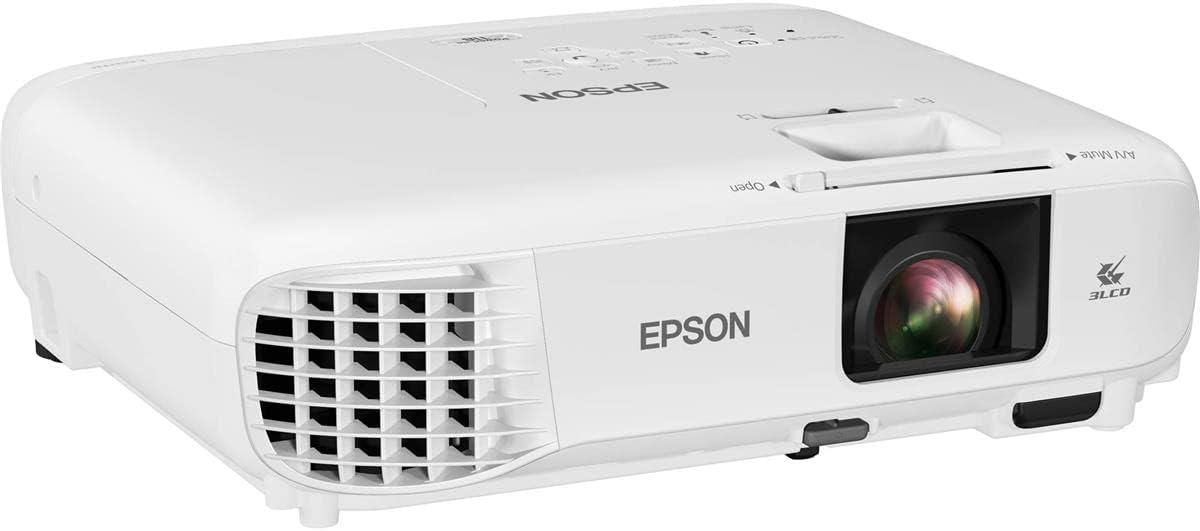
The Epson PowerLite 118 is a conventional classroom projector with a 4.9 rating, making it one of the most highly rated products here. It is designed to display presentations, videos, and visual material on a screen rather than physically capture worksheets or objects, so it belongs in the guide as a complementary whole-room display solution.
We may earn a commission when you buy through this link, at no additional cost to you.
Its 3LCD technology is intended to produce vibrant images, while the 4:3 aspect ratio reflects the traditional dimensions common in many classrooms. HDMI transfers video and audio through one cable, and the built-in speaker can support presentations without requiring a separate classroom audio system. The moderator function can connect up to 50 users simultaneously, which may be useful in collaborative or managed presentation environments.
The strongest specification is the stated 17,000-hour lamp life, supporting the projector as a durable, long-term classroom fixture. Ceiling-mountability helps keep the device out of sight and makes screen positioning more consistent. Its rating of 4.9 is excellent, although the rating alone cannot establish compatibility with every school network, content source, or interactive-board control system.
This Epson model is ideal for teachers who need a dependable screen display and already use a separate document camera. It is less suitable as a standalone document projector because it cannot capture paper or three-dimensional objects. Pairing it with a compatible visualiser can create a flexible classroom system, but buyers should confirm the projector's native inputs and classroom installation requirements.
The 17,000-hour lamp-life figure indicates a design focused on sustained use in educational and office settings. A ceiling-mounted installation can also reduce the daily setup and alignment associated with a portable projector.
A single HDMI connection carries both video and audio, reducing cable clutter. The integrated speaker provides a convenient fallback for short demonstrations, although larger rooms may still benefit from dedicated classroom audio.
We may earn a commission when you buy through this link, at no additional cost to you.
The DLP Business Projector 3300 Lumens is a screen-display projector with a perfect 5.0 rating. It is aimed at offices, classrooms, meeting rooms, and training spaces where slides, documents, charts, and other presentation visuals must be visible in a lit indoor environment.
We may earn a commission when you buy through this link, at no additional cost to you.
Its 3300 lumens provide a useful level of brightness for daytime viewing, while the built-in DLP system is described as supporting natural color and enhanced contrast. The projector supports large-size images intended to make it easier for a group to follow shared content. Fast startup is another practical strength, reducing preparation time between lessons, meetings, and training sessions.
The supplied information presents a straightforward wired workflow: connect the appropriate cable, power the projector, and display content. That simplicity may appeal to schools that want an uncomplicated display without wireless configuration. However, the specification list does not provide detailed information about resolution, aspect ratio, HDMI or VGA availability, mounting options, or audio, so buyers should verify those details for their specific classroom.
This projector is best for teachers displaying digital lesson content in a bright room, especially when fast startup and a large image are priorities. It does not replace a document camera, so papers and physical objects still need a separate visualiser or other capture method. Its excellent rating and brightness make it an attractive display companion rather than a complete document-projector solution.
The 3300-lumen output is designed to keep slides, charts, and teaching materials visible in everyday indoor conditions. This makes the projector more practical than a low-brightness model when lights remain on or daylight enters the room.
Quick startup helps reduce delays in a tightly scheduled school day. The simple wired design also keeps the operating process approachable for teachers who do not want to manage a complex network or wireless setup.
We may earn a commission when you buy through this link, at no additional cost to you.
The Epson PowerLite E20 is a 4.8-rated classroom projector designed for flexible placement and traditional 4:3 content. Like the PowerLite 118, it is a display device rather than a document visualiser, making it most useful for digital slides, videos, browser content, and presentations shown from a computer.
We may earn a commission when you buy through this link, at no additional cost to you.
Its 3LCD technology is designed to create vibrant, true-to-life images. HDMI transfers video and audio through one cable, while a five-watt speaker adds basic audio capability. The flexible construction allows display from virtually anywhere, and ceiling-mountability supports a permanent, neatly arranged classroom installation.
The stated 12,000-hour lamp life provides a clear durability advantage over replacing consumable projection technology frequently. Compared with the Epson 118, this model has a shorter stated lamp-life figure and a smaller listed speaker, but both remain suitable for recurring classroom presentation duties. As with any projector, the final image quality still depends on room brightness, screen size, wall color, and source resolution.
The E20 is a strong choice for teachers seeking an approachable, highly rated traditional projector without advanced network features in the supplied specification. It does not photograph documents, so schools wanting to show student work or physical teaching aids should pair it with a document camera. Its value lies in providing a bright, simple display platform for digital classroom content.
The construction supports multiple display positions, and the ceiling-mount option is useful when teachers need a stable, obstruction-free image. This adaptability helps the projector suit classrooms with different screen locations and furniture arrangements.
A stated 12,000-hour lamp life supports regular classroom use over an extended service period. The 4:3 format also aligns with many traditional educational displays, although widescreen materials may need careful scaling.
We may earn a commission when you buy through this link, at no additional cost to you.
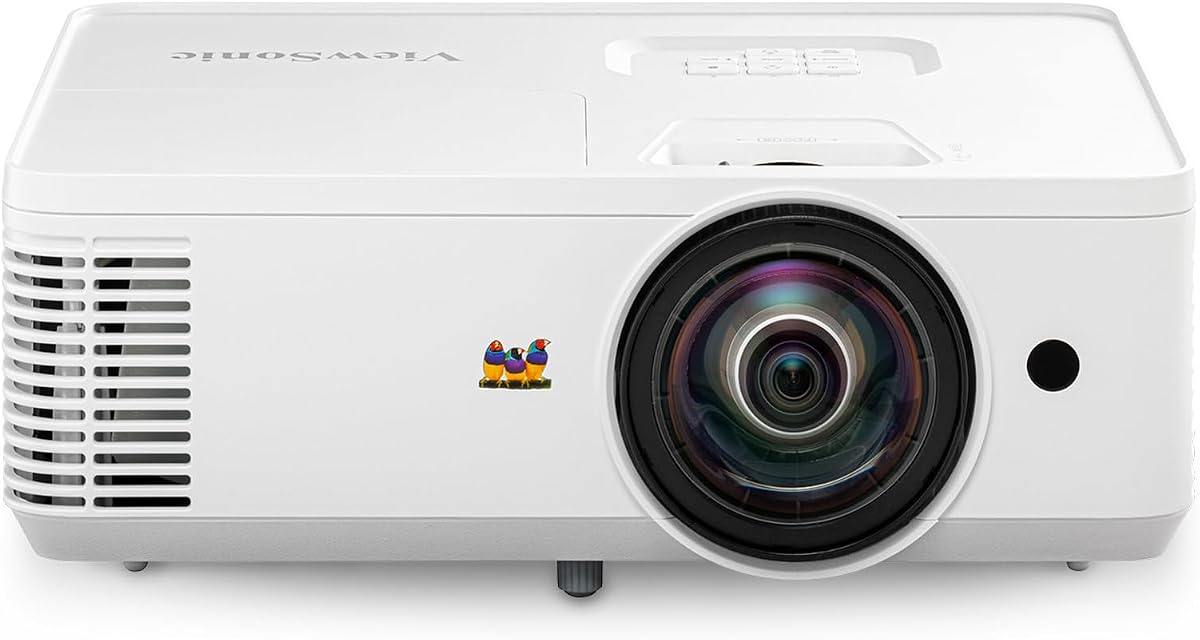
The ViewSonic PS502W is a short-throw projector built for small classrooms and meeting rooms where floor space is limited. Its 4.4 rating reflects a useful combination of 4000 ANSI lumens, a 0.5 throw ratio, and support for screen images up to 150 inches. It can project a 100-inch image from just 4.5 feet away.
We may earn a commission when you buy through this link, at no additional cost to you.
The 4000-ANSI-lumen output is designed to maintain visibility in moderate ambient light, making it suitable for daytime teaching sessions and rooms where lights cannot always be turned off. Proprietary SuperColor technology is described as providing a wide color gamut, while vertical auto-keystone correction and digital zoom help simplify setup and image adjustment.
The tradeoff is its WXGA native resolution of 1280 × 800. That is suitable for common educational slides and documents, but instructors who need to display very fine text alongside high-resolution images may prefer a higher-resolution projector. As a short-throw display model, it also cannot capture worksheets, student work, or three-dimensional objects for the camera.
The PS502W is ideal for compact rooms that need a large image without placing the projector far from the screen. Table or ceiling mounting offers installation flexibility, and dual HDMI provides straightforward wired source options. It is best used alongside a separate visualiser when physical teaching materials are central to the curriculum.
The 0.5 throw ratio and 150-inch maximum screen size make efficient use of limited space. At a 4.5-foot distance, the projector can create a 100-inch image while reducing the chance that students sit beneath or in front of the device.
SuperColor technology and 4000 ANSI lumens support clear presentation content in rooms with moderate ambient light. Vertical auto-keystone correction helps correct image geometry when the projector is not perfectly aligned.
We may earn a commission when you buy through this link, at no additional cost to you.
Choosing the right classroom projection solution requires matching the device to the material being displayed, the available connections, room lighting, and the amount of movement expected during a lesson. The most important distinction is whether a camera-based visualiser or a screen projector best matches the teaching workflow.
A document camera captures physical content and feeds it to a computer or display, making it the better option for worksheets, textbook pages, student work, experiments, art, and three-dimensional objects. A conventional projector displays content from a connected device but does not capture the physical classroom. Teachers who regularly show both kinds of content may want a document camera paired with a reliable classroom projector.
Resolution determines how much fine text and small visual detail can remain legible. The IPEVO V4K reaches 3264 × 2448 pixels, the INSWAN INS-2 captures 3840 × 2160, and the THUSTAR provides 8MP output, while the ViewSonic PS502W uses WXGA resolution. More pixels can benefit demonstrations, but usable focus, lighting, display quality, and the amount of content on screen also affect clarity.
A built-in LED is valuable in dim classrooms, and adjustable illumination gives teachers more control than a fixed lamp. The THUSTAR offers three brightness levels, while the INSWAN includes a built-in LED and anti-glare sheet. Capture area matters too: A3 support accommodates large sheets, while the IPEVO V4K provides a smaller but still generous 13.46 × 10.04-inch shooting area.
USB is the simplest wired workflow and works with the major computer platforms identified for several visualisers. Wi-Fi supports more flexible movement and can connect to mobile devices, while HDMI provides a direct route to projectors, televisions, and monitors. Before buying, confirm the operating systems, conferencing applications, ports, and classroom display inputs used by the teacher.
Teachers who move around the room benefit from wireless operation, a battery, and a wide wireless range. The IPEVO VZ-X provides all three, with Wi-Fi, HDMI, and USB modes and a stated 9–12-hour battery life. Wired visualisers such as the IPEVO V4K and THUSTAR are often simpler to deploy but tether the camera to the computer.
A short-throw projector can create a large image in a compact classroom and reduce shadows from people standing near the screen. The ViewSonic PS502W supports images up to 150 inches and can produce a 100-inch display from 4.5 feet away. Traditional projectors may require more distance, so room dimensions and the position of the screen should be measured before installation.
Brightness becomes essential when a room cannot be darkened or when daytime light enters the space. The ViewSonic PS502W provides 4000 ANSI lumens, the DLP Business Projector provides 3300 lumens, and the Apollo Horizon 2 has a 2000-lumen output. A camera's own LED is also important because it illuminates the material rather than the screen.
Annotation, zoom, recording, scanning, whiteboard tools, and optical character recognition can reduce the need for extra applications. The INSWAN includes Documate, while the Lumens DC166 offers one-touch recording, playback, internal JPEG storage, and an SD card slot. Teachers should also consider whether their existing conferencing software accepts the camera as a standard visual source.
Begin by placing the camera or projector where the entire teaching area is visible and where students will not block the image. For a document camera, extend the arm securely, position the lens above the material, and use the built-in LED or room lighting to eliminate shadows. Connect the device using the mode that matches the lesson, then select the appropriate input on the classroom display before opening conferencing or presentation software.
Focus before the class begins and test the framing with the largest document, object, or whiteboard area likely to be shown. Adjust brightness, image rotation, zoom, and head angle conservatively, making small changes rather than repeatedly moving the entire unit. A quick sound and video test is also valuable when the model includes a microphone or will be used for remote teaching, because a clear image cannot compensate for unstable audio.
After use, disconnect cables gently, return the camera head to a protected position, and fold or collapse portable stands as directed. Clean the lens with a soft, dry cloth, keep the camera away from dust and direct heat, and avoid pulling on flexible joints or the camera cable. For installed projectors, clean the ventilation area and follow the manufacturer's lamp and filter maintenance guidance.
A document camera captures physical materials such as papers, student work, and classroom objects. A classroom projector displays digital slides, videos, or computer content on a screen. Teachers who need both functions generally use a document camera alongside a projector rather than expecting one device to perform both roles.
Higher resolution can reveal finer text and small details, but clarity also depends on focus, lighting, display resolution, and how close the material appears on screen. An 8MP camera with effective illumination and stable focus may serve a classroom better than a higher-resolution model used in poor lighting.
Wireless cameras are especially useful when teachers move around the room, work from tablets, or want to avoid cable management. A wired USB camera can be simpler and more consistent for teachers who always present from the same computer. The best choice depends on the devices and routines already used in the classroom.
Many modern document cameras appear as standard cameras and can be selected inside these conferencing applications. The supplied data explicitly identifies compatibility for the THUSTAR and INSWAN, while the IPEVO models are described as compatible with web-conferencing workflows. Teachers should still confirm the exact operating system and application setup before class begins.
A built-in LED is highly useful in dim rooms or when demonstrating dark, textured, or three-dimensional objects. Adjustable levels provide better control than a fixed light because the ideal setting differs between reflective paper, pale worksheets, and room conditions. The THUSTAR's three levels and the INSWAN's integrated LED are useful examples.
The required area depends on the materials in use. A standard worksheet may fit a smaller visualizer, while two-page spreads, large posters, maps, and A3 paper demand broader coverage. The THUSTAR and INSWAN list A3-related coverage, and the IPEVO VZ-X offers large 16:9 and 4:3 viewing areas for flexible use.
No. A short-throw projector is designed to make a large digital image in a compact space, but it does not capture physical documents or objects. The ViewSonic PS502W can complement a visualiser, yet the two devices perform separate parts of the classroom presentation workflow.
Check the room dimensions, screen size, lighting conditions, device ports, operating systems, conferencing software, and whether the teacher needs to move around while presenting. For cameras, also review the maximum capture area, focus behavior, LED controls, and whether wireless operation or a battery is necessary.
The IPEVO V4K stands out as the strongest overall document camera for detailed USB-based teaching, combining 8MP capture, full-HD streaming, fast focusing, and an adjustable stand. The THUSTAR provides the best budget combination of A3 coverage, three-level lighting, autofocus, and microphones, while the IPEVO VZ-X is the premium choice for teachers who value wireless mobility, several connection modes, and long untethered use.
For larger or brighter rooms, the right projector can be just as important as the camera. The ViewSonic PS502W is ideal for compact spaces requiring a large short-throw image, the Epson models suit traditional 4:3 classroom presentation, and the DLP Business Projector offers a simple high-brightness display option. Choose the device that matches the actual materials, room, and teaching pattern rather than selecting on one specification alone.
Before making a final decision, confirm current compatibility, software support, room requirements, and pricing. Technology and classroom setups change, and product availability may also vary. Checking those details at the time of purchase will help ensure that the selected document projector integrates smoothly with the teacher's devices, display system, and daily curriculum.

