
Ostrich 65W Round-Tip Charger
4.5Editor score
65W and 45W round-tip support
Converts 4.5mm to 7.4mm
Protects against common electrical faults
This Replacement Dell Laptop Charger guide compares connector types, wattage, voltage, compatibility, safety features and included cords.
A replacement Dell laptop charger must match both the connector and the power requirements of the computer. Connector diameter alone is not enough: round-tip models need the correct voltage and current, while USB-C models must support the laptop’s charging profile and deliver the appropriate wattage.
The products in this guide were compared using their stated compatibility lists, electrical specifications, connector designs, included accessories, safety claims, customer ratings and intended use cases. The selection covers round-tip, USB-C, 45W and 65W options, including replacements for Latitude, XPS, Inspiron, Chromebook and Dell Pro systems.
Each review explains the strongest reasons to consider the charger while also identifying details that deserve attention. Two listings lack usable product information, so they are included for completeness but cannot be meaningfully evaluated. Prices and availability can change, making the specifications and compatibility details especially important to verify before ordering.
4.5Editor score

4.8Editor score

4.6Editor score
This side-by-side comparison organizes the ten listings by connector, output, compatibility and included components, making it easier to identify the option that matches a specific Dell computer and charging setup.



The Ostrich Charger Compatible with Dell Laptop Computer 65W 45W Round Tip Power Adapter earns a 4.5 customer rating and stands out as a flexible solution for Dell systems that use a round barrel connector. Its most useful feature is the included 4.5mm-by-3.0mm to 7.4mm-by-5.0mm converter, which broadens the range of compatible machines.
We may earn a commission when you buy through this link, at no additional cost to you.
The adapter is rated for a maximum output of 65W at 19.5V and 3.34A while accepting 100–240V input. That makes it suitable for travel across regions with different household voltage systems. The listing also identifies compatibility with Dell Inspiron, XPS and Vostro series laptops and states that it supports 45W systems as well.
Its safety description includes protection against short circuits, overvoltage, overcurrent and internal overheating, while the manufacturer also references testing by an American consumer product testing laboratory. The principal limitation is obvious: this is a round-tip solution, so it cannot serve a laptop that requires a USB-C charging connector.
Choose this charger when the original adapter used a 4.5mm or 7.4mm round plug and the laptop expects 19.5V. It is particularly appealing for owners who want one replacement that can cover both connector sizes. Verify the model and voltage markings before buying, especially if the laptop belongs to a more recent or specialized product line.
The included converter allows the adapter to fit systems using either of the common Dell round-tip dimensions. That makes it a practical option when replacing an older charger whose plug did not physically match the port on the replacement laptop.
A 100–240V input range allows the adapter to be used with compatible power sources in many countries. The included power cord still needs to be appropriate for the outlet standard in the location where the charger will be used.
We may earn a commission when you buy through this link, at no additional cost to you.
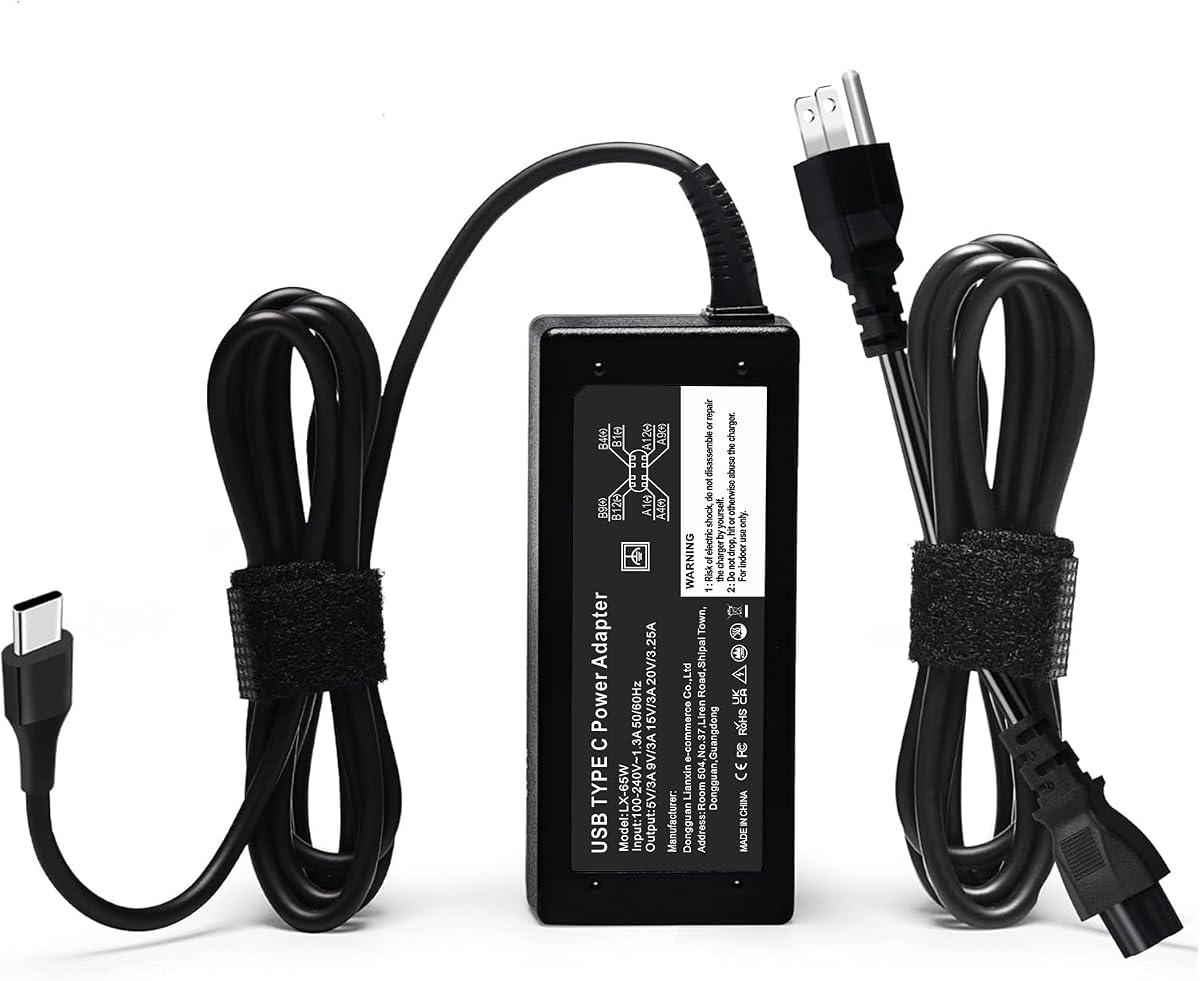
The Replacement for Dell Laptop Charger 65W Watt USB Type C AC Power Adapter has a 4.8 customer rating, the highest among the fully documented products in this guide. It combines a compact USB-C design with extensive coverage across Dell Latitude, XPS, Inspiron, Chromebook and selected Dell Pro models.
We may earn a commission when you buy through this link, at no additional cost to you.
The adapter accepts 100–240V input and supplies up to 20V at 3.25A, with a stated maximum output of 65W. Its compatibility list includes numerous current and recent Latitude 5000- and 7000-series systems, XPS 13 models, several Inspiron models, Dell Pro 13, Pro 14 and Pro 16 computers, and multiple Dell Chromebook models.
A major strength is the detailed replacement-part list, covering LA65NM170, LA65NM190, DA65NM190, HKA65NM200, LA60NM200, LA45NM210 and numerous Dell part numbers. Built-in protection is stated to guard against overvoltage, overcurrent, overheating, overload and short circuits. The package includes both the 65W USB-C adapter and a power cord.
This is the strongest all-around recommendation for a USB-C Dell laptop because it combines the highest available rating with one of the broadest model lists. It is best for home offices, classrooms, travel and workplace replacement programs. Confirm the USB-C port on the computer and verify the model or part number before purchasing, since physical connector similarity does not guarantee complete charging-protocol compatibility.
The model list extends beyond one product line to include Latitude, XPS, Inspiron, Dell Pro and Chromebook computers. Buyers can cross-reference their exact model designation or original adapter part number to reduce the risk of an unsuitable match.
The compact adapter is designed for storage in a laptop bag or suitcase, while its 100–240V input makes it adaptable for many international power systems. The included cord completes the standard wall-to-laptop charging setup.
We may earn a commission when you buy through this link, at no additional cost to you.
The Dell Laptop Charger 65W Watt USB Type C AC Power Adapter is presented as a new genuine original Dell AC adapter with non-retail packaging. It has a 3.9 customer rating, placing it below the other USB-C options in this list, but it offers a tightly defined compatibility set for several Latitude and XPS models.
We may earn a commission when you buy through this link, at no additional cost to you.
Its output profile includes 65W at 20V, 45W at 10V, 27W at 9V and 15W at 5V. The stated compatible Dell part numbers include 0WMDHR, 0VT148, 0CJG9W, 0T3JDJ and 723JG, while the factory part numbers include LA65NM190, HA65NM190 and HKA65NM200.
The model list emphasizes Dell Latitude 3340, 3440, 3540, 5340, 5440, 5540, 7340, 7440, 7640 and 9440 systems, including 2-in-1 configurations. It also names XPS 12 and XPS 13 models and several older Latitude systems. The main concern is that this list is less expansive than the leading USB-C replacement.
This option is worth considering when the computer appears in the stated model or part-number list and the buyer wants a charger described as an original Dell unit. It may be less suitable for users who need support for a broader range of modern Dell models. The included three-foot cord is useful for desks and travel bags where a shorter lead is convenient.
The stated output modes include 65W, 45W, 27W and 15W, providing some flexibility across compatible USB-C Dell hardware. The computer’s charging requirements should still determine which mode it negotiates with the adapter.
Rather than implying universal coverage, the listing identifies specific Latitude, XPS and Dell part numbers. That makes it easier for careful buyers to validate the match before placing an order.
We may earn a commission when you buy through this link, at no additional cost to you.
The Replacement for 65W Dell Laptop Charger USB-C has a 4.2 customer rating and is differentiated by a bulk-ready case pack containing 50 units. It is designed for offices, schools, repair shops and other settings that need to standardize charging equipment across many systems.
We may earn a commission when you buy through this link, at no additional cost to you.
The charger supplies 65W through a USB Type-C connector, with listed outputs of 5V at 3A, 9V at 3A, 12V at 3A, 15V at 3A, 18V at 2.5A and 20V at 3.25A. Its input range is 100–240V at 50–60Hz and 1.8A, making it adaptable across common international power supplies.
Compatibility is organized around Dell Pro 13, 14 and 16 Plus systems, Latitude 5000- and 7000-series models, and 2-in-1 devices. The listing also describes premium oxygen-free copper wiring, thickened tin plating, overvoltage and overcurrent protection, short-circuit protection, real-time temperature detection and heat dissipation.
The case-pack configuration is the key decision point. A business replenishing multiple chargers may find this practical, while a single household buyer may find the minimum configuration unnecessarily large. Confirm the exact model and connector before ordering in bulk, and retain a documented equipment map so each charger can be assigned correctly.
A consolidated case of 50 chargers is designed for organizational purchasing and inventory management. It can simplify the process of replacing mismatched or aging adapters across many desks, classrooms or service benches.
The adapter supports several lower-voltage outputs in addition to its 20V, 3.25A maximum. This range can be useful for a varied collection of compatible Dell USB-C computers.
We may earn a commission when you buy through this link, at no additional cost to you.
The DECSZDY Replacement for Dell Laptop Charger 65W USB-C carries a 4.1 customer rating and offers one of the longer compatibility lists in the guide. Its product information covers Dell Latitude, XPS, Inspiron and Chromebook models, together with numerous adapter part numbers.
We may earn a commission when you buy through this link, at no additional cost to you.
It accepts 100–240V at 50–60Hz and 1.8A input. Maximum output is listed as 65W, with 5V, 9V, 12V, 15V and 18V modes plus a maximum 20V at 3.25A output. The package includes a 65W USB-C power adapter and a power cord.
The stated compatible Latitude selection includes several 3000-, 5000-, 7000- and 9000-series computers, along with 2-in-1 models. The list also names multiple XPS 13, XPS 15, Inspiron 13, 14 and 16 systems and Dell Chromebook models. The replacement part numbers include LA65NM170, LA65NM190, HKA65NM200, LA45NM210 and numerous abbreviated Dell identifiers.
Safety protection is attributed to a built-in IC chip providing short-circuit, overcurrent, overvoltage, overheating and overload protection. The product is a solid alternative for a compatible USB-C system, especially when the model number is clearly included in the listing. Buyers should not rely on a broad list alone; the exact computer model and original charger markings remain the safest basis for selection.
The listing provides both whole model names and original adapter part numbers. Buyers can use whichever identifier is easiest to find on the computer, its documentation or the charger they are replacing.
The stated chip-based safeguards cover several common electrical failure conditions. As with any replacement adapter, these protections supplement rather than replace careful matching and proper use.
We may earn a commission when you buy through this link, at no additional cost to you.
The 60W 65W USB C Laptop Charger fits for Dell Pro 14 16 13 Plus USB-C Adapter has a 4.4 rating and emphasizes support for relatively new Dell Plus and Pro systems. Its long included cord differentiates it from many of the shorter-cord alternatives in the guide.
We may earn a commission when you buy through this link, at no additional cost to you.
The adapter accepts 100–240V at 50–60Hz and provides listed outputs of 15V at 3A, 20V at 2.25A, 20V at 3A and 20V at 3.25A. It is rated for 65W and states compatibility with 60W and 45W models. The power cord is listed at 10 feet, offering flexibility when the wall outlet is farther from the work surface.
Compatibility information includes Dell 14 Plus and 16 Plus 2-in-1 systems, Dell Pro 13 Plus, Pro 13 Premium, Pro 14 Plus, Pro 16 Plus, Pro 3, Pro 5 and Pro 7 models. It also covers a wide selection of Latitude, XPS, Chromebook and Inspiron USB-C systems. A detailed list of replacement part numbers is included.
This charger is a strong fit for newer compatible Dell machines in offices where a longer reach is useful, such as shared desks or conference rooms. It is less attractive for travelers who value a compact setup or for owners of a legacy round-tip laptop. Check the model list carefully because the listing expressly limits certain systems to 65W USB-C configurations.
The ten-foot cord can make charging easier in rooms with a distant outlet or a fixed desk arrangement. Users can also place a more compact USB-C power strip within reach and keep only the needed section of cable on the desk.
The listing gives particular attention to newer Dell 14 Plus, 16 Plus and Pro configurations. Exact model identifiers are provided so buyers can confirm fit rather than relying on a general Dell USB-C assumption.
We may earn a commission when you buy through this link, at no additional cost to you.
The Dell 45W Replacement AC Adapter for Dell has a 4.6 customer rating and focuses on a specific, easily verified class of laptop: Dell systems that originally used a 45W round-tip charger with part number 0KXTTW or LA45NM140.
We may earn a commission when you buy through this link, at no additional cost to you.
Its electrical specification is concise. The adapter accepts worldwide input from 100–240V AC at 50–60Hz and provides up to 45W at 19.5V and 2.31A. A power cord is included, making the package a straightforward replacement for a missing or damaged original adapter.
The narrow specification is a strength for precise replacement buying. A buyer who finds 0KXTTW or LA45NM140 on the original charger can compare it directly with the listing. Its limitation is equally clear: it is not a USB-C adapter and should not be selected for a newer Dell computer that expects USB Type-C charging.
This is a strong recommendation for owners of compatible 45W Dell laptops, particularly when the goal is to replace a lost original unit with a clearly identified alternative. Before buying, check the connector, voltage and current printed on the old adapter or the laptop’s power label. A lower-wattage adapter should not be assumed to work with a system designed for a different charging profile.
The two original Dell identifiers give buyers a direct method for confirming compatibility. Finding the same number on the old charger removes much of the guesswork involved in choosing a generic replacement.
The 100–240V input specification supports use across a wide range of domestic and international electrical systems. The local power cord must also be compatible with the outlet where the adapter will be connected.
We may earn a commission when you buy through this link, at no additional cost to you.
The 65W AC Charger for Dell Inspiron 11 13 15 17 3000 5000 7000 La65ns2-01 has a 4.4 rating and is aimed primarily at legacy Dell Inspiron computers. It supports both 4.5mm-by-3.0mm and 7.4mm-by-5.0mm round connectors, making it useful across multiple generations of that product line.
We may earn a commission when you buy through this link, at no additional cost to you.
Maximum output is listed at 19.5V and 3.34A for 65W, with an input range of 110–240V. The included cord is 8.8 feet long, which provides a generous connection distance for desks, dorm rooms and home offices. Unlike the Ostrich option, its stated lower input limit is 110V rather than 100V.
The compatibility list spans Inspiron 11-, 13-, 15- and 17-inch families and numerous 3000-, 5000- and 7000-series model numbers. It also identifies numerous replacement part numbers, including LA65NS2-01, 0KXTTW, 04H6VH, ADP-45XD BA, D0KFY and several others. The listing states that the adapter is new from the manufacturer and carries CE and FCC safety certification.
This charger is most appropriate for an older Inspiron or related Dell computer that uses a round barrel plug and expects the stated 19.5V output. Verify the system model, connector and current requirements before ordering. It should not replace a USB-C charger, and a 65W adapter should be matched to a laptop designed to accept that charging specification.
The extensive list of Inspiron series and individual model numbers supports replacement of chargers across several older product generations. This is valuable for schools, offices and repair businesses that still maintain older Dell fleets.
Support for both 4.5mm and 7.4mm ports reduces the need to find the exact physical match. It does not change the need to confirm voltage, wattage and model compatibility before connecting the charger.
We may earn a commission when you buy through this link, at no additional cost to you.
The B0F371QBYX listing is included in the original ten-product set, but the supplied product data contains no usable title, rating, image, description or technical specifications. It therefore cannot be assessed as a charger based on the information available for this guide.
We may earn a commission when you buy through this link, at no additional cost to you.
Without a connector type, wattage, voltage, current rating, input specification or supported model list, it would be irresponsible to recommend this listing for a specific Dell computer. A USB-C charger with inadequate power output, for example, may not charge correctly, while a round-tip adapter with the wrong voltage can cause damage.
The most responsible approach is to treat the Amazon product page as a source for additional documentation. Buyers should look for the connector dimensions, electrical ratings, included cord, supported Dell models and original replacement part numbers before considering a purchase.
This listing is not recommended as a first choice because the available evidence does not establish what it is or whether it is compatible. Check the current product page carefully, and compare the specifications with the markings on the original charger and the power requirements printed on the laptop.
Every critical compatibility attribute is absent from the supplied listing data. Review the live product page and request a specification table before buying if the seller has not made the details visible.
A Dell model name alone is not enough because connector design and power requirements vary substantially. The missing electrical information prevents a reliable recommendation.
We may earn a commission when you buy through this link, at no additional cost to you.
The B0921QPWQX product appears in the supplied set, but no usable description, title, rating, image or technical facts are available. As a result, this listing cannot be compared meaningfully with the documented chargers or assigned a defensible use case.
We may earn a commission when you buy through this link, at no additional cost to you.
The information required to evaluate a laptop power adapter includes connector type, input voltage, output voltage, amperage, wattage, supported charging protocols, cable configuration and compatible computer models. None of those points can be established from the available listing data, so a recommendation based on assumed specifications would be misleading.
If the live Amazon page provides a clear specification sheet, buyers can compare those values with the power label on the Dell laptop and the original adapter. The physical connector should also be inspected without forcing it into the port. Original Dell part numbers can provide another useful cross-reference when available.
This option is not recommended over the fully documented chargers because there is too little information to establish compatibility or electrical safety. Buyers should only proceed after confirming the complete specifications and package contents on the current product page.
Do not rely on a generic product heading that fails to identify connector type or output. Obtain and compare the adapter’s detailed electrical specification before considering it for a Dell laptop.
The old charger’s label often provides voltage, current, wattage, connector type and manufacturer part number. Those markings provide a much stronger basis for a safe and useful replacement decision.
We may earn a commission when you buy through this link, at no additional cost to you.
Choosing a replacement charger is primarily a matching exercise. Start with the laptop’s connector and power requirements, then use the original adapter labels, model documentation and supported part numbers to confirm that the replacement is suitable.
Dell laptops use both round barrel-style connectors and USB Type-C connectors, and the two are not interchangeable. A 4.5mm-by-3.0mm or 7.4mm-by-5.0mm round connector belongs in a physically matching round port, while a USB-C charger is intended for a USB-C port. A charger that lists a model family should not be assumed to fit every model in that family. Check the port shape directly and look for the original adapter’s connector description before shopping.
The output voltage must correspond to what the laptop expects, while the current rating must be at least as high as the required charging current. Many of the documented round-tip adapters use 19.5V, with current and wattage determining whether the unit is a 45W or 65W option. A higher current rating may be appropriate when the charger and laptop are designed for it, but a lower power rating may provide inadequate or unstable charging. Read the label on the old adapter and the system’s power information rather than estimating from the computer’s screen size.
Exact model numbers provide the most direct way to narrow the field, but the full model designation matters. Similar-looking Dell families can use different connectors and charging profiles. Several products in this guide also list original replacement part numbers such as LA65NM190, HKA65NM200, 0KXTTW and LA45NM140. If the old charger carries one of these identifiers, check whether the replacement explicitly supports it. A short common model name by itself is less reliable than a complete model or part number.
For USB-C chargers, wattage alone does not tell the whole story. The computer and adapter must negotiate a compatible USB Power Delivery profile, and some Dell systems accept only specific output modes. The documented adapters list several supported voltages, such as 5V, 9V, 12V, 15V, 18V and 20V. A replacement should support the profile required by the target computer, particularly when a device is a 2-in-1 or a newer Dell Pro or Plus system.
A replacement adapter should include protection against common electrical hazards. The product descriptions mention overvoltage, overcurrent, overload, overheating and short-circuit protection, with some also describing temperature detection and heat dissipation. These claims provide useful context, but buyers should also inspect the physical construction, cable strain relief and connector fit. The listing’s stated certifications and safety testing can help differentiate documented products, although no charger should be used if it shows damage, discoloration, unusual heat or a loose plug.
The useful cord length depends on where the adapter will be used. A long cord can reach an awkward wall outlet in an office, dorm room or conference space, while a compact lead and small adapter are easier to pack. Documented options range from a three-foot cord to a ten-foot cord, and the Ostrich round-tip product includes a separate connector converter. Consider whether the extra length is genuinely useful or merely adds clutter to a travel bag.
A wall adapter is only useful if the necessary connection cable is included. Most of the documented products list an AC power cord, which connects the adapter to a wall outlet, while the USB-C adapter itself plugs directly into the computer. The Ostrich round-tip option also includes a 4.5mm-to-7.4mm converter cable. Confirm whether a separate laptop power cord or connector cable is included, especially for international travel where regional outlet shapes differ.
A household buying one replacement, an office standardizing dozens of computers and a repair shop supporting several generations of hardware have different priorities. Individual buyers generally value clear model compatibility and straightforward setup. Bulk purchasers may prioritize case-pack configuration and standardized inventory management. Frequent travelers may favor a compact adapter with broad input voltage, while fixed workstations may benefit more from a longer cord. Choose based on the actual fleet and charging locations rather than only on wattage.
Before connecting any replacement, compare the charger’s input and output label with the markings on the original adapter and the laptop’s power requirements. Confirm the connector shape, output voltage, current or wattage and model support. If the old charger is unavailable, use the laptop documentation and manufacturer specifications rather than selecting by appearance alone. Never force a connector that does not fit, and do not assume that a USB-C charger supports every Dell USB-C laptop.
Place the adapter on a stable, dry and ventilated surface rather than on a soft blanket, cushion or enclosed area. Connect the adapter to the wall, allow it to establish the appropriate connection with the computer, and observe the charging indicator. Unplug the cable from the computer before disconnecting it from the wall. For travel, use a compatible local power cord or plug adapter and avoid adapters or extension strips that may overload.
Inspect the adapter, cable and connector regularly. Look for fraying, pinches, bent contacts, discoloration, unusual odors, buzzing or excessive heat, and stop using the charger if any of these signs appear. Keep liquids away from the power connection, wrap the cable without creating sharp bends and avoid placing stress on the plug. If the charger or laptop behaves inconsistently, test with a known-compatible charger and have the laptop or adapter professionally inspected.
Only when the connector, output voltage and charging protocol are compatible and the laptop is designed to accept the higher-rated adapter. Some Dell systems negotiate different power levels, but the replacement must still meet their requirements. Check the voltage, current, connector and model compatibility, and use the manufacturer’s guidance when available.
A round-tip charger ends in a cylindrical barrel connector that may measure 4.5mm by 3.0mm or 7.4mm by 5.0mm. A USB-C charger has a symmetrical oval plug and requires compatible USB Power Delivery support. The two connectors are physically different and are not interchangeable without an appropriate, electrically safe solution.
Look at the label on the original charger for a Dell-style part number such as LA65NM190, HKA65NM200, 0KXTTW or LA45NM140. You can also find the computer’s complete model number from its underside, BIOS or support documentation. Compare either identifier with the replacement listing before ordering.
Yes. A charger accepting 100–240V can generally be used with compatible power sources in many countries, although the wall cord and plug arrangement must also be suitable. The Ostrich and most documented USB-C options list 100–240V input. The SK90195334 round-tip charger lists 110–240V, so users in locations with a 100V supply should check more carefully.
A higher-wattage charger can be safe if the voltage, connector, current handling and charging protocol all match what the laptop expects. USB-C devices negotiate power through supported profiles, but that does not make every USB-C adapter universally compatible. Confirm the specifications in the laptop documentation and the adapter listing before using a higher-rated unit.
A complete USB-C setup generally includes the AC adapter and a wall power cord because the adapter’s male plug connects directly to the laptop. A round-tip setup also needs the barrel connector attached to the adapter. Products such as the Ostrich charger additionally include a 4.5mm-to-7.4mm converter for compatible systems.
No. Screen size does not determine connector type, voltage or supported charging protocol, even within the same Dell product family. Check the exact model designation, charging specifications and original adapter part number. The port shape is also useful for distinguishing USB-C from a round-tip connection, but model-level confirmation remains the safest method.
A charger that does not fit properly, produces unstable charging, becomes excessively hot, smells unusual or shows visible cable or connector damage should be disconnected immediately. Do not use a charger whose output specifications are unknown. If the laptop’s original charger shows similar damage, have the laptop inspected because power-system problems may also affect the computer.
The QXA 65W USB-C charger is the strongest all-around recommendation in this guide because it combines a 4.8 customer rating, broad Dell model coverage, a detailed replacement-part list and stated electrical protections. The Ostrich round-tip adapter is the leading flexible option for 45W and 65W systems that use the traditional Dell barrel connector, while the Dell 45W AC Adapter stands out for buyers who can verify original part numbers 0KXTTW or LA45NM140.
Prioritize the connector, voltage, current, wattage and exact computer model before considering any secondary feature. USB-C buyers should also confirm that the laptop supports the adapter’s charging profile, while round-tip buyers should measure the port and compare the old charger’s label. Cable length, included accessories and safety features are useful tie-breakers, but they cannot compensate for an incorrect electrical match.
Product listings, ratings, availability and prices can change over time, so check the current Amazon page and seller information before making a final purchase. Compare the adapter’s live specification with the original charger and the laptop documentation, and buy only when every critical value aligns.