
Anker 100W Max Charger
4.7Editor score
Three USB-C charging ports
Real-time smart display
Up to 100W per port
Low-current charging mode
Our 100W Gan Fast Charger guide compares ten compact GaN chargers across power delivery, ports, displays, portability, safety, compatibility, and everyday use.
A 100W GaN fast charger combines substantial laptop-charging capability with a compact footprint, making it useful for travel, hybrid work, and clutter-conscious desks. The best models provide intelligent power allocation, broad device compatibility, and enough ports to serve several devices without requiring separate adapters.
This guide compares ten options on maximum output, port count, included accessories, display features, thermal safeguards, portability, and supported devices. It covers compact three-port designs, four- and five-port hubs, smart-display models, and a two-pack whose actual per-charger output is below the stated 100W target.
Each review explains where the charger stands out, where compromises appear, and which user is most likely to benefit. Ratings and specifications reflect the supplied product information, while current listings, availability, cable requirements, and charging performance can vary over time.
4.7Editor score

4.8Editor score
4.5Editor score
The comparison below covers each charger's headline capacity, port layout, portability, monitoring features, and strongest use case, with a special note where the advertised 100W category does not reflect the stated maximum output.


The Lenovo 100W USB C Charger is a four-port GaN power block built around a balanced combination of capacity, cooling, and broad compatibility. It carries a 4.8 rating, the highest among the listed products, and its two USB-C and two USB-A ports make it more versatile than many compact three-port alternatives. The total output is 100W, with intelligent distribution among connected devices.
We may earn a commission when you buy through this link, at no additional cost to you.
Its most attractive feature for a mobile workstation is the GaN III implementation, which Lenovo says operates 40% cooler than traditional chargers and includes over-temperature safeguards. The charger can power a 14-inch MacBook Pro with the M3 Pro to 50% in 40 minutes, according to the supplied information. Compatibility extends across ThinkPad, ThinkBook, MacBook, Dell XPS, HP, iPad, iPhone, Galaxy, AirPods, Apple Watch, Switch, and Steam Deck devices.
The included 4.9-foot 240W USB-C cable is a meaningful convenience because it is designed to handle demanding laptop charging. The foldable plug and 30% smaller footprint also improve portability. The tradeoff is that total output is shared among as many as four connected devices, so every port will not receive 100W simultaneously. Buyers who want live power information would also need to choose a display-equipped alternative.
This is the strongest general-purpose option for someone who regularly alternates between a demanding notebook, a phone, and smaller accessories. It offers the most balanced feature set in the group: enough ports for realistic desk setups, broad compatibility, a high-capacity included cable, and active thermal management. It is especially attractive to ThinkPad and MacBook users who want one charger to replace several separate power blocks.
The charger can handle up to four devices at once, distributing a total 100W across two USB-C and two USB-A connections. That makes it useful for a laptop, phone, earbuds, and watch rather than only for premium USB-C equipment.
GaN III technology, thermal safeguards, and a stated 40% cooler operating approach help manage heat when the charger is used for extended laptop charging sessions. The result is especially relevant for travelers and desk users who leave the block plugged in for long periods.
We may earn a commission when you buy through this link, at no additional cost to you.
The UGREEN Nexode 100W stands out because all four of its ports are USB-C rather than mixing USB-C and legacy USB-A. It carries a 4.6 rating and supports up to 100W through the primary USB-C connections, giving modern phone, tablet, and laptop owners a cleaner one-cable ecosystem. The product information also identifies support for charging two laptops simultaneously.
We may earn a commission when you buy through this link, at no additional cost to you.
Compactness is a central strength. GaN technology permits a smaller block than conventional laptop chargers, while the foldable plug keeps the prongs protected during transport. UGREEN lists compatibility with MacBook Pro and Air, Dell XPS, iPhone 17 and 16, Galaxy S25 and S24, iPad Air, Pixel 10 and 9, and Steam Deck. It also charges a MacBook to 51% in 27 minutes under the stated conditions.
The main limitation is the absence of USB-A, which can matter for older accessories or peripherals that still rely on that connector. The supplied information also does not identify an included cable, so users may need to own suitable USB-C cables already. Another compromise is that there is no screen for inspecting real-time port output, although integrated GaN technology helps guard against overheating.
This model is an excellent fit for a modern all-USB-C kit. It particularly appeals to users who alternate between two notebooks and two phones, or who want one compact adapter to support a phone, tablet, earbuds, and laptop. If legacy USB-A support is unnecessary, its four dedicated USB-C ports are among the cleanest designs in this guide.
Having four USB-C ports avoids dongles and adapter blocks for compatible equipment. It also gives USB-C phones, tablets, cameras, handheld gaming devices, and laptops a consistent connection standard.
The ability to charge two laptops at once is unusual at this size, although exact speed depends on power allocation and each device's requirements. It is most useful for users carrying a primary and secondary portable notebook.
We may earn a commission when you buy through this link, at no additional cost to you.
The Anker 100W Max USB C Charger combines three USB-C ports, up to 100W of output, and one of the most informative displays in the category. Its 4.7 rating reflects a strong feature set, and the screen provides real-time charging status, temperature, and port-performance information. That visibility makes it particularly attractive to technically minded users who want to see how power is allocated.
We may earn a commission when you buy through this link, at no additional cost to you.
Anker states that each USB-C port can sustain 100W, while its low-current mode automatically switches to 95W plus 5W when output stays at or below 5W for one minute. This is designed for earbuds and other low-power accessories. The charger measures 2.72 by 2.17 by 1.34 inches and uses a foldable plug, preserving the portability expected from a premium GaN design.
The package includes a 4.9-foot USB-C to USB-C cable, welcome guide, and 18-month warranty. As a trade-off, the product description mentions USB-A compatibility through a USB-C2 or USB-A arrangement but emphasizes three USB-C ports, making it less suitable for a desk with several legacy peripherals. The display and status system also add more complexity than a basic charging block.
Choose this model when you value clear charging information as much as raw power. It is well suited to mixed phone, accessory, and laptop charging where the screen can confirm output and temperature in real time. For users who do not care about monitoring, a four-port non-display model may be simpler, but this is the premium pick for visibility, compactness, and flexible USB-C charging.
The high-definition display presents charging status, temperature, and port performance directly on the charger. That is convenient during travel or shared workspaces because important information does not need to be retrieved from a phone.
Low-current behavior can make earbuds and similar accessories easier to charge without forcing a high-power profile on them. The automatic transition reduces the need to intervene when moving between large and small devices.
We may earn a commission when you buy through this link, at no additional cost to you.
The UGREEN Nexode Pro 100W is built for users who want to connect an unusually large number of devices. It includes four USB-C ports and one USB-A port, with support for as many as five devices at once. The 4.7 rating and extensive smart-monitoring features make it one of the most ambitious options in the guide.
We may earn a commission when you buy through this link, at no additional cost to you.
Its touch display can show total output, power assigned to each port, PD or QC protocol, connected-device battery level, and internal charger temperature. This information is more granular than a simple power indicator. The product also includes intelligent distribution intended to prevent connected devices from competing for the shared 100W capacity. For a 14-inch MacBook Pro M4, UGREEN states that the charger can reach 54% in 30 minutes.
Safety features include over-voltage, over-current, over-heat, short-circuit, and over-charge protection, along with intelligent temperature control. The housing uses PC material rated at 94-V0 for fire resistance, and the foldable plug supports travel use. The trade-off is that five-device sharing inherently limits how much power reaches any one device, and the supplied description does not promise 100W from every port.
This charger makes the most sense for a complex desk with a notebook, tablet, two phones, and an accessory, or for a family sharing a charging station. It also suits users who value detailed protocol and temperature information. Those who only need one or two high-power connections can find more headroom in a three-port charger, but this is the clear pick for maximum port count and monitoring.
Four USB-C connections and one USB-A connection cover most current and legacy charging needs. The design can replace a cluster of wall blocks while preserving a single compact footprint.
Beyond wattage, the display exposes charging protocol, battery level, port allocation, and core temperature. That depth is useful for diagnosing slow charging, cable limitations, or devices that are not receiving their preferred profile.
We may earn a commission when you buy through this link, at no additional cost to you.
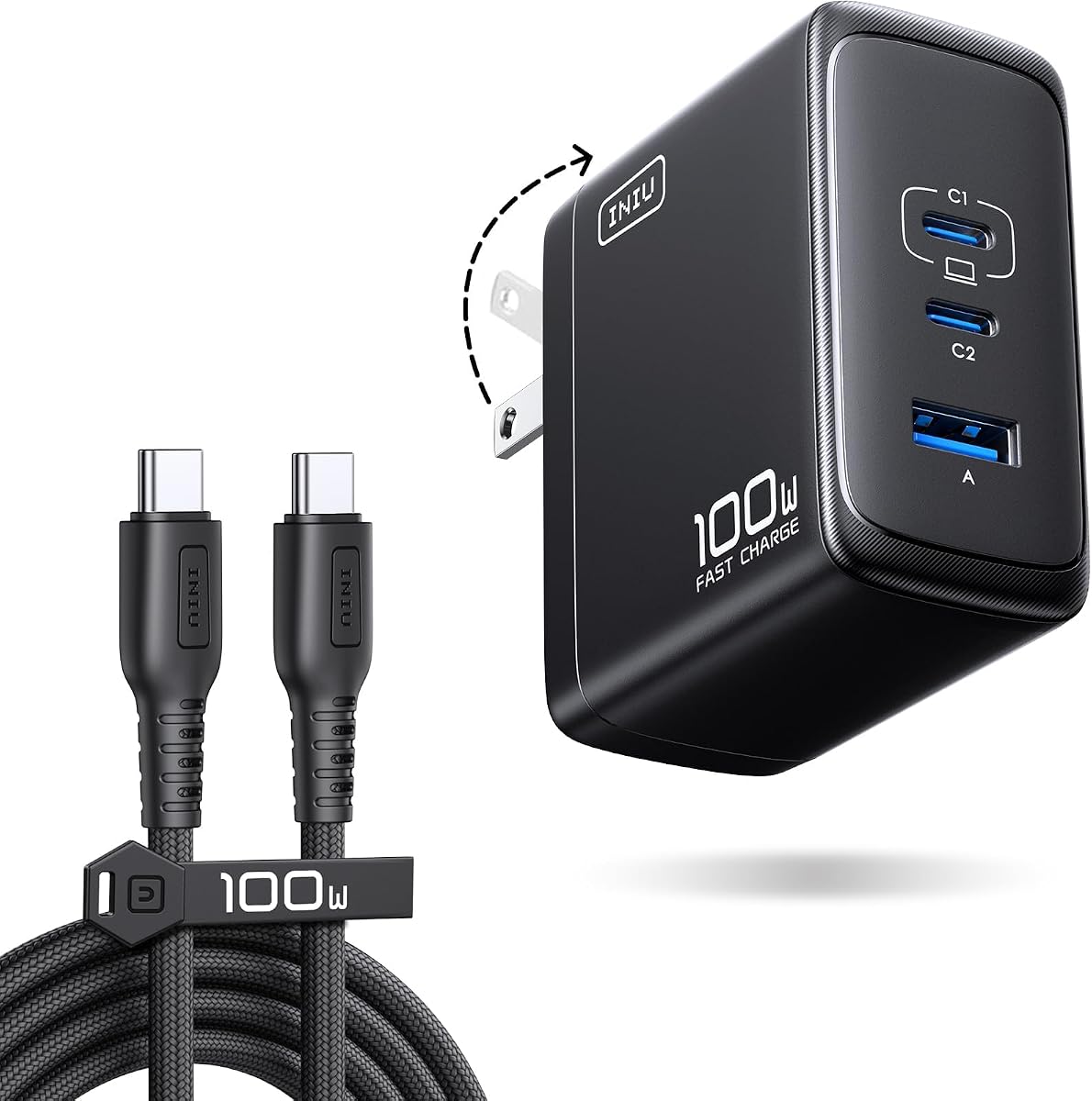
The INIU 100W USB C Laptop Charger offers a simple three-port setup with a maximum output of 100W. It carries a 4.5 rating and is presented as a compact alternative to the original 96W charger. The included 1.5-meter braided USB-C cable is designed for 100W delivery, removing the need to purchase a separate high-capacity cable immediately.
We may earn a commission when you buy through this link, at no additional cost to you.
Power can be distributed as 100W to one device, 70W plus 30W across two devices, or 45W plus 30W plus 22.5W across three. Those combinations make it useful for a notebook, phone, and smaller accessory. The supplied information also lists charging results for several modern phones and a 14-inch MacBook Pro, plus compatibility with drones, cameras, Steam Deck units, and smart wearables.
Its foldable plug and 30% smaller body support travel use, while advanced GaN technology is intended to reduce heat. The product listing mentions ETL standards and a three-year replacement policy for quality issues. On the other hand, there is no display for checking allocation or temperature, and the maximum 100W rating applies to one port rather than the full three-port load.
This is a sensible selection for buyers who want the core benefits of a 100W GaN charger without paying for a display or five-port body. It is particularly useful for travelers who want the cable in the box and for desk users who regularly charge three devices. Those prioritizing live system data should consider the UGREEN Nexode Pro instead.
The stated 100W, 70W-plus-30W, and three-port allocations give a useful picture of what the charger can do. This makes it easier to judge whether a notebook can remain the priority when a phone and accessory are connected.
The included braided cable is specified for 100W and is longer than the short leads bundled with many compact chargers. Its stated durability advantage is useful for users who will carry the adapter and cable frequently.
We may earn a commission when you buy through this link, at no additional cost to you.
The Belkin 100W Compact GaN USB C Charger Block focuses on dependable charging, safety, and straightforward portability. Its 4.5 rating reflects a balanced product rather than one built around a screen or unusually high port count. It supports up to 100W and is compatible with USB-C laptops, PD-enabled phones, tablets, watches, earbuds, and power banks.
We may earn a commission when you buy through this link, at no additional cost to you.
Belkin's eight-point SmartProtect system covers over-voltage, over-wattage, short circuits, surges, over-temperature, over-current, signal interference, and electrostatic discharge. Over-heat protection is another central feature, while GaN technology is intended to improve efficiency and reduce heat generation. The supplied charging examples include an iPhone 17 Pro reaching 50% in 21 minutes and a Galaxy S25 reaching 50% in 22 minutes.
The charger is 33% smaller than the original 96W MacBook adapter, and its foldable prongs protect both bags and nearby surfaces. A five-foot USB-C to USB-C cable is included. Belkin also states that the charger uses PCR materials and ships in plastic-free packaging. The main limitations are the lack of multiple ports and the absence of real-time output information.
This model is well suited to a user who values one dependable USB-C charger over a multi-device charging hub. Belkin's established accessory focus and broad safety coverage make it an attractive travel and office option, particularly for people moving between a laptop, phone, watch, and earbuds. Buyers who routinely charge more than three devices at once will want a four- or five-port option.
The SmartProtect system addresses more than basic over-temperature control. Its coverage of surge, short circuit, electrostatic discharge, signal interference, and power-related faults gives it a reassuring safety proposition for everyday use.
Foldable prongs reduce snagging and impact damage during transport, while the included five-foot cable lets the charger be used immediately. PCR materials and plastic-free packaging also appeal to buyers who consider environmental impact.
We may earn a commission when you buy through this link, at no additional cost to you.
The Anker Nano 100W MacBook Charger is designed around a very small three-port body. It has a 4.2 rating, the lowest of the ten products, but its core specifications remain competitive: up to 100W output, three simultaneous device connections, and a 34% smaller size than the original 96W MacBook power brick.
We may earn a commission when you buy through this link, at no additional cost to you.
GaN II technology enables the compact construction through a higher operating frequency, stacked design, and revised circuit board. Either USB-C port can provide 100W, and the included five-foot USB-C cable includes an E-Marker chip and a stated bend lifespan above 5,000 cycles. The charger can power a MacBook, iPhone, and AirPods together, making it appropriate for a compact three-device workspace.
Its 4.2 rating suggests some variation in customer satisfaction, although the supplied information does not identify a specific defect. Compared with newer alternatives, it lacks the Anker 100W Max model's display, and it is larger than some other Nano-style competitors. The shared 100W capacity also means that charging three demanding devices at once will reduce the amount available to each.
The Nano remains a compelling choice for travelers who prioritize physical size and want a trusted three-port setup. Its included e-marked cable and high-power USB-C connections address common laptop-charging pitfalls. If an on-screen power readout or broader port selection is important, one of the display-equipped or four-port alternatives is likely a better match.
The design favors a modern three-port layout instead of adding a legacy connector. That keeps the body smaller and more consistent for USB-C phones, laptops, tablets, and accessories.
The bundled five-foot cable carries an E-Marker chip and is specified for 100W operation. That detail matters because a basic USB-C cable may support data and slower charging but not the full output of a demanding notebook.
We may earn a commission when you buy through this link, at no additional cost to you.
The original UGREEN Nexode 100W combines three USB-C ports and one USB-A port in a compact GaN housing. It carries a 4.6 rating and supports up to 100W on a single USB-C connection when paired with a compatible 100W 5A cable. The supplied information states that a MacBook Air M3 can reach 55% in less than 30 minutes under those conditions.
We may earn a commission when you buy through this link, at no additional cost to you.
Its thermal system uses dynamic temperature sensors and an intelligent PWM chip that adjusts output to safeguard connected devices. The four-port configuration can charge phones, tablets, laptops, and USB-A accessories simultaneously. Compatibility includes MacBook Pro and Air, iPhone 8 through 17, Galaxy S10 through S25, iPad, and Steam Deck, although the listing warns that Dell and Lenovo laptops can be limited by their charging protocols.
The foldable-plug GaN design is small enough to fit in a palm, making it convenient for travel and business trips. A trade-off is that the maximum 100W figure depends on using one port and a suitable 100W 5A cable; no cable is identified as included in the supplied details. The USB-A port adds legacy support, but the presence of only three USB-C connections limits all-USB-C desk flexibility.
This model remains useful for mixed-device travel kits, particularly where a MacBook or phone receives the main charging demand and smaller accessories share the remaining output. Buyers who need the absolute broadest compatibility should check their notebook's protocol. For users who require two high-output laptop ports, the newer four-USB-C UGREEN model offers a cleaner architecture.
Dynamic temperature sensors and PWM-based output adjustment allow the charger to react as operating conditions change. This is an important safeguard when a laptop demands sustained high power in a warm environment.
Three USB-C ports serve modern equipment, while USB-A covers older accessories and chargers. That mix can be more immediately practical than an entirely USB-C design for travelers who still carry legacy cables.
We may earn a commission when you buy through this link, at no additional cost to you.
This two-pack is marketed under a 100W-style title, but its detailed description makes the actual limit clear: each charger has a maximum output of 65W, with a three-port allocation of 65W plus 20W plus 18W. The product still earns a 4.6 rating because the individual blocks support modern fast-charging protocols and are sold together for users who need two separate charging stations.
We may earn a commission when you buy through this link, at no additional cost to you.
Each block has two USB-C connections and one USB-A connection. The primary USB-C port supports USB PD 3.1, PD 3.0, PPS, QC 3.0, AFC, and Samsung Super Fast Charging 2.0. The listing states that a Galaxy S26 Ultra, S25 Ultra, or S24 Ultra can reach 65% in 30 minutes, while a MacBook Air M2 can reach 50% in 30 minutes under the stated conditions.
Safety features include thermal sensors, flame-retardant materials, and protection against over-voltage, over-current, over-temperature, and short circuits. GaN II technology helps make each unit 38% smaller, and no cables are included. The decisive issue is wattage: these are 65W chargers, not true 100W units, so they are better suited to smaller notebooks and mixed-device travel kits.
This product is most appealing to someone who wants two compact chargers for separate bags, offices, or family travel. It offers excellent protocol support and a convenient three-port arrangement in each block. However, anyone seeking full 100W laptop charging should choose a model whose detailed specifications actually confirm that output.
The package includes two independent three-port chargers, which is useful for travelers, couples, or employees who divide equipment between home and work. It avoids carrying a larger multi-port brick when separate placement matters more than total ports.
The listing title can imply a 100W product, while the specifications specify a 65W maximum per charger. Buyers should use the detailed port allocations to judge whether that level is adequate for their notebook and accessories.
We may earn a commission when you buy through this link, at no additional cost to you.
The UGREEN Nexode Pro 160W is a five-port GaN charger with substantially more headroom than a conventional 100W block. It carries a 4.7 rating, provides 160W of total output, and allows up to 140W on either of its first two USB-C ports. That makes it a stronger choice for demanding 16-inch notebooks, gaming laptops, and other high-consumption equipment.
We may earn a commission when you buy through this link, at no additional cost to you.
Its rotatable touch display provides total wattage, per-port power, the active charging protocol, and internal temperature information. Four USB-C ports and one USB-A port support simultaneous charging of a notebook, phone, Galaxy device, AirPods, and tablet. UGREEN states that a MacBook Pro 16-inch M4 Max can reach 56% in 30 minutes, illustrating the extra capacity available to a compatible large notebook.
The compact housing uses a foldable U.S. plug and automatic power allocation. Protection circuitry addresses overheating, over-voltage, over-current, and short circuits, with two smart temperature-control modes. Compatibility extends across iOS, Android, and Windows devices, and the product description states support for more than 1,000 device types. The obvious tradeoff is that this charger exceeds the needs of many users seeking a 100W adapter.
This is the right pick for professionals who regularly work with large or power-hungry notebooks and want one charging hub for an entire desk. Its display and extra headroom can also support future equipment without moving immediately to a new adapter. For a smaller ultraportable, the 100W models in this guide are more proportionate and easier to carry.
A 140W maximum on a single USB-C port provides meaningful headroom over a standard 100W charger. It is especially relevant for large-screen notebooks, gaming systems, and mobile workstations that can demand more power.
The rotating display lets the user keep charging data visible from different positions. Total output, individual port allocation, protocol, and temperature make it a useful diagnostic center for a multi-device desk.
We may earn a commission when you buy through this link, at no additional cost to you.
Choosing a 100W GaN charger involves balancing true output, port configuration, cable support, thermal management, and the devices you need to charge. The largest advertised wattage is useful only if the charger, cable, and device all support the same protocol and allocation.
A 100W label can describe one port, the total charger output, or a broader device combination. Some products deliver up to 100W only when one device is connected, while shared configurations divide that capacity among several ports. Check the individual power-allocation profiles before assuming that a laptop will receive its full required wattage while a phone and earbuds are also charging.
USB-C is essential for modern laptops and phones, but USB-A can remain convenient for older accessories. Three-port designs suit a laptop, phone, and small accessory, while four or five ports reduce the need for separate blocks. Consider also whether you need two high-output USB-C connections for two notebooks or simply one laptop alongside several low-power devices.
The charger and cable must both support the intended power level. A cable rated for ordinary phone charging may not carry 100W reliably, especially over longer distances. Some listings include a suitable 5A or E-marked cable, while others require the buyer to supply one. Confirm the included cable's length, rating, and connector type, and keep a capable spare cable for travel.
Sustained laptop charging produces heat, so temperature monitoring and automatic power adjustment are meaningful safety features. Look for over-temperature protection, thermal sensors, intelligent PWM or power-allocation systems, and flame-resistant housing. These safeguards help the charger maintain stable output while reducing stress on connected devices and the surrounding outlet.
A smart display can show real-time wattage, port allocation, temperature, charging protocol, and sometimes device battery level. This is valuable for diagnosing performance and for users who enjoy technical feedback. It is unnecessary for straightforward charging and adds size, complexity, and another surface to protect. A plain block is usually simpler and more discreet.
USB Power Delivery support does not guarantee identical charging behavior on every notebook. Some Dell and Lenovo models are explicitly limited by their charging protocols, while Apple, HP, Dell XPS, and other compatible systems may use different power profiles. Review the device maker's charger requirements and confirm that the charger supports the notebook's wattage and protocol.
GaN reduces the size and weight associated with high-power charging, while a foldable plug protects the pins inside a bag. Measure the charger against your travel space and consider whether the body can occupy an outlet without blocking adjacent sockets. Build quality, housing material, and a compact shape matter most when the charger accompanies a notebook on frequent trips.
Manufacturer support and warranty terms can materially improve ownership confidence. The listed products include coverage ranging from an 18-month warranty to a two-year period or a three-year quality-issue replacement policy. Read the conditions carefully because replacement programs may apply only to defects and may require proof of purchase or a support request.
Begin by identifying the device, its required charging protocol, and the maximum wattage it accepts. Connect the charger to a grounded wall outlet, then attach a compatible USB-C cable between the charger and device. For maximum laptop output, use a cable rated for the charger and device's required power. A screen may initially show startup information before settling on the active charging profile.
When adding more devices, consult the charger's stated power-allocation information. Start with the highest-priority device connected, then add smaller accessories and confirm that the output remains appropriate. Avoid using damaged cables, bent connectors, extension leads that reduce power quality, or outlets that appear loose or excessively warm. The charger should remain uncovered in a ventilated position rather than being buried under bedding or papers.
For long-term care, wipe the housing with a dry or lightly damp cloth and keep the plug and ports free of lint and debris. Retract foldable prongs before packing the charger, and do not yank cables from the wall. Inspect the casing, connector, and cable for heat damage, discoloration, cracks, or unusual odor. If any problem appears, disconnect it from the outlet and seek manufacturer support rather than continuing to use it.
No. The charger and laptop must agree on a compatible charging protocol, and the laptop's power requirements must fall within the charger's allocation. MacBook, Dell XPS, HP, ThinkPad, and other USB-C laptops may use different profiles or impose their own limits. Check the device maker's power requirements and the charger's compatibility notes before relying on full-speed charging.
Not necessarily. Many 100W chargers allocate the full maximum only when a single compatible device is connected and the cable supports that level. With multiple devices attached, the charger redistributes power among its ports. Review the stated single-port and multi-device profiles to understand what your laptop, phone, and accessories will receive.
Yes, a cable that supports the intended high-power profile is advisable. Look for a USB-C cable rated for 100W and equipped with the appropriate chip when using demanding laptops. Some chargers in this guide include suitable braided, 240W, or E-marked cables, while others do not, so check the package contents before adding another cable to your kit.
These accessories generally draw much less power than a notebook and can usually share a multi-port charger with phones or tablets. Exact behavior depends on the charger's intelligent allocation and the accessory's own charging requirements. The Anker 100W Max includes an automatic low-current mode intended to make charging low-power devices such as earbuds easier.
GaN technology can improve efficiency and reduce the physical size required for a given power level, but it does not replace proper protection circuitry. The strongest choices in this guide combine GaN with temperature monitoring, over-temperature control, and defenses against over-voltage, over-current, short circuits, or related faults. Continued use should always follow the manufacturer's safety guidance.
According to the detailed specifications supplied for that listing, each charger has a maximum output of 65W, with a three-port allocation of 65W plus 20W plus 18W. It is therefore better described as a two-pack of 65W chargers, even though its title uses 100W wording. Select one of the products with explicitly confirmed 100W output if full laptop power is essential.
A display is useful if you want to see live output, temperature, protocol, and port allocation. It can help identify a weak cable or a device that is not negotiating its preferred charging profile. If you mainly want a simple, compact power block, a model without a screen will be easier to use and potentially less cumbersome.
Chargers with appropriate thermal and electrical protections are designed for extended charging, including overnight use, but they should be connected to a sound wall outlet and kept uncovered. Inspect the charger and cable periodically, stop using them if they become unusually hot or show damage, and follow any manufacturer-specific instructions that accompany the product.
The Lenovo 100W USB C Charger is the strongest all-around recommendation, combining four ports, strong laptop compatibility, a 240W cable, and advanced GaN III cooling. The Anker 100W Max Charger is the premium option for users who value a real-time display, while the INIU 100W USB C Charger offers a focused three-port setup with a capable braided cable.
For four dedicated USB-C connections, consider the UGREEN Nexode 100W. Choose the UGREEN Nexode Pro 100W when five ports and detailed monitoring are priorities, and choose the 160W Nexode Pro when a large notebook needs more headroom than a conventional 100W charger provides. Confirm the port allocation, required protocol, and included cable before buying.
Finally, check the current listing and manufacturer specifications before purchase, because product details and availability can change. Make sure the selected charger supports your exact devices, uses an appropriate cable, and provides enough output after accounting for everything connected at the same time.