
Caydo T3 AI Drawing Projector
4.6Editor score
Five progressive drawing themes
AI photo and text conversion
Native 720P projection
WiFi and Bluetooth support
Kids Drawing Projector guide comparing ten models for age range, included art supplies, projection features, creativity, app compatibility, and ease of use for
Kids drawing projectors turn blank paper into guided art activities by casting images that children can trace, color, and personalize. A strong model balances clear projection, simple controls, age-appropriate guidance, and enough accessories to support independent creative play without requiring complicated setup.
The ten products in this guide were compared using their stated age ranges, built-in artwork, projection adjustments, app and AI capabilities, included supplies, lighting features, portability, and storage design. The list includes disc-based tracing kits, app-connected systems, AI generators, and a light-up tracing pad for children with different interests and experience levels.
Each review explains who the product suits best, what makes it distinctive, and where its compromises may matter. Ratings reflect the published product information at the time of research, while features and availability can change. Current prices also fluctuate, so shoppers should compare current cost, included accessories, and compatibility before purchasing.
4.6Editor score

4.5Editor score

4.4Editor score
The table below compares every projector in the guide by age range, creative content, connectivity, and included accessories. It shows how traditional disc-based systems differ from app-connected, AI-powered, and light-up approaches.


The Flycatcher smART Sketcher 2.0 combines traditional step-by-step art with smartphone and tablet connectivity, earning a 4.5 rating. Its standout feature is the balance between guided drawing and personal expression. Children can select built-in subjects, follow tutorials, project their own edited photos, or add details that move beyond the original outline.
We may earn a commission when you buy through this link, at no additional cost to you.
The system supports more than 60 pre-loaded images across subjects such as animals, landmarks, and vehicles. Bluetooth app access adds personalized drawings, interactive tutorials, and additional content. Children can photograph an object, edit it in the app, and project it for tracing, which makes the device feel less limited than a conventional disc-based projector and considerably more interactive.
There are trade-offs. The app connection and optional creativity packs introduce more steps than a simple plug-in tracing toy, and children who are not comfortable with a connected device may not use those features independently. The stated educational benefits, including hand-eye coordination and fine motor practice, also make the most sense when children actually trace and color rather than simply watch projected images.
This is the strongest all-around recommendation for a child who wants guided instruction but also wants the freedom to draw familiar people, pets, or original ideas. It suits ages five and up, especially children ready to explore an app with limited help. For families wanting broad built-in content, clear tutorials, and a path toward personalized artwork without relying on a full-size entertainment projector, it is especially compelling.
The ability to photograph, edit, and project a chosen image expands the projector beyond a fixed activity library. A child can use a family photo, favorite toy, pet, or landscape as the basis for a drawing, giving the finished piece more personal meaning than tracing a preset cartoon.
Step-by-step tutorials and clearly defined images help younger artists understand how a finished picture develops from simple shapes. At the same time, customizable options let children add colors, backgrounds, and personal details rather than treating every line as a test with one correct answer.
We may earn a commission when you buy through this link, at no additional cost to you.
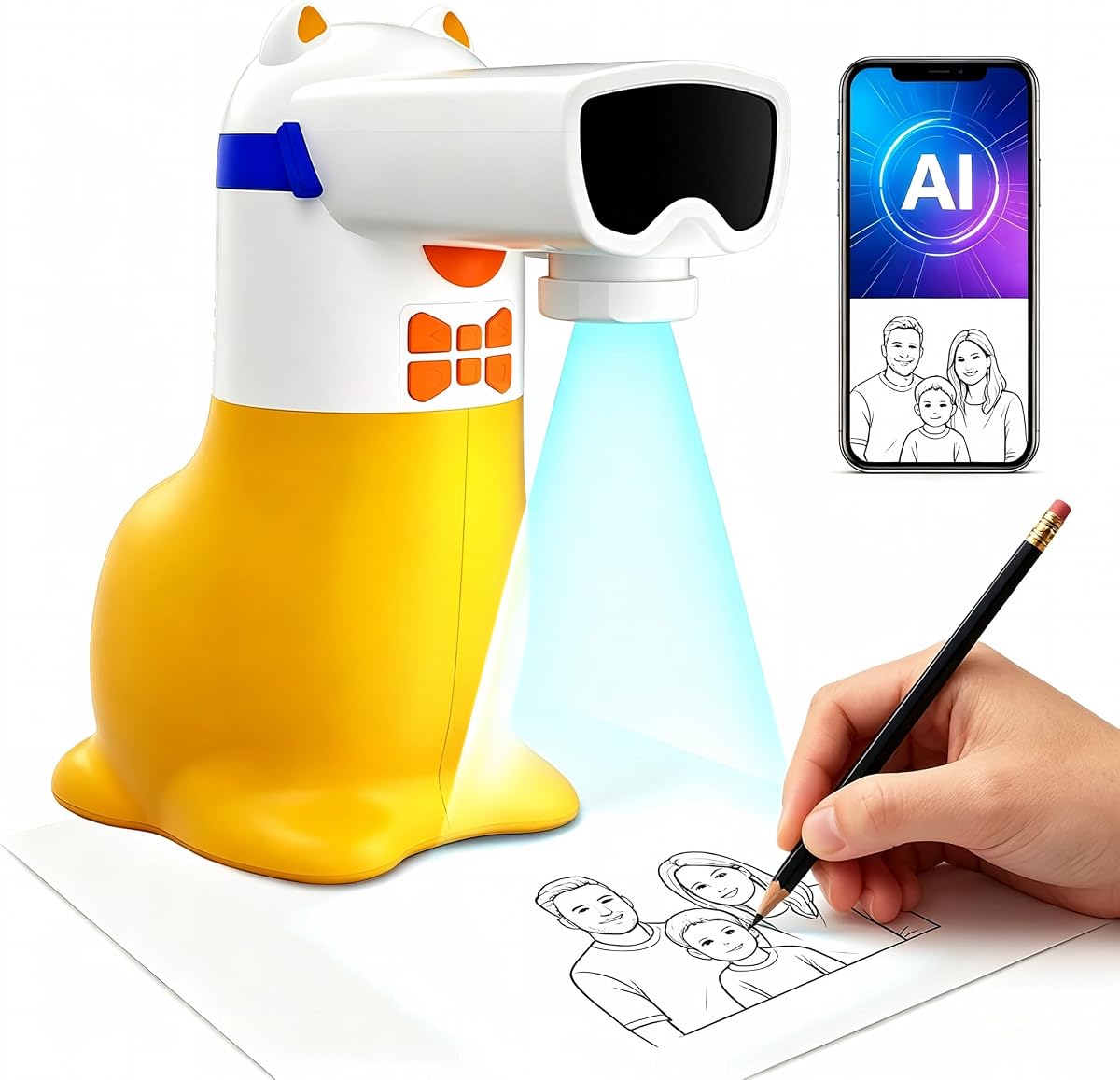
This AI Drawing Projector is built around a simple but powerful idea: a child can describe an imagined scene or choose a personal photo and then trace the resulting image. It carries a 4.4 rating and is intended for ages five through twelve. The projection step keeps the final activity hands-on, so the technology produces a drawing rather than replacing artistic participation.
We may earn a commission when you buy through this link, at no additional cost to you.
Text prompts can turn ideas such as a dancing dragon or a castle in space into custom pictures. Photos of relatives, pets, toys, and meaningful events can also become traceable artwork. Fifty built-in pictures provide immediate options, while additional Drawing Packs and Learning Packs cover animals, holidays, ocean life, letters, numbers, and stories without requiring memory cards.
The Learning Packs add spoken English words and numbers as corresponding pictures appear, creating a listen-and-trace activity. Regular Drawing Packs do not include this audio, so buyers should choose according to the intended learning goal. Corded operation is another limitation: the included USB cable requires a compatible 5V/1A adapter or power bank, and the unit cannot be used away from a suitable power source.
The projector is a thoughtful gift for children who want to invent scenes and turn meaningful photos into keepsakes. It is less convenient for travel than battery-operated models and may be more compelling for children comfortable with typing or selecting a photo than for very young users who only want to trace preset images.
AI generation gives children a direct route from language to visible art. The resulting outline is designed to be projected and traced, preserving the familiar pleasure of drawing while making elaborate or unfamiliar subjects easier to begin.
When a Learning Pack is selected, the built-in speaker reads English words and numbers while matching pictures appear. Children can listen, repeat, trace, and color, making the projector useful for blending creative and early academic activities.
We may earn a commission when you buy through this link, at no additional cost to you.
The Blue Marble Learn to Draw Projector is a straightforward tracing option for children who are still learning how a projected image works. It has a 4.4 rating and uses a patent-pending arrangement that allows children to trace a full image without placing their hands directly over the light. That design can make the first drawing session more productive and less frustrating.
We may earn a commission when you buy through this link, at no additional cost to you.
Four image discs provide illustrated content, including a step-by-step tutorial that develops a complete fantasy scene. Nine colorful markers are included, and color suggestions on the discs can guide children or be ignored in favor of their own choices. The projector is adjustable and collapsible, while built-in compartments hold the markers and discs for tidier storage.
The main limitation is content breadth. Unlike app-connected or AI models, the Blue Marble projector does not advertise personalized images or an expandable digital library. Families interested in broader themes may need additional compatible discs, while others will appreciate the uncomplicated design and straightforward physical controls.
This projector makes the most sense for beginners, especially children who want a simple introduction to tracing without a connected phone or tablet. Its compact, organized design also suits travel and quick household setup. For families prioritizing accessibility and an easy entry point, it delivers the core drawing-projector experience with a useful set of included supplies.
The adjustable, collapsible structure can be positioned to suit a child and a sheet of paper without becoming a complicated optical device. Built-in storage for discs and markers means the entire activity can remain together, reducing lost pieces and clutter.
The included tutorial disc breaks a fantasy scene into manageable stages. Beginners can see how shapes combine into a complete illustration, while more capable children can still reinterpret the image using their own color choices.
We may earn a commission when you buy through this link, at no additional cost to you.
The Caydo T3 Joy combines a large library of ready-to-draw patterns with optional AI creation, earning a 4.8 rating. It is designed for ages four and up and includes 120 patterns across four themes, including cute animals and space adventures. Children can begin quickly by selecting a picture, while step-by-step structure helps beginners stay on track.
We may earn a commission when you buy through this link, at no additional cost to you.
The Caydo App expands the activity by converting an uploaded photo into a clean outline or generating one from a written idea. A child could transform a family pet, favorite toy, or vacation image into a tracing project, or request a scene such as a superhero puppy. The downward-facing light, RG0 certification, and timer settings of 0.5, 1, or 2 hours support a more controlled creative routine.
Although the 4.8 rating is the highest in this list, the model's capabilities are more complex than those of a basic tracing kit. The AI functions require the app, and younger children may need help entering prompts or managing uploaded material. Some households may also find the extensive feature set unnecessary if their child is content with traditional guided drawing.
The T3 Joy is a strong gift for children who have outgrown a simple disc projector but do not need a full entertainment system. It combines a generous starting library with flexible AI creation, child-friendly safety features, and a timer that supports breaks. For birthdays, holidays, or everyday creative play, it offers engaging variety with clear drawing guidance.
A photograph can become a clean projected outline, giving children a way to draw a pet, relative, or favorite object without starting from a blank page. Text prompts provide another route, allowing an imaginative scene to become a manageable tracing exercise.
The projector shines downward rather than directly at the child, who sees a softer reflected image. RG0 certification and selectable timers add further reassurance for parents establishing screen-free creative sessions.
We may earn a commission when you buy through this link, at no additional cost to you.
The Thin Air Brands Drawing Projector is a compact, animal-focused option for children aged three and up. It carries a 4.6 rating and includes 32 sketches across four sturdy discs. The all-in-one format provides eight crayons and a pad of artist paper, allowing a child to begin tracing and coloring without assembling a large collection of separate supplies.
We may earn a commission when you buy through this link, at no additional cost to you.
Its simple controls are appropriate for preschoolers and early elementary-aged children. After inserting three AA batteries, the user places paper beneath the projector arms, turns the knob, slides in a disc, and begins. Rugged ABS plastic and a construction described as resistant to shock and impact make the unit well suited to regular play, although batteries are not included.
The narrow subject matter is the main trade-off. Children who are strongly interested in animals will find 32 different sketches useful, but the set does not offer the broad themes, photo conversion, or open-ended creation of more advanced models. The simple disc system also lacks the variety that app and AI functions provide.
This projector is best for a young child who enjoys animal pictures and needs a straightforward introduction to tracing. It may also suit families seeking a self-contained activity for travel or quiet indoor play. Those wanting open-ended digital features should look further up the list, but those prioritizing durability and easy access to art supplies may find this model especially convenient.
Thirty-two animal sketches provide enough variety for repeated sessions while keeping the subject matter understandable for younger artists. Familiar creatures provide a friendly starting point for learning shapes, proportions, and coloring techniques.
The stated shock- and impact-resistant ABS construction is appropriate for a toy likely to be handled frequently by small children. A folding or compact design also makes the activity easier to put away between sessions.
We may earn a commission when you buy through this link, at no additional cost to you.
The Caydo T3 AI Drawing Projector is the most versatile premium model in the guide, combining a learning-oriented drawing system with AI creation and home entertainment functions. It carries a 4.6 rating and targets children ages five and up. Five built-in themes progress from simple lines and letters to more detailed patterns, allowing the content to grow with a child's abilities.
We may earn a commission when you buy through this link, at no additional cost to you.
Photos can be converted into clean traceable outlines, while typed ideas can become custom scenes. After drawing, the native 720P projector, built-in WiFi, and Bluetooth allow children to stream cartoons or play music. Automatic brightness adjustment is designed to keep the image clear in different rooms, and downward projection, RG0 certification, and selectable timers support comfortable use.
The breadth of functions creates a learning curve. Children need assistance with the app, account setup, WiFi connection, or streaming configuration. Families who only want a simple tracing projector may find the extra entertainment and connectivity unnecessary, and the premium positioning may be difficult to justify for occasional use.
The T3 is a compelling choice for a child with broad interests who wants one device for drawing, AI-assisted art, and occasional entertainment. It is particularly attractive when a family already understands apps and streaming services. For those priorities, it delivers considerably more capability than a standard projector while retaining a guided drawing foundation.
The 720P projection, WiFi, and Bluetooth functions extend the device beyond tracing. A child can move from an art activity to a cartoon or music session, which may help the projector feel useful rather than novelty-driven.
Five themes begin with basic lines and letters before moving toward detailed patterns. The progression supports confidence and skill development, giving younger children a manageable starting point and older children more advanced challenges.
We may earn a commission when you buy through this link, at no additional cost to you.
The Gohero Drawing Projector provides 64 images and an adjustable optical system for children ages three through six. Its 4.3 rating reflects a solid traditional approach: children choose a design, place paper or use the included whiteboard, and trace the projected illustration. The larger image count gives families more variety than many entry-level kits without requiring a connected device.
We may earn a commission when you buy through this link, at no additional cost to you.
The projector head rotates 360 degrees and moves up and down, making it easier to match the projection to a drawing surface. A dedicated focus button sharpens the image for clearer tracing. The kit also includes 10 color pens, three stencils, and a pack of drawing paper, supporting both conventional tracing and additional shape-based activities.
Its limits are its age orientation and lack of digital customization. The stated market covers children roughly three to six, and there is no stated app, photo conversion, or AI capability. Children who have already mastered basic tracing may eventually find the fixed image library less compelling than personalized or open-ended systems.
The Gohero model is a good match for parents seeking a complete, adjustable, and screen-free activity for a preschool or early elementary-aged child. The rotating head, focus control, and varied accessories make it versatile without requiring technical knowledge. It is also easy to organize because the kit doubles as a storage case for travel or tidy cleanup.
A rotating head and vertical movement allow the projected image to be positioned more precisely over paper. The focus control then sharpens the design, which is especially useful when children are learning to align their pencils with faint lines.
The projector kit doubles as a storage box, giving the pens, stencils, paper, and projector a designated home. That makes the system convenient for car rides, air travel, restaurants, or any setting where an organized activity can occupy a child.
We may earn a commission when you buy through this link, at no additional cost to you.
The KETIEE Drawing Projector is a basic multi-function art toy for children aged three and up. It has a 4.5 rating and supports four activities: projection, copying, drawing, and music. A child can select from nine included discs, trace patterns of different difficulty, and use the erasable board for repeated practice without continually consuming paper.
We may earn a commission when you buy through this link, at no additional cost to you.
The projection head rotates through 360 degrees so users can adjust clarity until the image becomes easier to follow. The package includes the drawing machine, drawing book, 12 pens, nine discs, and an erasable board. This broad accessory count provides several ways to engage with the product, particularly for children who enjoy repeating the same images or experimenting with colors.
The design is dated compared with app-enabled and AI-powered projectors, and the music feature is a secondary novelty rather than a major entertainment system. As with any erasable surface, wear and cleanliness may eventually affect the tracing experience. The product also does not offer photo conversion or personalized outlines.
This projector suits families seeking a straightforward drawing toy with numerous included accessories and a low entry point. It may be particularly useful for younger children who like tracing, drawing, and musical features in one compact package. Older children who value personal content generation or a large projected screen are better served by more advanced choices.
Projection and copying support guided tracing, free drawing allows unstructured practice, and music adds a playful audio element. This variety can keep the same device useful across different moods and levels of artistic confidence.
A 360-degree rotating projector makes it possible to refine the displayed image instead of abandoning a difficult design. Clearer lines are especially helpful for young children who are still developing pencil control and visual tracking.
We may earn a commission when you buy through this link, at no additional cost to you.
The Crayola Light Up Tracing Pad is a different kind of drawing projector: rather than projecting an image from above, it illuminates tracing artwork from beneath. Rated for children ages six and up, it carries a 4.6 rating and provides a comfortable way to practice sketches, animation basics, and expressive lettering on a flat illuminated surface.
We may earn a commission when you buy through this link, at no additional cost to you.
The package includes the tracing pad, 12 short colored pencils, 10 tracing sheets with multiple mix-and-match designs, 10 blank sheets, and one graphite pencil. The even LED surface and non-slip frame help maintain a smooth, steady tracing experience. Additional designs can be downloaded online, extending the content beyond the sheets supplied in the box.
Three AA batteries are required and sold separately. The product is also less flexible than a conventional projector because it focuses on tracing and does not project free-form images, photographs, or app-generated artwork. Its fixed art formats may eventually limit highly creative users, although the included blank sheets provide some freedom.
The Crayola pad is a strong option for children who enjoy drawing and tracing rather than projecting large pictures. Its recognizable branding, useful accessory bundle, and portable design make it attractive for home, classroom, or group creative play. It is particularly suitable for a child ready to work carefully with a pencil and a flat tracing surface.
The light-box format places the source beneath a translucent drawing surface, producing an evenly illuminated image. This setup avoids the need to position a projector above a desk and can be useful when children want to work at a comfortable seated height.
Included designs support tracing, sketching, animation basics, and lettering. With both themed and blank sheets, children can practice precision or begin a free drawing while using the same compact device.
We may earn a commission when you buy through this link, at no additional cost to you.
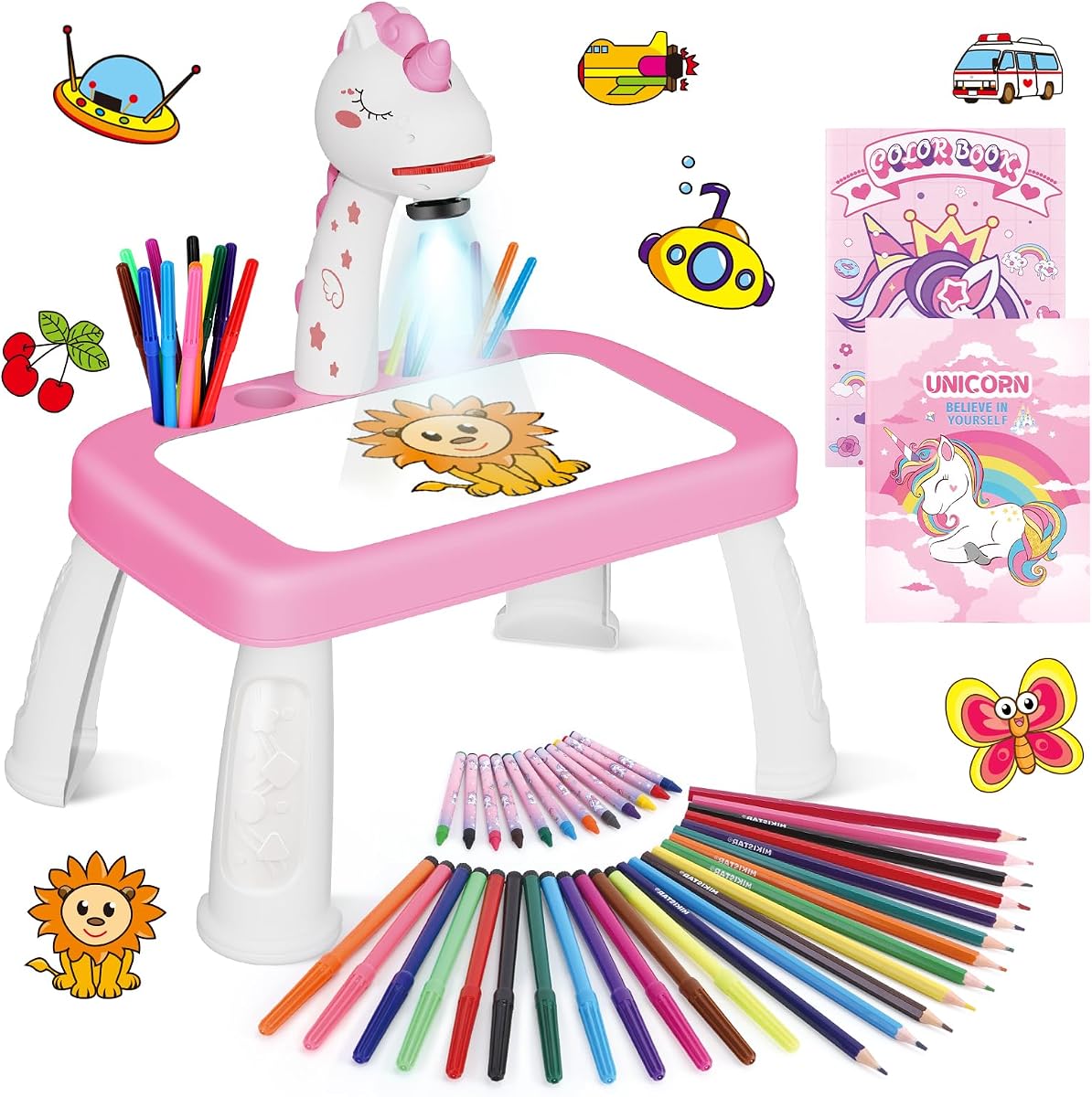
The Unicorn Drawing Projector Kit combines a themed projection table with one of the broadest traditional art-supply bundles in the guide. It has a 4.4 rating and is intended for children aged three and up. Its unicorn shape, decorative styling, sticker book, and collection of colorful accessories create an inviting introduction to tracing and drawing.
We may earn a commission when you buy through this link, at no additional cost to you.
The package contains 12 color drawing pens, 12 colored pencils, 12 crayons, a drawing book, a unicorn sticker book, nine projection discs, and a board eraser. Children can choose among three types of drawing tools, while the upgraded drawing table provides more usable space than an earlier version. Simple assembly and adjustable image clarity help get play underway quickly.
The main limitation is the strength of the theme. A child who loves unicorns and fantasy imagery may find the set cohesive and engaging, but the appeal may fade faster than with a projector offering varied subjects or personalized creation. Like the other disc-based models, it has no stated app, AI, or photo-to-outline capability.
This kit works well as a themed gift for a young child who enjoys fantasy characters and wants a complete collection of drawing tools. The generous bundle reduces the need to purchase separate pens, pencils, crayons, and paper. Families seeking broader creative technology may prefer a connected model, but those focused on an accessible, decorative starter set will find the Unicorn Kit easy to use.
Thirty-six drawing tools, a drawing book, nine discs, and a sticker book create numerous ways to use the product. The range of pens, pencils, and crayons also lets children compare line quality, color, and texture as they develop their own preferences.
The unicorn-shaped board and coordinated accessories make the activity feel like a special kit rather than a generic tracing toy. This can encourage a child to begin a creative session quickly, although a projector with varied subjects may sustain interest longer.
We may earn a commission when you buy through this link, at no additional cost to you.
The right drawing projector depends on the child's age, attention span, artistic interests, and tolerance for connected devices. The most useful purchase combines a projection style children can understand with enough guidance, supplies, and content to remain engaging.
Choose a model with graduated content when a child is likely to improve quickly. Step-by-step discs teach fundamental shapes and composition, while themed libraries and photo conversion offer new challenges. The most durable option for a growing child is one that includes both accessible starting material and advanced creative tools.
Prioritize simple clarity controls and a stable frame. A projector that stays in position, focuses easily, and leaves enough room for a sheet of paper will produce a smoother experience than one that requires frequent readjustment.
A large library is only useful if the child can navigate it. Younger users benefit from visible themes and simple selection, whereas older children may value custom prompts, uploaded images, and more advanced drawing styles.
A complete starter bundle is most valuable for occasional use or gifting. Households that already own ample art supplies may prioritize a stronger projector, more images, or smart features instead of a large quantity of basic tools.
Treat AI as a creative aid rather than a replacement for drawing. The best implementation keeps children actively tracing and coloring. Families with limited connectivity or a preference for offline entertainment should favor models whose core built-in features do not depend on the app.
Look for downward-facing light, stable focus, and a timer if parents are concerned about session length. Whichever model is chosen, a short break away from the drawing surface every so often is a sensible routine for young children.
For home use, setup and cleanup are usually more important than maximum portability. For travel, choose a compact model with protected discs, secure accessory storage, and a power method that matches the intended environment.
Inspect the stated construction and included warranty information when durability is a priority. Also consider whether a young child can operate the focus and selection controls independently or will need help every time.
Begin in a well-lit but dimmable room, place the projector on a stable surface, and position the paper where the full image will be visible. For traditional models, insert the selected disc and adjust the height, angle, or focus until the lines appear sharp. Keep hands away from the light source and ensure that the projected image is not blocked while the child traces.
Let the child choose a design or, for connected models, photograph or enter an idea according to the manufacturer's instructions. Printed and handwritten guidance varies by product, so follow the specific system rather than assuming all projectors operate identically. Trace slowly, use light pencil pressure, and encourage children to add their own colors, backgrounds, patterns, and details instead of attempting perfect copies.
Afterward, turn the projector off, remove batteries if the product is stored for a long period, and wipe the surface with a dry or lightly damp cloth as appropriate. Keep discs and accessories in their compartments, avoid leaving chalky or wet art materials against optical surfaces, and inspect the device for loose parts or damage. For app-based products, update the application when needed and follow the manufacturer's guidance for account and connectivity security.
Suitability depends on the specific model and the child's development. Simple disc-based kits are commonly offered for children around three and up, while app-connected and AI products often target ages four, five, or older. The stated age range is the best starting point because it reflects the intended content, controls, and setup. A child younger than that range may still enjoy the toy with help, particularly if they can already handle a pencil and follow a simple image.
Many models project light downward onto paper so the child sees a softer reflected image rather than a beam directed into the eyes. Some products also state that they meet RG0 blue-light safety standards, but parents should still follow the manufacturer's instructions and supervise use. Working in a normally lit room, keeping the image focused, and taking regular breaks are sensible ways to make drawing sessions more comfortable.
Traditional projectors with physical image discs generally work without a connected device. Flycatcher smART Sketcher 2.0, the AI Drawing Projector for Kids, and the two Caydo T3 models use apps for some or all of their personalized features. The built-in drawing content on those connected models may still provide traditional activities, but buyers should verify how much functionality remains available without the app.
Several AI-enabled models can transform an uploaded photograph into a clean outline. Flycatcher smART Sketcher 2.0 allows a photo to be captured, edited, and projected for tracing, while both Caydo T3 models can convert photos into outlines through their apps. This is especially useful for drawing a pet, family member, toy, or favorite place instead of selecting a preset image.
A projector is generally used with paper and a drawing tool, such as crayons, colored pencils, or markers. Many models include some or all of these supplies, while others require the family to supply them. The included lists range from a basic drawing book and discs to sets containing 36 drawing tools, paper, a sticker book, and an erasable board. Check the package contents before buying additional materials.
Both approaches can suit beginners, but they teach in different ways. Disc-based models provide predictable, guided images and are often easier for a child to operate independently. AI models can create more personalized subjects, yet they may require help with a phone, app, photo selection, or text entry. A young first-time user may begin more comfortably with a traditional model and later move to AI-assisted creation.
Store the unit in a dry place with its discs, papers, and art tools organized in the included compartments or a protective case. Remove batteries during long-term storage if the manufacturer recommends it, and prevent dust or art residue from settling on the lens and projection surfaces. Foldable models should be collapsed according to their instructions, and connected devices should have their apps and firmware kept current when used again.
Many children can use a basic model independently once it is set up, particularly when the device has simple buttons, stable positioning, and a manageable number of choices. App-based and AI products may need help during initial setup and when entering prompts or uploading photos. A short adult demonstration followed by independent tracing is a useful way to establish a simple routine and build confidence.
The Flycatcher smART Sketcher 2.0 is the strongest all-around choice for families seeking guided drawing, a substantial built-in library, and app-based personalization. The Caydo T3 AI Drawing Projector stands out for advanced creative features, progressive themes, and entertainment functions, while the Blue Marble Learn to Draw Projector offers a simple, compact, and economical introduction to tracing with organized accessories.
Prioritize the experience that matches the child rather than the longest feature list. Young children benefit from clear images, easy controls, and a focused subject library, while older or more creative children may value photo conversion, AI outlines, and broader content. Also consider light direction, timer controls, included supplies, power requirements, storage, and how independently the child can operate the system.
Ratings, product features, app availability, and current prices can change, so shoppers should review the latest listing before buying. Comparing the complete package, current cost, age guidance, and compatibility helps ensure that the selected kids drawing projector provides a satisfying combination of education, creativity, and screen-free play.