
BENFEI 4K@144Hz Steam Deck Dock
4.7Editor score
Extensive display refresh support
Gigabit wired Ethernet
All-aluminum ventilated stand
This guide compares the best Steam Deck Docks for display quality, charging, networking, USB speed, portability, and device compatibility.
Steam Deck Docks transform a portable gaming handheld into a more practical desktop setup by adding external display support, wired networking, charging, and room for accessories. A worthwhile dock should match your monitor, preserve cooling airflow, deliver stable power, and connect reliably without introducing unnecessary complexity.
We compared the ten featured docks using their published specifications, including HDMI resolution and refresh rate, power delivery, Ethernet speed, USB configuration, physical design, warranty coverage, and supported handhelds. The list covers basic six-port hubs, feature-rich models, portable designs, and a bundled premium option.
Each review highlights the strongest use case while also noting important limitations, such as restricted network speed, missing included accessories, or device-specific compatibility. Ratings and product details can change over time, as can marketplace pricing, so compare the current listing carefully before ordering.
4.7Editor score

4.5Editor score

4.5Editor score
The table below compares the featured Steam Deck Docks across display capabilities, power delivery, wired networking, and USB expansion. The differences make some options better suited to high-refresh gaming, others to compact travel, and several to broader multi-device use.
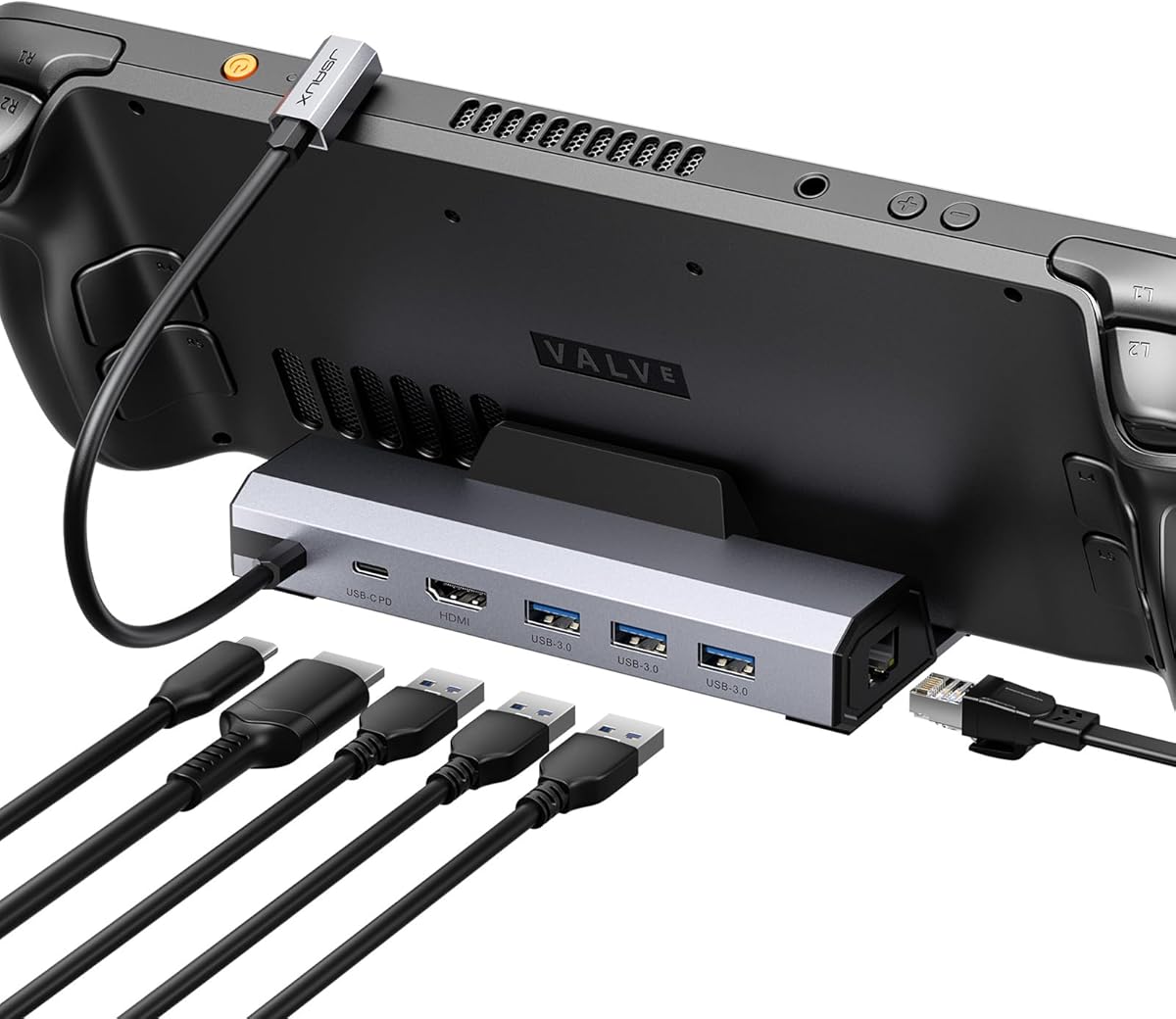




The JSAUX 6-in-1 Docking Station for Steam Deck/ROG Ally X/Legion Go S-HB0603 earns a 4.3 rating and offers a balanced feature set for gamers who want external video, faster networking, and simultaneous charging. Its defining specification is HDMI 2.1 output at up to 4K and 120Hz, a useful ceiling for responsive high-refresh displays.
We may earn a commission when you buy through this link, at no additional cost to you.
Three USB-A 3.0 ports provide enough space for a keyboard, mouse, controller receiver, or other common peripherals, while Gigabit Ethernet offers a more consistent connection than Wi-Fi. The dock supports 100W power delivery and lists Steam Deck LCD and OLED, ROG Ally and Ally X, Legion Go and Go S, and MSI Claw among compatible systems.
The main drawback is that a charger and charging cable are not included, so the complete setup may require an additional purchase. It also explicitly does not support ROG Xbox Ally or ROG Xbox Ally X. Those limitations make it less universal than the name suggests, particularly for owners of the newer Xbox-branded handhelds.
This is a strong choice for a Steam Deck or compatible handheld already equipped with suitable charging hardware. It suits users who value 120Hz video, three familiar USB-A connections, and wired networking without paying for a larger multi-device hub or a bundled charger.
The 4K at 120Hz output gives the dock a clear advantage for owners of compatible high-refresh monitors. The actual experience still depends on the handheld, game, display, and graphics settings, but the dock provides the necessary connection foundation.
Gigabit Ethernet is valuable for online games, downloads, and file transfers where a stable connection matters. Three USB-A 3.0 ports make it easier to retain an established desktop peripheral setup.
We may earn a commission when you buy through this link, at no additional cost to you.
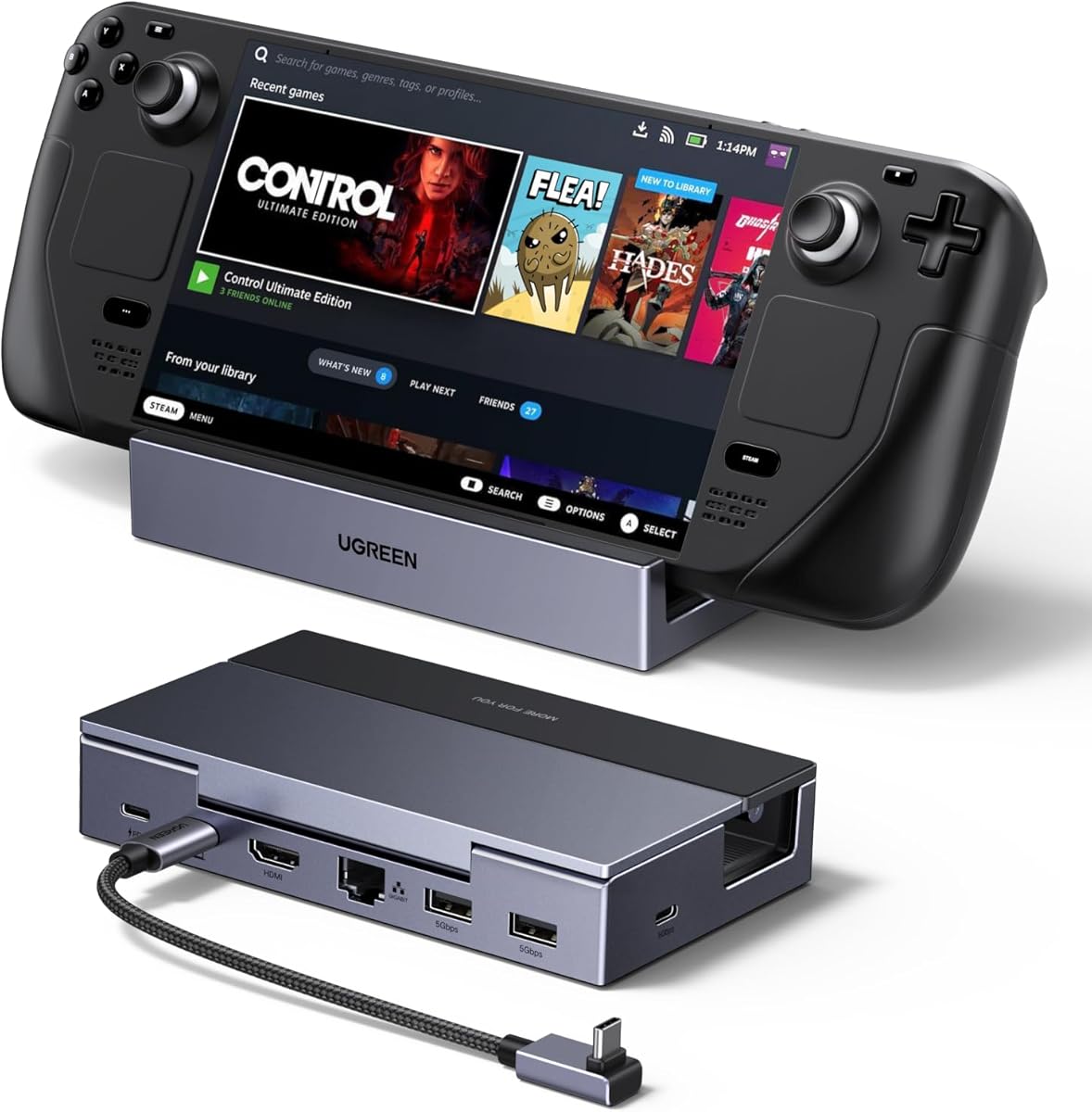
The UGREEN Steam Deck Dock 9-in-1 USB C Docking Station Foldable Stand has a 4.5 rating and stands out as the most complete general-purpose option in this guide. It combines fast USB expansion, wired networking, charging, broad display support, and a folding stand that appears designed with real desktop use in mind.
We may earn a commission when you buy through this link, at no additional cost to you.
Its USB configuration includes two USB 3.2 Gen 2 ports, one USB-A and one USB-C, capable of transfer rates up to 10Gbps, plus two USB 2.0 ports for keyboards, mice, and receivers. HDMI output supports 4K at 60Hz and numerous higher-refresh combinations, including 2K at 144Hz, 1080p at 240Hz, and other listed modes.
The stand uses two foldable panels, and its back panel is positioned so it does not block the handheld's heat-dissipation outlet. This is a meaningful physical-design improvement for sustained play. One minor point of confusion is that the product title calls it a 9-in-1 dock while the feature description opens with a 6-in-1 reference; buyers should therefore check the listed ports rather than rely only on the count in the title.
This is the ideal pick for a Steam Deck owner who wants fast storage transfers, an external display, Ethernet, and a ventilated desktop stand in one package. It also works with numerous USB-C devices, though the product description excludes the Switch 2 and notes different maximum charging rates for Steam Deck and ROG Ally.
The 10Gbps Gen 2 ports are particularly useful for external SSDs, flash drives, and game-file transfers. Users should still confirm that their connected storage device supports comparable transfer speeds.
The folding panel arrangement keeps the back of the handheld clear while supporting it upright. That helps preserve airflow and makes the dock more suitable for extended desktop sessions than a simple flat hub.
We may earn a commission when you buy through this link, at no additional cost to you.
The 6-in-1 Docking Station for Steam Deck OLED, ROG Ally, Legion Go, and MSI Claw has a 5.0 rating and focuses on the features most desktop users need: external display output, wired internet, charging, and multiple USB peripherals. It is a compact alternative to larger docks with more ports and controls.
We may earn a commission when you buy through this link, at no additional cost to you.
HDMI 2.0 supports up to 4K at 60Hz, while Gigabit Ethernet provides 1000Mbps wired connectivity. Three high-speed USB 3.0 ports handle devices such as storage, keyboards, mice, and controllers. The 100W PD 3.0 input supports power-intensive operating modes and includes power-management and surge-protection features.
The most obvious limitation is the 60Hz ceiling for 4K output. That is ample for many games, office tasks, and media viewing, but it is less compelling for owners of high-refresh 4K monitors. The supplied information also does not describe a dedicated stand, so the dock's physical design may be less convenient for upright desktop positioning than the UGREEN or BENFEI alternatives.
Three-year replacement coverage adds a useful layer of support and makes this an attractive choice for a straightforward setup. It is particularly suitable for Steam Deck OLED users who want a straightforward network-and-USB hub with simultaneous charging.
Six clearly defined functions avoid unnecessary complexity: display output, Ethernet, charging, and three USB connections. That makes the dock approachable for first-time Steam Deck desktop builders.
Three-year replacement coverage gives buyers more confidence in a component intended for regular plug-and-unplug use. Support options are especially useful when compatibility questions arise with different handhelds.
We may earn a commission when you buy through this link, at no additional cost to you.
The WAVLINK Gaming Dock has a 4.4 rating and targets performance-focused users with one of the most ambitious display specifications in the group. Its HDMI 2.1 output supports a single 4K display at up to 144Hz under DisplayPort 1.4 and DSC, using DSC for high-bandwidth modes.
We may earn a commission when you buy through this link, at no additional cost to you.
Three USB 3.2 Gen 2 ports—two USB-A and one USB-C—support transfer rates up to 10Gbps, making the dock well suited to external storage and faster file movement. Gigabit Ethernet supplies a stable wired option, while the power system accepts 100W input and provides 85W output for continuous device operation.
The compact enclosure measures 13.0 by 7.5 by 3.5 centimeters and weighs 145 grams, making it easy to carry between a gaming setup and another location. The trade-off is that no charger or charging cable is included. The listing also separates the charging-only USB-C connection from the USB-C data port, which is a useful distinction but demands attention when connecting accessories.
This is a compelling option for owners of high-refresh monitors and fast storage who already own suitable charging hardware. It supports Steam Deck, Legion Go, ROG Ally, Claw, and USB-C phones or tablets, but it is not compatible with the Nintendo Switch.
The 4K at 144Hz target is valuable for competitive and visually demanding games when the connected display and handheld can support it. Users must also account for the DSC requirement mentioned in the specifications.
The small, lightweight body reduces the space occupied on a desk and simplifies transport. Fast USB and wired Ethernet make it easier to retain productivity or gaming accessories while moving between locations.
We may earn a commission when you buy through this link, at no additional cost to you.
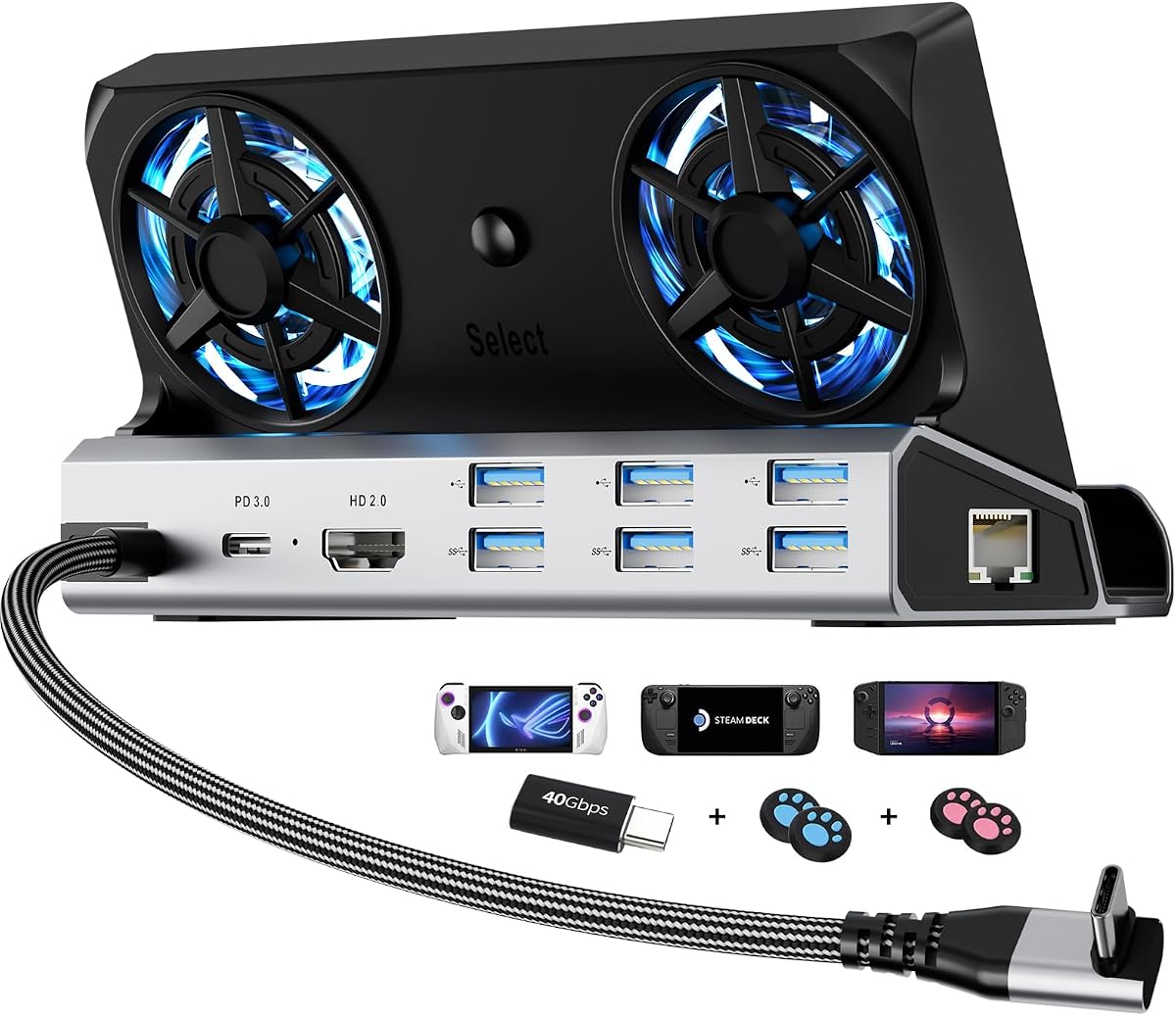
The YCE 12-in-1 Steam Deck Dock has a 4.2 rating and offers the broadest physical feature set in this roundup. It is designed not only as a port hub but also as a powered desktop cradle with an aluminum body, two cooling fans, RGB lighting, and a slot for upright handheld placement.
We may earn a commission when you buy through this link, at no additional cost to you.
Its connections include HDMI 2.0 at 4K and 60Hz, Gigabit Ethernet, three USB 3.0 ports, three USB 2.0 ports, and a USB-C connection supporting 100W charging and up to 40Gbps data. The dedicated slot accommodates devices up to 27 millimeters thick, including Steam Deck LCD and OLED, ROG Ally models, Legion Go variants, MSI Claw, and listed Switch models.
The dual 5-centimeter fans move more air than very small alternatives and can be disabled along with the RGB lighting through a rear switch. That makes the dock more elaborate than a basic hub. The same design also introduces a learning curve and more potential sources of noise, particularly in a quiet room or during light desktop work.
Four silicone joystick caps and a USB-C extender are included to protect controls and the handheld's original port. This is an excellent choice for owners who want maximum connectivity and active cooling, although Nintendo limits USB data functionality on its own hardware.
The two larger fans provide a visible cooling benefit beyond passive stands. Turning them off when they are unnecessary helps balance performance, noise level, and seasonal convenience.
Twelve listed functions support displays, wired networking, charging, storage, and legacy peripherals. The breadth reduces the need for separate adapters and is useful for owners who regularly switch between work and gaming configurations.
We may earn a commission when you buy through this link, at no additional cost to you.
The UGREEN Steam Deck Dock 6-in-1 4K@120Hz HDMI 2.1 has a 4.4 rating and delivers a polished balance of portability and desktop capability. Its HDMI 2.1 output supports 4K at 120Hz and also lists VRR, FreeSync, and G-Sync compatibility for use with suitable displays.
We may earn a commission when you buy through this link, at no additional cost to you.
The hub provides two USB-A 3.0 ports, one USB-C 3.0 data port, all operating at up to 5Gbps, plus Gigabit Ethernet. A 100W PD 3.0 input can power the host device at up to 85W while charging the dock, and TVS, ESD, and over-current protection are included for stable operation.
Its foldable stand combines aluminum alloy with PC and ABS, keeping the footprint small while presenting the handheld at a comfortable viewing angle. The 5Gbps USB specification is lower than the 10Gbps offered by the larger UGREEN model, so fast external SSDs will not reach their highest possible transfer rate through this hub.
Compatibility extends across Steam Deck, ROG Ally, ROG Xbox Ally, ROG Xbox Ally X, Legion Go, laptops, PCs, Macs, and phones. It works with Windows, macOS, Linux, and SteamOS without installed drivers, making it an easy choice for users who move between systems.
Combining 4K at 120Hz output with adaptive-sync support gives the dock a strong foundation for high-refresh gaming. The listed protection circuits also help support dependable operation with multiple connected devices.
The folding structure is easy to store, while cross-platform support makes the dock useful beyond the Steam Deck. Broad device compatibility reduces setup friction when working with a laptop, phone, or another handheld.
We may earn a commission when you buy through this link, at no additional cost to you.
The JSAUX 6-in-1 Dock and 100W Charger has a 4.5 rating and is the most complete bundle in the guide. Rather than providing only the dock, it includes a 100W charger, USB-C to USB-C cable, European plug adapter, and UK plug adapter, reducing the number of additional items needed for a ready setup.
We may earn a commission when you buy through this link, at no additional cost to you.
Core dock specifications closely match the other HB0603 model: HDMI 2.1 output at up to 4K and 120Hz, 100W power delivery, three USB-A 3.0 ports, and Gigabit Ethernet. The product supports Steam Deck LCD and OLED, ROG Ally and Ally X, Legion Go and Go S, and MSI Claw.
The main consideration is portability. Carrying a charger, cable, and two plug adapters alongside a handheld and dock is less convenient than transporting a bare hub. The listing also notes that ROG Xbox Ally and ROG Xbox Ally X are not supported, despite the broad branding for other Windows-based handhelds.
This bundle is ideal for first-time Steam Deck desktop users who do not already own a suitable USB-C charger. It is also a strong fit for travelers who need region-specific plug support, provided the additional travel weight is acceptable.
The included charger and USB-C cable remove the uncertainty of finding a compatible power supply. Plug adapters for European and UK outlets add useful flexibility for international travel.
The dock itself supports 4K at 120Hz, Gigabit Ethernet, and 100W power delivery. Those features create a capable desktop environment without relying on a single-function travel adapter.
We may earn a commission when you buy through this link, at no additional cost to you.
The BENFEI 4K@144Hz Steam Deck Dock has the highest rating in this guide at 4.7 and delivers an unusually capable display specification. HDMI output is listed at 8K and 30Hz, 4K and 144Hz, 2K and 240Hz, or 1080p and 480Hz, giving owners many options when matching a dock to a capable display.
We may earn a commission when you buy through this link, at no additional cost to you.
The connection set includes two USB 3.0 ports and one USB-C data port, each supporting 5Gbps, along with Gigabit Ethernet and 100W PD 3.0 charging. That is a well-rounded foundation for a desktop with external storage, wired networking, and simultaneous power delivery.
Its all-aluminum stand holds the handheld at an elevated viewing angle, while silicone pads help prevent slipping and scratching. The placement also keeps cooling vents unobstructed. The principal limitation is that its USB data rates are 5Gbps rather than 10Gbps, so it is not the strongest choice for maximizing external SSD throughput.
The product is designed primarily around the Steam Deck, while the title also identifies ROG Ally compatibility. An 18-month warranty adds confidence. It is an excellent pick for display-focused gamers who want high refresh rates, sturdy construction, and reliable charging without moving to the largest dock format.
The wide range of listed resolutions and refresh rates makes this dock appealing for both 4K television-like displays and high-refresh gaming monitors. Real-world output remains subject to device and game support.
The solid stand offers a stable desktop position while leaving ventilation paths clear. Silicone contact points also help protect the handheld from scratches during regular use.
We may earn a commission when you buy through this link, at no additional cost to you.
The Steam Deck Dock for Steam Deck, ROG Ally, Legion Go, MSI Claw, Nitro Deck, and Steam Deck OLED has a 4.0 rating and provides a compact set of essential connections. It includes a 4K at 60Hz HDMI output, 100W USB-C power delivery, one 5Gbps USB 3.0 port, and two USB 2.0 ports.
We may earn a commission when you buy through this link, at no additional cost to you.
The 100Mbps RJ45 Ethernet connection distinguishes this model from the Gigabit-equipped docks in the list. It can still provide a stable wired route, but it does not offer the throughput of a full Gigabit connection and is less suitable for very large transfers.
The aluminum alloy housing adds durability and passive heat dissipation. Compatibility is broad across Steam Deck LCD, OLED, and Limited Edition White models, as well as ROG Ally, Legion Go, MSI Claw, and Nitro Deck. However, the product explicitly excludes ROG Ally X, AYANEO, and Switch, and may not fit cases with kickstands unless their thickness remains below 2 millimeters.
This is a reasonable choice for a compact, basic setup where display output, charging, and a few peripherals are the priorities. Buyers who rely on fast wired transfers should prioritize a Gigabit model, while those with bulky cases should check the fit before ordering.
The six-port layout covers the common desktop needs without the footprint and complexity of a large multi-device dock. It is easy to pair with a keyboard, mouse, display, and wired network.
The stated case-thickness limit is especially relevant for owners of protective shells with kickstands. Checking the case and connector geometry before purchase can prevent an awkward fit.
We may earn a commission when you buy through this link, at no additional cost to you.
The BENFEI Steam Deck Dock has a 4.2 rating and provides a conventional six-port desktop hub with a solid aluminum stand. It is designed for Steam Deck OLED and ROG Ally users who want external display, wired internet, charging, and a small collection of peripherals.
We may earn a commission when you buy through this link, at no additional cost to you.
HDMI output supports 4K at 60Hz, 2K at 144Hz, and 1080p at 240Hz. Two USB 3.0 ports and one USB-C data port each provide up to 5Gbps, while Gigabit Ethernet supports high-speed wired access. The 100W PD 3.0 connection is designed to maintain power during intensive handheld gaming.
The stand holds the device at a comfortable angle, and its silicone pads help prevent sliding and scratching. It also keeps the cooling vents clear. The main limitation is that its headline 4K mode is 60Hz, and its USB ports are limited to 5Gbps, so it does not match the display or transfer specifications of the higher-end BENFEI model.
This is a sensible pick for standard 4K television gaming, desktop productivity, and use with fast but not high-end external storage. The 18-month warranty and driver-free installation make it approachable, while the full Gigabit Ethernet port distinguishes it from similarly basic docks with slower networking.
The port selection is familiar and balanced: one display, one Ethernet, one charging connection, and three data ports. It covers common needs without forcing a larger and more complicated hub.
The aluminum stand adds a more permanent desktop feel than a loose adapter. Silicone pads and open ventilation space make it suitable for extended handheld use.
We may earn a commission when you buy through this link, at no additional cost to you.
Choosing the right Steam Deck Dock means balancing display ambitions, charging needs, peripheral plans, portability, and compatibility. The most important step is to build around your monitor, power supply, cases, and accessories rather than choosing solely by the number of ports.
HDMI specifications should be matched to the monitor you already own or plan to use. A dock listing 4K at 60Hz is sufficient for many television-style setups, while 4K at 120Hz or 144Hz requires a suitably capable handheld, game, cable, and display. Higher refresh figures can also depend on compression support such as DSC, as noted for the WAVLINK model.
In short, prioritize the highest mode your monitor and game can actually use, not the largest number printed on the box.
A dock accepting 100W power delivery provides ample input for the featured handhelds, but the handheld itself may charge at a lower maximum rate. The Steam Deck is listed at a 45W maximum, while ROG Ally reaches 65W, so a higher dock input does not guarantee faster handheld charging. Some bundles include a charger and cable, while others require separate accessories.
Choose a model with a suitable charger included if you want a complete setup, and compare charging-output details before assuming the dock will power every connected device.
USB 3.0 and 3.2 Gen 2 hubs commonly provide up to 5Gbps, while the faster 10Gbps options listed for the UGREEN and WAVLINK docks can better serve compatible external SSDs and flash drives. Port type also matters: USB-A is convenient for existing accessories, while USB-C can support data, displays, and charging depending on the port's specific function.
Match both connector type and transfer speed to your accessories, and avoid buying a high-speed dock solely on port count when your most important device uses a different interface.
Most featured docks include Gigabit Ethernet with a theoretical rate of 1000Mbps, which is a sensible choice for online gaming, large downloads, and stable remote play. The generic dock listed at rank nine provides 100Mbps instead, so it is better suited to basic connectivity than intensive transfers. A wired connection can also reduce dependence on crowded Wi-Fi networks.
Choose Gigabit Ethernet for a flexible modern desktop setup. Treat 100Mbps as a basic backup connection rather than an equal substitute for the faster option.
A dock that holds the handheld upright can improve screen visibility, but it must not obstruct exhaust vents. Foldable stands help with portability, active fans add cooling, and larger aluminum housings can support more ports. The YCE dock goes furthest with active cooling, while the UGREEN and BENFEI stands focus on clear airflow and compact construction.
Prioritize stable positioning, unobstructed ventilation, and a footprint that fits your desk. Extra fans or lighting are useful only if you value those features enough to accept their added complexity.
The word Steam Deck Dock does not guarantee support for every current handheld. The featured products cover combinations of Steam Deck LCD and OLED, ROG Ally variants, Legion Go variants, MSI Claw, Nitro Deck, and selected Switch models. Some explicitly exclude ROG Xbox Ally, ROG Xbox Ally X, Switch 2, AYANEO, or other devices. Protective cases can also affect alignment and connector reach.
Check the exact handheld model, case design, and connector position before ordering. When a listing lists both supported and excluded systems, treat the exclusions as important as the positive compatibility claims.
A compact dock with a folding stand is easier to move between a home desk, office, and travel setup. Larger all-in-one stations provide more ports and active cooling but are heavier. Bundles can include a charger, USB-C cable, regional plug adapters, joystick caps, or a port-protecting extender, reducing setup friction while increasing what must be carried.
Decide whether the dock will live on one desk or travel with you. For a fixed setup, a complete bundle may be more valuable than a smaller bare hub.
Warranty periods range from 18 months to three years across the featured products, with some models also offering responsive technical support or replacement coverage. Longer coverage is reassuring for a frequently plugged accessory, although it should complement rather than replace careful use and clear compatibility expectations.
Review the warranty terms for the exact model you choose. Prompt support and clear replacement policies are especially helpful if your main use case involves carrying the dock between different devices.
Begin by confirming that your handheld model and protective case are compatible with the dock. Connect the dock's USB-C interface to the proper port, route the cable without creating tension at the connector, and place the handheld on the stand so that its vents remain unobstructed. If the dock includes a slot, insert the device only after the cable is seated correctly.
For external display use, connect the monitor to the dock's HDMI port, select the appropriate input on the display, and configure the handheld's display settings. Connect Ethernet and only the peripherals you need, then attach a qualified charger to the dock's dedicated power input unless the setup specifically supports another arrangement. Some models distinguish their charging-only USB-C port from the data-capable USB-C port.
Allow air to circulate around the handheld and dock, and avoid placing either item on soft fabric that can block vents. Clean the stand, silicone pads, and connector openings with a soft, dry lint-free cloth. Do not push debris into ports, use liquids on the electronics, or repeatedly tug a cable from the device; folding or extending the USB-C extender where provided can reduce wear on the original socket.
The featured docks are designed to accept power delivery and charge a connected handheld while other functions such as display output and USB connectivity remain active. The handheld may charge more slowly than the dock's maximum input rating, and some listings recommend a particular charger. Use a qualified power supply and the designated charging connection.
Every featured dock lists HDMI output with a 4K mode, but the maximum refresh rate varies from 60Hz to 144Hz and some include very high lower-resolution modes. For the smoothest available image, the display, handheld, game, and cable must all support the selected mode. Check the dock's exact output specifications rather than relying on the 4K label alone.
Gigabit Ethernet can provide a stable connection with lower inconsistency than Wi-Fi, especially in crowded networks. Its practical benefit is greatest for large downloads, online games sensitive to connection variation, and remote play. The 100Mbps model remains useful for basic browsing and ordinary online activity but is not equivalent for intensive transfers.
No. Most featured docks list several handheld models, but exclusions vary by product, and ROG Xbox Ally, ROG Xbox Ally X, AYANEO, and Switch versions are excluded by some listings. Check the compatibility notes for both the exact handheld and any protective case before purchasing.
It depends on the SSD and intended use. A 5Gbps dock can work well for ordinary game storage and routine transfers, while a 10Gbps dock is better positioned to take advantage of faster compatible storage. The drive, cable, file format, and host device can all limit the result, so check each component's supported speed.
It should not. The better designs in this guide are intended to leave exhaust paths clear, while the YCE model adds two active fans. Look for a stand that supports the handheld without covering its rear or side vents, and maintain open space around the device during extended play.
No. The JSAUX premium bundle includes a 100W charger, USB-C cable, and regional plug adapters, while the WAVLINK model explicitly requires the buyer to supply a qualified charger and charging cable. Other listings do not make inclusion equally clear, so check the package contents before completing an order.
Yes. External monitors, Gigabit Ethernet, high-speed USB, keyboards, mice, and storage can turn a supported handheld into a useful desktop setup. The UGREEN models and other docks with broad USB-C compatibility are particularly flexible, although charging behavior, display modes, and operating-system support should be verified for the device you plan to connect.
The UGREEN 9-in-1 Foldable is the strongest all-around recommendation because it combines 10Gbps USB, Gigabit Ethernet, 100W charging, wide display support, and a ventilated folding stand. The BENFEI 4K@144Hz model stands out for display flexibility and a high customer rating, while the JSAUX premium bundle is ideal for buyers who also need a charger and international plug adapters.
Prioritize the features your setup will actually use. A high-refresh monitor calls for strong HDMI specifications, fast storage benefits from 10Gbps USB, and competitive online gaming can be enhanced by Gigabit Ethernet. Physical stand design, case fit, cooling, and handheld compatibility deserve equal attention because they determine whether the dock is convenient in daily use.
Before ordering, recheck the current product listing, package contents, compatibility notes, and marketplace pricing. Specifications, included accessories, firmware behavior, and customer feedback can change over time, making the live listing the most reliable source for your final decision.