
10Gtek X540-10G-2T
4.1Editor score
Dual copper RJ45 ports
Intel X540 controller
Low-profile bracket included
This 10GB Ethernet Card guide compares 10 leading PCIe, USB-C, RJ45, SFP+ and NAS-ready options for speed, compatibility, features and use.
A 10GB Ethernet Card can transform a capable desktop, workstation, server, or NAS by adding a faster wired network connection without replacing the entire system. The right model depends on your available PCIe slot, whether you prefer copper RJ45 or SFP+ connectivity, operating system, enclosure, switch, and cabling.
We compared these ten adapters by examining their controller platforms, port configurations, supported link speeds, operating-system coverage, installation requirements, thermal design, and intended networking scenarios. The guide includes compact PCIe x1 models, dual-port server cards, a fiber-capable SFP+ adapter, a purpose-built Synology card, and a USB-C alternative.
Each review explains what the card does best, identifies practical limitations, and clarifies who should consider it. Ratings reflect the supplied customer feedback, while product details come from the listed specifications. Availability and pricing can change, so check the current listing and verify your equipment before purchasing.
4.1Editor score

4.2Editor score

4.6Editor score
This side-by-side comparison highlights each adapter's interface, port design, speed support, and ideal hardware environment, making it easier to match a card to a desktop, server, NAS, or compact system.




The TP-Link TX401 is a single-port PCIe adapter built around 10GBase-T connectivity, and its 4.2 rating reflects a generally favorable response from customers. Its standout qualities are useful speed flexibility, straightforward installation, and a supplied 1.5-meter CAT6A cable that helps buyers avoid an immediate cabling shortfall.
We may earn a commission when you buy through this link, at no additional cost to you.
The card supports 10, 5, 2.5, 1Gbps, and 100Mbps connections, automatically negotiating with compatible infrastructure. That range makes it a practical choice when the other end of the link may use 2.5GbE or gigabit Ethernet. QoS can prioritize gaming traffic, while full-height and low-profile brackets improve compatibility with different desktop cases.
The principal limitation is that there is only one RJ45 port. A workstation that needs aggregation, redundant links, or separate client and server networks may be better served by a dual-port card. The included cable is also only 1.5 meters long, and maximum 10Gbps performance still depends on a 10Gbps switch or router, compatible cable, and the rest of the system.
This is a strong recommendation for a desktop builder or workstation owner who wants a single high-speed wired connection without replacing the motherboard. It combines a mature controller approach, multi-gig flexibility, and helpful installation accessories, making it an easy card to recommend as the general-purpose choice in this roundup.
Automatic negotiation across five supported rates means the TX401 can operate with more than just current 10Gbps hardware. This is valuable when a home lab or small office combines a 10Gbps core with 2.5GbE access points and ordinary gigabit devices.
The included CAT6A cable and choice of standard and low-profile brackets cover two common setup problems immediately. They do not replace the need for a matching high-speed switch, but they reduce the number of extra parts required at installation.
We may earn a commission when you buy through this link, at no additional cost to you.
The VIMIN Dual RJ45 card is a 4.5-rated adapter for servers, high-end desktops, and virtualization environments that need two 10Gbps copper connections. Its defining feature is the Intel X540-T2 chipset, paired with two RJ45 ports and a heat sink intended to support stable operation during sustained workloads.
We may earn a commission when you buy through this link, at no additional cost to you.
The adapter fits PCIe x8 and x16 slots and supplies both standard and slim brackets. Compatibility extends across Windows, Windows Server, Linux, and VMware, making it suitable for mixed laboratory and infrastructure environments. Its gold-finger interface and heat-dissipation design reflect the card's positioning as a more server-oriented option.
The crucial trade-off appears in the multi-speed specification. Unlike many modern 10GbE adapters, this card does not support 2.5Gbps or 5Gbps. If the connected device operates at either of those rates, the card will operate at only 1Gbps, which could be a decisive limitation in a mixed-speed network.
Buyers running homogeneous 10Gbps server infrastructure can benefit from the dual ports, broad OS coverage, and X540-based platform. It is less suitable for a multi-gig home lab where 2.5GbE compatibility matters. For its intended all-10Gbps environment, it offers an attractive balance of features, rating, and configuration.
Dual RJ45 connectivity can simplify a server that communicates with separate storage, management, or client networks. It also gives administrators options for link aggregation where the switch, operating system, and application stack are configured to support it.
The included heat sink is particularly relevant for a 10Gbps controller under sustained transfer loads. Cooling supports stability, although airflow, case design, and the exact workload remain important factors beyond the adapter itself.
We may earn a commission when you buy through this link, at no additional cost to you.
The Asus NADACA0140 is a conventional single-port RJ45 upgrade for users who want to move beyond gigabit networking without introducing a USB adapter. Its 4.1 rating is positive, and the specification combines 10Gbps throughput with compatibility across 10, 5, 2.5, 1Gbps, and 100Mbps.
We may earn a commission when you buy through this link, at no additional cost to you.
Because it uses an RJ45 interface, the card can work with ordinary copper network cables, although higher speeds demand appropriate cable quality. Built-in QoS allows selected data packets and bandwidth-consuming applications to receive priority, potentially helping gaming and interactive workloads remain smooth.
Operating-system support is listed for Windows 10, 8.1, 8, and 7, plus Linux kernels 4.4, 4.2, 3.6, and 3.2. Users of a newer Linux distribution should confirm driver behavior before purchasing. The single-port layout is also less versatile than the dual-port options in this guide.
The card is best suited to a desktop or workstation with one high-speed uplink and a mix of network speeds. It offers a sensible balance of multi-gig flexibility, QoS, and standard RJ45 convenience, and it is a practical choice for users who do not need dual ports or SFP+ connectivity.
Quality-of-Service support can keep latency-sensitive traffic from competing equally with bulk transfers. Its value is greatest on a busy shared network, where a desktop, workstation, or server handles more than one type of workload.
RJ45 connectivity avoids the need to select a compatible SFP+ module or transceiver. This makes the card approachable for standard office, home-lab, and creative-workstation installations using conventional copper cabling.
We may earn a commission when you buy through this link, at no additional cost to you.
The 10Gtek X540-10G-2T is a value-oriented dual-port card that uses the original Intel X540 controller, a platform well known in server networking. Its 4.1 rating and broad server compatibility make it an interesting alternative for users who need more than one 10Gbps copper link.
We may earn a commission when you buy through this link, at no additional cost to you.
Both ports support high-speed copper connections, and the card is suitable for Category 6A runs up to 100 meters, with Category 6 listed up to 55 meters. It works with older and current Windows Server releases, Windows 7 through Windows 10, Linux, and ESX or ESXi. Storage protocols including iSCSI, FCoE, and NFS are also identified as supported use cases.
The card includes a low-profile bracket, but it does not support hot swapping. Windows 11 can be used with manual setup, and the seller specifically recommends obtaining an installation guide before deployment. These are important caveats for administrators who expect a fully modern, plug-and-play experience.
The X540-10G-2T makes the most sense for a server, homelab, or workstation that needs dual 10G ports and values a known controller architecture over the newest multi-gig features. It is particularly compelling for compatible virtualization and storage environments, provided buyers are comfortable with the stated driver and hot-swap limitations.
The original Intel X540 controller is a meaningful selling point for administrators familiar with its drivers and management ecosystem. It gives this card a server-oriented identity rather than positioning it as a simple desktop upgrade.
Two copper ports can support a storage-oriented topology involving separate data and management paths. The listed iSCSI, FCoE, and NFS support also makes the adapter relevant to virtualized storage and NAS experimentation.
We may earn a commission when you buy through this link, at no additional cost to you.
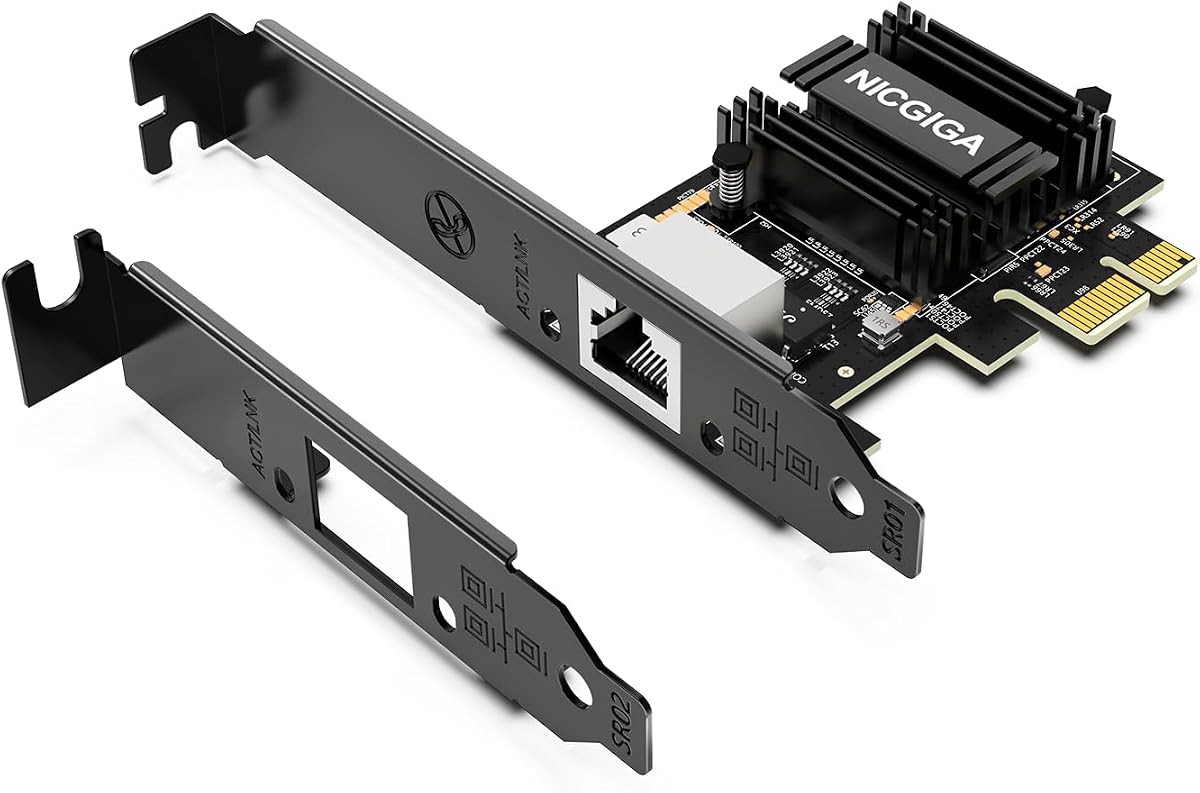
The NICGIGA RTL8127 stands out for fitting a 10Gbps network connection into a PCIe 4.0 x1 footprint. Its 4.3 rating and focus on compact systems make it particularly relevant to Mini PCs, ITX builds, and workstations where preserving expansion slots is important.
We may earn a commission when you buy through this link, at no additional cost to you.
The Realtek RTL8127 controller supports automatic negotiation at 10, 5, 2.5, 1Gbps, and 100Mbps. The card also supports Wake-on-LAN and can use standard Cat6a, Cat7, or high-quality Cat6 cabling. Standard full-height and low-profile brackets are included, improving its fit across different compact and full-size cases.
The card works with modern Windows systems, Windows Server 2019 and 2022, and current Linux distributions using Kernel 6.x or later. Older Kernel 5.x systems can use Realtek's official source code, but Linux buyers should be comfortable with driver setup. It fits x1, x4, x8, and x16 PCIe slots, but it cannot be used in a legacy PCI slot.
This is a compelling recommendation for a compact system that wants modern multi-gig networking without surrendering a full x16 slot to a single-port adapter. The single port and manual Linux considerations are modest compromises, while the x1 footprint, thermal efficiency, and broad speed support form an attractive package.
A PCIe 4.0 x1 interface provides an unusually space-efficient path to 10Gbps networking. That makes the NICGIGA easier to integrate into small builds where lane availability is more valuable than a second physical network port.
Automatic negotiation lets the card adapt to 10Gbps, 5Gbps, 2.5Gbps, and lower networks. Combined with the controller's low power and heat characteristics, it is well suited to always-on systems that also benefit from Wake-on-LAN.
We may earn a commission when you buy through this link, at no additional cost to you.
The VunLink RTL8127AT is a compact 10GbE adapter designed for PCs, NAS systems, servers, workstations, and home labs. Its 4.3 rating reflects a strong customer reception, while the product data emphasizes flexible installation, broad application coverage, and energy-efficient operation.
We may earn a commission when you buy through this link, at no additional cost to you.
The PCIe 4.0 x1 card can be installed in x1, x4, x8, or x16 slots, making it a flexible choice for compact and conventional systems. Automatic negotiation supports 10, 5, 2.5, 1Gbps, and 100Mbps, and the recommended setup uses compatible 10G equipment with Cat6a cabling. Actual link speed still depends on the network endpoint and cable.
Windows 10, Windows 11, Windows Server, and mainstream Linux systems are supported, although driver installation may be necessary depending on the exact operating system release. Compatibility with particular NAS platforms, virtualization environments, and Linux distributions can also vary. Those caveats matter when deploying the card in a specialized platform.
The RTL8127AT is a good match for a builder who wants a small, efficient, multi-speed adapter for a NAS or compact workstation. It may be less attractive where broad platform certification or zero-configuration operation is essential, but for mainstream DIY and home-lab environments it offers a flexible, modern feature set.
Supporting every major rate from 100Mbps through 10Gbps means the card can remain useful as network hardware evolves. This is helpful when a NAS or workstation connects to a mixture of access points, switches, and storage devices.
The RTL8127AT is presented as a lower-power, lower-heat alternative to traditional 10GbE controllers. That can be valuable in mini PCs, compact workstations, and systems where sustained cooling or power draw deserves attention.
We may earn a commission when you buy through this link, at no additional cost to you.
The Asus XG-C100F is the guide's main SFP+ option, providing a route to 10Gbps networking through a modular transceiver cage. Its 4.3 rating and fiber support distinguish it from the predominantly RJ45-based alternatives, making it relevant to infrastructure where distance, cabling, or switch design matters.
We may earn a commission when you buy through this link, at no additional cost to you.
The adapter supports both fiber-optic connections and Direct-Attach Copper cables through its SFP+ cage. It operates across PCIe 2.0 and 3.0 x4 interfaces, while an aluminum heatsink helps manage heat during demanding workloads. Built-in QoS can prioritize important streams or games.
The main practical cost is that RJ45 ports do not provide a simple, universal solution. Users need an appropriate SFP+ module or Direct-Attach Copper cable, and they must ensure the selected module matches the switch and network environment. The listed operating range is 0 to 40 degrees Celsius, with a storage range of negative 40 to 60 degrees Celsius.
Choose the XG-C100F when fiber or modular high-speed networking is central to the installation. It is less convenient for a straightforward home desktop that already has suitable Cat6a cabling and a 10GbE switch, but it offers greater deployment flexibility where optical links are required.
The SFP+ cage allows a single adapter to work with optical fiber or suitable direct-attach copper hardware. This flexibility can simplify future network changes without requiring a permanently fixed cable interface.
The built-in aluminum heatsink is a useful feature for sustained 10Gbps transfers. Proper case airflow remains important, but the adapter is designed to dissipate heat rather than relying on passive cooling alone.
We may earn a commission when you buy through this link, at no additional cost to you.
The Synology E10G30-T2 is a two-port 10GbE RJ45 adapter intended specifically for compatible Synology systems. It has the highest rating among the products listed at 4.6, and its purpose-built design, long warranty, and direct NAS focus distinguish it from general-purpose PCIe cards.
We may earn a commission when you buy through this link, at no additional cost to you.
Both ports support high-performance storage applications and automatically negotiate between 10Gbps and 1Gbps. That two-speed behavior makes the card practical for a Synology deployment where different clients or switches may operate at different rates. A five-year warranty also provides stronger coverage than the shorter protection listed for some competing adapters.
Compatibility is the central limitation. The card is purpose-built for Synology systems rather than arbitrary desktop motherboards, and it requires DSM 7.1.1-42962 Update 5 or later. Buyers must consult the manufacturer compatibility list before purchasing, since a high rating and attractive features do not guarantee use in a general PC.
For a compatible Synology owner, this is a premium recommendation because it adds two native high-speed storage connections without the ambiguity of a universal adapter. It is not a general-purpose choice for a workstation, and using it outside its intended ecosystem may provide little benefit or may not be supported at all.
The dual 10GbE ports are designed around high-performance storage applications, where faster links can improve transfers between a Synology system and clients. It is a natural fit for a NAS connected to a 10Gbps network core.
A five-year warranty and a clearly defined Synology focus may be more valuable than broad third-party compatibility for NAS owners. The required DSM update should be installed before installation to ensure the card is recognized correctly.
We may earn a commission when you buy through this link, at no additional cost to you.
The TRENDnet TEG-10GECTX is a single-port PCIe adapter with an emphasis on standards, supported operating systems, and multi-gig copper networking. Its 4.1 rating is positive, and the product data provides a particularly thorough account of its interfaces, standards, and installation accessories.
We may earn a commission when you buy through this link, at no additional cost to you.
The card offers a 10Gbps RJ45 port and supports 10, 5, 2.5, 1Gbps, and 100Mbps. Its PCIe 3.0 x4 interface suits a broad range of modern systems, while LED indicators help provide basic link-status visibility. Standard and low-profile brackets allow installation in more cases than a fixed bracket design would.
NDAA and TAA compliance may be important for United States and Canadian government purchasing environments, and the adapter is backed by three years of manufacturer protection. The listed standards include IEEE 802.3ab, IEEE 802.3bz, IEEE 802.3an, IEEE 802.1Q, and IEEE 802.3ad, which will matter to infrastructure buyers.
This card is a sensible recommendation for a business desktop, workstation, or server that needs one flexible high-speed uplink. It is especially attractive when 2.5GbE over Cat5e is desired, or when procurement requirements matter. A dual-port card would be preferable for link redundancy, but this model remains a well-specified all-round choice.
Support for 2.5 and 5Gbps over standard Cat5e can be helpful in offices where replacing older horizontal cabling would be inconvenient. It gives attached devices a faster option before the entire network is upgraded.
Listed IEEE standards, broad Windows compatibility, government procurement compliance, and three years of protection make the card approachable for professional and institutional buyers. Driver and platform checks are still advisable before installation.
We may earn a commission when you buy through this link, at no additional cost to you.
The Cable Matters USB-C to 10Gb Ethernet adapter is the only USB-based product in the roundup, offering a practical alternative for laptops and compact systems without an accessible PCIe slot. Its 3.9 rating is the lowest listed, but its distinctive design addresses users for whom internal installation is impossible.
We may earn a commission when you buy through this link, at no additional cost to you.
The adapter uses the Realtek RTL8159 controller and supports 10, 5, 2.5, 1Gbps, and 100Mbps through automatic negotiation. It works with USB-C, USB4, and Thunderbolt 3, 4, and 5 devices, and the included braided cable, aluminum housing, thermal silicone, and heat sink are designed to address heat concerns common in high-speed USB Ethernet adapters.
The largest limitation is the USB-C connection itself. The product data recommends USB 3.2 Gen 2×2 with 20Gbps bandwidth or higher for best results. Typical real-world Windows throughput is described as approximately 7Gbps, while some Macs may report a 5Gbps link and approximately 5Gbps throughput. Older operating systems may also require the latest driver.
This adapter is best for mobile workstations, travel kits, and systems lacking a free PCIe slot, especially when a USB4 or high-bandwidth Thunderbolt port is available. It is less suitable for a desktop where an internal PCIe card would provide a more direct path and eliminate USB-related compatibility constraints.
A USB-C adapter turns any compatible Thunderbolt, USB4, or high-bandwidth USB-C port into a multi-gig Ethernet connection. This is especially convenient for notebooks and temporary mobile workstations.
The aluminum enclosure, thermal silicone, and heat sink are intended to control heat during sustained high-speed transfers. A robust braided cable also reduces strain on the device port, which is valuable in a portable setup.
We may earn a commission when you buy through this link, at no additional cost to you.
Choosing a 10GB Ethernet Card involves matching the adapter's interface, port count, controller, speed support, and physical dimensions to your computer and existing network. Compatibility with the connected switch, cabling, operating system, and case is just as important as the headline 10Gbps rate.
Choose a card that fits both electrically and physically. A PCIe x1 card will usually work in a larger x4, x8, or x16 slot, while the reverse is not necessarily true, so a compact x1 design offers unusually flexible placement.
Use copper for straightforward desktop and NAS installations. Consider SFP+ when fiber, transceiver choice, or direct-attach links are explicit requirements rather than optional features.
Choose one port for simplicity and lower hardware demands. Choose two when your network design, redundancy goals, or storage topology genuinely benefits from separate links.
Prioritize a card whose supported negotiation range matches your actual network equipment. Multi-gig support offers more flexibility than a model limited to 10 and 1Gbps.
Check the exact operating-system version, kernel, DSM release, or hypervisor before ordering. Also check whether the product requires a manual driver step rather than assuming every current system is plug-and-play.
Audit both patch cords and in-wall cabling before ordering. Long, aged, or lower-grade copper can prevent a capable card and switch from negotiating the desired link speed.
Match the bracket to the case and consider airflow for long transfers. A low-profile bracket does not guarantee a low-heat design, so both chassis fit and cooling requirements deserve separate attention.
Read the manufacturer's compatibility list before selecting an ecosystem-specific card. Platform support can reduce installation uncertainty, but it also makes the card less versatile outside its intended system.
Before installation, shut down the computer completely, disconnect its power cable, and consult the motherboard and case documentation. Confirm that the chosen PCIe slot is available, identify whether a full-height or low-profile bracket is needed, and check the system requirements for the selected operating system. For a USB-C adapter, compare the computer's port specification with the adapter's bandwidth recommendation before connecting it.
Install the internal card in a powered-off system, connect the appropriate Ethernet cable, and restore power. If the network link does not appear, install the manufacturer's current driver and verify that the operating system recognizes the new interface. The USB-C model may require updated Realtek drivers on some Windows or Linux systems, while the 10Gtek requires manual setup for Windows 11 and the Synology card requires a compatible, updated DSM release.
For best results, connect to a switch or router that supports the same link rate and use appropriate copper or SFP+ hardware. After installation, confirm the negotiated speed, update the network driver, enable QoS where appropriate, and test large file transfers as well as latency-sensitive applications. Keep the card unobstructed, maintain case airflow, and avoid repeated unplugging or card removal while the system is active.
It can improve performance between devices on your local network, but it cannot increase the speed supplied by your internet connection. A 10GbE card is most useful for NAS transfers, large backups, media workflows, shared storage, and other local data movement. Internet speed remains limited by your service, router, and upstream equipment.
You need an available PCIe slot that matches the card's interface and physical dimensions. A PCIe x1 card can generally fit a larger x4, x8, or x16 slot, while an x8 or x4 card cannot necessarily fit a smaller slot. You also need a compatible case, adequate power, a supported operating system, and installation knowledge appropriate to your experience level.
Yes, you need compatible 10Gbps hardware at the other end of the connection for a full 10Gbps link. A router, switch, NAS, or server with only gigabit Ethernet will limit the negotiated rate. Some cards support lower speeds, allowing temporary use with older equipment, but the available connection speed depends on the least capable linked device.
Cat6 can support 10Gbps over suitable distances, but installation quality and cable specification matter. The TP-Link TX401 includes a CAT6A cable, while the 10Gtek lists Category 6A up to 100 meters and Category 6 up to 55 meters. For dependable full-rate operation, use a cable explicitly rated for 10Gbps and avoid damaged or poorly terminated runs.
A PCIe 10GbE card connects directly through an internal expansion slot, while a USB-C 10GbE adapter uses the host's USB interface. The direct PCIe path can provide fewer bottlenecks, while USB-C is far easier for laptops and systems without an open expansion slot. The Cable Matters adapter performs best with USB 3.2 Gen 2×2, USB4, or a suitable Thunderbolt connection.
They are better when you need separate data and management links, redundancy, or supported link aggregation. They are not inherently faster for a single transfer, and they may require more switch ports, configuration, and cabling. A single-port card is often the simpler choice for one workstation or a basic NAS uplink.
Most products in this guide support both operating systems, but the exact version and driver requirements differ. The NICGIGA offers broad modern Linux support, the 10Gtek needs manual setup for Windows 11, and the Synology card requires a particular updated DSM release. Always verify compatibility before purchasing rather than relying on the general operating-system name alone.
RJ45 uses a copper Ethernet cable through a familiar modular connector, while SFP+ accepts a compatible transceiver or Direct-Attach Copper module. RJ45 is usually simpler for ordinary desktop and NAS installations. SFP+ offers more flexibility for optical fiber and specialized network equipment, but it normally requires additional compatible hardware.
The TP-Link TX401 is the most balanced general recommendation because it combines a single-port 10GBase-T design, five-speed negotiation, QoS, useful operating-system support, and installation accessories. The 10Gtek X540-10G-2T stands out when two ports and a known server controller matter more, while the Synology E10G30-T2 is the premium choice for compatible Synology storage systems.
Prioritize the complete network path rather than the card alone. Check PCIe lane and bracket requirements, operating-system drivers, switch capability, cabling, and the exact link rate your other devices support. Compact builders may prefer the x1 efficiency of the NICGIGA or VunLink, while the TRENDnet is attractive for multi-gig copper and procurement needs. Choose the Asus XG-C100F when fiber is required, and the Cable Matters adapter when no internal slot is available.
Product availability, driver support, and pricing can change, so review the current listing and manufacturer compatibility information before ordering. Confirm that your switch and endpoint devices can negotiate the intended speed, and use the required bracket or platform-specific setup instructions. With those checks completed, the right 10GB Ethernet Card can provide a meaningful upgrade for local networking, storage, and workstation performance.
