
SCRIB3D P1 3D Printing Pen with Display
4.4Editor score
Beginner-friendly feeding controls
Stepless speed adjustment
PLA and ABS compatibility
Explore the best 3D printing pens for kids, comparing safety, filament options, controls, accessories, and ease of use to help families choose confidently.
A 3D printing pen gives children a tactile way to turn drawings, cards, decorations, and imaginative ideas into raised plastic creations. The best models combine approachable controls with helpful safety features, reliable filament feeding, and enough accessories to encourage repeated creative play without overwhelming young users.
This guide compares ten 3D printing pens and kits using the supplied product information, focusing on child suitability, ease of operation, material compatibility, temperature controls, included supplies, design aids, and maintenance features. It also identifies options suited to first-time creators, older children, and families who want a more advanced creative toolkit.
Each review explains the standout qualities and realistic trade-offs of its featured model. The top picks represent strong choices for different priorities, while the buying guide covers the details that matter most. Product availability, bundle contents, ratings, and prices can change, so shoppers should confirm current listings before purchasing.
4.4Editor score
4.4Editor score
4.5Editor score
The table below compares every featured 3D printing pen by its intended audience, control system, material support, and included creative aids, making it easier to identify the right model for a child's experience level.


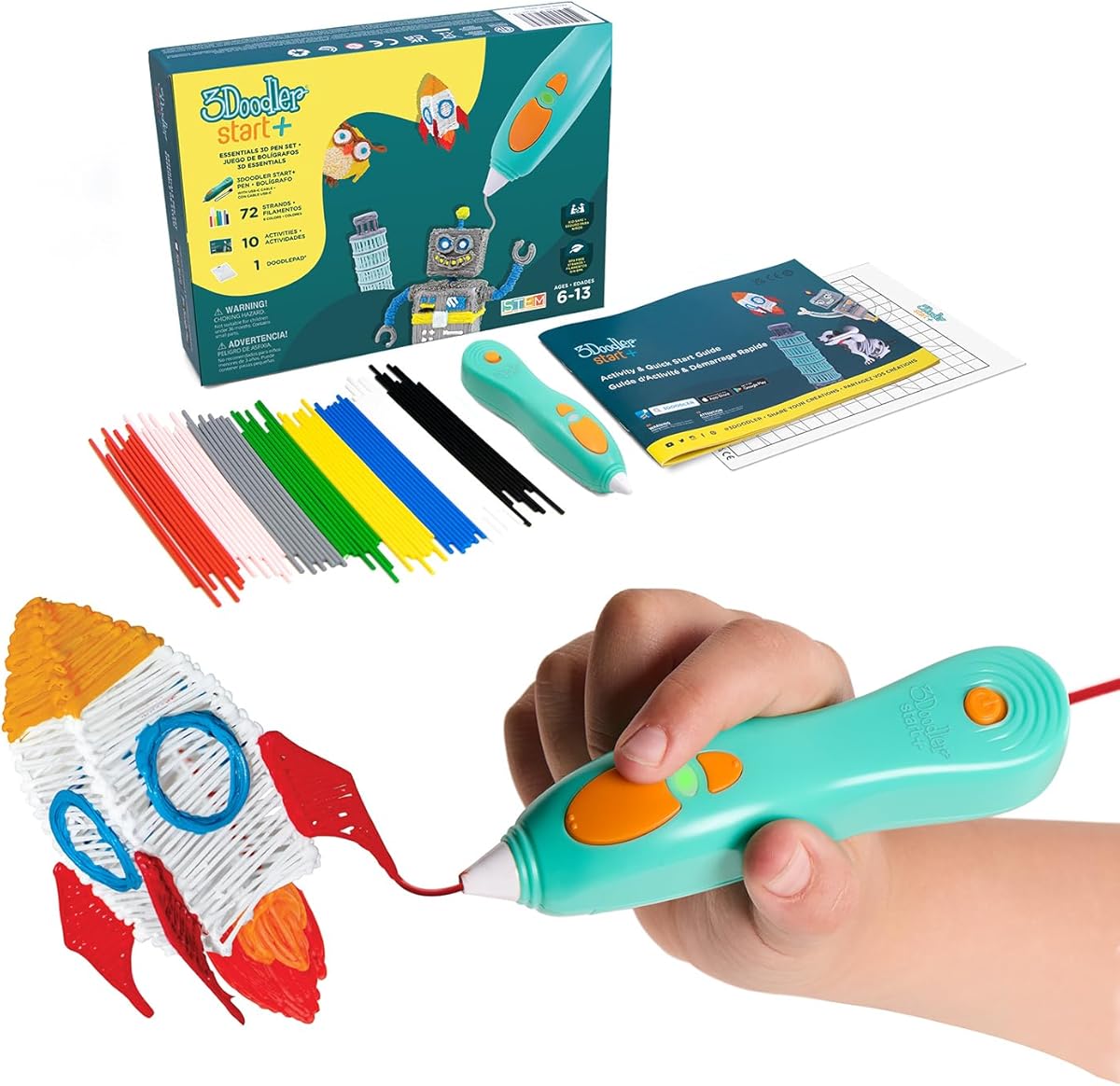
The 3Doodler Start+ Essentials stands out as the most child-focused pen in this roundup, earning a 4.4 rating from its supplied customer feedback. Its defining feature is the child-safe design: the nozzle and exposed plastic can be touched without the burn risk associated with conventional hot-end 3D printing tools. That makes it especially suitable for children ages six and older who are likely to handle the pen enthusiastically rather than cautiously.
We may earn a commission when you buy through this link, at no additional cost to you.
The set is designed to make the first session productive. It includes 72 strands of mixed-color Start+ plastic, a DoodlePad and Doodlemat, a USB-C cable, an activity guide, and ten new stencils. The slimmer pen body should be easier for smaller hands to hold, while the faster charging and additional filament reduce the likelihood that a child becomes frustrated before producing something meaningful. A stand-by mode also makes it more convenient to pause a project without leaving the pen active.
Its limitations come from the same focus that makes it appealing. Start+ plastics are intended for a simpler, lower-temperature experience and do not offer the same freedom as pens designed for PLA, ABS, or other 1.75-millimeter filaments. Advanced users may also find the included activity guide less challenging than the controls and material range on higher-end models. Those limitations are acceptable because this product is optimized for safe, approachable, screen-free creativity rather than professional experimentation.
For a child making a first 3D pen creation, this is the strongest all-around choice in the list. It reduces safety concerns without removing the satisfying element of extrusion, supplies enough material and templates for immediate use, and supplies a simple educational activity. Adults should still supervise creative sessions and help younger children understand the basic operation, but the product itself appears thoughtfully tailored to independent, tactile play.
A touchable nozzle and plastic profile remove the need for children to treat the pen like hazardous workshop equipment. This makes independent drawing more practical while preserving the visible melting process that inspires curiosity about heat, materials, and design.
With 72 strands, ten stencils, a drawing surface, and an activity guide already included, children can begin with guided patterns before inventing freeform shapes. That balance of structure and open-ended play makes the kit useful for both quiet learning time and family activity.
We may earn a commission when you buy through this link, at no additional cost to you.
The SCRIB3D P1 is a strong budget-oriented option for children who are ready to learn the basics of 3D pen use. It holds a 4.4 rating and includes the core materials needed to begin: a pen, 30 feet of PLA filament in three colors, a power adapter, a step-by-step manual, and a stencil guide. Its accessibility comes from using a conventional plug-in design rather than requiring a separate charging dock or complex setup.
We may earn a commission when you buy through this link, at no additional cost to you.
Its most useful control is the stepless speed slider, which allows a child to move from slow, detailed lines to faster filling without selecting from a limited set of fixed presets. The temperature is also adjustable for PLA from 160 to 210 degrees Celsius and ABS from 210 to 235 degrees Celsius. Forward and reverse buttons give beginners a direct way to feed and retract filament, while the included manual explains the warming and loading process.
The tradeoff is that this is a conventional heated pen rather than a completely touch-safe model. It also ships with a smaller palette of filament than several creative bundles, and the supplied wording inconsistently refers to three colors and 30 feet, so buyers should check the current package contents. For children who will be closely supervised, however, the P1 offers more material flexibility and control than many simpler entry-level alternatives.
This pen is a practical recommendation for families seeking an affordable introduction to 3D drawing without paying for a large kit. It is especially useful for children who already understand basic crafting and can manage a warm tool with adult guidance. Its clear controls, useful safety functions, and compatibility with familiar plastics make it a versatile choice that can grow beyond simple beginner projects.
The stepless slider gives young makers a meaningful degree of control over line thickness and application speed. This helps children adapt the pen to different tasks without navigating complex menus or technical terminology.
Directional feed and retract buttons make loading and unloading more intuitive, while the two-minute auto-sleep reduces unnecessary heating after a session ends. These small conveniences help preserve the maker's attention and filament.
We may earn a commission when you buy through this link, at no additional cost to you.
The MYNT3D Professional is a feature-oriented pen for older children, teens, and adults who want more precise control over the extrusion process. Its 4.4 rating reflects a generally well-regarded feature set, particularly the large OLED display. The screen makes temperature easy to monitor while drawing, which is valuable when experimenting with different effects or moving beyond basic flat shapes.
We may earn a commission when you buy through this link, at no additional cost to you.
Temperature can be adjusted in one-degree increments from 140 to 230 degrees Celsius, and the adjustable feed controls both speed and flow. These settings make it possible to develop a feel for how different heating levels affect the deposited material. The package includes three colors of PLA filament, an AC adapter, and a slim ergonomic pen, backed by a one-year limited warranty.
The drawback is that this model asks children to engage with more of its technical capabilities than a basic starter set requires. A young first-time user may benefit more from guided stencils, a larger collection of filament colors, or a child-safe touch temperature. The three included PLA colors also place less emphasis on variety than bundles built around a broader creative supply.
Despite that, the Professional is a compelling option for a child who has already mastered the basics or an adult working alongside a young maker. Its display, fine temperature control, and adjustable feed provide a useful foundation for more ambitious structures and precise designs. It suits creative problem-solving better than simplified gift-making.
The OLED display provides immediate feedback about the pen's temperature. Older children can learn to associate heat settings with smoother flow, thicker lines, and different finishing effects without guessing blindly.
Rather than providing elaborate child-specific guidance, this pen rewards experimentation and technical curiosity. It works well for a maker ready to move from flat doodles toward layered models and more intentional construction.
We may earn a commission when you buy through this link, at no additional cost to you.
The MYNT3D Super combines a simple control scheme with compatibility for both PLA and ABS, making it a versatile option for children who want room to experiment. It carries a 4.3 rating and is described as suitable for kids, artists, and engineers, which reflects its broader appeal. A stepless speed slider allows the user to regulate the flow of material without cycling through fixed settings.
We may earn a commission when you buy through this link, at no additional cost to you.
Its ultrasonic sealed nozzle is designed to resist clogging and improve durability, addressing one of the most common frustrations with 3D pens. The kit includes three colors of PLA filament, an AC adapter, and a slim ergonomic touch pen. Because ABS is supported, families can later try a different material without replacing the entire tool, provided an adult handles the higher-temperature setup.
Compared with display-equipped models, the Super offers less immediate information and fewer visible settings. Children who are very young may find it more approachable than a technical interface, but the lack of a screen also makes temperature changes less transparent. The small color selection can also limit projects until more filament is purchased.
This model is a good middle ground for a child who has outgrown a purely decorative starter pen but does not need every advanced feature of the Pro bundle. It supports both PLA and ABS, has dependable nozzle design, and offers smooth control in a relatively straightforward pen.
The ultrasonic sealed nozzle is intended to limit clogging and withstand repeated use. That makes the model appealing for children who expect to draw often rather than complete only one supervised project.
PLA and ABS compatibility give a young maker two familiar material paths. Starting with the included PLA is straightforward, while an adult can introduce ABS when the child is ready to manage additional temperature settings.
We may earn a commission when you buy through this link, at no additional cost to you.
The SCRIB3D Advanced is built for creators who want clearer operating information and a comfortable pen without moving into a highly technical interface. Its 4.3 rating reflects a balanced feature set. The large LCD screen monitors heat and provides access to loading, unloading, temperature, and speed adjustments, while eight speed options give makers consistent choices for different line thicknesses.
We may earn a commission when you buy through this link, at no additional cost to you.
The curved, soft-touch body is intended to sit comfortably in the hand during longer sessions. The kit contains five colors of PLA, approximately 50 feet of filament in total, a power adapter, a step-by-step manual, and a stencil guide. Together, those supplies provide enough material and structure for children to begin with guided projects before creating original pieces.
The main compromise is that its speed adjustment is preset rather than continuously variable like the stepless sliders on the P1 and MYNT3D models. Children seeking perfectly smooth control may find that transition noticeable. As with the P1, the use of an adapter means the pen cannot be used while moving away from an outlet.
It is a strong choice for older children and families who prioritize visible controls and a comfortable grip. The display reduces uncertainty, and the eight speed settings are easier for a child to understand than a continuously changing slider. For creative sessions involving repeated detail work, this model offers a good balance of precision, guidance, and comfort.
The LCD provides a central place to check heating and speed status. This gives a child clearer feedback than a pen with only a small indicator and makes it easier to learn which settings suit different activities.
The curved soft-touch housing is designed around sustained use. It may be particularly comfortable for detailed projects or children who want to keep drawing after the novelty of the first few objects fades.
We may earn a commission when you buy through this link, at no additional cost to you.
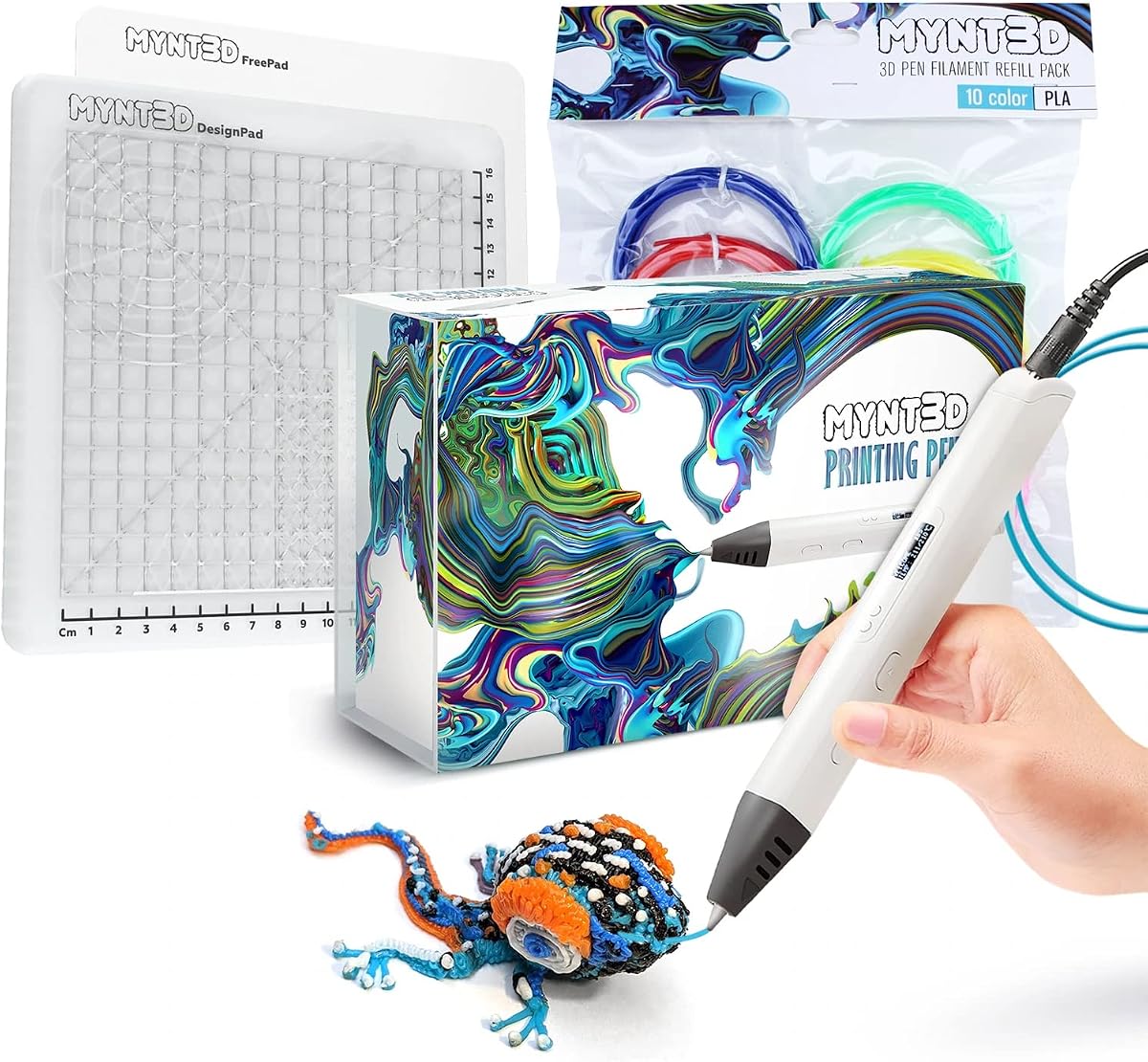
The MYNT3D Pro Bundle is the most feature-complete option in the list and holds the highest listed rating at 4.5. It is especially appealing to older children and creative families who want substantial material variety immediately. The bundle combines the Pro pen with vacuum-sealed PLA in ten colors: blue, green, red, yellow, orange, pink, black, tan, brown, and gold.
We may earn a commission when you buy through this link, at no additional cost to you.
The pen provides stepless speed control for smooth flow regulation, discrete temperature adjustments for different material settings, and a replaceable sealed nozzle intended to resist clogging and extend operating life. The supplied DesignPad expands the experience with a double-sided silicone surface containing channels for geometric shapes and a transparent FreePad designed to help users trace patterns or maintain adhesion for freeform work.
Its premium nature also means it is less minimal than a starter kit. Younger children may need guidance to understand why temperature settings change, and the wide filament selection can encourage ambitious projects before their dexterity is ready. The more complex drawing system also takes time to master compared with simple stencils and a flat pad.
For a child with strong interest in 3D design, this bundle offers exceptional long-term flexibility. The ten colors reduce the chance of boredom, the two drawing surfaces support different styles, and the replaceable nozzle addresses durability. It is best suited to an older maker, teen, or family project where variety and continued experimentation matter more than minimal setup.
Ten colors allow young designers to plan multicolored objects, sort materials by purpose, or explore different combinations. Vacuum-sealed refills also help preserve unused filament between sessions.
The silicone DesignPad supports geometric construction, while the transparent FreePad assists with tracing and freeform drawings. Together they make it easier to learn shape planning before attempting more ambitious structures.
We may earn a commission when you buy through this link, at no additional cost to you.
The MYNT3D Super Bundle combines the Super pen with ten colors of PLA and the same practical dual-surface mat system found in the Pro bundle. Its 4.4 rating makes it one of the strongest-performing options here. It offers more immediate creative variety than a basic pen-and-filament set, making it appealing to children who become quickly bored with single-color projects.
We may earn a commission when you buy through this link, at no additional cost to you.
The Super pen adds stepless speed control, temperature adjustment for ABS or PLA, and a replaceable sealed nozzle designed for long-lasting operation. The DesignPad includes channels that help form geometric shapes, while the transparent FreePad assists with tracing patterns and improving adhesion during freeform drawings. A one-year limited warranty and customer support access add reassurance for buyers.
As with the Pro bundle, the extra complexity may be unnecessary for a very young first-time user. ABS support expands potential materials but should be introduced with adult supervision and attention to the specified temperature. The larger assortment of colors and surfaces also means more components to organize, and the bundle format may be more than a family needs for occasional use.
This is an excellent choice for an older child or enthusiastic beginner who wants color variety and a supportive drawing setup. It offers more creative range than the standard Super while remaining less technically demanding than some finely adjustable professional models. The combination makes it a strong all-around creative kit for ongoing projects.
Ten PLA colors make it possible to create patterned objects, layered signs, holiday crafts, and color-coded structures. The assortment gives children enough variety to sustain interest beyond a single introductory session.
The two-sided silicone system supports both guided geometry and freeform work. That makes the bundle useful for teaching planning, tracing, symmetry, and basic construction techniques through direct making.
We may earn a commission when you buy through this link, at no additional cost to you.
The 3Doodler Flow is designed for teens, adults, and creators, but it can suit older children interested in portable tools and varied materials. Its 4.1 rating is the lowest among the products with an available numerical score, although the model still offers several notable strengths. The integrated LCD provides real-time temperature monitoring, and the body is described as compact and lightweight.
We may earn a commission when you buy through this link, at no additional cost to you.
Material flexibility is a major attraction. The Flow accepts 1.75-millimeter filaments including PLA, ABS, and wood, giving makers access to plastic and wood-infused effects. The kit includes eight colors of plastic totaling 80 feet, along with a comprehensive activity guide. Setup is described as uncomplicated: connect the pen, insert filament, allow it to heat, and begin drawing on a surface or stencil.
Its age positioning makes it less ideal as a first 3D pen for a young child. Children using ABS or wood filaments will need adult help and a clear understanding of the higher heat involved. Its rating is also not as strong as the other featured models, so buyers who prioritize a child-specific experience may find a better-supported alternative.
For an older child or teen who wants portability, flexible materials, and a screen-free creative outlet, the Flow remains a compelling choice. Its relatively light construction makes it easier to carry between spaces, while the LCD gives experienced makers useful information. The included guide provides a helpful entry point despite the product's more advanced positioning.
PLA, ABS, and wood compatibility broaden the appearance and texture of possible projects. A maker can start with easy-to-use PLA and gradually explore alternatives with adult supervision.
The compact, lightweight body is easier to move between a table, desk, or shared creative space. That portability can help children continue projects in different locations rather than working only at one fixed station.
We may earn a commission when you buy through this link, at no additional cost to you.
The SCRIB3D P1 Mat Bundle is designed around a simple idea: give children a dedicated, supportive surface for tracing, practicing, and producing cleaner 3D pen work. It includes the P1 pen with display, a two-sided silicone mat, starter PLA filament, a stencil book, a project guide, and a power adapter. Although no numerical customer rating was supplied, the bundle includes several useful features for beginners.
We may earn a commission when you buy through this link, at no additional cost to you.
The silicone mat contains built-in shapes and patterns that help guide a child's first designs. Its reverse side and flexible construction can support different practice styles, while the wipe-clean surface makes repeated sessions easier to manage. The product information describes it as heat-resistant and reusable, which adds practicality for a tool intended to be used regularly.
A notable advantage is cross-model compatibility. The mat is made for SCRIB3D P1 pens but is also described as suitable for Advanced and PRO models. A family can therefore use the same surface while moving between compatible tools, reducing unnecessary duplication and making the purchase feel more futureproof.
The tradeoff is that the package does not provide the same immediate color or filament abundance as the ten-color MYNT3D bundles. It is most useful for a child who wants guided practice and a tidy workspace rather than someone seeking a large collection of materials. For beginner-focused creative sessions, the mat's shapes and patterns may be more valuable than additional filament colors.
Embedded shapes and patterns give a beginner a visible starting point instead of a blank surface. Following a guide teaches control of line direction and speed before the child attempts independent designs.
The wipe-clean silicone surface is easier to reuse than disposable sheets of paper. Compatibility with several SCRIB3D pen models also extends its usefulness beyond a single product purchase.
We may earn a commission when you buy through this link, at no additional cost to you.
The 3Doodler Start+ Refill Bundle is built for families who want an exceptionally large supply of material and a child-focused pen. No numerical rating was provided for this listing. The core set includes the Start+ pen, DoodlePad, 72 strands of mixed-color filament, a USB-C cable, an activity guide, and ten new stencils, together with more than 1,250 additional feet of plastic filament.
We may earn a commission when you buy through this link, at no additional cost to you.
The child-safety design remains a defining advantage. As with the Start+ Essentials model, the nozzle and plastic can be touched without posing a burn risk, making the tool more approachable for children ages six and older. The additional material can support repeated projects without the interruption of running out of filament halfway through a large build.
The main drawback is that the enormous refill quantity makes this a specialized bundle rather than a simple starter purchase. A child who only wants to try 3D printing briefly may not use all of it, while families need somewhere to store and organize the extra strands. The set remains limited to the Start plastic system, so it offers less material variety than pens supporting standard 1.75-millimeter PLA and ABS.
This bundle is most appropriate for an enthusiastic child or a family that expects regular use. It combines the reassuring safety profile of the Start+ with a supply large enough for elaborate models, seasonal crafts, and shared projects. For those who value uninterrupted creativity over a minimal accessory package, it is the most extensively stocked option here.
More than 1,250 additional feet of filament reduces the need to stop a major creation for a refill. The quantity is particularly useful for freeform sculptures, layered decorations, and repeated family crafting sessions.
Ten physical stencils provide an offline starting point, while the optional app offers iOS and Android users templates, instructions, and additional patterns. Families can balance guided digital use with screen-free physical making.
We may earn a commission when you buy through this link, at no additional cost to you.
The right 3D printing pen depends on age, supervision, creative goals, and the amount of guidance a child needs. These are the most important factors to evaluate before choosing a model.
Heat design is one of the most important distinctions for a children's 3D pen. The 3Doodler Start+ models use a lower-temperature Start plastic system with a touchable nozzle and plastic profile, while the other featured pens use conventional heated extrusion systems. For a child who may touch the nozzle repeatedly, a touch-safe design can reduce concern and make independent creative play more practical. A conventional pen can still be appropriate for older children under adult supervision, but families should understand that the working area can become hot.
In summary, prioritize a touch-safe model for younger children and close supervision for standard heated pens.
Young makers benefit from controls that feel intuitive. The SCRIB3D P1 uses forward and reverse buttons with a stepless slider, while the 3Doodler Start+ emphasizes a simple pen experience and supplied stencils. Older children can handle displays, discrete temperatures, and more advanced flow settings. A larger display may also help a child learn by showing the current state of the tool rather than requiring the maker to infer what is happening from a small indicator light.
In summary, choose simple guided controls for beginners and display-equipped controls for children ready to experiment.
PLA is included with most of the featured models and is generally the easiest starting material. The MYNT3D Super, SCRIB3D P1, and 3Doodler Flow also support ABS, giving experienced users more options for different properties and finishes. The 3Doodler Flow adds wood filament compatibility, while the 3Doodler Start+ system remains restricted to its proprietary Start plastics. More material choices increase creative potential but also add cost, storage needs, and temperature-management considerations.
In summary, begin with included PLA and consider broader compatibility only when a child is ready to manage different settings.
A pen alone can produce interesting results, but accessories make the initial experience much easier. Stencils provide guided shapes, activity guides suggest projects, drawing mats help trace patterns, and multiple filament colors support more varied designs. The MYNT3D Pro and Super bundles include ten colors and two drawing surfaces. The Start+ Refill Bundle provides extensive filament volume, while the SCRIB3D P1 Mat Bundle prioritizes one structured practice surface.
In summary, choose the accessory mix that matches your child's need for guidance, color variety, or a larger material supply.
Flow control determines how quickly material leaves the nozzle and influences line thickness. Stepless sliders offer continuous adjustment, while the SCRIB3D Advanced provides eight distinct speed options and the MYNT3D Professional supports one-degree temperature increments. Fine controls can produce smoother lines and more consistent structures, but they may be unnecessary for a child following simple stencils. They become valuable when a maker wants precise layers, faster infill, or repeated consistency across a large project.
In summary, prioritize straightforward speed control for beginners and precise adjustments for technically curious older makers.
A clogged nozzle can interrupt play and waste filament, so the nozzle design deserves attention. The MYNT3D Super uses an ultrasonic sealed nozzle intended to be nearly clog-proof, while the Pro version uses a replaceable sealed nozzle. The SCRIB3D models include anti-clogging features, and the P1 also has an auto-sleep function after two minutes of inactivity. A replaceable nozzle can be particularly valuable for regular use because it offers a potential solution when a fixed component eventually needs servicing.
In summary, look for sealed or replaceable nozzles if the child will use the pen frequently and create larger projects.
A pen that feels uncomfortable in the hand can limit how long a child creates. The SCRIB3D Advanced uses a curved soft-touch housing, while the MYNT3D models are described as slim and ergonomic. The 3Doodler Flow is compact and lightweight for portable use. Most models require a power connection, so cordless freedom is limited. Battery-operated models can be convenient for travel, but the supplied information emphasizes wired operation for most of the category.
In summary, select a comfortable shape for long projects and consider size when the pen needs to travel or be shared.
3D pens can provide a productive alternative to passive screen use by turning ideas into tangible objects. The Start+ models explicitly emphasize STEM learning and screen-free play, while guidebooks and stencils introduce geometry, planning, color, and construction. The 3Doodler Flow app adds optional digital templates and instructions without making a screen necessary for the core activity. Parents who want independent play may prefer physical stencils, whereas children who enjoy guided digital content may appreciate app-supported projects.
In summary, choose physical guidance for independent screen-free play or optional app resources for mixed-media learning.
Begin by placing the pen on a stable, heat-resistant work surface and reading the included instructions for the specific model. For standard heated pens, connect the power adapter, insert the recommended filament, and allow the tool to reach the indicated temperature. The SCRIB3D P1 and Advanced models use a red warm-up light, while display-equipped models show temperature status. Never pull filament from a hot nozzle, and do not touch exposed heated parts. Children using conventional models should have adult supervision during warm-up and use.
Load the filament according to the manual, usually by inserting it into the rear and pressing or holding the forward control until it reaches the nozzle. Test extrusion on the included mat or a suitable template before making a finished object. Begin with short lines, then gradually try circles, outlines, grids, and layered shapes. Use the mat to improve consistency, release completed pieces carefully once they have cooled, and keep the work area clear so a raised object cannot be knocked to the floor.
After the session, stop extrusion and follow the model's unloading or retraction instructions. A tool with a retract function can pull filament back into the pen, while other models may require the user to pull softened material away carefully after it cools. Let the nozzle cool before storage, wipe the mat, and keep filament sealed in a dry location. Do not attempt to clear a blockage with sharp objects, and contact the manufacturer or seller if the nozzle consistently does not feed.
Safety depends on the specific design and the child's age. The 3Doodler Start+ models use a lower-temperature system with a nozzle and plastic that can be touched, while conventional heated pens should be used with adult supervision. Check the manufacturer's age guidance, keep children away from the hot nozzle, and ensure the work surface is stable.
The featured 3Doodler Start+ sets are intended for children ages six and older because of their child-safe material system. Other models may also suit older children who can follow loading instructions and understand that the nozzle gets hot. A child's readiness matters more than age alone, particularly for independent use.
No. Many models use standard 1.75-millimeter PLA or ABS, but the 3Doodler Start+ uses proprietary Start plastics. The 3Doodler Flow can also use compatible 1.75-millimeter wood filament. Confirm the supported material and filament diameter before ordering replacements for any pen.
PLA is usually easier for beginners because it is included with most kits and is widely used for straightforward creations. ABS can provide additional material options on compatible pens, but it generally requires a higher temperature and adult guidance. Start with the manufacturer's recommended filament and follow its temperature settings.
Possible causes include insufficient heating, a filament type that the model does not support, an improperly seated strand, or a partially obstructed nozzle. Confirm that the pen has reached operating temperature, check that the filament is inserted correctly, and allow the material to soften before adjusting it. Avoid inserting tools into the nozzle and seek manufacturer guidance if the problem continues.
The level of supervision depends on the model and the child's maturity. Touch-safe Start systems may support more independent creative sessions, but no creative tool should be used completely without adult awareness. Conventional heated pens require closer supervision during warm-up, extrusion, unloading, and cleaning.
Yes. A 3D pen can help demonstrate geometry, spatial planning, engineering, color mixing, and iterative design. The Start+ models include an activity guide, while several other products provide stencils, project guides, or drawing mats. For school-aged children, adult guidance is still useful when changing temperature settings or handling unfamiliar materials.
A small amount is enough for a first flat design, but children often use more than expected once they begin layering or creating several objects. The smaller kits include enough filament for guided examples, while larger bundles suit continuous experimentation. Choose based on how frequently the child expects to create and how ambitious the planned projects are.
The 3Doodler Start+ Essentials is the most well-rounded choice for a young child because it combines a touch-safe design with a substantial starter bundle. The SCRIB3D P1 offers strong value for families seeking an affordable but versatile introduction, while the MYNT3D Pro Bundle stands out for ten filament colors, a replaceable nozzle, advanced controls, and two dedicated drawing surfaces.
Prioritize the features that match the child's age and temperament. Younger makers benefit from lower-temperature safety, simple controls, stencils, and guided activities. Older children may appreciate display-equipped temperature monitoring, finer speed adjustment, broader filament compatibility, and more challenging construction options. The best tool is not necessarily the most advanced one, but the one a child will understand and want to use again.
Before buying, confirm the current package contents, supported filament, age recommendation, warranty terms, and availability of replacement supplies. Ratings and product configurations can change over time, and current prices vary between sellers. Comparing the latest listing with the capabilities in this guide will help families select a 3D printing pen that is safe, engaging, and suited to their child's creative stage.