
Noctua NA-FC1
4.8Editor score
Manual four-pin PWM control
No-stop minimum speed mode
Three-fan splitter included
Compact flexible installation
Our front panel fan controller guide compares 10 models for channel control, LCD monitoring, PWM noise reduction, temperature alarms, and desktop PC compatibili
A front panel fan controller gives desktop PC builders a convenient way to monitor temperatures, adjust fan speeds, and identify cooling problems without repeatedly entering the BIOS. The most useful models combine clear displays, independent channel controls, PWM support, temperature sensors, and alerts that draw attention to overheating or stalled fans.
We compared these controllers by considering the number of fan channels, display information, manual and automatic modes, alarm functions, electrical specifications, installation method, and overall suitability for different PC builds. The list includes traditional 5.25-inch drive-bay panels, compact manual controllers, software-controlled hubs, and compact digital modules.
Each recommendation highlights the features that distinguish it from the alternatives, while also noting practical trade-offs. The first three picks represent our featured options across different budgets and priorities. Product availability, configurations, and prices can change, so readers should verify the latest listing and case compatibility before ordering.
4.8Editor score

5.0Editor score

4.2Editor score
The comparison below organizes all ten controllers by their most important design choices, including drive-bay installation, channel count, temperature monitoring, control mode, and physical power requirements.
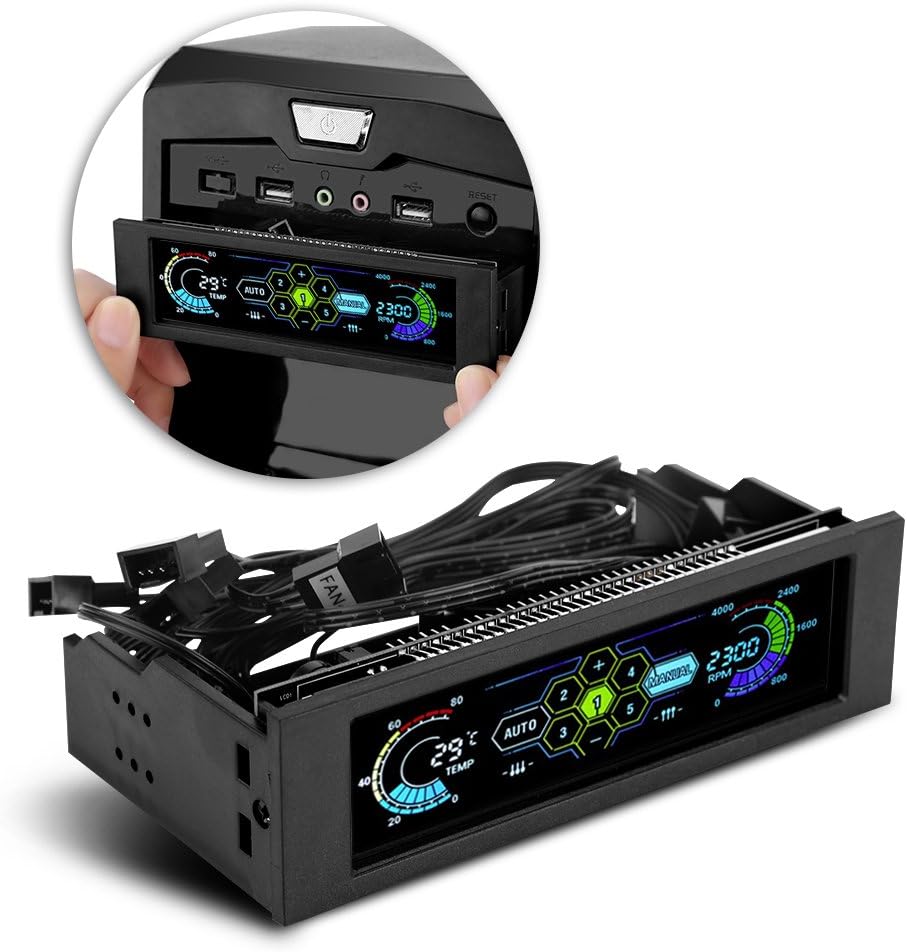


The STW-6041 is a 5.25-inch optical-drive front panel controller that combines four fan channels with a wide LCD and four temperature readings. Its 5.0 rating reflects an especially strong overall result within this product group. For a builder who wants visible monitoring and direct control without opening the case, it offers a useful balance of features and simplicity.
We may earn a commission when you buy through this link, at no additional cost to you.
Its standout qualities are the combination of independent channel control, PWM-based speed adjustment, and an integrated over-temperature warning system. The LCD can show four sets of fan speeds and four sets of temperatures, giving users a broad view of cooling activity. When the temperature exceeds 60 degrees, the temperature display flashes and an alarm sounds, while the system also includes fan anti-seize protection.
Noise control is another practical strength. The PWM circuitry allows fan output to be reduced when full speed is unnecessary, which can help lower high-frequency sound and make the system more comfortable during quieter workloads. The aluminum alloy faceplate, matte finish, and high-specification capacitors also make the controller look more like a deliberate case accessory than an internal utility component.
The main compromise is physical: it requires an available 5.25-inch optical drive bay, and connecting multiple sensors and fans requires additional wiring behind the panel. Even so, those demands are predictable for anyone installing a front-panel accessory. We recommend it for builders who want four monitored channels, clear temperature information, automatic controls, and audible warnings in a conventional desktop chassis.
The four-channel layout is more versatile than a simple one- or two-fan controller. Each channel can be adjusted while the LCD provides four temperature values and four fan-speed readings, helping users identify which cooling zone needs attention.
The over-temperature warning makes the controller more than a display. PWM adjustment supports lower noise when cooling demand is low, while the flashing temperature indicator and audible alarm draw attention to abnormal conditions.
We may earn a commission when you buy through this link, at no additional cost to you.
The V BESTLIFE controller is built for users who want a single front-panel interface for monitoring and controlling several fans. It uses a large LCD, offers automatic and manual modes, and can control the wind speed of five fans based on the computer temperature. Its 4.7 rating indicates a strong showing with a feature set aimed at practical monitoring.
We may earn a commission when you buy through this link, at no additional cost to you.
The display is one of the most useful aspects because it presents temperature, fan speed, the selected alarm temperature, and hard-disk status. That broad information helps users assess more than cooling alone. Manual alarm settings can range from 40 to 90 degrees, and the controller alerts the user if a fan breaks down and can no longer cool the computer.
Automatic and manual operation make the controller adaptable to different preferences. Automatic mode can use measured temperature as the basis for fan adjustment, while manual mode provides more direct intervention. Five fan groups also offer enough capacity for a large airflow configuration, although builders with only two or three case fans may not use that capacity fully.
Its drive-bay format means it will suit full-size and mid-size cases more readily than compact builds without a 5.25-inch bay. Cable routing must also accommodate its sensor and fan connections. Despite that physical requirement, it is a strong fit for builders who prioritize a large status display, five-fan capacity, and clearly reported cooling failures over a minimal controller design.
Showing temperature, fan speed, alarm level, and hard-disk status gives the LCD a broader diagnostic role. That information can help a user decide whether an unusual reading reflects a cooling issue, a fan problem, or another area of system activity.
The mode switch supports different operating preferences. Temperature-based automatic control suits everyday use, while manual control is helpful when diagnosing fan behavior, testing a new arrangement, or maintaining a deliberately low-noise setup.
We may earn a commission when you buy through this link, at no additional cost to you.
The SaiDian controller is a 5.25-inch drive-bay unit for controlling three groups of fans, with a large LCD that shows temperature, fan speed, alarm settings, hard-disk status, date, and time. Its 3.9 rating places it behind the stronger-rated products, but the core feature set remains relevant for builders who need a clear front display and automatic thermal response.
We may earn a commission when you buy through this link, at no additional cost to you.
Its control system supports both manual adjustment and temperature-based operation. The alarm range can be set from 50 to 90 degrees, and the fan-jam alarm sounds when a fan fails and cannot dissipate heat. The display gathers several useful readings into one place, reducing the need to check separate software for basic system awareness.
Connection details are clearly specified: a large four-pin male-and-female power interface, three-pin fan interfaces, and 60-centimeter link cables. Output voltage is listed as 5–12V, input voltage as 5V and 12V, and power as 10W. Those specifications make it especially relevant for conventional three-pin fan configurations rather than systems requiring a broad four-pin PWM hub.
The trade-off is capacity and connector specificity. Three controlled groups are fewer than the five offered by the V BESTLIFE and fewer than the four channels available in the STW-6041. Its 3.9 rating also suggests less consistency than the leading picks. It remains a practical option for a three-fan desktop build that values automatic control, date and time display, and a clearly defined jam alarm.
The controller is designed around three fan groups, which can be appropriate for a focused cooling layout. Users should confirm that their fans use compatible three-pin connections before relying on the listed fan interfaces.
The adjustable 50–90°C alarm range and immediate fan-jam warning make the unit useful for basic protection. Temperature, fan speed, alarm level, and hard-disk status provide a compact operational overview.
We may earn a commission when you buy through this link, at no additional cost to you.
The Thermaltake Commander F6 RGB is the most visually elaborate controller in this roundup, combining a 5.25-inch bay panel, RGB LCD, six control knobs, and six temperature sensors. Its 4.2 rating reflects a capable package, while the expanded channel count distinguishes it from most of the conventional display controllers listed here.
We may earn a commission when you buy through this link, at no additional cost to you.
Six individual voltage control knobs provide direct control over multiple fans, and six sensors can represent different thermal zones. The RGB LCD adds a visual centerpiece to a finished build, while compatibility with up to two Lumi LED strips extends the coordinated lighting concept beyond the controller itself.
Safety features include a warning alarm and short-circuit protection, making the panel more than a decorative interface. The inclusion of six sensors also means it can support more nuanced monitoring than units that report only one or two temperature sources. A one-year manufacturer warranty provides some reassurance for a component intended for long-term installation.
This is also the most involved option. Six knobs, multiple sensors, fan connections, and optional LED strips require greater attention to cable routing and setup. The 4.2 rating is not the highest in the group, so the premium feature set rather than rating alone drives the recommendation. It suits enthusiasts who want a coordinated panel, extensive controls, and extensive thermal monitoring.
Six voltage control knobs offer more direct adjustment points than the four- and five-channel alternatives. That makes the panel appropriate for elaborate airflow configurations where separate fan groups are important to the build.
The RGB LCD and support for two Lumi LED strips give the unit strong visual appeal. Six temperature sensors pair that appearance with broad thermal monitoring rather than making it a display-only accessory.
We may earn a commission when you buy through this link, at no additional cost to you.
The Ejoyous 4-Channel LCD Controller combines a 5.25-inch front panel with independent control for as many as four case fans. Its wide LCD can show RPM and four temperature values, while four temperature sensors allow monitoring in separate areas of the chassis. No numerical customer rating is supplied, so its evaluation here rests on the documented specifications rather than an established rating history.
We may earn a commission when you buy through this link, at no additional cost to you.
The controller supports both automatic and manual regulation. Its four separate controllers enable quick adjustments, and the temperature readings can be used to understand how different parts of the case respond to changing cooling demand. This makes it appealing for users who want more granular control than a single shared speed setting offers.
Safety and acoustic features are unusually comprehensive for a four-channel panel. If a measured temperature exceeds 60°C, the temperature symbol blinks and an acoustic alarm sounds. Fan monitoring can also detect a possible standstill, while PWM circuitry supports quieter operation by matching fan performance to system demand. High-temperature capacitors are intended to support reliable operation inside the case.
The absence of a customer rating is the principal uncertainty. A new or less-reviewed product can still have a strong feature set, but buyers have less historical feedback to evaluate. It is best suited to a builder with a free optical drive bay who values four-zone monitoring, stall detection, and PWM noise control and is comfortable with limited rating history.
Four sensors and four displayed temperature values make it easier to understand airflow differences around the case. Users can identify areas running warmer and adjust the associated fan channel instead of changing every cooling group at once.
PWM regulation allows output to follow cooling demand, reducing unnecessary high-frequency noise. A visible temperature warning, audible alarm, and fan-standstill detection add practical protection if a cooling component stops working.
We may earn a commission when you buy through this link, at no additional cost to you.
The ARCTIC Fan Controller is a ten-port hub designed for builders who want precise, software-assisted management of a large fan setup. It offers individual PWM control for every connected fan, native support for Windows and Linux with Kernel 7.2 or later, and a straightforward mounting system using magnets or adhesive.
We may earn a commission when you buy through this link, at no additional cost to you.
Its major advantage is capacity. Ten ports exceed the four-, five-, and six-channel options among the drive-bay controllers. Each port supports up to 2A, with a 4.5A total maximum. These published limits give builders a clearer basis for planning a multi-fan configuration than a collection of motherboard headers with different output capabilities.
Centralizing fan connections can also simplify the physical build. Instead of relying on numerous extension and Y-splitter cables, users can route fan leads toward one controller. The magnetic and adhesive mounting options make it adaptable to locations where a traditional front panel is not necessary.
The trade-off is that this is not a display-based front panel controller. There is no LCD, temperature readout, or visible warning system, and users need compatible fan-control and monitoring software. Its 4.6 rating is solid, but it serves a different need. Choose it for extensive, software-driven fan control; choose one of the LCD models when immediate visual feedback and a front-panel interface matter more.
Ten individual PWM ports give builders room to create distinct cooling groups or manage numerous case fans individually. The 2A per-port and 4.5A total ratings also provide clear electrical limits for planning.
Native Windows and Linux support allows compatible monitoring and fan-control software to manage the system. Consolidation reduces cable clutter, making the controller particularly useful in complex builds with many fan connections.
We may earn a commission when you buy through this link, at no additional cost to you.
The Noctua NA-FC1 is a compact manual controller for four-pin PWM fans, offering a focused alternative to large LCD panels. Its 4.8 rating is among the strongest in the group, reflecting a simple device built around reliable low-noise control. It is particularly appropriate when the goal is a clean, quiet setup rather than comprehensive monitoring.
We may earn a commission when you buy through this link, at no additional cost to you.
The controller can act as a manual speed reducer or work alongside automatic motherboard fan control. This gives users a flexible way to cap fan speed or establish a preferred range. Its “no stop” mode prevents fans from falling below 300rpm, which helps avoid BIOS fan errors that can occur when a monitored fan appears to have stopped.
A three-way splitter cable is included, allowing up to three fans to be controlled simultaneously. That capacity is modest compared with the six- and ten-port options, but it suits common configurations involving a CPU fan and a small group of case fans. Its compact format also makes it less intrusive inside a case than a full 5.25-inch drive-bay panel.
The obvious limitation is that it has no display, temperature sensor, or automatic mode. Users who need live thermal information and alarm functions will find more value in an LCD controller. Even so, for a deliberate quiet PC using compatible PWM fans, the NA-FC1 offers a refined, uncomplicated control solution backed by a six-year manufacturer warranty.
Manual control gives users direct control over compatible four-pin PWM fans. It can lower unnecessary speed or work in tandem with motherboard control, supporting quieter operation for high-speed PWM fans.
Keeping controlled fans above 300rpm helps avoid BIOS errors associated with an apparently stopped fan. The included three-way splitter also makes a small multi-fan group straightforward to arrange.
We may earn a commission when you buy through this link, at no additional cost to you.
The Delinx 12V PWM Controller is a compact digital module that combines automatic and manual fan control with broad electrical compatibility. Its 4.9 rating is the highest numerical rating among products with published feedback. The included five-channel hub and wide voltage support make it useful for a desktop PC as well as other temperature-regulated projects.
We may earn a commission when you buy through this link, at no additional cost to you.
The kit includes a USB-C PD-to-12V adapter cable with a three-amp on/off switch, a 3.2-foot temperature probe, 3M adhesive, and a five-channel fan hub. Input voltage is listed as 5–30V, output is up to five amps, and compatible fans can use 5V, 12V, or 24V four-pin PWM connections. The compact dimensions also help with integration into confined spaces.
Its digital display switches between real-time temperature and fan speed, with the temperature range listed as -13°F to 248°F and fan speed reaching up to 50,000 RPM. Adjustable low and high temperature thresholds and a 0–27°F hysteresis provide detailed control. If the temperature probe is disconnected, the unit automatically reverts to manual mode so direct PWM control remains possible.
Safety features include over-voltage, over-current, and reverse-polarity protection, plus power-off memory for settings. The trade-off is that this is a module rather than a front-panel device, and a compatible USB-C PD power source is needed. It is an excellent choice for a compact or flexible build where automatic control, protection, and a five-fan hub matter more than a drive-bay display.
Support for 5V, 12V, and 24V four-pin PWM fans makes the controller unusually flexible. The five-amp output ceiling and included five-channel hub support more demanding arrangements than a basic manual controller.
Adjustable start and full-speed temperatures plus selectable hysteresis allow cooling behavior to be tuned. Over-voltage, over-current, reverse-polarity protection, and power-off memory add reliability for long-term use.
We may earn a commission when you buy through this link, at no additional cost to you.
The 6041 Four-Channel Controller uses a 5.25-inch front panel to provide four-fan control, temperature monitoring, and an LCD that also displays date and time. Its 3.2 rating is the second-lowest in the group, so it is not the strongest recommendation on customer feedback alone. Nevertheless, the documented design includes several features PC builders commonly seek.
We may earn a commission when you buy through this link, at no additional cost to you.
The wide LCD shows four sets of fan speeds and four sets of temperatures. That amount of information can make it easier to compare different cooling zones without opening the case or entering another utility. The four-channel arrangement allows a builder to control multiple fans separately, while the front panel keeps the information accessible during normal use.
An over-temperature system flashes the temperature and sounds an alarm when the computer exceeds 60 degrees. Fan anti-seize protection is also listed. PWM circuitry can reduce high-frequency noise by adjusting fan output and lowering fan power when full speed is not required, making the controller relevant to users who want a quieter system without abandoning automatic monitoring.
The principal drawback is its 3.2 rating, which is considerably lower than the leading products. The supplied information also does not state connector types or detailed power limits as clearly as some alternatives, so buyers should verify compatibility before purchase. It is most appropriate for a builder who values the familiar four-channel LCD layout, date and time, and audible heat warnings.
Four fan-speed readings and four temperature values provide a broad snapshot of cooling performance. The date and time display also adds practical information to an otherwise dedicated cooling interface.
Flashing temperature warnings and an audible alarm make overheating visible. PWM adjustment allows the controller to reduce fan output when appropriate, helping lower high-frequency noise during quieter operation.
We may earn a commission when you buy through this link, at no additional cost to you.
The Five-Fans Speed Computer Fan Controller provides a traditional drive-bay interface for controlling five fan groups. It includes a large LCD, automatic and manual modes, a CPU temperature sensor, and an adjustable alarm range. Its 3.4 rating is below the top-rated products, making the documented features and intended use more important to the evaluation.
We may earn a commission when you buy through this link, at no additional cost to you.
The display can show temperature, fan speed, the selected alarm temperature, and hard-disk status. Based on the computer temperature, the controller can regulate the speed of five fan groups. Users can also switch to manual control, which is useful for tuning a specific arrangement or maintaining a preferred noise level.
Alarm temperature can be configured from 40 to 90 degrees. If a fan breaks down and can no longer cool the computer, the controller issues an immediate alert. These protective features make the panel appropriate for systems where the user wants cooling information and fault warnings visible from the outside of the case.
Compared with the V BESTLIFE product, which offers a similar five-fan approach, this controller has a lower rating and less detailed information about connector types and electrical limits. It also requires a compatible 5.25-inch bay. Buyers should check the current product details carefully, but it remains a viable option for a larger desktop chassis that needs five groups under front-panel control.
Five controlled groups offer more flexibility than the smaller three- and four-channel panels. This capacity suits larger airflow configurations in which different intake, exhaust, or cooling areas benefit from separate adjustment.
The LCD brings temperature, fan speed, alarm settings, and hard-disk status into one view. A user-adjustable 40–90°C alarm range and immediate breakdown alert help make cooling faults harder to overlook.
We may earn a commission when you buy through this link, at no additional cost to you.
The right front panel fan controller depends on case layout, fan count, connector type, desired automation, and how much visual feedback you want. These factors help separate a full LCD control panel from a compact manual controller or software-driven fan hub.
Front-panel controllers are not standardized in size or placement. The STW-6041, V BESTLIFE, SaiDian, Thermaltake Commander F6 RGB, Ejoyous, 6041, and Five-Fans models use a 5.25-inch optical-drive-bay format, so the case must provide a suitable bay and the necessary front access. The Noctua NA-FC1 and Delinx module are compact internal alternatives, while the ARCTIC controller mounts with magnets or adhesive. Buyers should measure the intended location and consider whether a drive-bay panel will interfere with the case exterior or existing equipment.
Channel count determines how precisely a system can be managed. The SaiDian controller handles three groups, the STW-6041, Ejoyous, and 6041 provide four, the V BESTLIFE and Five-Fans products support five, the Thermaltake Commander F6 RGB supports six, and the ARCTIC unit provides ten ports. The Noctua NA-FC1 can control up to three fans through its included splitter, while the Delinx package includes a five-channel hub. Count not only the fans you own but also the zones you want to control independently.
Fan compatibility depends on both physical connectors and control method. The Noctua NA-FC1 and Delinx controller explicitly support four-pin PWM fans, while the SaiDian controller lists three-pin fan interfaces. PWM control is valuable when quieter adjustment is a priority because it allows the controller to regulate speed rather than relying only on full or stopped output. Users should also check the controller's supported input voltage, output current, and total power limits against the fans and power connections in their build.
Manual control offers direct, predictable adjustment and is ideal for a small system where the user already understands ideal fan speeds. Automatic modes use temperature readings to vary output as cooling demand changes. Most LCD controllers in this group provide manual and automatic options, while the Noctua NA-FC1 is explicitly a manual speed reducer that can also work alongside motherboard fan control. The Delinx module switches to manual mode if its temperature probe is disconnected, providing a useful fallback.
A front LCD can provide immediate information without opening a case or launching monitoring software. Depending on the model, the screen may show temperature, fan speed or RPM, alarm thresholds, hard-disk status, date, and time. The Thermaltake Commander F6 RGB adds RGB lighting and dedicated knobs, while the Noctua and ARCTIC products intentionally omit displays. Decide whether visual status is essential or whether a small rotary control and separate software are more appropriate for your build.
Cooling failures are easiest to address when they are noticed. Many of the LCD panels include audible alarms for excessive temperature, and the SaiDian, V BESTLIFE, Ejoyous, and Five-Fans models specifically describe fan-breakdown or fan-standstill warnings. These systems can be valuable in a powerful workstation or gaming PC where elevated temperatures need attention. Confirm the stated threshold and consider how loud the alarm is in your environment, especially for a system used in a quiet office or recording space.
Temperature readings are only as useful as their placement. The STW-6041, Ejoyous, and 6041 list four temperature readings or sensors, the Thermaltake Commander F6 RGB includes six, and the Delinx package includes a temperature probe with adjustable low and high thresholds. Sensors placed in intake, exhaust, or component-adjacent areas can reveal different thermal behavior. Route the leads where they will not interfere with fans, drive cages, or cable closures, and secure them consistently for repeatable readings.
More channels, sensors, displays, and lighting also mean more connections. The Thermaltake Commander F6 RGB offers the broadest conventional panel feature set, while the ARCTIC controller manages ten ports through software. The compact Noctua and Delinx products reduce front-panel complexity but require different mounting and power arrangements. Consider your comfort with cable routing, software configuration, and case access. A simpler controller that you understand and can maintain may be more valuable than a feature-rich panel that is difficult to configure.
Begin by identifying the controller's power input, fan outputs, temperature sensors, and any LED connections. With the computer powered off, install the panel or module in its intended location, connect the compatible power source, and attach fans according to their connector type. Arrange sensor leads and fan cables behind the drive cage or inside the chassis so they remain clear of rotating components and do not obstruct airflow.
Power the system and set a conservative fan speed before enabling automatic regulation. Use manual mode to confirm that each connected fan starts, responds to adjustment, and reports a sensible operating condition. On models with temperature thresholds, set low and high limits appropriate for the intended workload, and confirm that alarms can be heard or seen from the user's normal position. If using software-controlled hardware, install the compatible monitoring and fan-control utilities before relying on automatic profiles.
For ongoing care, inspect cables and connectors after any chassis maintenance, and periodically verify that the displayed temperatures still make sense. Clean around the LCD and buttons with a dry, soft cloth rather than liquid cleaners. Do not route leads where they can contact sharp metal edges, and avoid placing sensors directly against heat sources if the goal is to measure circulating case temperature. Regular visual checks can reveal loose connections, stopped fans, or a sensor that has shifted.
A front panel fan controller is a device that lets a PC user monitor or adjust connected case fans from an accessible panel. Depending on the model, it may provide manual knobs, an LCD, temperature sensors, automatic cooling profiles, PWM control, and audible alarms. Some full-size controllers install in a 5.25-inch drive bay, while compact units mount inside the case.
No. The Noctua NA-FC1 and Delinx module explicitly support four-pin PWM fans, and several LCD panels describe PWM circuitry. The SaiDian controller, however, lists three-pin fan interfaces. Buyers should verify the exact connector type and control method of every fan before connecting it to a controller.
That depends on the model and its wiring requirements. A multi-channel controller may permit unused channels, but the supplied information does not explicitly confirm this for every product. A simpler approach is to choose a controller with a channel count close to the number of fans and groups in the planned build, while also following the included connection instructions.
Manual control keeps a selected speed or output level unless the user changes it. Automatic control adjusts fan behavior according to temperature readings and configured thresholds. Automatic operation is convenient when system load changes frequently, while manual control can be useful for a stable setup or for deliberate acoustic tuning.
It is advisable to retain motherboard monitoring because a front panel controller may not report every internal condition or support every software feature. The controller adds a convenient interface, but users should still verify startup behavior, temperature readings, and fan operation within the operating system's preferred monitoring tools.
No. It requires a compatible 5.25-inch optical-drive-bay opening and sufficient clearance for the panel, wiring, and sensors. Compact cases and builds without a free bay may be better served by an internal controller such as the Noctua NA-FC1, Delinx module, or ARCTIC fan hub.
The appropriate number depends on how many distinct thermal zones need observation. One sensor may be adequate for a simple system, while four or six can help compare intake, exhaust, and component-adjacent areas. The Thermaltake Commander F6 RGB includes six sensors, while the STW-6041, Ejoyous, and 6041 provide four readings or sensor connections.
Use PWM-capable fans and a controller that supports PWM adjustment. Set a sensible minimum speed that preserves cooling, establish automatic thresholds for higher loads, and avoid setting unnecessary fans to maximum output. The Noctua NA-FC1 also provides a no-stop mode that keeps controlled PWM fans above 300rpm, which can help avoid BIOS fan errors.
The STW-6041 stands out as the most balanced featured option, combining four channels, four temperature readings, PWM adjustment, a wide LCD, and over-temperature alerts. The Noctua NA-FC1 offers a simpler path to quieter PWM fan control, while the Thermaltake Commander F6 RGB provides the most elaborate premium panel with six channels, six sensors, RGB lighting, and LED-strip compatibility.
Prioritize case fit first, followed by connector type, channel count, and the amount of automation you actually need. Builders wanting visible status and front-panel warnings should focus on the LCD models, while those seeking a streamlined setup may prefer the Noctua. Larger or unconventional projects can consider the ARCTIC ten-port hub or the Delinx module because they support more flexible voltage and fan configurations.
Finally, check the latest product listing, included accessories, electrical requirements, and compatibility details before ordering. Controller designs, bundles, and availability can change, and prices can fluctuate. Confirm that the selected model matches the fans, sensors, case layout, and monitoring software used in your particular build.

