Rii RK907
4.5Editor score
Ultra-slim wired design
Quiet low-profile keys
Splash-resistant construction
Mac and PC compatibility
Lightweight Keyboard guide comparing 10 portable models for travel, small desks, quiet typing, wireless flexibility, mobile work, and full-size convenience.
A lightweight keyboard can make a crowded desk feel more spacious, fit into a carry-on without adding bulk, or provide a comfortable way to control a tablet from across a room. The best model balances portability with usable key sizes, dependable connectivity, sensible battery life, and enough layout convenience for the way you work.
We compared ten compact and slim keyboards across wired, 2.4GHz wireless, and Bluetooth designs. The list considers size, weight, typing layout, backlighting, device switching, noise level, battery life, foldability, gaming features, and the compromises that come with reducing the number of keys. Every model serves a distinct use case.
The selections reveal that lightweight does not have to mean impractical. Some retain a number pad, others prioritize near-silent typing, and several fit directly into a travel bag. Ratings and specifications reflect the available product information, while prices and promotions can change, so check the current listing before purchasing.
4.5Editor score

4.4Editor score

4.4Editor score
This side-by-side comparison highlights the major differences among compact wired keyboards, full-size wireless models, foldable travel keyboards, multi-device Bluetooth designs, gaming boards, and a touchpad-equipped TV keyboard.



The GEODMAER 65% Gaming Keyboard is a compact 68-key board aimed at gamers who want a smaller footprint without giving up arrow keys, media controls, or illumination. It carries a 4.3 rating and distinguishes itself with a detachable USB-C connection, a no-conflict mode for 26 keys, and a relatively traditional 65% arrangement. Its dual-tone keycaps are designed to remain legible when the backlight is active.
We may earn a commission when you buy through this link, at no additional cost to you.
One of the most useful features is the lighting system. Users can switch between always-on and breathing modes, adjust brightness, and alter the breathing effect's frequency with dedicated Fn combinations. The keyboard also provides 11 media buttons, a Win-key lock to reduce accidental interruptions, and a claimed keystroke lifespan exceeding 10 million. These details make it more purpose-built for gaming than a bare-bones office keyboard.
The central compromise is its membrane construction. It provides a quieter, softer experience and an imitation mechanical feel, but it will not satisfy someone seeking the distinct feedback of a true mechanical switch. The wired design is another limitation: it avoids battery management and connection pairing, yet it adds a cable to the bag and prevents direct use with a phone or tablet.
This is a strong option for a desktop or laptop user who plays games, likes RGB-style illumination, and wants to free desk space. It also works well for students or office workers who need a compact typing area and media shortcuts. Choose it when affordability, a small footprint, and gaming-oriented functions matter more than multi-device portability.
The 68-key layout preserves separate arrow keys while removing the number pad, giving it a useful balance for both play and daily tasks. The compact dimensions make it easier to position in front of a laptop, and the 11 media buttons reduce reliance on mouse clicks for common commands.
Adjustable brightness and breathing effects make the board easier to use in dim rooms, while the no-conflict function supports simultaneous inputs in 26 keys. The lockable Win keys can also prevent accidental activation during fast gameplay.
We may earn a commission when you buy through this link, at no additional cost to you.
The Logitech Pebble Keys 2 K380s is a slim Bluetooth keyboard for people who switch among a computer, tablet, and another Bluetooth-capable device. Its 4.3 rating reflects a broadly capable design with a familiar laptop-style feel, a three-year stated battery life, and Logitech's Easy-Switch controls. The round, scooped keys offer a visually distinctive alternative to conventional square keycaps.
We may earn a commission when you buy through this link, at no additional cost to you.
Device flexibility is the central strength. The keyboard can connect to up to three devices across Windows, macOS, iPadOS, and ChromeOS, then move between them with a single press. Fn shortcuts provide quick access to search, screen capture, and the emoji menu, and the ten Fn keys can be personalized through the Logi Options Plus app. The included batteries and automatic sleep mode further reduce maintenance.
Its low-profile construction is portable, but it does not include a numeric keypad, so spreadsheet and accounting users may prefer one of the full-size Arteck models. The design also lacks illuminated keys, which can be a drawback in low-light offices. Its slim body prioritizes aesthetics and easy packing rather than the stronger structure associated with a metal-frame desktop board.
This model is ideal for students, frequent travelers, and anyone who regularly moves between a laptop and tablet. It is especially useful where a full-size keyboard would be cumbersome and where quiet operation matters. Pick it for multi-device convenience, understated styling, and a familiar typing layout, but choose another option if a number pad or backlighting is essential.
Bluetooth pairing and Easy-Switch buttons make it straightforward to move from a work laptop to a personal tablet. The broad operating-system support is useful for users whose devices do not all belong to the same ecosystem.
Scooped round keys and a low-profile body reproduce a familiar laptop-style typing experience. The quiet operation is well suited to shared rooms, while the stated three-year battery life reduces the likelihood of battery-related interruptions.
We may earn a commission when you buy through this link, at no additional cost to you.
The Arteck 2.4G USB Wireless Keyboard Full Size combines a complete number pad and navigation cluster with a relatively thin, portable body. Its 4.4 rating and 14.9-ounce listed weight make it a practical choice for users who usually prefer a full-size layout but want less bulk than a traditional office keyboard. The stainless-steel construction gives it a sturdy, premium-looking foundation.
We may earn a commission when you buy through this link, at no additional cost to you.
Setup is straightforward: the nano USB receiver plugs into a compatible computer, while the built-in rechargeable lithium battery is rated for up to six months under a usage pattern of two hours per day. Low-profile keys are designed to deliver quiet, comfortable typing, and the full-size arrangement includes a number pad, arrow keys, and shortcut keys. A USB charging cable is included with the package.
The main limitation is connection method. It uses a 2.4GHz USB receiver rather than Bluetooth, so it cannot hop among phones, tablets, and computers without changing the receiver. You also need an available USB-A port, although the nano receiver is small and easy to carry. The included rechargeable battery eliminates disposable battery purchases but requires periodic charging.
This keyboard is best for travelers, students, and home-office users who need number-pad functionality but want a slimmer alternative to a conventional desktop board. It also suits anyone who values a quiet keyboard and dislikes the charging demands associated with an internal battery in a portable device. For multi-device work, choose a Bluetooth model instead.
Unlike most mini keyboards, this model retains the numeric keypad and dedicated navigation area. That makes it easier to transfer from a full-size office keyboard without rebuilding habits for spreadsheets, data entry, or calculator work.
The 2.4GHz connection offers a stable cable-free desktop experience, and the built-in battery can last up to six months under the stated usage conditions. The nano receiver stores close to the keyboard and adds little bulk to a travel bag.
We may earn a commission when you buy through this link, at no additional cost to you.
The ProtoArc XK01 is a tri-fold full-size keyboard built for people who want desktop-style key coverage without carrying a rigid keyboard everywhere. It includes 105 keys, a number pad, a function row, and dedicated navigation keys. Its 4.3 rating reflects a capable travel design that stands apart from the much smaller compact boards in this roundup.
We may earn a commission when you buy through this link, at no additional cost to you.
The central benefit is its folding construction. The keyboard folds to 8.46 by 4.68 by 0.78 inches, and its internal aluminum hinges are tested for more than 10,000 folds. A no-clip design helps prevent sections from catching while it is opened or closed. Despite the fold, the 0.65-inch keycaps provide a usable desktop-style typing surface.
Connectivity is handled through Bluetooth 5.1, allowing the keyboard to pair with up to three devices and switch using a dedicated button. It is rechargeable through USB-C, and the stated auto-sleep standby can extend to 150 days. Quiet scissor switches suit coffee shops, offices, and shared environments, while 12 shortcut keys provide access to media and function controls.
This is a strong pick for frequent travelers and remote workers who need a number pad. It is less suitable for a permanently crowded desk where a rigid low-profile keyboard would be more convenient, or for users who frequently type at speed without first adjusting to the sectioned layout. It is also ideal for shared workstations, where a full-size board that can be packed away is useful.
The 105-key arrangement retains the number pad, function row, and navigation cluster, so spreadsheet work and desktop shortcuts remain familiar. Users do not need to sacrifice essential full-size functions simply because the keyboard is designed to fold.
The internal aluminum hinges are tested for 10,000-plus folds, and the no-clip construction helps keep the sections aligned. It should still be opened and closed along its designed sections rather than twisted, which will help preserve the mechanism over time.
We may earn a commission when you buy through this link, at no additional cost to you.
The TECKNET 2.4G Wireless Keyboard Mini is among the lightest full-featured options in the guide, with a listed weight of 10.4 ounces and dimensions of 11.5 by 4.9 inches. It carries a 4.4 rating and focuses on uncomplicated wireless typing, media hotkeys, and broad compatibility with Windows, Mac, Chrome OS, and Linux computers.
We may earn a commission when you buy through this link, at no additional cost to you.
Its 2.4GHz receiver offers a stable connection up to 32.8 feet, making it suitable for controlling a desktop from across a room or working with a laptop placed on a stand. The keyboard uses two AAA batteries, and its stated battery life is up to 12 months. The receiver is stored on the back beside the battery compartment, so the keyboard can be packed without losing the small USB component.
The most important adjustment is the Enter-key layout. Unlike a standard full-size board, this compact model uses a different arrangement that may take some time to become familiar. It also does not support Bluetooth, meaning it cannot connect directly to many phones or tablets and requires a USB-A port on the computer.
This is a compelling lightweight choice for anyone who wants a simple wireless keyboard for a shared desk, home office, or laptop setup. Its portability and stated battery life are particularly attractive. People who type highly specialized shortcuts or work across several operating systems may appreciate its compatibility, while mobile-first users should choose a Bluetooth design.
At a listed 10.4 ounces, the TECKNET is easy to carry between rooms, offices, or travel destinations. Its small footprint leaves more open desk space than a conventional keyboard while retaining dedicated media controls.
Two AAA batteries can provide up to 12 months of operation according to the stated estimate. The 2.4GHz receiver works with Windows, Mac, Chrome OS, and Linux systems, making it a flexible choice for mixed-device workspaces.
We may earn a commission when you buy through this link, at no additional cost to you.
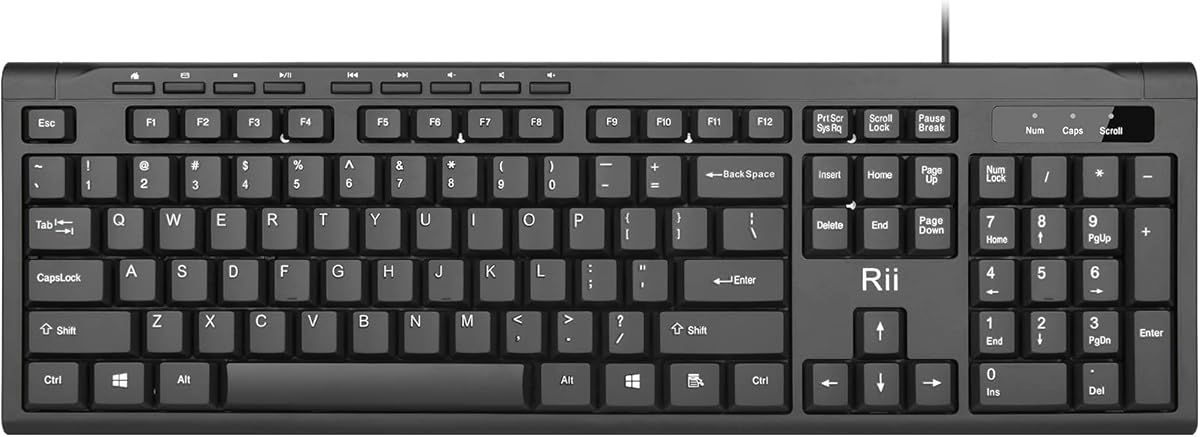
The Rii RK907 is a straightforward ultra-slim wired keyboard built for office work, home use, and anyone who wants a clean typing surface without a complicated connection process. Its 4.5 rating is the highest among the ten products listed, reflecting a well-liked combination of low-profile keys, quiet operation, and practical construction.
We may earn a commission when you buy through this link, at no additional cost to you.
The keyboard connects through a standard USB plug and works with Mac and PC systems. Its low-profile keys are designed to create a quieter, more comfortable typing experience, while the desktop-oriented layout supports extended work sessions. Splash resistance adds a practical layer of protection against accidental moisture, and the slim chassis remains far less imposing than a full-height office keyboard.
Its wired nature is both a strength and a limitation. There is no charging routine, pairing process, or receiver to forget, and the connection cannot suffer from wireless interference. However, the attached cable adds a loose item to manage and means the keyboard is less convenient when moving between locations without a computer.
This model is an excellent choice for a fixed workstation where simplicity, quiet typing, and a low-profile appearance matter. It can also be carried to a shared office because it takes little space, provided a suitable USB port is available. It is not the most natural option for a café workflow involving a phone, a space-saving laptop setup, or a user who wants a completely wireless desk.
The wired USB connection removes wireless pairing and battery management from the equation. That predictability makes the RK907 attractive for office tasks, reception desks, and other frequently used computer locations.
The shallow keys help reduce overall visual and physical desk bulk while supporting quiet typing. Splash resistance adds useful protection for a busy work environment where an accidental drink or damp hand is possible.
We may earn a commission when you buy through this link, at no additional cost to you.
The Logitech MX Keys Mini is a premium compact wireless keyboard designed for productivity users who work across several computers and want illumination without the bulk of a full-size board. Its 4.4 rating reflects a polished feature set, including smart backlighting, Bluetooth Low Energy, device switching, and integration with Logitech's broader multi-computer workflow.
We may earn a commission when you buy through this link, at no additional cost to you.
The keyboard's most distinctive feature is its adaptive lighting. Keys illuminate when the user's hands approach and adjust to changing room conditions, removing the need to manually manage a fixed backlight. Smart Keys add convenient controls for dictation, microphone mute, and emoji. Pairing supports up to three devices across nearly any operating system, allowing a single press to move between them.
The MX Keys Mini can also work across multiple computers, pairing with an MX Master 3 or MX Anywhere 3 for a fluid workflow. USB-C recharging provides up to 10 days of use with lighting on or as much as five months when lighting is off. Its minimalist body, rounded finger-oriented keys, and compact footprint balance portability with a polished, desktop-ready appearance.
This is the top choice for professionals, creators, and multi-device users who value smart features and a refined typing experience. The absence of a number pad makes it less suitable for dedicated spreadsheet entry, and the premium construction comes with a higher price than simpler models. It is ideal when a desk must remain elegant, uncluttered, and ready for work across several computers.
Proximity sensing activates the illumination when hands approach, while automatic adjustment accounts for changing light levels. This provides visibility without requiring repeated manual brightness changes during the workday.
Three-device Bluetooth switching and multi-computer support make the keyboard useful for people who divide work among a laptop, desktop, and another system. Dedicated Smart Keys further streamline communication and system-control tasks.
We may earn a commission when you buy through this link, at no additional cost to you.
The ProtoArc XK04 is purpose-built for people who want to type physically on a phone or tablet without carrying a full-size keyboard. It has a 4.4 rating, a listed weight of 7.8 ounces, and a two-fold design that compresses into a pocketable package. When open, it measures 10.76 by 4.07 inches and is optimized for mobile devices.
We may earn a commission when you buy through this link, at no additional cost to you.
Bluetooth 5.1 allows connection to up to three devices, with dedicated keys for switching without repeated pairing. The listed 33-foot range gives it practical reach in a café, living room, or classroom. USB-C recharging and an auto-sleep standby of up to 150 days support the travel-oriented design, while the integrated PU leather cover protects the keyboard from scratches.
The compact layout is the main limitation for conventional computer work. It may feel restrictive for long documents, spreadsheet tasks, or users accustomed to a number pad. It also needs software that recognizes an external keyboard, and some mobile tasks may not expose every key or support desktop-style shortcuts.
Choose the XK04 for air travel, commuting, café work, or a shared living room where space is minimal. Its folding format is especially useful for a phone or tablet user who wants to answer long messages, draft notes, or work on a document away from a full desk. For heavy desktop typing, select the larger ProtoArc XK01 or a full-size Arteck board.
Physical keys make text entry on a phone or tablet faster and more accurate than an on-screen keyboard for many users. The 10.76-by-4.07-inch open size provides enough separation for touch typing while remaining suitable for an airplane tray or café table.
The two-fold structure reduces the footprint, and the integrated PU leather cover shields the keys during transport. At a listed 7.8 ounces, it adds little weight to a handbag, briefcase, or carry-on.
We may earn a commission when you buy through this link, at no additional cost to you.
The Arteck 2.4G Wireless Keyboard Stainless Steel Ultra Slim offers a full-size key arrangement in a particularly thin and light body. Its listed dimensions are 11.1 by 5.3 by 0.16 inches, and it weighs 10.2 ounces. The 4.4 rating reflects a strong combination of portability, sturdy construction, and familiar desktop functionality.
We may earn a commission when you buy through this link, at no additional cost to you.
The stainless-steel shell provides a durable, substantial feel despite the low profile. Low-profile keys are designed to remain quiet and comfortable, while the full-size layout allows users to retain arrow, navigation, and number-pad functions. The built-in rechargeable lithium battery is stated to last up to six months when used for two hours per day.
A nano USB receiver handles the 2.4GHz connection, providing a simple cable-free setup with compatible computers. The receiver occupies a USB port, and the keyboard does not offer Bluetooth pairing for phones or tablets. The included USB charging cable and welcome guide complete the package, along with a stated 24-month warranty.
This model is a sensible option for people who want the complete layout of a desktop keyboard in a noticeably slimmer form. It works well for travel, home offices, and shared workstations where a full-size board is needed but easy storage is important. Those who regularly switch among mobile devices should favor a Bluetooth keyboard, while users prioritizing a numeric pad and low weight will appreciate this design.
Keeping a number pad and full-size key coverage avoids the learning curve associated with smaller layouts. It is a useful middle ground for travelers who need to work with numbers and spreadsheets as well as ordinary text.
The steel body offers a sturdy feel while remaining only 0.16 inches thick. It takes up less visual and physical space than a traditional keyboard and weighs just 10.2 ounces according to the listed specifications.
We may earn a commission when you buy through this link, at no additional cost to you.
The Logitech K400 Plus is a wireless touch keyboard designed primarily for a PC connected to a television. It has a 4.4 rating and offers a distinctive combination of familiar typing keys and a large integrated touchpad, allowing users to navigate media interfaces without reaching for a separate mouse.
We may earn a commission when you buy through this link, at no additional cost to you.
The Logitech Unifying receiver provides a straightforward connection through USB and supports a wireless range of up to 33 feet. Quiet keys and the integrated touchpad are useful when the computer is located on a media cabinet or entertainment stand. The battery is rated for up to 18 months, and an on/off button helps extend that interval when the keyboard is not being used.
Compatibility extends across Windows 7, Windows 8, Windows 10 and later, Android 7 or later, and Chrome OS. The design is spill-resistant, and the included receiver may be found in the packaging or in a paired mouse's battery compartment depending on how the product is supplied. A separate Logitech Options configuration is available for adjusting controls.
This keyboard is ideal for a living-room PC, streaming setup, or casual smart-TV browsing. It is not the strongest choice for intensive desktop productivity because the touchpad cannot match the precision of a mouse and the keyboard lacks the compact multi-device flexibility of newer models. Its strength lies in relaxed couch-distance media control and dependable wireless convenience.
The large touchpad provides room for media-menu selection and pointer movement without a separate mouse. It is especially convenient for a PC connected to a television, where the screen is farther away than a normal workstation.
The stated 18-month battery life minimizes maintenance in a setup that may not be used every day. The on/off switch provides further control over power use, while quiet keys help reduce noise during evening viewing.
We may earn a commission when you buy through this link, at no additional cost to you.
The best lightweight keyboard depends on where it will be used, how you connect, and which keys you refuse to give up. Consider footprint, weight, layout, connection method, power management, sound, and travel requirements before choosing.
A keyboard is lightweight only when both its dimensions and carrying requirements are considered. Compact 65% and mini models remove the number pad and reduce desk usage, while full-size designs preserve every key but usually require a larger bag. Foldable models are especially useful when a rigid keyboard would be inconvenient to transport. Listed weights range from 7.8 ounces for the ProtoArc XK04 to 14.9 ounces for the Arteck full-size model, illustrating that a full-size layout can still be highly portable.
Choose the smallest layout that will not disrupt your work. If you regularly enter numbers, a full-size or folding model is worth the extra space.
Wired keyboards provide immediate, dependable operation and never require battery charging, but the cable must be carried and can restrict placement. 2.4GHz wireless models use a nano receiver and often pair easily with a computer, although the receiver consumes a USB port. Bluetooth eliminates the receiver and allows easier switching among computers, tablets, and phones, but compatibility and battery requirements deserve closer attention.
Match the connection to your devices. Favor Bluetooth for mixed ecosystems and 2.4GHz for a single computer, or wired operation for a permanent desk.
The phrase lightweight keyboard can describe anything from a pocket-sized mobile board to a slim full-size model. A 65% layout retains arrow keys while removing the number pad, a mini keyboard saves the most space but may rearrange the Enter key, and a full-size layout includes a numeric keypad and navigation cluster. Foldable designs can retain 105 keys, but their segmented layout may feel unfamiliar initially.
List the keys you use most before buying. Avoid saving the greatest amount of space if that change would make daily work frustrating.
Battery expectations vary by design. The Logitech K400 Plus is rated for up to 18 months, the TECKNET mini keyboard for 12 months, and the Arteck rechargeable models for up to six months under a stated two-hours-per-day usage pattern. USB-C models make charging more convenient, while models using AAA batteries are simple to refill but require spares.
Consider how often you will remember to charge a keyboard. Long battery estimates are especially helpful for infrequent travel use.
Lightweight construction does not dictate how noisy a keyboard is. Membrane keys, scissor switches, and low-profile office keys are generally presented as quiet options, but the perceived sound also depends on typing force and the surface beneath the keyboard. Gaming models may provide a more pronounced mechanical impression and stronger visual feedback rather than prioritizing silence.
Use a keyboard in a shared room if quiet operation matters. Choose a membrane or scissor-switch model for meetings, libraries, and late-night work.
Bluetooth keyboards that can store multiple device profiles are valuable for people who alternate between a work laptop, personal computer, and tablet. The Logitech Pebble Keys 2, MX Keys Mini, and both ProtoArc folding keyboards support three-device switching, whereas the Arteck and TECKNET boards rely on a 2.4GHz receiver. A multi-device keyboard reduces the need to carry several input devices.
Look for dedicated switching keys and confirm that every device you own supports the same connection technology. Convenience is only useful if your devices are compatible.
Backlighting improves visibility in dim environments and is a central feature of the GEODMAER gaming keyboard and Logitech MX Keys Mini. The GEODMAER offers brightness controls, breathing modes, media buttons, and no-conflict support across 26 keys, while the Logitech adjusts its illumination automatically. Other models prioritize slimness, silence, or portability without lighting.
Choose illuminated controls for gaming or low-light work. If lighting is unnecessary, a simpler keyboard may better match your priorities.
A travel keyboard should be easy to pack and protected during transit. The ProtoArc XK04 includes a folding PU leather cover, and the XK01 uses tested aluminum hinges with a no-clip folding design. Packed-in receiver storage is also useful, as seen with the TECKNET and Arteck models. Wired boards generally need a separate cable pouch or a compartment with enough space for a coiled lead.
Check the included receiver, charging cable, and protective materials before buying. Convenient storage can matter as much as the keyboard's listed weight.
Begin by placing the keyboard on a flat, stable surface and allowing enough wrist movement to remain comfortable. Connect a wired board directly, insert the supplied 2.4GHz receiver into a compatible USB port, or place a Bluetooth keyboard into pairing mode and select it from the device's Bluetooth menu. Multi-device models can then be associated with their dedicated switching buttons.
For travel, power down wireless keyboards before packing them, store any USB receiver in its designated compartment, and avoid placing heavy objects on the keycaps. Foldable models should be folded along their intended sections, while rigid compact boards fit best in a padded sleeve. Do not wrap a powered-on or recently charged battery inside a sealed bag for an extended period.
Keep the keyboard free of dust, crumbs, and sticky residue by disconnecting it or switching it off when cleaning. Use a soft microfiber cloth for the surface and a soft brush between the keys. Avoid pouring liquid directly onto the board, and let any liquid on the keycaps dry before reconnecting it. Charge rechargeable models at a suitable time and keep spare batteries available for models that use replaceable cells.
The ProtoArc XK04 is among the most compact because it folds in two and has a listed weight of 7.8 ounces. The TECKNET mini keyboard is also highly portable at a listed 10.4 ounces, but it retains a fixed non-folding design. Consider not only weight but also whether the keyboard fits comfortably in your bag and whether its small layout suits your typing habits.
Yes, if you need a number pad and familiar desktop spacing. The Arteck full-size model combines a complete layout with a listed weight of 14.9 ounces, while the ProtoArc XK01 folds a 105-key layout into a smaller package. Both are more substantial than mini boards, but they reduce the need to adapt to unfamiliar key arrangements.
Choose Bluetooth if you want to connect easily to multiple devices, including tablets and phones. A 2.4GHz model is often simpler for one computer and provides a dedicated receiver without pairing. Check the available USB ports and operating-system compatibility before deciding, since a 2.4GHz keyboard generally needs a USB-A receiver.
A 65% keyboard can be well suited to gaming when it includes useful controls and anti-ghosting support. The GEODMAER 65% model provides separate arrow keys, 26 no-conflict keys, media buttons, adjustable backlighting, and a Win-key lock. Players should still confirm their preferred controls and ensure the layout matches their game habits.
Both are low-profile mechanisms designed to keep keyboards slim, but they feel and operate differently. The GEODMAER uses membrane construction with an imitation mechanical feel and quiet operation, while the ProtoArc XK01 uses scissor switches intended for controlled, low-noise typing. The best choice depends on whether you favor a softer feel, a more defined travel experience, or gaming-oriented feedback.
Many offer long stated battery life, but the estimate depends on the model and usage. The Logitech K400 Plus is rated for up to 18 months, the TECKNET for 12 months, and the rechargeable Arteck models for up to six months under stated conditions. USB-C models are convenient, while replaceable-battery designs are useful when access to charging is limited.
Bluetooth models are the most straightforward because they can connect directly to compatible mobile devices. The Logitech Pebble Keys 2, Logitech MX Keys Mini, and both ProtoArc folding keyboards support Bluetooth device switching. Some mobile systems restrict third-party keyboard features, so verify compatibility and app support before making a purchase.
A wired model is generally better for a permanent desk because it needs no charging and cannot lose its connection. A wireless keyboard is more convenient when you move between devices, control a computer from a distance, or want a cleaner cable-free workspace. The Rii RK907 is a simple wired option, while the Arteck, TECKNET, Logitech, and ProtoArc models offer wireless flexibility.
The strongest general-purpose choice in this guide is the Logitech MX Keys Mini for users who value adaptive lighting, multi-device switching, and refined productivity features. The Arteck 2.4G Full Size provides a more practical balance for anyone who needs a number pad, while the Rii RK907 delivers a quiet, reliable, wired experience at a budget-friendly level.
Prioritize the feature that would cause the most daily frustration: a number pad for spreadsheet work, silent keys for shared spaces, Bluetooth for mobile devices, or foldability for frequent travel. A keyboard with fewer keys may feel more portable, but it is not automatically better if its layout forces constant adjustment or removes a function used every day.
Before ordering, check the current product listing for the exact dimensions, included accessories, supported systems, and latest specifications. Prices, promotions, and availability can change, so the final value of any pick depends on what is available when you buy.