
Long Stylus Pen for Touch-Screen
4.7Editor score
Extended 185mm aluminum body
Five mesh nibs included
Matte colored metal construction
Battery-free universal operation
Discover the best Mesh Tip Stylus picks for note-taking, drawing, scrolling, and everyday touchscreens, with features, compatibility, and value compared.
A mesh tip stylus offers a soft alternative to conventional rubber nibs, combining smooth conductivity with a screen-friendly woven fiber surface. The right model can make writing, drawing, scrolling, and tapping feel more controlled, whether you use a phone, tablet, laptop display, e-reader, or Nintendo Switch. Tip size, body design, and compatibility matter as much as the advertised precision.
This guide compares ten mesh tip styluses and replacement-tip packs across the features supported by their product information. It considers tip flexibility, touch response, grip, length, replacement options, device compatibility, and intended uses such as classroom sharing, everyday note-taking, detailed drawing, or maintaining an existing stylus. Complete pens and tips-only accessories are clearly distinguished.
The first three recommendations cover the strongest combinations of usefulness, design, and assortment for different needs, while the full list evaluates every option in rank order. Ratings and product details can change over time, and marketplace pricing also fluctuates, so readers should verify the current listing, device compatibility, and included accessories before purchasing.
4.7Editor score
4.6Editor score

4.5Editor score
This side-by-side comparison distinguishes complete mesh tip styluses from replacement-tip packs and highlights the most useful differences in tip configuration, body design, included quantities, and device support.


The Styluslink Stylus Pen for Touchscreen is a five-pack of complete, battery-free styluses built around two fiber tip sizes on every pen. Its 4.6 rating reflects a well-regarded balance of smooth touch response, broad compatibility, and useful accessories. The smaller 0.18-inch end supports more deliberate tapping and note-taking, while the 0.24-inch end is better suited to broad strokes, navigation, and casual sketching.
We may earn a commission when you buy through this link, at no additional cost to you.
The set's strongest feature is its flexibility. Each lightweight alloy pen has a tip at both ends, eliminating the need to carry multiple tools for different tasks. It works with capacitive devices including iPhones, iPads, Android phones and tablets, Kindles, Microsoft Surface devices, Chromebooks, and Nintendo systems. Ten additional replacement pencil nibs are included, which reduces the inconvenience of a dirty or worn primary tip.
Comfort receives particular attention in the product information, with an ergonomic shape intended to reduce fatigue during longer writing sessions. The fiber nibs are described as soft and sensitive, while their small diameters should make them suitable for interface navigation and more precise marks. As with many woven fiber tips, users may notice a slightly different drag and initial resistance compared with a conventional rubber nib.
This is the most balanced recommendation for anyone who wants several pens, two tip sizes, and replacement nibs without moving to separate accessories. It is especially useful for households, classrooms, offices, or anyone who alternates among a phone, tablet, and touchscreen laptop. The main caveat is that additional replacement tips are not included beyond the ten supplied, but the initial package is already generous for regular use.
Using the narrow end for menus, handwriting, and detailed marks while reserving the wider end for scrolling and drawing creates a practical division between precision and smooth movement.
The five-pen assortment makes it easy to place one in a bag, desk, classroom, vehicle, or home device, reducing the chance of leaving the only available stylus behind.
We may earn a commission when you buy through this link, at no additional cost to you.
This product is a ten-pack of replacement mesh fiber tips rather than a complete stylus. It carries a 4.6 rating and is intended for owners of compatible passive capacitive pens who want a fresh, responsive tip without replacing the entire pen body. The woven fiber is presented as more conductive and precise than ordinary rubber nibs, which can make it worthwhile for writing, drawing, and general navigation.
We may earn a commission when you buy through this link, at no additional cost to you.
Soft elasticity helps the replacement tips maintain consistent contact with a touchscreen, and the manufacturer specifically describes them as safe for use with screen protectors. They are listed as compatible with GUUGEI stylus models B091J7GG77, B0B6C74D78, and B0BPSLVWZK. The product information also says that the supplied size parameters can be compared with other stylus brands, making the pack potentially useful beyond the explicitly named models.
The main consideration is fit. A replacement nib that does not match the pen's diameter, tip shape, or attachment method may not sit securely or may not provide the intended touch response. The pack also cannot serve buyers who are simply looking for their first stylus, since no pen body is included. Checking the existing pen and the published dimensions is therefore essential before buying.
For someone whose favorite pen still feels comfortable but whose tip has become rough, sluggish, or less precise, this is an economical and focused solution. It is less suitable for general shoppers seeking a ready-to-use accessory. Its value comes from preserving a compatible pen and having ten spares available for future wear or contamination.
A fresh conductive mesh surface can restore smooth gliding and accurate registration when a pen body remains comfortable but its original tip has become worn or dirty.
Compare the tip dimensions and attachment style with the existing stylus because similar-looking fiber tips may not share the same diameter or fit.
We may earn a commission when you buy through this link, at no additional cost to you.
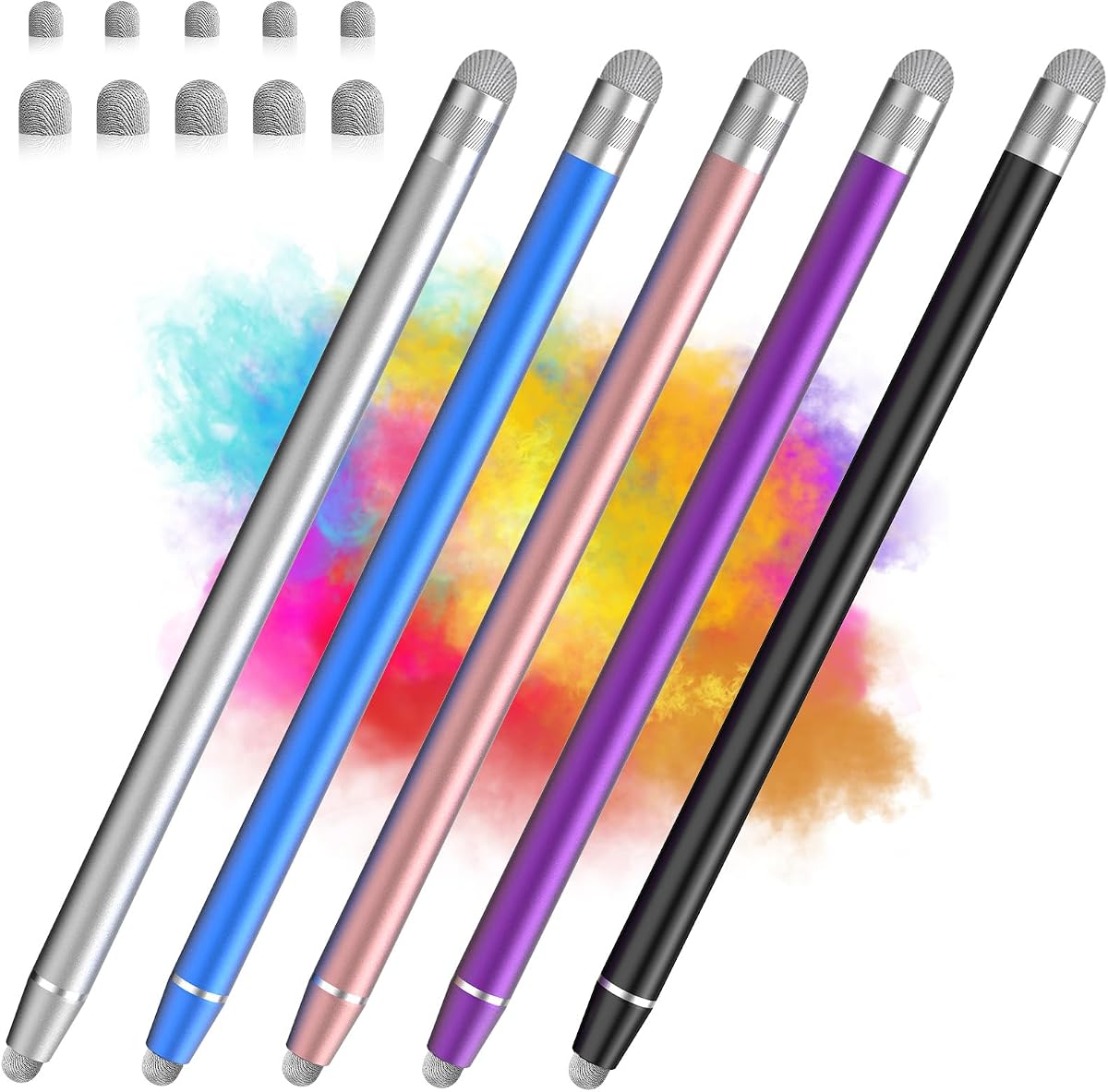
The Long Stylus Pen for Touch-Screen is the highest-rated option in this comparison, carrying a 4.7 rating. Its defining feature is the extended 185millimeter body, which gives users additional reach across large tablets and iPads. This can reduce hand movement during long writing, drawing, or navigation sessions compared with a compact stylus.
We may earn a commission when you buy through this link, at no additional cost to you.
The pens use fiber mesh tips described as having better conductivity and less sliding resistance than rubber. They are also said to work well with screen protectors without scratching the surface. Five complete pens appear in black, silver, blue, purple, and pink, with matte metal bodies and a colorful electrophoresis finish intended to resist yellowing. A pocket or book hook provides a convenient storage option.
There are five spare mesh nibs included, and replacement is described as a simple rotation of the nib. Nevertheless, the extra tips are fiber mesh rather than a second precision size, so buyers wanting both broad strokes and very fine marks may prefer a dual-tip design. The longer body may also be less convenient in a small pocket than a compact pen, even though the hook improves handling.
This is the strongest choice for people who regularly draw, annotate, or navigate a large tablet and prefer a pen that resembles a traditional writing instrument. Its 4.7 rating, metal construction, extended reach, and spare tips make it a premium-feeling recommendation. It also works without batteries, pairing, or setup across compatible capacitive devices.
The extended length gives the hand a more natural reach to the upper portion of a large display, which can make extended annotation and sketching less physically demanding.
A matte metal body provides a substantial grip, while the integrated hook makes the longer pen easier to keep secure when it is not in use.
We may earn a commission when you buy through this link, at no additional cost to you.
The Bopomofo 10Pack Stylus Pen Replacement Fiber Mesh Tips provides ten replacement tips for passive capacitive stylus pens. Its 4.5 rating places it among the well-regarded accessories in this guide. The product information emphasizes the fabric-based tip's smooth feel and responsiveness, particularly for writing, drawing, and scrolling across web pages.
We may earn a commission when you buy through this link, at no additional cost to you.
Unlike a standard rubber stylus tip, woven fiber is presented as a smoother interface that registers readily with capacitive screens. The manufacturer also states that fiber mesh generally lasts longer than rubber, making these tips useful for extending the working life of an existing pen. Their soft surface is intended to protect the display and reduce the likelihood of scratches.
One honest caveat is the break-in period. The tips initially feel somewhat stiff, and the manufacturer advises applying slight pressure until sufficient contact area is established, particularly when a screen protector is present. Continued use reportedly softens the material and improves sensitivity. The pack also contains no complete stylus, so buyers need an existing compatible pen and should confirm the dimensions and replacement method.
For users who value smooth scrolling and already own a suitable stylus, these tips are a strong maintenance choice. They are especially attractive to anyone comparing fiber with a frequently worn rubber nib, since the woven material is intended to wear more slowly. The recommendation is less suitable for first-time stylus buyers or anyone unwilling to check fit before installation.
The tips may require light initial pressure, but continued use is described as softening the fiber and improving sensitivity on both bare glass and protected screens.
The smooth woven surface is the main attraction for users who regularly move through long pages and prefer less resistance than a conventional rubber tip.
We may earn a commission when you buy through this link, at no additional cost to you.
This five-pack combines a compact 14.1-centimeter body with useful dual-ended sizing. Its 4.5 rating reflects a straightforward approach to portable touch interaction. The smaller 0.2-inch fiber end is intended for precise tapping and note-taking, while the wider 0.3-inch end supports smoother scrolling and drawing across popular note-taking and creative applications.
We may earn a commission when you buy through this link, at no additional cost to you.
Each pen weighs only 10.4 grams, making the set easy to carry in a pencil case, laptop sleeve, or small bag. The alloy body has a matte finish intended to resist fingerprints, while replaceable fiber tips allow the working ends to be maintained. Colors include black, white, silver, blue, and rose gold, making it easy to distinguish pens assigned to different people or devices.
Compatibility is broad across iPad, iPad Pro, iPad Air, iPad mini, iPhone, Samsung Galaxy devices, Google Pixel, Microsoft Surface, most Android equipment, and Nintendo Switch. No Bluetooth pairing or charging is required, which keeps daily use simple. The package does not include spare replacement tips, however, so buyers should know that the five included pens are the only pens supplied.
This is a strong pick for students, commuters, and casual users who want a light, uncomplicated stylus for occasional notes, taps, navigation, or drawing. The smaller size is a clear advantage for portability. Those who expect intensive art work may favor the wider end and may want a product that includes extra replacement tips.
The 14.1-centimeter body is easy to carry, yet the dual tips preserve useful separation between detailed interaction and broad navigation.
With no wireless setup or charging, the pens can move directly from a bag to a supported phone, tablet, computer display, or handheld console.
We may earn a commission when you buy through this link, at no additional cost to you.
The 24Pcs Fiber Mesh Stylus Tips pack contains twenty-four replacement tips in two sizes: 3millimeters, also listed as 0.11 inches, and 3.6millimeters, listed as 0.14 inches. Its 3.9 rating is the lowest among the ten selections, but the package offers the broadest stated size range and tip quantity among the replacement options.
We may earn a commission when you buy through this link, at no additional cost to you.
Installation is described as tool-free: users twist off the old tip and replace it with a new mesh tip. The fiber material is presented as sensitive and precise enough for artists, students, and professionals, while its soft texture is intended to avoid scratching the screen. The two sizes may make the pack useful for owners of multiple compatible stylus models.
Its lower rating warrants attention when comparing alternatives. The product information does not provide the same level of detail about the supported pen models or break-in behavior as several competing packs. As with every tips-only product, successful installation depends on accurate diameter and attachment compatibility. A visually similar tip may still be the wrong size for a specific stylus.
For someone who owns several compatible fiber-tip pens, wants both common tip diameters, or expects frequent tip changes, the large assortment is useful. It is not a complete stylus solution, and buyers should compare the stated measurements with their existing pen before ordering. The product is best viewed as a maintenance pack rather than a first-touchscreen accessory.
Including 3millimeter and 3.6millimeter tips increases the chance of finding a close fit for compatible stylus models, provided buyers measure before ordering.
The twist-off replacement method allows a worn tip to be exchanged without tools, helping keep a stylus ready for writing or drawing.
We may earn a commission when you buy through this link, at no additional cost to you.
The 15-piece Stylus set is the largest complete-pen assortment in the guide. Its 4.6 rating indicates a well-regarded option for classrooms, shared offices, homes with several touchscreen users, or anyone who wants a supply of inexpensive writing tools. Ten colors are represented across the fifteen pens, making distribution straightforward.
We may earn a commission when you buy through this link, at no additional cost to you.
Each stylus is 4.37 inches long and weighs 3.3 grams. An integrated clip attaches to an iPad case, notebook, or pocket, while the short size keeps the pens easy to store. The universal fiber tip works with capacitive touchscreens, including iPad, iPhone, Nintendo Switch, Amazon tablets, Android devices, and products from brands such as Apple, Samsung, Lenovo, Xiaomi, Huawei, and Motorola.
The fiber tips are described as lasting three to four times longer than standard rubber tips and as screen-safe. The silver fiber may naturally oxidize and darken over time, but the manufacturer clarifies that this is a normal physical change rather than a stain and does not affect performance. Extra tips are not included, so buyers should account for future replacement needs.
This set is ideal when the priority is availability and portability rather than precision variety. Because every pen has one tip diameter, it is less suitable for detailed work that benefits from both fine and broad ends. It remains a compelling pick for broad distribution, basic note-taking, tapping, classroom instruction, and light drawing.
Fifteen individually usable styluses allow a teacher, presenter, or administrator to place one at every seat or station without needing to share a single pen.
The short, lightweight body and built-in clip make it simple to attach a stylus to a tablet case or keep it beside a notebook.
We may earn a commission when you buy through this link, at no additional cost to you.
This four-pack stands apart because each pen combines a soft fiber mesh tip with a clear disc tip rather than offering two versions of the same mesh nib. Its 4.6 rating reflects a versatile design for users who want smooth navigation for some tasks and precise, quiet contact for others. The clear disc is positioned for detailed note-taking, sketching, and interface navigation.
We may earn a commission when you buy through this link, at no additional cost to you.
Both ends are described as anti-scratch and intended to protect the screen from smudges and fingerprints. The bodies combine stainless steel and aluminum for a pen-like feel, with a comfortable grip area and lightweight dimensions for extended use. Screw-on tip covers and velvet drawstring pouches provide storage and travel protection, adding practical polish to the set.
Compatibility covers capacitive iPads, iPhones, Android devices, Samsung Galaxy equipment, and e-readers. Extra replacement tips are available separately rather than being included in the package. Buyers who strongly prefer one familiar tip material may see the mixed design as unnecessary, and the clear disc could produce a different feel from a fully woven mesh point.
This is the most interesting option for users who divide their work between smooth scrolling and precise drawing. The four-pen format is smaller than some classroom-oriented sets, but the storage pouches make it easy to divide them among locations. It is a strong all-around choice when tip versatility and a refined body design are the leading priorities.
Switching between woven fiber and a clear disc makes it possible to alternate between smooth gliding and highly controlled contact without carrying separate stylus bodies.
Screw-on covers and velvet drawstring pouches help protect both the working tips and the pen bodies during storage or transport.
We may earn a commission when you buy through this link, at no additional cost to you.
The 10 Pcs Mesh Stylus Tips pack is a replacement-focused product for compatible screw-in stylus pens. It carries a 4.1 rating, placing it below the leading complete styluses and some of the better-rated tip packs, but its central selling point is precise, high-sensitivity fiber mesh designed for detailed drawing, writing, and interface navigation.
We may earn a commission when you buy through this link, at no additional cost to you.
The soft tips are intended to fit securely without scratching the screen, and the product is described as compatible with most screw-in designs. Specific size parameters are supplied so buyers can compare them with other stylus brands. This could be particularly useful for a person who owns a stylus whose body remains in good condition but whose original nib has become rough or less responsive.
As a tips-only purchase, it does not solve the need for a new stylus body. Fit remains the central caveat: even a nominally universal replacement must match the original tip's diameter, length, and connection method closely enough to remain secure. The 4.1 rating also makes it wise to compare buyer feedback and confirm compatibility before ordering multiple packs.
For a compatible pen owner who prioritizes precision and has already identified the correct size, these tips provide ten spares and a straightforward way to maintain touch accuracy. They are less suitable for general touchscreen users seeking an all-in-one pen, but they offer a focused solution for preserving a preferred stylus body.
The fiber material is positioned as a sensitive contact surface for writing, drawing, and detailed interface work rather than as a simple disposable cap.
Measure the original tip and confirm that it uses a compatible screw-in attachment, since a loose or undersized replacement can impair both control and screen registration.
We may earn a commission when you buy through this link, at no additional cost to you.
The STYLUSHOME two-pack provides two complete capacitive styluses with differently sized fiber tips on opposite ends. Its 4.5 rating reflects a practical design for switching between smooth drawing and sensitive writing. The two-in-one format gives each user more versatility than a single-ended stylus while remaining simpler than a mixed mesh-and-disc system.
We may earn a commission when you buy through this link, at no additional cost to you.
The soft fiber tips are designed to register reliably on capacitive screens while protecting against scratches and fingerprints. Compatibility includes iPads, iPad Pro, iPhones, Android tablets and phones, Samsung Galaxy devices, and Nintendo Switch systems. Four small and four large replacement tips are included, and the working ends can be changed within seconds without special tools.
The main limitation is quantity. Two pens are enough for a couple of devices but offer less flexibility than the five- and fifteen-pen sets in this guide. The product information does not emphasize a particularly long body, so buyers who need additional reach on a large display may prefer a more extended model. It also supplies two tip sizes rather than alternative contact materials.
This is a sensible recommendation for a couple, a small family, or one person who wants two sizes and spare nibs in a manageable package. It is best suited to general note-taking, browsing, tapping, and casual drawing. The included replacements make maintenance unusually convenient for a compact two-pen set.
The different fiber tip sizes let users move between fine note-taking and broader drawing or scrolling without adding another stylus body to their bag.
Four small and four large replacement fibers provide a useful supply of spares, while the tool-free ends make changing a damaged tip straightforward.
We may earn a commission when you buy through this link, at no additional cost to you.
The most useful mesh tip stylus is one that matches your device, preferred tip feel, and level of precision. Reviewing these buying factors helps separate complete pens from replacement accessories and avoids choosing a tip size or design that will not fit your routine.
A complete stylus is the right choice if you do not already own a suitable pen or if you want several devices to have dedicated tools. Products in this guide include complete pens with five, four, fifteen, or two pen bodies. A replacement pack is more appropriate when your existing stylus body still feels comfortable and works well, but its tip is worn, dirty, or less responsive. Some listings explicitly include spare nibs, while others sell additional replacements separately.
Check what is physically included before comparing products. A large count of replacement tips does not equal a large stylus assortment, and a pen sold with two working ends may still arrive without spare nibs. Choose a complete pen for immediate convenience; choose tips only when compatibility with a specific existing pen is confirmed.
Small tips generally suit interface selection, handwriting, and detailed marks, while wider tips tend to support smooth scrolling, broad strokes, and casual drawing. This guide includes dual-size combinations measuring 0.18 and 0.24 inches, 0.2 and 0.3 inches, and a two-ended product without exact measurements. Replacement packs may provide one standard size or offer alternatives such as 3millimeter and 3.6millimeter tips. The actual feel also depends on tip shape, density, and the device's sensitivity.
Do not assume that a small mesh tip behaves exactly like a precision digital pen. Mesh fibers are passive and work by mimicking finger contact, so they generally provide less pressure sensitivity and palm rejection than an active digital stylus. For basic navigation and note-taking, that limitation is rarely important; for professional illustration, assess the supported app and stylus more carefully.
A stylus must support capacitive touch to recognize a passive fiber tip. The listed products are designed for many capacitive phones, tablets, e-readers, touchscreen laptops, and some Nintendo Switch models. Compatibility lists vary, however, and references to particular brands do not guarantee that every model or operating-system version behaves identically. Screen protectors can also affect sensitivity, particularly with a newly installed mesh tip.
Review the exact device list, and look for the words capacitive touch screen if the product is a passive accessory. Some specialized or non-capacitive displays may require an active digital stylus instead. If the stylus must fit into a particular case, notebook loop, or pocket, verify its dimensions as well.
The working surface determines how a stylus feels in the hand. Lightweight alloy is easy to carry and offers a modern, pen-like appearance, while aluminum constructions may provide a more substantial grip. Matte finishes can resist fingerprints and improve handling compared with glossy surfaces. Color choices are less functionally important, but multiple colors can help distinguish pens assigned to different people or devices.
Think about how long you will use the stylus. A compact body reduces bulk in a bag, whereas an extended body can reduce the need to reach across a large tablet. Weight, balance, and grip texture may matter more than appearance during extended writing. Product information that mentions an ergonomic shape or comfortable grip is useful, but personal hand size remains the deciding factor.
Fiber mesh is generally described as more conductive than an ordinary rubber nib, with smooth sliding and consistent contact. That makes it useful for browsing, writing, and drawing, but new mesh tips may initially feel stiff. The Bopomofo replacement tips explicitly recommend a small amount of pressure during the break-in period, especially when a screen protector is present. Continued use can soften the fibers and improve registration.
Keep the tips clean and avoid forceful rubbing, particularly if the tip begins catching or dragging. If contact becomes inconsistent, replacing the tip is often simpler than replacing the entire pen. A pack containing several spare sizes can help maintain performance over time and prevent a worn tip from interfering with smooth navigation.
Replaceable tips extend the useful life of a stylus and make it easier to keep a suitable tip diameter on hand. Tool-free twist-off or screw-on systems are convenient for quick changes, but the new tip must match the pen's dimensions and attachment method. Some products include four, five, eight, or ten replacement nibs, while others provide no extras and direct buyers to separate accessories.
If you use a stylus heavily for drawing, replacement support is particularly valuable. Fine work can wear or deform a tip faster than general tapping. Keep one spare in a bag or desk drawer, especially for products whose tips are difficult to source locally. Confirm whether replacements are threaded, friction-fit, or another format before purchasing an additional pack.
The number of pens in a set should reflect whether you are buying for yourself or distributing tools. A two-pack suits an individual or couple, while four- and five-packs work well for several locations. A fifteen-piece set is especially appropriate for a classroom, shared office, workshop, or home with many touchscreen users. Assorted colors also make it easier to keep track of which pen belongs to which device.
A larger set is not automatically better if it contains just one tip size and no spares. Compare body quality, tip variety, and storage features alongside quantity. For example, a compact four-pack with mixed working tips and pouches may serve a traveling professional better than many identical pens, while a fifteen-pack may be the more logical choice for a shared learning environment.
The simplest mesh stylus is passive, needs no charging, and works as soon as it touches a compatible screen. This makes the category approachable for occasional note-taking, browsing, and gaming. More elaborate sets may add dual sizes, mixed materials, metal bodies, storage pouches, protective covers, or large replacement inventories. Those enhancements can be useful, but they are not necessary for every user.
Start with the tasks you actually perform. If you only need to tap icons and scroll, a single universal fiber tip is sufficient. If you alternate between writing and drawing, prioritize two sizes. If you travel with the device, consider a clip, cover, or pouch. Choosing only the features that solve a real inconvenience usually leads to a more satisfying purchase.
Begin by removing any case or screen protector only if necessary, then switch on the device and open the app you want to use. A passive mesh stylus needs no charging, pairing, or special mode. Touch the screen lightly with the tip to confirm recognition. For a newly installed fiber nib, use slightly firmer pressure at first, then ease off as the material softens and contact becomes more consistent.
Choose the working end according to the task. Use the smaller tip for selecting text, tapping small controls, writing, and detailed marks. Use the wider end for scrolling, sweeping gestures, broad sketching, and faster movement. Keep the stylus at a shallow angle rather than pressing hard, and avoid dragging a dirty tip across the display because grit can create tiny abrasion marks.
When the tip feels rough, sluggish, or less accurate, switch off the device and wipe the tip gently with a slightly damp, soft cloth. Avoid harsh chemicals, abrasive pads, and vigorous rubbing. Replace a worn or damaged tip according to the pen's twist-off or screw-on design, making sure the new nib is the correct size. Store the pen in its pouch or with the tip protected, and do not leave it pressed against a dirty surface.
A mesh tip stylus uses a woven or fabric-like fiber point to conduct capacitive touch input. It acts as a passive substitute for a finger and requires no batteries, charging, or Bluetooth pairing. The material is generally described as sliding more smoothly and lasting longer than an ordinary rubber nib, although the exact response can vary by tip and device.
Mesh tips can work well for sketching, annotation, and less demanding digital drawing because they glide smoothly and offer reasonable control. They do not provide the pressure sensitivity or palm rejection of many active digital styluses, so experienced artists may prefer a specialized drawing pen. A smaller mesh tip can improve precision, while a broader tip may feel better for sweeping strokes.
It should work if your tablet has a capacitive touchscreen that accepts finger input. The products in this guide support many iPads, Android tablets, Microsoft Surface devices, Chromebooks, e-readers, phones, and some Nintendo systems. Check the exact compatibility list for your model, and note that screen protectors or newly installed replacement tips may initially require a little extra pressure.
Most compatible styluses use a twist-off or screw-on tip that can be removed by hand. Turn the old tip counterclockwise until it releases, then attach the new tip in the same manner until secure. Confirm the diameter and connection style before ordering replacements, because visual similarity does not guarantee a proper fit.
Fiber tips are often smoother and more durable than standard rubber tips, making them appealing for heavy scrolling and extended use. Rubber can still provide a familiar feel and may register immediately without a break-in period. The best choice depends on the device, tip design, and whether smooth gliding or immediate softness matters more to the user.
A new fiber tip may need a short break-in period before it reaches the full responsiveness described by the manufacturer. Apply light pressure during initial use, especially with a screen protector, and allow the fibers to soften through regular contact. If the tip remains unresponsive or drags unevenly, check the fit and clean the device screen before trying another compatible tip.
Yes, a passive mesh stylus can handle notes, menus, forms, presentations, and light markup on compatible capacitive screens. It is especially useful when direct finger input makes small selections difficult. For extensive handwritten notes, choose a smaller tip and a body comfortable enough for extended use; for shared spaces, a multi-pen set makes individual assignment easier.
No. Every complete stylus listed in this guide operates as a passive capacitive accessory, so it needs no battery, charging cable, pairing process, or special device mode. The main maintenance task is keeping the tip clean and replacing it when it becomes worn, so look for a compatible replacement method if you use the pen frequently.
The Styluslink five-pack is the strongest all-around choice because it combines five complete pens, two fiber tip sizes, lightweight alloy bodies, and ten replacement nibs. The Long Stylus Pen stands out for people who want extended reach and a metal body on larger tablets, while the compact dual-ended five-pack is an appealing choice for students and everyday carry. Together, these three cover versatility, large-screen use, and portability.
Prioritize compatibility first, then choose the tip arrangement that matches the work. A small tip improves controlled interaction, a wider tip supports smooth movement, and a dual-ended design provides both. Complete pens suit new users and shared environments, while replacement packs make sense when an existing stylus body is still comfortable but its fiber tip has worn. Consider length, grip, storage, and the availability of spare nibs as secondary factors.
Finally, check the current marketplace listing before ordering, since product details, ratings, included accessories, and pricing can change over time. Confirm that the stylus supports the intended device and that any replacement tips match the existing pen. With those checks complete, a good mesh tip stylus can provide a comfortable, screen-friendly way to write, navigate, draw, and interact without the complexity of a rechargeable digital pen.