
AIRHUG Magnetic USB Microphone
4.3Editor score
Three flexible mounting options
AI noise reduction mode
Windows and Mac compatibility
A microphone can determine whether everyone in a Microsoft Teams meeting hears a clear, balanced conversation. The right device should capture voices from around the table, reduce distracting background noise, support easy connection to a computer, and deliver audio without echo or unnecessary setup.
This guide compares ten conference speakerphones and USB microphones using the supplied ratings, stated pickup ranges, connection options, noise-reduction features, platform compatibility, controls, and intended meeting scenarios. It covers wired desktop models, portable Bluetooth systems, gooseneck microphones, and compact conference devices.
Each review explains who benefits most from the product and where it fits within a Teams setup. Ratings provide a quick reference, but features, room size, participant count, operating system, and microphone placement are equally important. Product prices and availability can change, so verify current listing details before purchasing.
4.3Editor score
4.2Editor score

4.7Editor score
As an Amazon Associate we earn from qualifying purchases.
The comparison below highlights each microphone's form factor, pickup approach, connection method, and most useful meeting feature. It is designed to make differences clear before you consider room size, participant count, controls, or platform requirements.




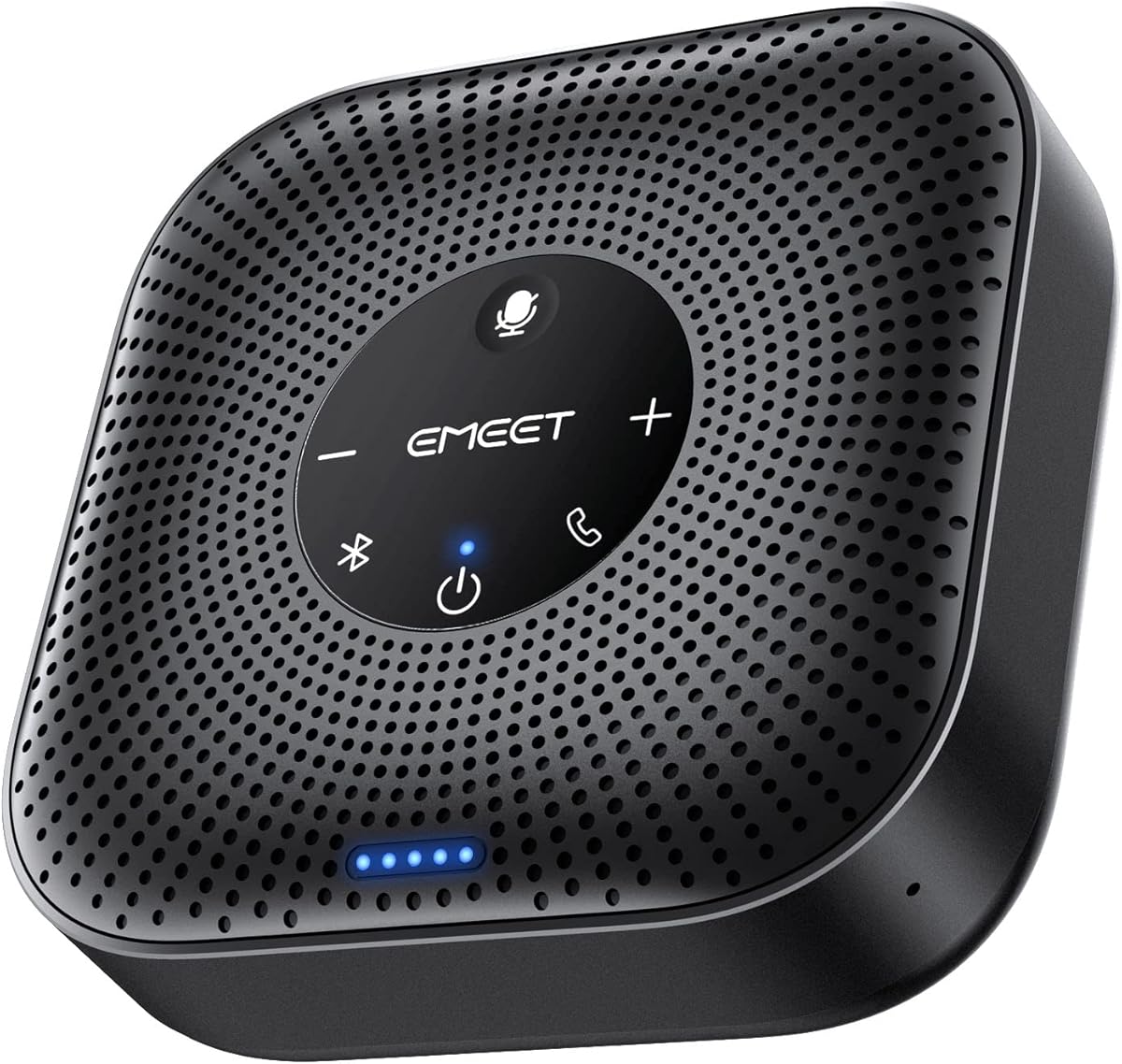
The EMEET M0 Plus is a conference speaker and microphone with a four-microphone array, 360-degree voice pickup, and a stated rating of 4.2. It is designed for conference rooms, home offices, and travel, where the ability to place one central device and hear people from different positions matters more than the form of a traditional desktop microphone.
We may earn a commission when you buy through this link, at no additional cost to you.
Its four AI microphones work with EMEET's upgraded VoiceIA algorithm to filter background noise and suppress echoed speech. The built-in 3-watt speaker spreads meeting audio through the room, while full-duplex operation is intended to support natural conversation. A particularly useful feature is the ability to daisy-chain two compatible EMEET speakerphones, expanding coverage and supporting up to 16 attendees.
Connection flexibility is another strength. The M0 Plus offers USB-C with a USB-C-to-A adapter, Bluetooth 5.0, and single- or dual-device Bluetooth pairing. It is stated to work with Microsoft Teams, Zoom, Slack, Webex, and other conferencing platforms without additional drivers. The trade-off is that this is a more advanced device than a simple USB microphone, and a larger room may require planning and the optional second unit.
This is the strongest all-around recommendation for a Teams meeting room that needs both a microphone and room speaker. Choose it when participants sit around a table, you want voices captured from multiple directions, and wireless flexibility matters. It is especially suitable for organizations expecting meeting sizes to grow, provided the daisy-chain feature is used correctly and compatible products are available.
For a smaller room, the standard single-device configuration is enough. For a larger group, adding a second compatible EMEET unit can create a more complete shared meeting area. Its combination of pickup, speaker output, wired connectivity, wireless connectivity, and stated long talk time makes it a versatile central choice.
The four-microphone 360-degree array reduces the need to pass a microphone from person to person. Placing the unit near the center of a modest meeting table lets it capture voices from multiple seating positions while VoiceIA processing works to suppress ambient distractions.
USB-C provides a straightforward path to a laptop, while Bluetooth 5.0 supports phones and other compatible devices. Dual-device Bluetooth pairing also gives the room more flexibility when a meeting may involve calls across different devices.
We may earn a commission when you buy through this link, at no additional cost to you.
The TONOR G11 is a USB condenser microphone designed for small and medium online meetings, with a 4.3 rating and a stated pickup distance of 11.5 feet. Unlike a conference speakerphone, it captures and sends the user's voice to a computer but does not provide a built-in speaker for playing the meeting audio.
We may earn a commission when you buy through this link, at no additional cost to you.
Its omnidirectional pickup pattern allows it to receive subtle sounds from 360-degree directions, reducing the need for participants to raise their voices or lean toward the device. The included 1.8-meter nylon-shielded cable is designed to reduce signal interference, while the metal construction, anti-slip base, and compact footprint make it suitable for a desk or shared conference table.
Setup is straightforward on Windows and macOS. The microphone is driver-free, although users may need to select it as the input device in their computer settings after connecting it. A physical mute button and blue status light make it easy to see whether the microphone is active. The main limitation is that it does not replace speakers, so a laptop's built-in audio or separate conference speaker is still required.
Choose the TONOR G11 for a fixed meeting table where several people need to be heard by the remote audience and the computer already has adequate speaker output. It offers a useful balance of reach, simple controls, and broad computer compatibility without introducing another device to manage. It is less suitable for mobile meetings or solo users who want a combined microphone and speaker.
The 11.5-foot stated pickup range makes the G11 relevant to meeting tables where participants may be spread out. Its 360-degree design captures sound from different sides, making placement near the center of the group more practical than placing it close to one speaker.
The physical mute control offers a direct way to manage microphone status during a call. An anti-slip mat under the metal base helps the microphone remain stable, while the wired USB design removes battery and pairing concerns.
We may earn a commission when you buy through this link, at no additional cost to you.
This adjustable gooseneck USB microphone has a 4.4 rating and combines omnidirectional pickup with a movable 360-degree neck. That makes it a practical choice for people who want to direct the microphone toward their position on a desk or in a small meeting space without moving the entire unit.
We may earn a commission when you buy through this link, at no additional cost to you.
The condenser microphone uses noise-canceling technology to reduce background noise and echo, while a one-touch mute button and LED indicator provide a quick visual reference of its operating status. Its 1.8-meter USB cable supports plug-and-play use on Windows 7, 8, 10, and 11 as well as macOS, with no driver installation required.
Construction combines a metal pipe with a heavy-duty ABS stand, giving the product a more substantial feel than a lightweight plastic desktop microphone. That does not make it suitable for every environment, though: the product information specifically says it is not compatible with Xbox, Raspberry Pi, or Android. It is also a microphone rather than a combined speakerphone.
This model is best for a user who wants a dedicated desktop microphone for Teams, online learning, voice dictation, or gaming with precise placement control. Choose it over a flat conference microphone when one person is the primary speaker or when the adjustable neck can be aimed more effectively than a fixed base. For a group that needs both microphone and room audio, choose a conference speakerphone instead.
Its high rating, straightforward operation, and flexible positioning make it a compelling everyday desktop choice. The key buying consideration is whether the target computer uses a supported USB configuration and whether a separate speaker is available for hearing other participants.
The flexible gooseneck can be rotated to find a useful pickup position. This is helpful in a home office where the computer is offset, at a shared desk with multiple seating positions, or anywhere a fixed flat microphone may not sit at the ideal height.
A single press changes the mute state, and the integrated LED indicates what the microphone is doing. This is useful in online meetings because it reduces uncertainty about whether a private comment might still be transmitted.
We may earn a commission when you buy through this link, at no additional cost to you.
The AIRHUG 21 is a compact USB conference microphone with a 4.3 rating, a stated six-foot pickup radius, and support for small groups of one to three participants. It is intended for laptop and desktop users who need clearer voice capture without carrying a larger conference speakerphone into every meeting.
We may earn a commission when you buy through this link, at no additional cost to you.
A 48 kHz sampling rate supports detailed voice capture, while AI Noise Reduction Mode is designed to reduce fan noise, keyboard clicks, and other background distractions. Users can also choose Original Mode for a more natural sound. The microphone starts in recording mode after a restart, remembers the last sound mode, and uses blue, green, and red lights to communicate mode and mute status.
It connects with a six-and-a-half-foot cable and a USB-C-to-A adapter, works without drivers, and supports Windows and Mac systems. Compatibility is listed for Zoom, Skype, Microsoft Teams, Google Meet, Webex, FaceTime, and many other meeting applications. The compact base measures 3.38 inches in diameter and weighs 0.33 pounds, making it manageable for business travel.
The significant limitation is that the AIRHUG 21 has no echo cancellation. It also has no built-in speaker, and its stated small-room focus makes it less appropriate for a larger table. Users who need two-way echo control should consider the AIRHUG 01 instead, while those wanting a speakerphone may need a dedicated speaker as well.
This microphone is a good fit for a one-to-three-person Teams meeting, a small home office, online learning, or a compact workspace. It is particularly useful for users who want selectable voice processing and a portable form. Its lack of echo cancellation is acceptable when the device is used in a small room and the computer's own audio handling manages the listening side effectively.
AI Mode is useful when fan noise, typing, or general room activity could distract from the call. Original Mode is the alternative when a natural, unprocessed voice is preferred or when a more faithful recording is desired for content creation.
The low-profile base and light weight make the AIRHUG 21 convenient to carry between a desk and a temporary meeting space. The included cable length provides enough reach to position the microphone away from the computer and nearer the people speaking.
We may earn a commission when you buy through this link, at no additional cost to you.
The AIRHUG 01 is a portable conference speakerphone rated 4.0, with a full-duplex digital microphone, a stated six-foot pickup range, and support for meetings involving four to six people. It combines a microphone, room speaker, wired USB connectivity, and Bluetooth in one portable unit.
We may earn a commission when you buy through this link, at no additional cost to you.
Its integrated digital signal processor handles real-time audio processing, including noise reduction and linear and nonlinear echo suppression. The product information states that the echo cancellation can address echo lengths up to 400 milliseconds, a relevant advantage when the device's own speaker is active during a conversation.
Two devices can be connected simultaneously through Bluetooth and USB-C, allowing a computer and a phone to remain linked during a meeting. Plug-and-play support covers Windows, macOS, Android, and Linux, while listed meeting compatibility includes Zoom, Skype, Microsoft Teams, Google Meet, Webex, and FaceTime. Acoustic reminders announce power, pairing, and connection changes, although they can be disabled while connected.
Portable use is well supported by the included carry bag and compact form. There are two caveats in the supplied information: the speakerphone may automatically turn off after becoming fully charged, for which restarting it is recommended, and the audible connection reminders may be unnecessary in some settings. Its rating is also the lowest among the ten products, although the feature set remains substantial.
Choose the AIRHUG 01 for a small shared room, hybrid meeting, or traveling professional who needs one device to handle both voice pickup and playback. It is particularly compelling when simultaneous USB and Bluetooth connections are valuable. Users who require the highest listed rating or a more clearly stated participant capacity may prefer another option.
Simultaneous Bluetooth and USB-C connectivity can keep a phone and computer linked without repeatedly changing inputs. This is useful when work switches between a mobile call and a desktop Teams meeting during the same workday.
The dedicated echo-cancellation system is the major distinction between this model and a microphone-only product. That makes it a more complete choice when people need to hear remote participants through the same device that captures their voices.
We may earn a commission when you buy through this link, at no additional cost to you.
The EMEET M1A is a USB conference speakerphone with a 4.3 rating, two omnidirectional microphones, and 360-degree smart voice pickup. It is aimed at business and professional settings where a dependable wired connection and a single device for microphone and speaker output are more important than wireless flexibility.
We may earn a commission when you buy through this link, at no additional cost to you.
EMEET's VoiceIA technology provides noise reduction, echo cancellation, voice amplification, and full-duplex operation. The smart speaker offers nine selectable volume levels, and a blue LED on the control panel helps indicate the current level. A particularly valuable privacy feature is the ability to mute both the speaker and microphones immediately during a meeting.
The built-in USB-C cable supports plug-and-play operation, and a USB-C-to-USB-A adapter is included for compatibility with more computer ports. The wired connection is intended to provide stable audio transmission without pairing steps. Listed compatibility includes Skype for Business, Microsoft Lync, Google Hangouts, FaceTime, GoToMeeting, BlueJeans, and Webex.
Unlike the M0 Plus, the M1A does not list Bluetooth connectivity, so it is less suitable for calls that frequently switch between a computer and phone. It is also a larger commitment than a basic USB mic because it includes room-speaker functionality. Those trade-offs are reasonable for a permanent conference room where consistent plug-and-play operation is the priority.
Choose the M1A for a dedicated business meeting room, training room, consultation office, or hybrid workspace. It offers a balanced set of voice-processing features, clear volume controls, and a privacy-oriented mute function. Teams users who want the freedom to move between devices may prefer the more flexible M0 Plus, while those with a fixed workstation can take advantage of the M1A's stable wired design.
The two omnidirectional microphones give the M1A broad pickup around its location, while VoiceIA handles noise, echo, amplification, and full-duplex communication. That combination helps the unit serve as a central room microphone rather than a single-user desktop accessory.
A wired USB-C connection avoids wireless pairing complications and is well suited to a permanently arranged meeting room. Muting both the microphones and speaker adds a clear privacy safeguard when a private conversation occurs beside an active call.
We may earn a commission when you buy through this link, at no additional cost to you.
The Amazon Basics Condenser Microphone has a 4.4 rating and is primarily a focused, desktop-oriented USB microphone for streaming, recording, podcasting, and individual conference use. Its 14-millimeter condenser diaphragm is designed for high sensitivity, low noise, low distortion, and clear sound pickup.
We may earn a commission when you buy through this link, at no additional cost to you.
Unlike the conference microphones in this list, it uses a cardioid pickup pattern intended to isolate the speaker in front of it and reduce background noise. The stand rotates 360 degrees, allowing the microphone to follow the user, and a one-tap mute function helps manage privacy during online meetings. Compatibility is listed for Windows and macOS, as well as streaming and broadcasting applications.
Installation is driver-free through a USB data cable. The microphone can also be detached and attached to a tripod, boom arm, or standard microphone stand with a 5/8-inch thread. A built-in shock absorber and silicone rubber boot help control vibration and protect the microphone body. These details make it more versatile for content creation than a typical meeting-only device.
The important limitation is that a cardioid desktop microphone is not a room-capture solution. It works best when one person remains near the front of its pickup area. It also does not include a speaker, so users need separate audio output or the computer's built-in speakers. Calling it a conference microphone would overstate its stated design purpose.
Choose this model for a home office where the primary user needs a high-quality personal microphone for Teams one-to-ones, streaming, or recording. It is also attractive for users who may later move the microphone to a boom arm or stand. For a meeting involving several people around a table, choose a 360-degree conference microphone or a speakerphone with room-wide pickup instead.
The cardioid pattern is useful when a person is working at a desk and nearby room noise should not dominate the recording. It concentrates the microphone's useful response toward the front, making consistent positioning important for a stable result.
The removable design supports more than a fixed desktop arrangement. Users who need a boom arm, tripod, or standard 5/8-inch microphone stand can adapt the setup while retaining the same USB condenser microphone.
We may earn a commission when you buy through this link, at no additional cost to you.
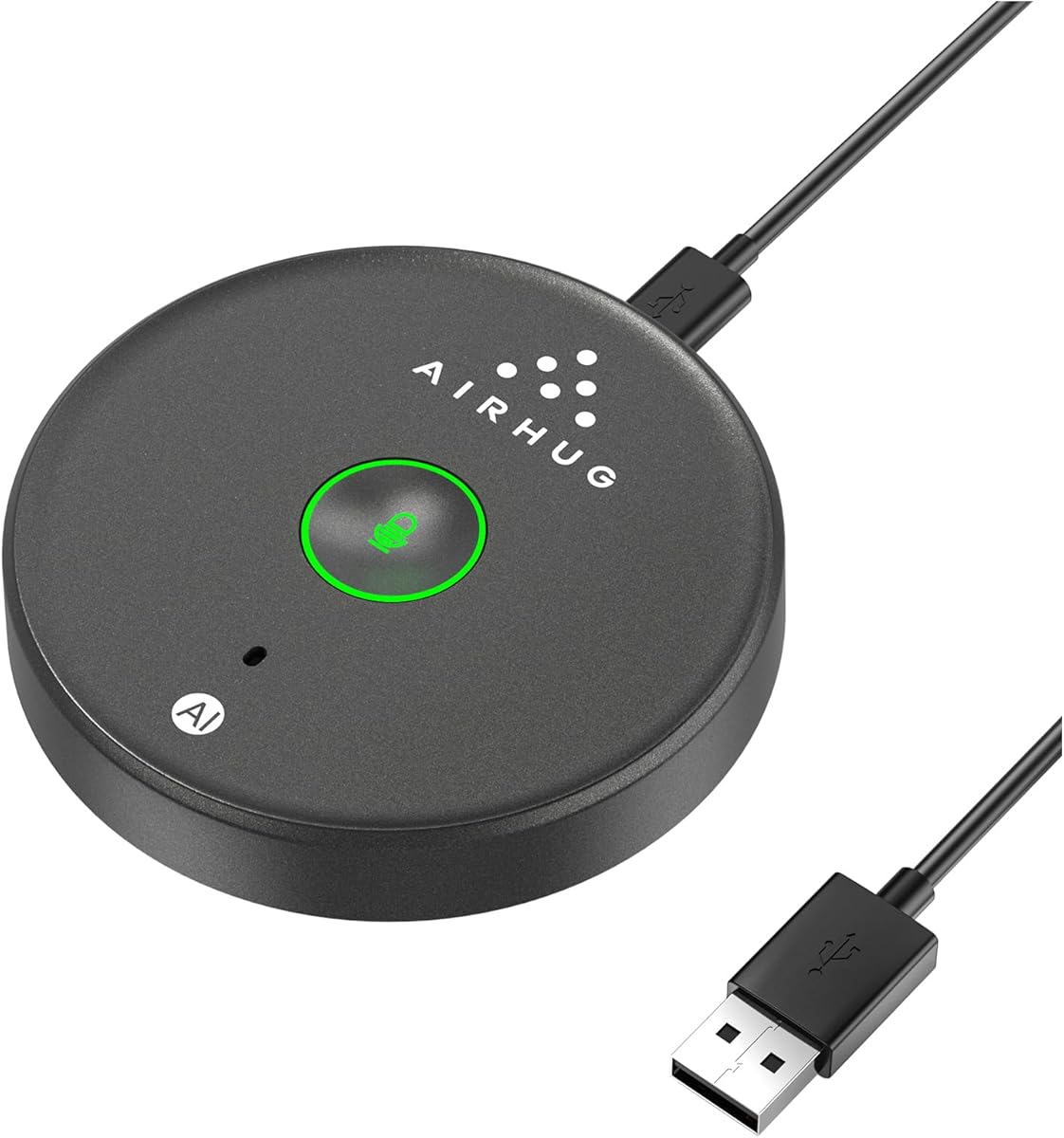
The AIRHUG Magnetic USB Microphone is a compact, flexible option with a 4.3 rating and a design that stands out through its magnetic mounting system. It can lie flat on a desk, attach to clothing, or fasten to a metal surface using an included magnetic patch, giving users more placement options than a conventional desktop base.
We may earn a commission when you buy through this link, at no additional cost to you.
Three reusable nano adhesive dots provide additional mounting possibilities, and the two-meter cable allows the microphone to sit away from the computer. Its 360-degree omnidirectional pickup has a stated six-foot range, allowing multiple voices to be captured around a small meeting area. A physical mute button and three-color LED provide clear feedback: blue for AI Noise Reduction, green for Original Mode, and red for muted.
AI Mode filters common distractions such as fans and keyboard clicks, while Original Mode is suggested for a natural, realistic representation of the voice. The product is driver-free, works with Windows and Mac, and supports major services such as Zoom, Teams, and Skype. The supplied package includes a two-meter USB-C-to-USB-A cable, the magnetic patch components, reusable adhesive dots, and a guide.
There is no built-in speaker, so users must rely on separate computer or room audio. Magnetic attachments may also be less appropriate where a strong adhesive mark is undesirable or where the surface cannot hold the patch securely. Those limitations matter most for users seeking a complete conference-room solution rather than a flexible input microphone.
Choose this model for a small Teams room where easy repositioning is valuable, for travel, or for a user who wants the microphone close to the conversation without leaving it fixed beside a laptop. It combines thoughtful mounting, selectable processing, and broad computer compatibility in a particularly flexible package. For larger tables, confirm that the six-foot range suits the seating arrangement.
The magnetic system lets users keep the microphone on a desk, on clothing, or on a suitable metal surface. That flexibility is valuable when a fixed meeting room does not exist or when the best listening position changes throughout the day.
AI Noise Reduction can help in a noisier workspace, while Original Mode provides an alternative when a fuller or more natural voice is preferred. The color-coded LEDs make the current state visible at a glance during a call.
We may earn a commission when you buy through this link, at no additional cost to you.
The TONOR G11 Pro is an upgraded version of the earlier G11 with a 4.3 rating, built-in AI noise cancellation, and a stated 11.5-foot omnidirectional pickup distance. It is designed for teleconferencing, online learning, chat, and other applications where several people may speak from different positions around a table.
We may earn a commission when you buy through this link, at no additional cost to you.
The noise-canceling system targets distractions such as fan noise and keyboard clicks to create a clearer call signal. Physical volume and monitoring buttons are built into the body, with click adjustment through four levels. A one-tap control mutes or unmutes the microphone, while a 3.5-millimeter jack allows headphones to be connected for private monitoring.
The control panel uses color states to make operating modes visible: blue for microphone mode, red for mute, and purple for monitoring. A long press lasting three seconds changes those modes. It is important not to connect the 3.5-millimeter jack to external speakers, because that can produce feedback interference.
As with other microphone-only conference devices, there is no built-in speaker. A separate speaker or the computer's own output must handle playback. The model supports Windows and macOS without additional drivers, although it may need to be selected as the input device after being connected. Its wired nature also makes it less convenient for spontaneous mobile use.
Choose the G11 Pro when a meeting table is large enough to benefit from its 11.5-foot stated range, the call environment produces consistent distractions, or monitoring through headphones is important. It is a strong choice for users who want more direct control than a basic conference microphone provides, provided they understand that it handles input rather than room playback.
The upgraded AI noise cancellation is intended to reduce steady and intermittent sounds such as fans and keyboard clicks. This is particularly useful in an office where other people work nearby and the meeting cannot be moved to a completely quiet room.
The included headphone connection lets users hear their own audio privately and verify level and clarity. Four physical volume levels and clearly colored operating states make the microphone easier to control without navigating software.
We may earn a commission when you buy through this link, at no additional cost to you.
The Jabra Speak 510 2025 Edition is a portable USB and Bluetooth conference speaker with a 4.7 rating, the highest numerical rating among the products in this guide. Its stated strengths are clear meeting audio, quick setup, flexible connectivity, and portability across different working environments.
We may earn a commission when you buy through this link, at no additional cost to you.
The device can connect to a laptop or smartphone through Bluetooth or USB, allowing a meeting to move between mobile and computer-based communication. It is also stated to work with desk phones, mobile phones, soft-phones, online meeting platforms, conference calls, and music streaming. This broad device support makes it useful for people whose Teams workflow is only part of a larger communication routine.
The portable design means the speakerphone can move from a home office to a shared meeting room or temporary workspace. Its purpose is straightforward: provide better meeting sound without requiring a permanently installed conference system. The supplied information is less detailed about microphone array size, pickup distance, processing modes, and battery specifications than some competing listings, so buyers should not infer those capabilities from similar models.
The main disadvantages are limited technical detail in the listing and a premium position compared with basic USB microphones. It may also be less essential for a solo user whose laptop microphone and speakers are already sufficient. In a small room with several in-person attendees, however, a dedicated portable conference speaker can produce a more practical shared-device experience.
Choose the Jabra Speak 510 when call clarity, simple setup, portability, and a high customer rating are the leading priorities. It is a strong option for hybrid employees who regularly join Teams meetings from different locations or for small meeting rooms without permanent conference hardware. Confirm that its current connection controls and platform behavior meet your specific workflow before ordering.
Bluetooth and USB support give users a choice between a wireless phone connection and a wired computer route. That flexibility is valuable for meetings that may involve a desk phone, soft-phone, smartphone, or laptop.
The speakerphone is designed to be carried between meeting locations and used quickly. Its portable form avoids the installation process associated with a permanently mounted room system while still serving as a dedicated meeting speaker and microphone.
We may earn a commission when you buy through this link, at no additional cost to you.
The right Teams microphone depends on how many people speak, where the device will sit, whether room audio is needed, and how participants connect. Use the following factors to narrow the field before comparing final features and platform compatibility.
An omnidirectional microphone is the most logical choice for a shared meeting because it receives sound from around the device. The AIRHUG 21, AIRHUG 01, AIRHUG Magnetic USB Microphone, EMEET M0 Plus, EMEET M1A, and TONOR models use broad pickup to accommodate multiple positions. A cardioid pattern, such as the one in the Amazon Basics Condenser Microphone, focuses on the front of the microphone and is better for one primary user. Always position the device near the speaker rather than assuming a room-sized capture range.
Stated pickup ranges provide a useful starting point, but room acoustics and placement can change real-world results. The AIRHUG 21 is specifically described as suitable for one to three participants, while the AIRHUG 01 is intended for four to six people. The EMEET M0 Plus can support larger meetings and, when two compatible units are daisy-chained, up to 16 attendees. For larger tables, distributed microphones may produce a more consistent experience than asking one device to cover an entire room.
A microphone-only product sends your voice to the computer but does not play remote participants through a dedicated room speaker. The TONOR G11, AIRHUG 21, adjustable gooseneck model, Amazon Basics microphone, AIRHUG Magnetic model, and TONOR G11 Pro fall into this category. The EMEET M0 Plus, AIRHUG 01, EMEET M1A, and Jabra Speak 510 combine microphone and speaker functionality, making them more convenient for shared rooms.
Noise reduction targets distractions such as fans, keyboard clicks, engine noise, and background conversation. Echo cancellation is especially important when a conference speakerphone's own output can feed back into its microphone. The AIRHUG 01 has a specifically stated echo-cancellation system, while the EMEET models describe echo cancellation as part of their voice-processing platforms. The AIRHUG 21 and Magnetic Microphone offer selectable noise modes but the former explicitly lacks echo cancellation.
Most meeting microphones connect by USB, but the details matter. Check whether your computer needs USB-A or USB-C, whether an adapter is included, and whether the product supports your operating system. Bluetooth is useful for phones and flexible room setups, while a wired USB connection can be simpler and more stable. For Teams, select a model explicitly listed as compatible with Microsoft Teams or a standard USB microphone that the computer recognizes as an input device.
A permanently installed room can favor a wired conference unit, while traveling employees may prioritize a compact body, carry bag, and battery operation. The AIRHUG 01 includes a carry bag and supports Bluetooth, and the EMEET M0 Plus offers more than ten hours of stated talk time. The AIRHUG 21 and Magnetic USB Microphone are small enough to carry, although both depend on USB power and do not include a built-in speaker.
A physical mute button is valuable because it gives immediate control over what the meeting can hear. LED status feedback can show muted, active, monitoring, or processing states. The TONOR G11 Pro adds physical volume and headphone monitoring, while the EMEET M1A provides nine speaker levels and can mute the speaker and microphones together. These controls are especially helpful when shared computers are used by several people.
The best microphone position is near the people speaking and away from laptop fans, hard reflective surfaces, and sources of noise. A fixed desktop base suits a permanent desk, a gooseneck provides directional adjustment, and the AIRHUG Magnetic model can lie flat, attach to clothing, or mount on metal. In a meeting room, place the device centrally and test the sound from every usual seat before beginning a client call.
Begin by placing the microphone or speakerphone in the center of the conversation, within its stated pickup range and away from laptops, fans, and other noisy equipment. For a microphone-only model, connect the USB cable and select the device as the input in the computer's sound settings. For a combined speakerphone, connect it through USB or pair it over Bluetooth, then confirm that the computer uses the right microphone and speaker.
Open Microsoft Teams, start a test call, and ask participants in different seats to speak at a normal conversational volume. Check input level, mute status, and playback volume. Many models include a mute button and LED indicators, so use those controls to confirm the state of the microphone. If the voice sounds processed, try another available mode, such as Original Mode, and reduce the input level if voices sound excessively amplified.
For ongoing care, handle wired microphones by the base or cable rather than pulling on the connector, and keep magnetic pieces clean before attaching them to a surface. Store portable units in a protective area, avoid moisture and direct heat, and use the stated compatible operating systems and ports. If a device is not detected, check the input selection, USB connection, and computer privacy settings before assuming the microphone is faulty.
A dedicated device is not required for every Teams call, but it becomes valuable when a laptop microphone cannot capture everyone or its speakers are too quiet for a group. A microphone-only model can improve outgoing audio, while a conference speakerphone also handles playback for people sharing the room. The best choice depends mainly on participant count, room size, and placement.
Usually, yes, when multiple people are speaking from different positions around a table. Omnidirectional models receive sound from all sides and are designed to serve as a shared meeting microphone. A cardioid model can be better for a solo user because it focuses on the person directly in front of it. Either type benefits from careful placement near the speaker.
A standard USB microphone that Windows or macOS recognizes as an input device should work with Teams without special software. Several products in this guide are also explicitly listed as Microsoft Teams compatible. After connecting the microphone, check the Teams audio settings and your computer's sound panel to make sure the intended input and output devices are selected.
Noise cancellation reduces unwanted environmental sounds such as fans, typing, and background conversation. Echo cancellation prevents remote audio played by a speaker from being picked up again by the microphone and sent back into the call. Echo cancellation is especially important for a combined conference speakerphone, while noise reduction is useful in both microphone-only and full speakerphone designs.
USB generally offers a simple and stable computer connection with less pairing involved. Bluetooth is more convenient for phones, flexible meeting spaces, and setups that switch between devices. Products such as the EMEET M0 Plus, AIRHUG 01, and Jabra Speak 510 support both approaches, so the better choice depends on how the room is used.
The microphone should be positioned near the people speaking, ideally near the center of a shared table, and within the manufacturer's stated pickup range. Range alone does not guarantee clarity because room noise, reflections, and nearby equipment can affect the result. Test the device from every usual seat and move it closer if some participants are consistently difficult to hear.
Yes, provided the meeting is small enough for the pickup range and the device is placed where everyone can speak toward it. The AIRHUG 21 is stated for one to three participants, while the AIRHUG 01 is aimed at four to six people. Larger meetings may need more coverage or multiple compatible devices for consistent intelligibility.
Most USB models in this guide are designed for plug-and-play operation without additional drivers. Some may still require you to choose the microphone as the input device in the computer's sound settings. If Teams does not detect it, check the selected input, cable or adapter, and application privacy permissions before troubleshooting further.
The EMEET M0 Plus stands out as the most versatile overall recommendation because it combines four 360-degree microphones, a room speaker, noise and echo filtering, USB-C, Bluetooth, and a daisy-chain option for larger meetings. The AIRHUG Magnetic USB Microphone is a flexible budget choice with unusual placement options, and the Jabra Speak 510 is the premium pick for portability, simple setup, and the highest rating in the group.
For most shared meeting rooms, prioritize 360-degree pickup, adequate reach, noise reduction, and echo cancellation if the device also includes a speaker. For one-person calls, a focused cardioid microphone can be easier to manage. In every case, follow the device's stated compatibility guidance, use the physical mute control, and adjust placement based on a real test call rather than relying only on the listed range.
Current prices, promotions, product revisions, and availability can change, so review the latest listing before buying. Confirm the connector type, operating system support, room capacity, and whether you need a built-in speaker. Those checks will help ensure that the chosen microphone integrates cleanly with Microsoft Teams and the way your group actually meets.