
Skybasic Wireless Digital Microscope
4.2Editor score
Wireless phone and tablet viewing
Adjustable eight-LED illumination
Portable fixed-focus design
A microscope for mobile repairing helps technicians inspect tiny solder joints, connectors, camera modules, and densely packed circuit-board components that are difficult to see with the naked eye. The right unit should provide a clear, steady image, controllable lighting, flexible positioning, and enough magnification for detail work without making the entire bench unnecessarily complicated.
The products in this guide were compared using the supplied specifications and customer ratings, with particular attention to mobile-repair relevance. We considered dedicated soldering lenses, display size, stand stability, illumination, PC or phone connectivity, media storage, magnification claims, and whether a microscope is genuinely practical for PCB inspection or intended mainly for casual observation.
Each review explains the stand's strengths, limitations, and best use so you can match the equipment to your repair style. The list includes budget handheld cameras, all-in-one soldering stations, and larger multi-lens systems, while noting that advertised magnification is not always the same as useful working magnification. Prices and availability can change.
4.2Editor score

4.4Editor score

4.7Editor score
As an Amazon Associate we earn from qualifying purchases.
The comparison below highlights the most important differences in magnification, viewing arrangements, lighting, connectivity, and included accessories. It also distinguishes dedicated soldering stations from portable microscopes designed more for quick inspection and casual viewing.



The Andonstar AD246S-M combines a 2160P digital microscope with three interchangeable lenses and a substantial adjustable boom stand. Its 4.5 customer rating reflects a versatile package aimed at electronics work, including mobile-phone and circuit-board repair. The dedicated Lens L is the most relevant option for solder joints, while the other lenses broaden its usefulness for parts, coins, and biological slides.
We may earn a commission when you buy through this link, at no additional cost to you.
Its repair value comes from the combination of a clear on-device image, HDMI output, a wireless remote, and eight LED intensity levels. A Windows connection opens professional measurement software for calculating length and area, taking photographs, and recording video. The supplied 32GB microSD card also makes it possible to save images without relying entirely on a computer.
The trade-off is complexity and size. The metal arm measures 7 by 7.8 by 13 inches and adjusts in several directions, which helps with positioning but occupies more space than a small handheld camera. The 2000X headline also needs context: working magnification depends on the selected lens, physical distance, screen size, and digital zoom. Practical soldering work may use a much lower figure than the maximum.
This is a strong choice for a technician who wants one microscope to cover detailed soldering, larger component inspection, and documentation. It is less suitable for someone wanting a pocket-sized tool for occasional inspections, but its dedicated repair lens, stable support, and strong recording and connectivity features make it the most balanced recommendation in this list.
The Lens L is intended for soldering and repairing, with a listed working range of 15X to 60X on the microscope screen and 60X to 240X when output is used with digital zoom. That separation between general and extreme claims helps distinguish useful detail from headline magnification.
HDMI output allows the image to move to a larger monitor, while USB access to the supplied Windows software adds measurement and file-management functions. The remote control and microSD recording make the system useful for documenting fault conditions, sharing findings, and reviewing work after a repair.
We may earn a commission when you buy through this link, at no additional cost to you.
The Skybasic Wireless Digital Microscope is a portable inspection camera for users who want to examine a solder joint, board component, or damaged connector with a phone or tablet. It carries a 4.2 rating and supports both a WiFi connection for Android and iOS devices and USB operation on Windows and Mac computers.
We may earn a commission when you buy through this link, at no additional cost to you.
The 2MP CMOS sensor can deliver 1920 by 1080 images to a smartphone, while computer viewing is specified at 720P. Eight adjustable LED lights help reveal component markings and surface details. One-button photo and video capture keeps documentation simple, and the included bracket and base provide enough support for basic handheld inspection.
Its main limitation is that it behaves more like a fixed-focus magnifying glass than a conventional laboratory microscope. Sharpness is achieved by keeping the lens between 3 and 60 millimeters from the subject, and the maximum 1000X claim should not be mistaken for a dedicated high-power soldering optic. App and operating-system compatibility can also require updates and privacy permission changes.
Choose this model when affordability, portability, and the ability to use a phone screen matter most. It is a sensible entry point for hobbyists, students, and repair technicians needing occasional board inspection. For continuous soldering or microscope-guided rework, a fixed stand with a larger dedicated display will usually provide a more comfortable and repeatable workflow.
Connecting to the microscope's WiFi hotspot through the Max-see app makes it possible to use an existing phone or tablet as the display. This lowers the number of components required on a compact bench and also makes the microscope easy to carry between a worktable and a parts drawer.
The lightweight body and simple stand work well for quick visual checks of connectors, solder joints, and board surfaces. Because it is fixed-focus and primarily handheld, it is less well suited to prolonged fine-pitch work than a heavy boom-arm soldering microscope.
We may earn a commission when you buy through this link, at no additional cost to you.
The TOMLOV DM9 is designed as an approachable all-in-one inspection station with a seven-inch LCD, a metal stand, and a 1200X maximum magnification claim. Its 4.4 rating and broad application list position it between a simple magnifier and a professional soldering microscope, making it appealing to mobile repairers who prefer a dedicated screen.
We may earn a commission when you buy through this link, at no additional cost to you.
The stand provides smooth height adjustment, while the metal base and column help reduce movement during detailed work. Eight integrated LEDs can be adjusted for brightness, and two flexible gooseneck lights can illuminate the subject from different angles to reduce shadows. The 12MP camera supports 1080P video, and a 16GB memory card is included for saving inspection records.
Users should distinguish the headline magnification from everyday usefulness. The screen allows comfortable viewing, but the advertised maximum depends on the distance and optical path, and it is not equivalent to laboratory-grade cellular magnification. The flexible lights may also need careful positioning on reflective or metallic parts, where a single bright source can create glare.
The DM9 is a good middle-ground option for a repair bench that also handles coins, jewelry, crafts, and other small objects. It gives the user a comfortable display without requiring a separate monitor, and the included storage reduces setup friction. Those conveniences make it more practical for routine inspections than a low-cost phone-only camera.
The seven-inch display gives enough room to examine an enlarged component while remaining small enough for a normal workbench. It is a meaningful improvement over leaning over a phone, particularly during repeated inspection, teaching, or shared demonstrations.
Adjustable onboard LEDs work with two directional gooseneck lamps to expose contours, scratches, and solder texture. Photos and 1080P video can be stored on the included 16GB card, while Windows or Mac viewing provides a larger screen for reviewing small areas.
We may earn a commission when you buy through this link, at no additional cost to you.
This five-inch LCD digital microscope is built around a compact repair setup, with a flexible arm and C-clamp that can secure the unit near a PCB. Its 4.5 rating reflects a straightforward, purpose-built option for inspecting micro-details such as solder joints. The IPS panel is intended to reduce eye and neck strain during extended electronics work.
We may earn a commission when you buy through this link, at no additional cost to you.
Focus and magnification are handled manually. The arm changes the lens-to-object distance, and the silver focus wheel is turned until the image is sharp. This process takes practice but gives direct control over the working distance. PC Camera mode can then open through the built-in Windows Camera app or Mac Photo Booth without requiring complicated third-party drivers.
A memory card is a significant consideration: one is not included, and a card supporting up to 32GB is required for saving 1080P videos and batches of high-resolution photographs. The device has only temporary built-in memory for testing. Users who mainly need live viewing can work without storage, but documentation-focused technicians should prepare a card before beginning.
This microscope suits a crowded bench where a full boom-arm system would be excessive. Its clamp frees valuable work surface, and the flexible arm can reach around irregular components. It is less convenient than a wireless model because it must stay physically positioned, but that trade-off creates a steadier, more repeatable inspection angle for delicate board work.
The C-clamp approach anchors the microscope to the edge of a table or suitable support, leaving the central work area clear. The flexible goose-neck arm can then change height and angle as the board or component is repositioned.
There is no autofocus, so a clear image depends on changing physical distance and rotating the focus wheel carefully. A compatible microSD card should be added if you plan to retain 1080P recordings or high-resolution images.
We may earn a commission when you buy through this link, at no additional cost to you.
The Elikliv EDM4 is a compact digital microscope with a four-point-three-inch LCD, 720P real-time imaging, and eight adjustable LED fill lights. Its 4.5 rating makes it a strong general-purpose option for circuit-board inspection, watch repair, jewelry, coins, and other close-up tasks. A height-adjustable stand helps maintain a steady viewing position.
We may earn a commission when you buy through this link, at no additional cost to you.
Its rechargeable battery is a meaningful advantage over models that require a continuous USB connection. Technicians can move the microscope around a bench or use it away from a power outlet. It can also connect to Windows or Mac computers for a larger live view and for sharing the image with multiple viewers, while its display remains useful for standalone operation.
The 1000X headline again requires realistic interpretation. Actual magnification varies with screen size and camera-to-object distance, and the small display shows less of the work area than a seven- or ten-point-one-inch model. Photo and video storage is possible, but the required memory card is not included, so that function needs additional preparation.
The EDM4 is a good pick for a technician who values portability, uncomplicated operation, and a cordless setup. It works well for quick PCB checks and shared repair demonstrations, though a larger dedicated screen would be preferable for long sessions involving extremely small components. Its strongest repair feature is the freedom to reposition without remaining tethered.
The built-in rechargeable battery provides up to three hours of continuous use, allowing the microscope to move with the work rather than stay fixed to one cable. This is useful on large repair tables, in shared workspaces, or during on-location inspection.
Eight adjustable LEDs provide a useful base level of illumination, and the height-adjustable stand makes it easier to obtain a consistent focus. PC or Mac connectivity can move the image to a larger display when finer visual comparison is required.
We may earn a commission when you buy through this link, at no additional cost to you.
The Bysameyee USB Digital Microscope supports a wide range of computers and Android devices that have OTG functionality. Its 4.0 rating reflects a basic but useful tool for inspecting PCBs, coins, skin, hair, and other small subjects. A metal stand, OTG adapter, ruler, driver, and carrying case are included.
We may earn a commission when you buy through this link, at no additional cost to you.
Eight built-in LEDs are controlled by a dimmer, and their light passes through a diffuser to reduce harshness. Connected devices can capture screenshots and video through the installed software. The included stand gives the camera a fixed position, which is important when attempting to inspect a tiny solder point consistently.
The most obvious limitation is device compatibility. It does not work with iPhone or iPad, making it a poor fit for an Apple-based repair workflow. Measurement functionality is also restricted to Windows, although image viewing and recording are not presented as Windows-only. The maximum 1000X figure is an advertised digital limit rather than a guarantee of laboratory-grade resolution.
This is a sensible secondary inspection camera for users who work primarily with Windows, Mac, Linux, or OTG Android hardware. It is less convenient for modern multi-device technicians because the lack of iOS support can require a separate cable or microscope. Within its supported devices, the low-cost design remains useful for board checks and portable troubleshooting.
The scope supports Mac OS X, several generations of Windows, compatible Linux kernels, and Android phones with OTG. An OTG Checker app can confirm phone support, helping avoid the disappointment of buying a camera that the device cannot display.
The included metal stand supports a repeatable camera position, while the dimmer allows light to be reduced when glare is a problem. Portable use is aided by the case, and the ruler provides a basic reference for basic-size inspection.
We may earn a commission when you buy through this link, at no additional cost to you.
The Four-in-One USB Microscope is designed for users who need one camera across iPhone, iPad, Android, and computer workflows. Its 4.4 rating is supported by a simple 4-in-1 connector arrangement covering USB, Micro USB, Type-C, and Lightning. The microscope supports 1080P photos and video on a phone, tablet, or computer.
We may earn a commission when you buy through this link, at no additional cost to you.
Installation is straightforward after the relevant software is installed, and the camera draws power from the connected device. Eight adjustable LEDs illuminate the subject, while control buttons located on the cable allow photos to be taken without touching the camera body. That separation helps reduce shake, an important detail when documenting a tiny board component.
There is no built-in screen, so the workflow depends on the connected phone, tablet, or computer. The simple stand is adequate for casual inspection but does not offer the repeatability of a weighted base, clamp, or boom arm. It should also be understood as a digital inspection camera rather than a professional biological microscope.
This is a strong option for mobile repairers who move between Apple and Android devices and want broad connector coverage without carrying several microscope cables. Its illumination, 1080P capture, and simple operation cover many quick inspection needs. It is best for portable checks rather than prolonged, microscope-guided soldering.
The included USB, Micro USB, Type-C, and Lightning leads reduce the chance that a technician will encounter the wrong connection for a common device. Android compatibility still depends on OTG support, but the range of supplied interfaces is unusually broad for a portable microscope.
Placing photo controls on the cable means the user does not have to press a button on the camera immediately above a delicate subject. This can produce steadier images and reduce the chance of contacting the board or component being examined.
We may earn a commission when you buy through this link, at no additional cost to you.
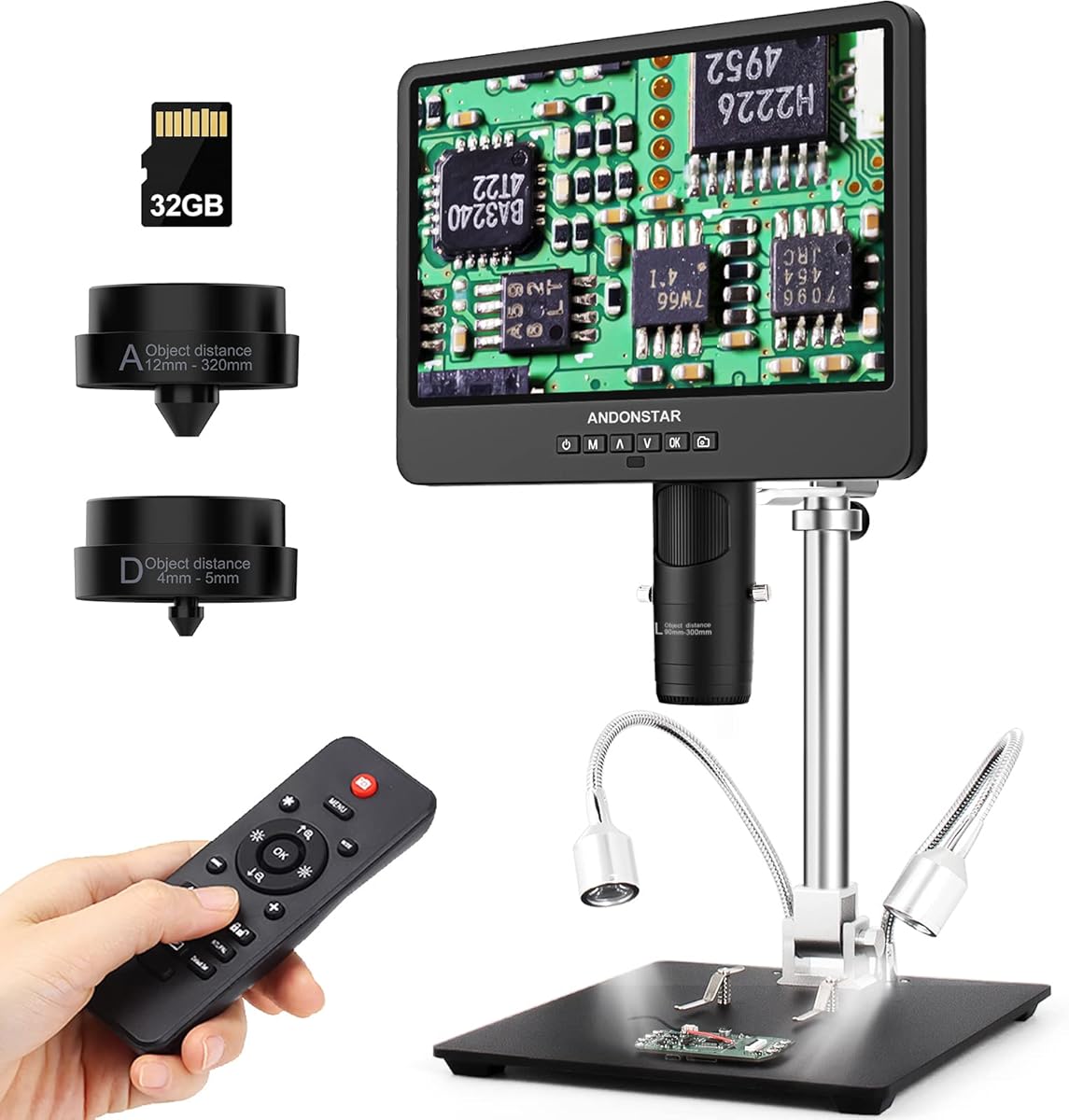
The Andonstar AD249S-M pairs a large 10.1-inch display with three interchangeable lenses, 2160P video, and a full-size adjustable boom arm. Its 4.6 rating makes it one of the strongest choices here for a technician who wants both a generous viewing area and dedicated repair optics in a single system.
We may earn a commission when you buy through this link, at no additional cost to you.
Lens L serves soldering and circuit-board work, while Lens A covers broad subjects such as parts, coins, plants, and stones, and Lens D handles biological slides. The stand adjusts forward, backward, left, right, and by angle, while its metal construction is intended to remain stable near high-temperature soldering work.
The trade-off is physical scale. A large monitor and full boom arm demand more bench space, and swapping lenses involves removing and installing screws. The up-to-2000X specification covers several lens and display configurations, but useful magnification still depends on distance and optics. As with the smaller AD246S-M, the maximum figure should not be treated as the ideal working setting.
The AD249S-M is best for professional or serious enthusiast benches that can accommodate a full imaging station. Its large screen, stable arm, dedicated soldering lens, HDMI output, remote control, measurement software, and supplied 32GB card create a comprehensive workflow for detailed repair, teaching, and documentation.
Ten-point-one inches provides enough screen area to retain context around a solder joint while still enlarging fine details. The larger view can reduce the need to reposition the image constantly and makes the unit more suitable for demonstrating work to a customer or colleague.
Three lenses separate soldering, general observation, and high-power inspection tasks, reducing the need to own separate scopes. HDMI output extends the image to a larger monitor, while the Windows measurement software supports dimensional calculations and digital file capture.
We may earn a commission when you buy through this link, at no additional cost to you.
The Andonstar AD249S-M Plus is the most fully equipped mobile-repair microscope in this roundup. It combines the 10.1-inch display, three lenses, 2160P recording, and a full boom-arm soldering station with an extension base, storage boxes, tool holder, and rotatable helping hands. Its 4.7 rating is the highest among the listed products.
We may earn a commission when you buy through this link, at no additional cost to you.
The extension base is described as increasing the soldering-station area by 230%, while its component boxes help separate small parts. A dedicated tool holder keeps implements within reach, and the rotatable clamps provide support for hands-free work. These accessories matter because a microscope alone cannot solve the problem of organizing and stabilizing a crowded electronics bench.
The system still retains the normal limitations of a large, multi-feature instrument. It takes up more space than a handheld camera, lens changes require screw removal, and setup takes longer. The maximum 2000X claim spans different lenses, screens, and zoom settings, so practical solder inspection will usually depend on the dedicated Lens L and a stable working distance.
The Plus version is best for a dedicated repair workstation, a professional bench, or a serious mobile repair hobbyist who values organization as much as magnification. Compared with the standard AD249S-M, its added station accessories reduce workspace clutter and improve workflow continuity, making it the most complete premium package here.
Storage compartments, a tool holder, and rotatable helping hands organize the work around the microscope rather than leaving every item on the bench. This can reduce interruptions and help keep small components from being displaced during a repair.
The 10.1-inch display, 2160P recording, HDMI output, wireless remote, and three-lens arrangement remain central to the Plus package. The additional station equipment improves the surrounding workflow, making the system more useful than a simple display upgrade alone.
We may earn a commission when you buy through this link, at no additional cost to you.
The Andonstar AD246S-M Plus combines a seven-inch 2160P microscope with a three-lens system and the expanded soldering-station accessories found in the brand's larger offering. Its 4.7 rating places it among the most highly rated choices, while the smaller screen makes it more practical for technicians who want premium features without an oversized monitor.
We may earn a commission when you buy through this link, at no additional cost to you.
Lens L is designated for soldering and repairing circuit boards and mobile phones, Lens A handles parts and other broad subjects, and Lens D provides higher-power observation for biological slides. The boom-arm station includes an extension base, component storage, a tool holder, helping hands, a soldering mat, and a bottom light stage to create a more organized repair environment.
Compared with the 10.1-inch AD249S-M Plus, this model offers less display area and therefore less peripheral context. It is better suited to a compact station, although the complete accessory set still demands room. As with the other Andonstar systems, advertised magnification varies by lens and display method, and manual focus and object distance remain important to image quality.
This is a compelling choice for a professional mobile repairer who values a complete workstation but prefers a seven-inch screen. The combination of dedicated repair optics, 2160P capture, HDMI output, measurement software, a wireless remote, and organized soldering accessories offers a more complete solution than a generic phone microscope.
The seven-inch LCD provides enough room for detailed work without reaching the physical footprint of a ten-point-one-inch model. It can serve as the primary display, while HDMI adds the option of moving the image to a larger monitor when a wider overview is useful.
The extension base, component boxes, tool holder, helping hands, mat, and bottom light stage address common bench problems. These additions make it easier to keep parts organized and hands occupied while inspecting a joint under the appropriate lens.
We may earn a commission when you buy through this link, at no additional cost to you.
The best microscope for mobile repairing is not simply the model with the largest magnification number. Focus on image clarity, stable positioning, useful working distance, controllable light, and a workflow that matches the devices and boards you regularly service.
Advertised magnification can include optical and digital effects, and the displayed value changes with screen size and camera distance. A headline figure of 1000X or 2000X does not guarantee that a tiny solder joint will look sharp at that setting. Mobile repair work depends more on correct focus, adequate illumination, stable framing, and a usable field of view than on possessing the maximum number.
Prioritize a microscope that lets you control distance and focus gradually. Dedicated Lens L optics on the Andonstar systems are expressly intended for soldering, while adjustable stands on the TOMLOV, Elikliv, and five-inch models support repeatable positioning.
A stable stand prevents the image from moving when you touch a probe, adjust a board, or work on a solder joint. Weighted metal bases and boom arms are generally more suitable for extended repair sessions, while C-clamps can save desk space. Small handheld stands are convenient for quick checks but demand more attention from the operator.
Look for adjustable height, flexible articulation, and a base that will not creep across the worktable. The best arrangement lets you approach an awkward board corner without repeatedly repositioning the camera by hand.
A larger display provides more surrounding context and can reduce the strain associated with leaning close to a small screen. A seven-inch display is a practical middle ground, while a ten-point-one-inch screen is easier for demonstrations and sustained work. Phone-based systems are compact and inexpensive, but they depend on the device's screen and can be less comfortable over time.
Consider both the integrated display and the option to output to a larger monitor. HDMI, USB PC viewing, and wireless phone connections each provide a different workflow, so the most useful feature is the one you will actually use at your bench.
Even, adjustable illumination reveals solder texture, cracks, corrosion, board markings, and component edges. Eight-LED illumination is common across this category, but light placement matters. Flexible side lamps can reduce shadows, while a bottom light stage can help when viewing a board against a contrasting background.
Choose controls that let you reduce brightness when reflections become a problem. Diffused light is also valuable on shiny connectors, metal shielding, and polished solder points.
WiFi is convenient for phones and tablets, USB works well with computers, and HDMI offers broad external-display support. Compatibility varies significantly: one listed USB scope excludes iPhone and iPad, while another includes USB, Micro USB, Type-C, and Lightning connectors. Android support may require OTG, and some applications require privacy permissions or updates.
Match the microscope to the devices already used in your workflow. Confirm the listed operating systems, required app, connection method, and whether the phone or computer supplies sufficient power before buying.
Documentation can be valuable when comparing a damaged component, recording a fault, or showing a customer what a repair involves. Look for 1080P or 2160P video, still-image capture, removable storage, and a remote control that prevents the camera from being shaken. Measurement software is a useful additional feature, although it is usually limited to Windows.
Check what is included. Some products provide a microSD card, while others require one to be purchased separately. A host with limited temporary memory is not a substitute for storage when documenting numerous repairs.
A high-quality scope becomes more useful when the bench around it is organized. Extension bases, component storage, tool holders, helping hands, soldering mats, and bottom lighting can improve workflow and reduce accidental movement. These accessories are especially relevant to a professional station, but they are less important for occasional inspection.
Decide whether you need a complete station or only a camera. Buying a feature-rich kit with accessories you will not use can make setup slower and consume unnecessary space, while a basic scope may leave you organizing components separately.
Begin by placing the microscope on a stable surface and securing the board or component before adjusting the image. Connect the selected lens, install the required software or storage card if needed, and remove any protective film. Turn on the LEDs at a moderate level before bringing the lens close, then use the stand or arm to establish a working distance.
Focus slowly rather than maximizing the claimed magnification immediately. Move the camera or object incrementally and turn the focus wheel until edges become distinct. Adjust the light angle to reveal relief and reduce glare. For board-level work, a solder-specific lens and a stable boom arm are generally more suitable than extreme digital zoom on a handheld camera.
After use, power down the scope, disconnect cables carefully, and return it to a protective case or designated stand. Keep the lens free of dust, solder residue, fingerprints, and flux. Do not direct compressed air into the housing, and avoid resting a hot soldering iron near the cable or plastic components. Follow the manufacturer instructions for battery, memory-card, and cleaning care.
Useful magnification depends on the size of the component, your eyesight, screen quality, illumination, and working distance. A dedicated soldering lens with a moderate working range is often more practical than the maximum digital zoom. Begin at lower magnification, focus carefully, and increase magnification only when the image remains sharp and stable.
A digital microscope can provide the detail needed for many board inspection and soldering tasks, especially when it has a stable stand, directional light, and a suitable working distance. It may not reproduce the depth perception and fluid movement of a stereo microscope. Choose based on the size of the work, display needs, documentation requirements, and available bench space.
HDMI can be valuable when a technician wants a larger view than the microscope's built-in display provides. It is especially useful for detailed inspection, teaching, and customer demonstrations. Make sure the output mode and monitor arrangement are supported, and remember that external viewing may offer different zoom ranges than the built-in screen.
That depends on the model. The Andonstar systems reviewed here include a 32GB microSD card, and the TOMLOV DM9 includes 16GB. The five-inch soldering microscope requires a card of up to 32GB for saving 1080P video and batches of photos, while the Elikliv EDM4 states that a card is not included. Check the specifications before recording.
Some can. The Skybasic uses a WiFi hotspot and app for iOS devices, while the Four-in-One USB Microscope includes a Lightning connector. The Bysameyee model explicitly does not support iPhone or iPad. For a mixed-device bench, confirm connector coverage, app availability, and operating-system requirements before making a purchase.
A stable stand, controlled focus, an appropriate working distance, and adjustable side lighting are the most important qualities. A dedicated soldering lens is also useful because it is designed to balance magnification and field of view. Software, recording, and high headline magnification are secondary to a clear and repeatable view of the joint.
Not necessarily. A single-purpose repair scope can handle routine board work, while a three-lens system is useful when the same bench also handles broad component inspection, coin collecting, education, or biological slides. Choose multiple lenses if the added versatility will be used regularly rather than simply adding unnecessary complexity.
Power it down and disconnect it before cleaning. Keep liquids away from the lens, display, and charging port, and remove loose dust according to the manufacturer's instructions. Do not touch the lens with fingers or use harsh solvents. Store the unit in a clean case, and inspect cables and connectors for solder or flux contamination before the next use.
The Andonstar AD246S-M offers the strongest balance of dedicated repair optics, recording, external viewing, and a manageable stand, making it the most versatile general recommendation. The TOMLOV DM9 is a comfortable all-in-one choice for a seven-inch display and solid metal support, while the Skybasic Wireless Digital Microscope serves budget-conscious users who want quick phone-based inspection.
Before buying, prioritize the details that affect actual work: a stable and reachable viewing position, clear focus, lighting that does not create excessive glare, and compatibility with the devices already on your bench. Include dedicated accessories only when they solve a recurring problem. A lower-cost scope with the right stand and lighting may be more useful than an elaborate system whose features remain unused.
Finally, verify the current specifications, included storage, app requirements, and connection method at the time of purchase. Product configurations, software updates, and availability can change, and prices fluctuate. Comparing the current listing with the repair tasks you perform is the best way to select an appropriate microscope for mobile repairing.