
OBD2 Power Cable for Dash Cam
4.5Editor score
Daily and parking modes
Low-voltage cutoff protection
Power-only OBD connection
Compare 10 OBD2 to USB C Power Adapter for Dash CAM options by voltage protection, parking modes, output, vehicle fit, installation, and setup ease.
An OBD2 to USB C power adapter gives a dash cam a cleaner installation by drawing power through the diagnostic port instead of occupying the cigarette-lighter socket. The right adapter also needs dependable voltage regulation, parking-mode support, vehicle-compatible cutoff behavior, and a connector that matches your camera.
This guide compares ten adapters on their operating modes, low-voltage protection, output, cable design, installation requirements, and stated compatibility. It covers compact daily-use kits, adjustable parking monitors, right-angle connectors, and solutions intended for broader vehicle voltage ranges without assuming every camera or vehicle behaves identically.
The list reveals that a strong OBD2 hardwire kit is not simply defined by continuous power. Each pick emphasizes a different balance of parking surveillance, timer control, voltage visibility, protection, or installation convenience. Product details and availability can change, so confirm current specifications and compatibility before purchasing.
4.5Editor score
4.4Editor score

4.3Editor score
The comparison below places all ten adapters side by side, focusing on the factors that determine installation success: operating mode, cutoff behavior, electrical protections, supported voltage range, and connector details. Remember that dash cam pin definitions and vehicle OBD power logic can differ, so compatibility checks remain essential.


This OBD2 to USB C power adapter combines a straightforward installation with the core functions most dash cam owners need. It earns a 4.4 rating, and its standout qualities are the physical operating-mode switch, regulated 5V/3A output, and automatic low-voltage cutoffs for both 12V and 24V vehicles. The result is a practical hardwire alternative for people who want a tidy cabin without modifying the factory electrical system.
We may earn a commission when you buy through this link, at no additional cost to you.
The adapter offers two clearly defined modes. Daily mode shuts off roughly 20 minutes after the engine stops, reducing unnecessary battery drain during normal use. Parking mode maintains power for continuous monitoring, while the built-in chip disconnects at 11.6V in 12V vehicles or 23.4V in 24V vehicles. A 3.5-meter lead provides ample routing room, and the power-only connection is designed to avoid interfering with OBD diagnostics or ECU data.
There are compatibility conditions that deserve attention. The USB-C connector uses the A5-B5 signal-pin definition and will not work with cameras requiring A8-B8 pins or a direct 12V input. Some vehicles also stop supplying power to the OBD port after shutdown, in which case the stated workaround is to drive to about 20 km/h to activate the port. These are limitations of the devices and vehicles involved rather than evidence that the adapter is defective.
This is the strongest overall recommendation for a driver seeking an uncomplicated, feature-balanced installation. It suits owners who want a physical choice between daily use and parking surveillance, especially when their camera supports the required A5-B5 arrangement. Confirm the camera pin definition and check the vehicle's OBD behavior before buying, then route the cable along trim panels for a clean finish.
The physical selector makes it easy to choose whether the camera should stop shortly after driving or retain power while parked. This avoids digging into the installation whenever normal use and overnight monitoring needs differ.
Voltage monitoring, over-current protection, and short-circuit protection provide useful safeguards. The 5V/3A regulated output also supports stable recording while keeping the 12V accessory socket available for other devices.
We may earn a commission when you buy through this link, at no additional cost to you.
This OBD2 power cable provides a focused, affordable route to a hardwired-looking dash cam installation. Its 4.5 rating is the highest among the listed adapters, while the useful combination of daily mode, parking mode, low-voltage protection, and regulated output makes it an appealing budget-oriented choice. It is particularly attractive for owners who want parking surveillance without a fuse-box installation.
We may earn a commission when you buy through this link, at no additional cost to you.
A one-control design separates daily operation from parking monitoring. In daily mode, power ends about 20 minutes after the engine is switched off. Parking mode supports continuous monitoring, vibration wake-up, and a transition to low-power time-lapse recording according to the camera's behavior. The product listing states a built-in 11.8V/23.4V protection level, with a three-minute delay after insufficient voltage is detected.
The cable measures 3.5 meters and can be concealed with the included installation tools. It supplies steady 5V/3A power without accessing diagnostic data, leaving the cigarette-lighter outlet free. Compatibility is narrower than a generic USB-C label may suggest: the connector follows the A5-B5 definition and does not support A8-B8 devices. Users should also avoid prolonged exposure to severe vibration, which can disrupt parking-mode behavior.
Choose this adapter when your priority is a straightforward, well-rounded parking-mode kit at the budget end of the category. Verify the camera's pin definition, make sure the vehicle's OBD port remains responsive as required, and test the mode switch after installation. For most compatible vehicles, it offers a tidy installation with fewer components than a full hardwire kit.
Parking mode can support vibration wake-up and time-lapse capture, while daily mode limits drain after a drive. The single switch keeps changes immediate and understandable.
The extended lead and included clamp-style installation tool make it easier to route power along the dashboard, pillar, or trim. The cigarette-lighter socket remains available throughout the installation.
We may earn a commission when you buy through this link, at no additional cost to you.
This OBD2 to USB-C power cable is the most feature-oriented model in the group, with a 4.3 rating and a clear premium identity. Its defining advantages are four selectable low-voltage cutoff levels, an integrated LED voltmeter, automatic ACC detection, and a broader collection of circuit protections. Those features make it particularly attractive to owners who want more control over parking power rather than relying on a single fixed threshold.
We may earn a commission when you buy through this link, at no additional cost to you.
ACC detection is intended to switch the camera automatically between active driving and parking surveillance. For 12V systems, the listed cutoffs are 11.6V, 11.9V, and 12.5V; for 24V systems, they are 23.4V, 23.8V, and 25V, with a 20-minute timer option also listed. The LED display provides real-time battery voltage, helping the user understand whether the vehicle or configuration is causing a power interruption.
The protection package includes over-current handling, short-circuit shutdown, overheat cutoff, and automatic thermal recovery. Stable 5V/3A output is provided for USB-C dash cams, GPS devices, and radar detectors. An A8B8 adapter cable is included for certain devices. Even so, the listing explicitly notes that not every dash cam brand was tested, so connector and parking-mode support should be verified with the camera seller before purchase.
This is the best premium recommendation for drivers who prioritize monitoring visibility and adjustable battery safeguards. It is more complex than the simplest dual-switch kits, but the controls can make long-term parking behavior easier to manage. Confirm both vehicle OBD logic and camera compatibility first, then use the LED voltage display to select a cutoff appropriate for the battery condition and parking duration.
Multiple cutoff selections let the user account for battery condition, temperature, and expected parking duration. The 20-minute timer option is useful for owners who want a shorter post-shutdown recording window.
The integrated LED voltmeter turns an otherwise hidden electrical system into something the driver can monitor. That visibility helps distinguish a low vehicle battery from an incorrect mode or connection.
We may earn a commission when you buy through this link, at no additional cost to you.
This OBD 2 dash cam hardwire kit delivers a versatile installation with a 4.3 rating. It is designed for sedans, SUVs, and trucks, and the listing names VIOFO, 70mai, Wolfbox, Rove, and RedTiger among compatible USB-C dash cam brands. Automatic ACC detection, an LED voltage display, and four adjustable protection options make it a practical choice for drivers who want guided setup without modifying factory wiring.
We may earn a commission when you buy through this link, at no additional cost to you.
The kit operates directly from the OBD port and frees the 12V accessory socket. A smart ACC chip is intended to provide continuous recording while driving and enter parking surveillance after the engine stops. Cutoff choices include 11.6V, 11.9V, 12.5V, and a 20-minute timer. The listing recommends beginning at 12.5V for older batteries or cold conditions, where a higher reserve can improve the likelihood of a clean start.
Vehicle behavior is the primary constraint. The OBD port must provide power with the engine off for parking mode to function, and some European vehicles continue to send ACC-related signals after shutdown. In those cases, the 20-minute timer may not activate as intended. A multimeter or the vehicle manual can be used to verify behavior, and the camera itself must support parking recording for the complete feature set to work.
Choose this adapter when broad camera-brand support and an approachable installation are priorities. The LED readout is especially useful for first-time installers who want to understand the vehicle's voltage behavior. Verify that the dash cam supports USB-C, parking recording, and the required connection arrangement, and check the OBD port before relying on unattended recording.
The recommended 12.5V starting point reflects a practical concern: an aggressive cutoff can protect the battery but still be too low for reliable starting in cold weather or with an aging battery.
A USB-C plug does not by itself guarantee compatibility. The camera must support parking mode, and its electrical expectations must align with the adapter's OBD and connector arrangement.
We may earn a commission when you buy through this link, at no additional cost to you.
CERRXIAN's OBD power cable is a 4.3-rated option distinguished by its right-angle USB-C plug and broad stated 13-40V input range. It converts vehicle power to 5V/3A and includes an 11.5-foot, or 3.5-meter, cable. The angled connector is useful where space is tight, particularly beside a mounted dash cam or where the cable enters a side-mounted USB-C socket.
We may earn a commission when you buy through this link, at no additional cost to you.
Two switch positions cover daily use and parking monitoring. ACC mode supplies power when the engine starts and turns it off within a vehicle-dependent window after shutdown. Parking mode is intended to continue monitoring for up to 24 hours, subject to battery condition and camera consumption. A smart chip cuts power when voltage falls below 11.6V, providing a final safeguard against complete depletion.
The manufacturer provides an unusually candid battery warning: 11.6V is a deep-discharge threshold, and reaching it may already affect starting ability or battery health. The cutoff cannot guarantee that the vehicle will start after prolonged parking. This cable is also expressly power-only and cannot be used for OBD scanners or other devices that require data communication. A trim tool is included for concealing the lead.
This is a sensible pick for drivers who value a compact right-angle connection and need a stated wide input range. It works best for compatible USB-C equipment that needs power only and for owners who understand that parking runtime must be managed carefully. Confirm the camera's requirements, select the appropriate mode, and periodically check the battery if the vehicle remains parked for long periods.
The right-angle USB-C head reduces the amount of straight clearance needed beside the camera. It can make cable management neater without requiring a separate angled adapter.
Low-voltage protection is a last line of defense rather than a guarantee. Vehicle battery health, parking duration, and camera draw all influence how long monitoring can safely continue.
We may earn a commission when you buy through this link, at no additional cost to you.
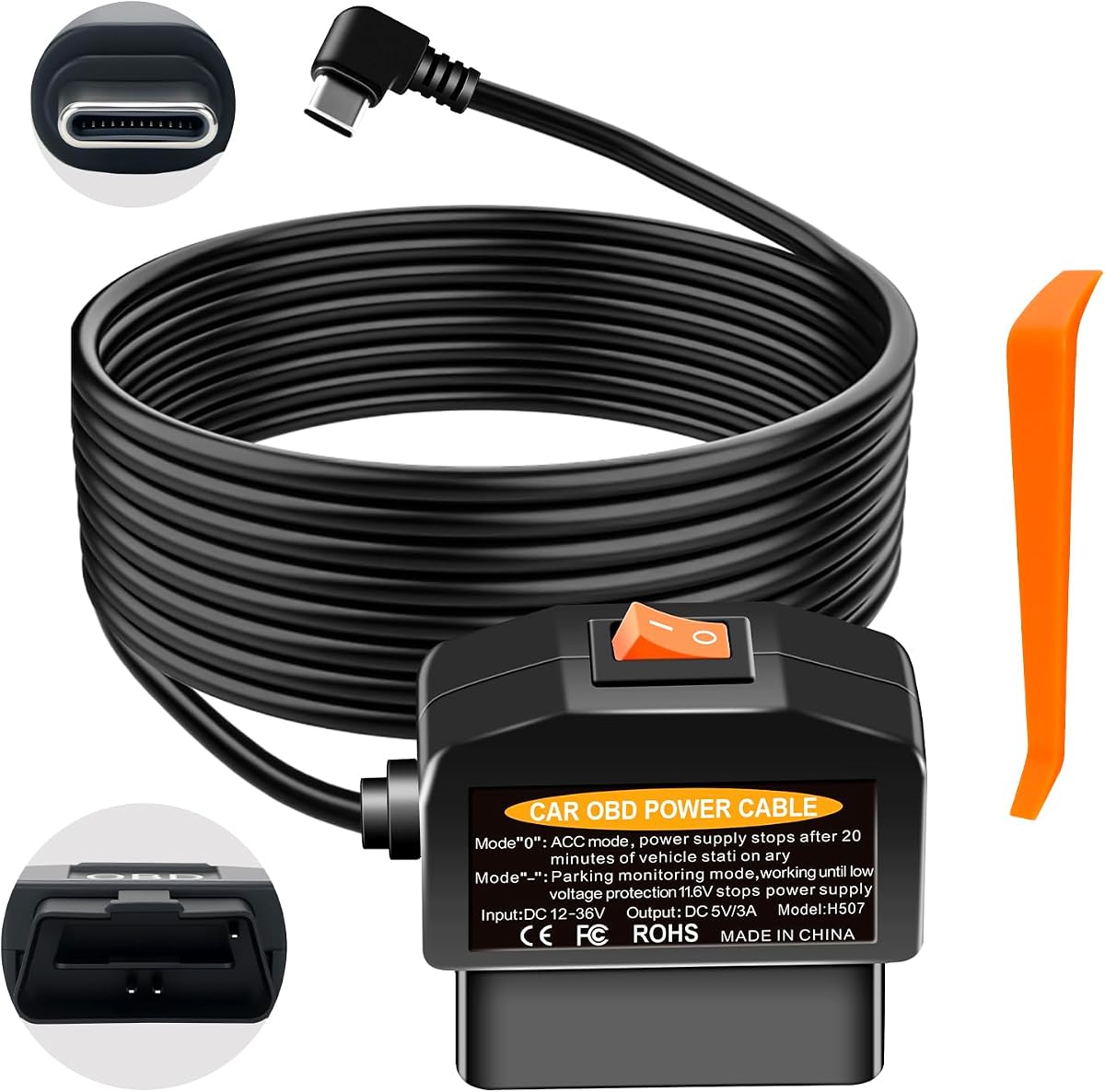
This OBD2 to USB C power cable earns a 4.4 rating through a combination of clear mode selection, broad 12V/24V support, and extensive electrical safeguards. Its six-part protection system covers low-voltage cutoff, anti-drain behavior, over-current, short circuit, reverse polarity, and overheating. The result is a well-rounded hardwire alternative for compatible dash cams that need continuous parking power.
We may earn a commission when you buy through this link, at no additional cost to you.
Mode zero provides ACC behavior and normally cuts output about 20 minutes after engine shutdown, although the timing can vary with the vehicle's OBD logic. The parking mode keeps power available for continuous monitoring and cuts it roughly five minutes after low battery voltage is detected. The listed thresholds are 11.6V for 12V vehicles and 23.4V for 24V vehicles. Stable 5V/3A output is intended to reduce camera restarts and recording lag.
The 3.5-meter cable connects to the OBD-II port without cutting wires or accessing the fuse box. It is designed for cars, SUVs, trucks, and larger commercial vehicles, but the USB-C side uses A5-B5 signal pins and excludes A8-B8 or 12V-input devices. Some vehicles initially withhold OBD power; the listed activation method is to drive to roughly 20 km/h after startup.
Choose this model when vehicle and camera protection are as important as parking-mode convenience. It offers a compelling feature set without adding a display or complicated adjustment process. Check the camera's pin definition, confirm that the connector is physically accessible after mounting, and test both operating modes before hiding the cable.
The six-part system addresses common concerns that extend beyond simple over-current protection, including reverse connection and overheating. These safeguards are useful in a hot vehicle interior where cables can remain under load.
The OBD-II plug and long lead allow the factory interior to remain intact. Once routed, the installation can look much closer to a factory hardwire than a cable extending from the center console.
We may earn a commission when you buy through this link, at no additional cost to you.
This OBD dash cam power cable uses one-button mode control and carries a 4.4 rating. It is designed for fuel vehicles with an OBD or OBD-II port and provides two operating choices: ACC mode, which shuts down after a short delay, and surveillance mode, which continues until a low-voltage condition is detected. Its troubleshooting notes are unusually explicit, making it approachable for first-time installers.
We may earn a commission when you buy through this link, at no additional cost to you.
The built-in control chip measures battery voltage and stops output below 11.6V. The listing explains that an unexpected shutdown may reflect genuinely low vehicle voltage rather than a failed cable. It also provides a useful starting check: confirm that the OBD plug and camera connector are secure, verify that voltage reaches approximately 13.1V after the engine starts, and observe whether the voltage falls to about 12.7V after shutdown.
The USB-C connector must use the A5-B5 signal definition. The product is also limited to fuel vehicles, and a separate vibration-detection model is referenced for hybrid and pure-electric applications. It is a power-only connector and does not interfere with other OBD data communication. Because the mode timer depends on voltage transitions, inconsistent readings from aging batteries can affect perceived performance.
This is a good match for owners of compatible fuel vehicles who prefer explicit troubleshooting information to a more automated setup. The one-button interface makes it easy to move between daily driving and parking surveillance. Before buying, confirm the camera's signal pins, verify that the vehicle is within the stated fuel-vehicle scope, and test the system with the engine both running and off.
The stated voltage checkpoints make it easier to identify whether a mode issue comes from the installation or the vehicle. This is particularly helpful for users unfamiliar with OBD power behavior.
The single button removes the need to navigate complicated controls. Daily ACC behavior prioritizes battery conservation, while surveillance mode supports unattended recording until protection activates.
We may earn a commission when you buy through this link, at no additional cost to you.
This dash cam hardwire kit offers a 4.2 rating and a useful addition for owners whose cameras need a different signal arrangement: an A5-to-A8 adapter is included. It provides ACC and 24/7 parking modes, an 11.6V cutoff, and a fuse-free OBD installation. The stated compatibility covers dash cams, GPS units, and radar detectors with USB-C power inputs.
We may earn a commission when you buy through this link, at no additional cost to you.
The OBD plug supplies power to the camera while leaving the original wiring untouched. ACC detection handles the transition between driving and parking use, while low-voltage protection is intended to reduce battery drain during long stops. A surge-protection feature is included, and the cable is specified as 11.5 feet long. The included A5-to-A8 lead is intended to address parking-mode compatibility issues for certain Wolfbox and Thinkware models.
The central requirement is constant 12V power at the OBD port after the engine stops. If the port shuts down, there is no parking mode, no USB output, and the camera will not operate. The listing also excludes electric vehicles, including early models, and states that the kit is for 12V vehicles. Some vehicles introduce a three-to-20-minute delay, and severe vibration can make the timing behave inconsistently.
This kit is worth considering when the included signal adapter solves a known camera issue or when a simple 12V installation is the priority. It offers the core hardwire-kit functions without requiring fuse-box access. Verify constant OBD power with the vehicle manual or a voltmeter, check whether the included adapter is actually needed, and confirm the camera's parking-mode support before installation.
The included A5-to-A8 lead may remove one common obstacle for specific camera models. It should be used only when the camera maker or seller confirms that the alternative signal arrangement is appropriate.
The kit cannot create parking-mode power if the vehicle cuts the OBD port after shutdown. Checking that behavior before purchase avoids the most likely source of disappointment.
We may earn a commission when you buy through this link, at no additional cost to you.
This OBD2 to USB C power cable combines a 4.0 rating with several installation-friendly features. Its real-time LED voltmeter, 90-degree USB-C connector, selectable low-voltage cutoffs, and 3.5-meter lead make it particularly convenient for tightly mounted cameras. The package also lists a pry tool and four wire ties, giving the installer the basic hardware needed to conceal the cable.
We may earn a commission when you buy through this link, at no additional cost to you.
Protection settings include 11.6V, 11.9V, 12.5V, and a 20-minute timer. The timer cuts power after the vehicle stops and is designed to support continuous or time-lapse parking recording when the camera has the relevant feature. The 12V-24V input is converted to a stable 5V/3A output. Built-in protection covers over-current, short circuit, overheating, and reverse connection.
The product's compatibility notes are important. The 20-minute timer may not work if the camera does not support time-lapse parking mode, if the vehicle continues to detect occupants or movement, or if the connector's A5-B5 definition does not match the camera. Some cameras use A8-B8 pins and will require a different cable. Severe or continuous vibration can also interfere with the intended parking behavior.
This adapter is a good option for someone who values a compact right-angle plug and visible voltage information more than a higher listed rating. Its accessory bundle supports a neat setup, while the selectable cutoff allows the user to adapt to battery condition. Confirm the signal-pin definition and parking-mode support, then test the timer in an ordinary drive before relying on it overnight.
The LED screen and angled connector address two different practical issues: diagnosing voltage behavior and fitting the cable neatly beside a mounted camera.
The available thresholds offer more flexibility than a fixed design, although a higher cutoff is generally more conservative. The best setting depends on battery age, weather, and how long the vehicle will remain parked.
We may earn a commission when you buy through this link, at no additional cost to you.
This OBD dash cam power cable has a 4.4 rating and stands out for a stated 12V-36V input range. It converts that vehicle power to a stable 5V/3A output through a single-button mode control. The design is aimed at dash cams, GPS navigators, radar detectors, and other compatible Type-C devices, while drawing power only from the OBD port.
We may earn a commission when you buy through this link, at no additional cost to you.
Mode O is the daily ACC setting. It begins supplying power when the vehicle starts and stops approximately 20 minutes after shutdown. The instructions add that the car should be vacated and left without vibration so that the timer can operate as intended. Monitoring mode provides continuous output until low voltage is detected, at which point the stated 11.7V cutoff is followed by a five-minute power-off delay.
The A5-B5 signal-pin requirement is the main connector limitation, and some phones may not accept the charging protocol. Vehicle behavior can also delay initial operation: if the camera does not power after startup, the listed workaround is to drive until the car reaches about 20 km/h. This occurs on vehicles that do not energize the OBD port immediately. The cable is otherwise designed to remain hidden along the trim and leave the cigarette-lighter socket free.
This is the final recommendation for users who prioritize a broad stated input range and straightforward daily or monitoring operation. Its lower cutoff threshold should still be treated as a last-resort battery safeguard, particularly for older vehicles. Verify the camera's connector definition, test the initial power sequence, and use the shorter daily mode when extended parking is not necessary.
The 12V-36V input covers a wide range of conventional vehicle electrical systems, while voltage regulation produces the 5V/3A output expected by many USB-C dash cams.
The timer is designed to stop output after the vehicle is abandoned. Continued vibration or detected movement can prevent the intended shutdown, so the mode should be tested in realistic conditions.
We may earn a commission when you buy through this link, at no additional cost to you.
The best adapter is one that matches both the dash cam's electrical expectations and the vehicle's OBD-port behavior. Beyond the connector shape, voltage protection, mode timing, and parking support determine whether the installation will work reliably.
A USB-C connector identifies the physical plug, but it does not guarantee that the cable will communicate with the camera correctly. Several products in this category specifically use the A5-B5 signal-pin definition, while some cameras require A8-B8. A mismatch may result in no charging, no parking mode, or an unstable connection. Ask the camera seller for the signal definition before buying and compare it directly with the adapter listing. Some kits include an alternative signal adapter, but that should be used only when the camera manufacturer confirms it is appropriate.
Parking surveillance requires the OBD port to remain powered after the engine stops. Some vehicles do this, while others disconnect the port or activate it only while the ignition is on. Check the vehicle manual, inspect existing accessories, or use a multimeter to determine whether the port stays live. Also determine whether it responds immediately or has a delay. The product guides recommend driving to roughly 20 km/h on some vehicles to trigger the port, but reliable constant power is still the preferred starting point.
Low-voltage protection is essential when a camera remains powered after the engine stops. Most adapters in this list cut out around 11.6V to 11.9V for 12V vehicles, while some provide higher selectable thresholds such as 12.5V. A higher threshold preserves more starting power but stops recording sooner. Models designed for 24V systems commonly use thresholds around 23.4V. Protection is not a guarantee that the battery will retain enough charge to start, especially with an aging battery or prolonged parking.
Daily or ACC mode ends power shortly after engine shutdown, conserving the vehicle battery. Parking or surveillance mode continues supplying power for unattended recording. Some products add a 20-minute timer, vibration wake-up, or time-lapse support. These features only work when the dash cam has compatible parking-mode firmware and the vehicle provides the necessary power signal. A physical switch is convenient, while automatic ACC detection reduces manual intervention but may be affected by the vehicle's OBD logic.
Most adapters convert vehicle power to a regulated 5V/3A output. Stable voltage can reduce unexpected camera restarts and recording interruptions, particularly when the engine is started or stopped and the vehicle's electrical output changes. Confirm the camera's accepted input rather than assuming every USB-C device uses the same protocol. The broad vehicle input ranges advertised by some products do not eliminate the need to verify the camera's power requirements.
Useful safeguards include over-current protection, short-circuit shutdown, reverse-polarity protection, and over-temperature handling. The top-ranked products also emphasize low-voltage and anti-drain control. These protections reduce the consequences of wiring errors, unstable vehicle voltage, or heat in the cabin. They do not make a poor installation appropriate, so the OBD plug, USB-C connector, and any included signal adapter should still be firmly seated.
Cable length affects installation options, while connector angle affects clearance around the camera. A 3.5-meter, or approximately 11.5-foot, lead is common for routing from the OBD port to the windshield area. Right-angle USB-C plugs can help with bulky cameras or side-mounted ports. Trim tools and wire ties can make the cable less visible, but routing should never interfere with airbags, pedals, the steering mechanism, or other safety-critical components.
Most passenger vehicles use a 12V system, but trucks, commercial vehicles, and some larger platforms may use 24V. Several adapters state support for 12V-24V inputs, while others accept a wider stated range. A few products are restricted to 12V vehicles or fuel vehicles, and one explicitly directs hybrid and electric users toward a vibration-detection alternative. Check the vehicle's electrical system and the adapter's support before ordering to avoid incompatible operation.
Before installation, identify the vehicle's OBD-II or OBD port, check the vehicle manual for OBD power behavior, and confirm the dash cam's connector and parking-mode requirements. Compare those details with the adapter's compatibility notes. Clean the dashboard area where the connector will sit, and plan a route that keeps the cable away from the driver's view, pedals, and moving parts.
Start the vehicle, plug the OBD connector firmly into the port, and connect the USB-C end to the camera. Test the camera while the engine is running, then switch off the engine and observe whether the port remains active. If activation is delayed, wait as directed or use the vehicle-specific activation method listed in the manual. After confirming power, select the desired operating mode and check the camera's recording status before concealing the cable.
Route the lead with the supplied clips, ties, or trim tool, keeping strain off both connectors. Periodically inspect the visible section for looseness, heat damage, or abrasion. Recheck the camera after long parking periods, and use a conservative cutoff if the vehicle's battery is old or the temperature is cold. Never use the adapter for OBD diagnostics or data-transfer devices because it is designed to provide power only.
No. The physical USB-C plug must also match the camera's expected signal definition, and several adapters in this guide use A5-B5 rather than A8-B8. The camera must also accept the adapter's regulated output and support the parking functions you want to use. Confirm these details with the camera manufacturer or seller before purchasing.
No. Some vehicles provide constant OBD power, while others shut it off when the engine stops or activate it only after the car begins moving. Parking mode therefore depends on the vehicle's design. Check the owner's manual or test the port with a multimeter, and allow any vehicle-specific startup delay before deciding the installation is faulty.
No. It is a final safeguard rather than a guarantee, and 11.6V is already a deep discharge level for many 12V batteries. Battery age, temperature, parking duration, and camera power consumption all affect remaining starting power. A higher cutoff, such as an available 12.5V setting, may be more appropriate for an older battery or prolonged parking.
ACC mode supplies power while the engine is running and normally shuts off about 10 to 20 minutes after shutdown, depending on the adapter and vehicle. Parking mode continues supplying power for unattended monitoring until a timer expires or the low-voltage protection activates. Continuous and time-lapse recording also require compatible dash cam firmware.
The products are intended to draw power only and not communicate with the ECU. That means they can free the cigarette-lighter socket without acting as a scanner, but they cannot be used with diagnostic tools that require OBD data. Confirm that the adapter is power-only before connecting any other device.
The vehicle may delay OBD power, the camera may need time to change modes, or the connector may not be fully seated. Some vehicles also activate the OBD port only after reaching about 20 km/h. Check both connections, observe the specified delay, and test daily mode before troubleshooting parking mode.
Yes, the extended cable is generally designed for concealed routing. Use the supplied clips or trim tools where appropriate, but keep the wire away from airbags, pedals, the steering column, and heated components. Leave a small amount of visible cable near the connector so it can be checked without dismantling the entire dashboard.
It depends on the adapter. Several products are restricted to 12V vehicles or fuel vehicles, while one listing directs hybrid and pure-electric owners toward a separate vibration-detection solution. The vehicle's OBD power logic also varies. Check the adapter's notes and the vehicle manual rather than assuming every OBD2 port behaves like a conventional 12V fuel vehicle.
The top three choices serve different needs. The top-ranked BNnYY adapter offers the best overall balance of physical mode control, 12V and 24V cutoff support, and regulated output. The second-ranked OBD2 power cable is a strong budget-oriented option with parking features and straightforward installation, while the third-ranked premium model adds adjustable cutoffs, an LED voltmeter, and broader protection features.
Prioritize the non-negotiable compatibility checks before focusing on convenience. Confirm the camera's signal pins, parking-mode support, and accepted input, then verify how the vehicle's OBD port behaves after shutdown. Among compatible products, a visible voltage display, selectable cutoff, physical mode switch, and well-routed 3.5-meter cable can make long-term use more convenient and easier to diagnose.
Product specifications, vehicle behavior, camera firmware, and current pricing can change over time. Review the latest listing and manufacturer guidance before ordering, and compare the adapter's current protections with the amount of parking time the vehicle will experience. That final compatibility review is the best safeguard against an installation that looks correct but does not behave as expected.
