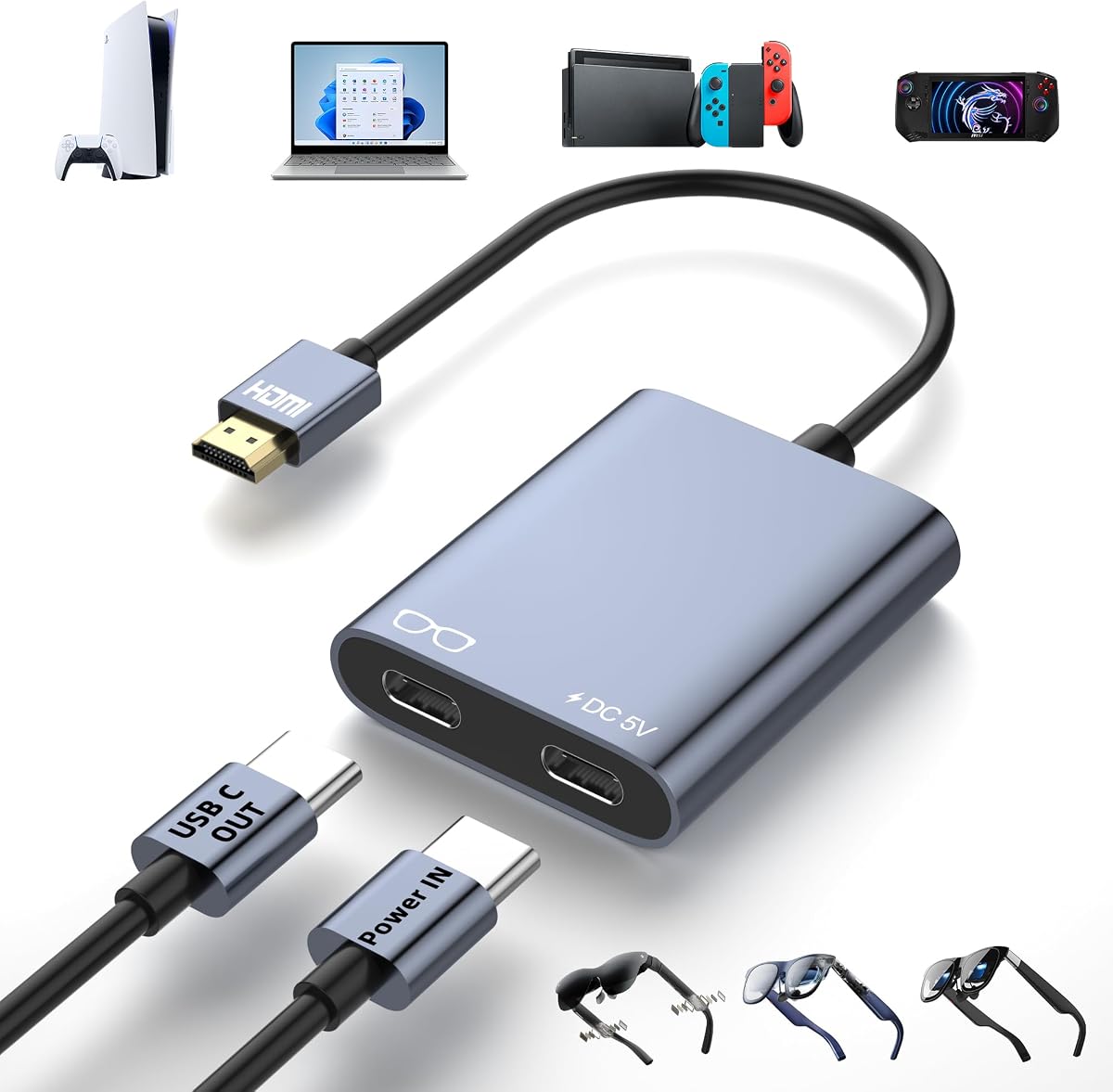
HDMI to USB C Adapter for AR Glasses
4.6Editor score
4K at 60Hz output
External power for stability
Broad AR glasses compatibility
Compare the best Rayneo HDMI adapters for AR glasses, evaluating HDR support, 4K output, charging, compatibility, portability, and ease of setup.
A RayNeo HDMI adapter can turn compatible smart glasses or portable displays into a large-screen entertainment and gaming setup, but the best choice depends heavily on your source device, glasses model, and power requirements. A useful adapter should provide the resolution your equipment can actually deliver, maintain a stable connection, and support simultaneous charging when your glasses need extra power.
This guide compares ten HDMI-to-USB-C adapters and Rayneo-compatible options based on output resolution, HDR capability, power management, one-way signal direction, supported RayNeo models, included cables, portability, and setup considerations. It covers both dedicated RayNeo accessories and broader adapters designed for USB-C AR glasses, including RayNeo Air 2s XR, alongside XREAL, Rokid, VITURE, and portable displays.
Each review identifies the adapter's strongest qualities and important limitations, helping you distinguish native RayNeo options from universal HDMI-to-USB-C converters. Ratings and specifications reflect the available product information, while availability and pricing can change. Always verify the exact output mode and power requirements of your glasses and source device before purchasing.
4.6Editor score

4.5Editor score

4.1Editor score
The comparison below covers native RayNeo adapters, universal HDMI-to-USB-C converters, and a portable option for Lightning-based iPhones, with attention to resolution, power, directional signal flow, and device support.


The RayNeo HDMI 2.0 Adapter is a purpose-built accessory for Air 4 Pro, GT Series, Air 3 Series, and other compatible RayNeo smart glasses. With a 4.1 rating, it stands apart from the universal converters in this roundup because it is designed around RayNeo hardware and adds HDR10 support. That makes it a compelling premium choice for viewers who want richer contrast and more vibrant colors rather than simply converting an HDMI signal.
We may earn a commission when you buy through this link, at no additional cost to you.
Its headline capability is 4K at 30Hz, with additional support for 2K at 30Hz and 1080p at 120Hz. The adapter can also keep the connected device charging while video is displayed, which is particularly useful during long gaming, streaming, and movie sessions. Its HDMI and Lightning connections provide a straightforward path from compatible consoles, streaming hardware, and iPhones to RayNeo glasses, while the advertised 201-inch virtual display creates a theater-like viewing environment.
There are important limits to consider. The Air 4 Pro's HDR10 output depends on the source also providing an HDR10 signal, so a standard 4K source may still work at the same resolution without HDR. The 4K mode is limited to 30Hz, which is suitable for cinematic viewing but less desirable for fast competitive gaming. Lightning devices also require Apple's Digital AV Adapter, which is not included, making this option less convenient for older iPhone users than a directly compatible USB-C route.
This is the recommendation to prioritize when you own a supported RayNeo generation, particularly Air 4 Pro or a GT Series model, and want the most integrated connection experience available. The combination of dedicated compatibility, HDR10, and simultaneous charging outweighs the lower maximum refresh rate for many viewers. Check the precise RayNeo model and source-device requirements before ordering, particularly if HDR or high-refresh gaming is important to you.
This adapter is explicitly designed for RayNeo Air 4 Pro and GT Series glasses, with additional support listed for the Air 3 Series. Its native focus can simplify setup compared with a general-purpose converter, especially when the glasses, power, and signal requirements are designed to work together.
HDR10 support is the feature that gives this adapter its premium position, provided your source offers the required signal. Simultaneous charging is also valuable for long sessions because it helps maintain power while the glasses display a large virtual screen.
We may earn a commission when you buy through this link, at no additional cost to you.
The RayNeo HDMI Adapter for Air 3, Air 2, and GT Series is a straightforward dedicated option for owners of those RayNeo generations. Its 4.2 rating reflects a balanced feature set centered on practical 4K output, simultaneous charging, and a compact design. It is a natural fit for users who want a purpose-made RayNeo connection without paying for the HDR10 feature found in the Air 4 Pro-oriented model.
We may earn a commission when you buy through this link, at no additional cost to you.
The adapter supports 4K at 30Hz, 2K at 30Hz, and 1080p at 120Hz. It can keep the attached device charged while streaming or gaming, and it uses a direct, plug-and-play approach without downloads or software configuration. The advertised 201-inch virtual display is intended to turn compatible content into an immersive screen for movies, shows, and games, while the lightweight enclosure makes the adapter easy to pack.
The key limitation is explicit: it is not for Air 4 Pro and does not support HDR10. That means buyers should not choose it if they want the newest dedicated RayNeo feature set or need HDR10 output. Its 4K ceiling of 30Hz also makes it more attractive for cinematic use than for demanding high-frame-rate gaming, although 1080p at 120Hz is available for suitable content.
Choose this adapter when you own an Air 3, Air 2, or compatible GT Series pair and value straightforward charging, broad support within those RayNeo families, and easy portability. It is less suitable for Air 4 Pro owners or anyone whose priority is HDR10. For those users, the dedicated HDMI 2.0 model is the more logical choice.
The product is designed around Air 3, Air 2, and GT Series glasses rather than every model in the current ecosystem. That focused compatibility makes it easier to understand which hardware it is intended to serve.
Its plug-and-play design avoids app downloads and complex display settings. The compact form also suits travel, while simultaneous charging supports extended viewing and gaming sessions.
We may earn a commission when you buy through this link, at no additional cost to you.
This HDMI-to-USB-C adapter combines 4K at 60Hz output with broad support for RayNeo Air 2s XR and numerous competing AR glasses. Its 4.6 rating is the highest among the ten products, and the feature package is notably complete: it supports external power, works with portable monitors, and includes a three-foot USB-A-to-USB-C charging cable. For buyers seeking flexibility rather than a RayNeo-only accessory, it is a strong value choice.
We may earn a commission when you buy through this link, at no additional cost to you.
The adapter sends video one way from an HDMI source to a USB-C display or compatible AR glasses. Sources include game consoles, laptops, Steam Deck, media players, and streaming devices, while outputs include RayNeo, XREAL, Rokid, VITURE, and Thunderbird AR glasses as well as USB-C portable monitors and projectors. An integrated 5V power port supplies power to the connected display or glasses, helping avoid black screens, flickering, and signal dropouts during extended use.
The trade-offs are substantial but easy to understand. External 5V power must be connected, and the supplied cable supports 5V at 1A or higher as described in the product information. The adapter is strictly unidirectional, so it cannot turn a USB-C source into an HDMI display signal. Some XREAL models also require switching to DisplayPort mode, while certain source devices may need their DHCP feature disabled.
This is a compelling recommendation for users who want 4K at 60Hz and a broad device ecosystem in a compact adapter. It is especially useful when you already own a USB-C display that supports DP Alt Mode and can provide reliable external power. Verify the connection direction, source settings, and glasses video mode before buying, because otherwise the adapter will not produce a usable picture.
Supporting 4K at 60Hz makes this converter more suitable for fluid high-resolution gaming and video than the dedicated RayNeo models limited to 4K at 30Hz. Its compatibility list extends across several major AR glasses families and common USB-C displays.
The 5V power input is essential rather than optional. Connecting a suitable supply helps maintain a stable signal during long sessions, while the included charging cable provides a convenient starting point for setup.
We may earn a commission when you buy through this link, at no additional cost to you.
The AR Glasses HDMI to USB C Adapter is a well-rounded converter with a 4.5 rating, 4K at 60Hz output, and play-and-charge functionality. It supports RayNeo Air 2s XR alongside XREAL, Rokid, VITURE, and Thunderbird glasses, making it a flexible option for mixed-device households. Its detailed instructions and compact aluminum housing make it especially practical for users setting up a portable entertainment system.
We may earn a commission when you buy through this link, at no additional cost to you.
Video travels from an HDMI source to a USB-C display, allowing connection to current and previous-generation game consoles, laptops, streaming devices, portable monitors, and projectors. The integrated 5V power port delivers power to connected AR glasses or displays to support stable operation. At 2.3 by 1.2 by 0.5 inches and 0.08 pounds, the adapter is small enough to carry without turning a simple conversion into another travel accessory to keep track of.
As with the other universal converters, external power is mandatory, and the connection is one-way. The USB-C end must connect to a display with DP Alt Mode rather than to a computer seeking video input. Headphones, docking stations, and VR headsets are not supported, and Studio Display audio is excluded. Certified USB4 or Thunderbolt cables may be needed to obtain the intended video and audio behavior from your particular hardware.
This is the best-balanced option for a RayNeo Air 2s owner who also wants portable-monitor support and a simple 4K gaming path. It combines useful output, charging, detailed troubleshooting, and an easy-to-carry form without requiring a RayNeo-specific ecosystem. Check DP Alt Mode support and your available power source first, since both determine whether the adapter can deliver its full advertised experience.
The aluminum enclosure manages heat while keeping the adapter suitably small for a pocket, bag, or glasses case. That portability makes it easy to move the same large-screen setup between a console at home, a laptop at work, and a projector while traveling.
The product information provides a useful troubleshooting sequence: reconnect both ends, update glasses firmware, confirm DP Alt Mode, and connect power first for portable monitors. These steps address many common problems encountered during first-time setup.
We may earn a commission when you buy through this link, at no additional cost to you.
The HDMI to USB-C AR Glasses Adapter is a 4.3-rated converter that supports up to 4K at 60Hz and 1080p at 120Hz or 144Hz when both source and display can provide those modes. It connects HDMI sources to RayNeo, VITURE, XREAL, and Rokid glasses, as well as compatible USB-C portable displays. The included 60-centimeter HDMI cable and 50-centimeter power cable make the package reasonably self-contained.
We may earn a commission when you buy through this link, at no additional cost to you.
One of its strongest qualities is the unusually detailed explanation of device behavior. It clarifies that the hub supplies up to 10W to connected glasses or displays, cannot power the source device, and may require users to disable DHCP on certain laptops, PS4 systems, and PS5 systems. It also recommends a USB 3.1 or newer cable for video, or a Thunderbolt 3 cable, which helps buyers understand that the adapter's headline resolution depends on the full connection chain.
The most important limitation is that the power output is intended for the AR glasses or display, not the source. A portable monitor should therefore be connected to external power before the hub, and consoles or laptops need their own charging arrangements. The product information also includes a specific warning for Viture Beast users about software versions released after November 2026, plus a suggested rollback path for affected systems.
Choose this adapter when detailed setup guidance matters to you or your equipment includes quirks around HDMI, DHCP, or power delivery. It is a capable converter for supported glasses and displays, but it demands more attention than simpler models. Review the source-device settings and firmware notes before setup so you can avoid troubleshooting avoidable issues.
The adapter can support 4K at 60Hz and high-refresh 1080p modes, but it cannot create resolution the source or display does not support. Using a capable USB-C video cable is just as important as choosing the right source settings.
The hub's maximum 10W output is designed for glasses and displays rather than the console or computer. Connect a portable display to its own power first, and allow the source device to be charged separately.
We may earn a commission when you buy through this link, at no additional cost to you.
This HDMI-to-USB-C adapter is rated 4.4 and supports 4K at 60Hz for compatible smart glasses, portable monitors, and USB-C projectors. Its compatibility list includes RayNeo Air 2s XR as well as XREAL, Rokid, VITURE, and Thunderbird glasses. For users who need one compact converter for several kinds of USB-C displays, its broad device list and straightforward aluminum construction are appealing.
We may earn a commission when you buy through this link, at no additional cost to you.
The adapter also includes a power supply port so the connected glasses or display can receive power during use. Its housing measures 2.3 by 1.2 by 0.4 inches, includes a 6.1-inch cable, and weighs 0.08 pounds. That makes it straightforward to carry between locations. The package includes the adapter and a USB-C power cable, and the manufacturer offers a one-year refund, return, or exchange guarantee with online manual support.
The product has a few operational restrictions. It works in one direction only, cannot be connected to another adapter, and should not be plugged in reverse. Users are also advised to update glasses firmware, reconnect the USB-C output if operation becomes unstable, and confirm that connected devices support audio and video transmission. The detailed XREAL One instructions are helpful for models that need a specific audio protocol selection.
This is a good middle-ground option for RayNeo Air 2s users and owners of portable displays who want 4K at 60Hz in a small package. It is less suitable if you need USB-C to HDMI conversion, plan to chain adapters, or need the two-year warranty offered by some competing converters. Confirm the display's DP Alt Mode capability and provide stable external power before purchasing.
The small aluminum housing and short integrated cable make the adapter easy to organize with a pair of glasses or portable monitor. Its light weight is useful for presentations, travel, and temporary workstation setups.
RayNeo, XREAL, Rokid, VITURE, and Thunderbird support are listed alongside portable monitors and projectors. That makes the adapter useful when your video equipment changes but your goal remains a simple HDMI source to USB-C display connection.
We may earn a commission when you buy through this link, at no additional cost to you.
The Hagibis HDMI to USB C Adapter is a 4.2-rated 4K-at-60Hz converter designed for AR glasses, portable monitors, projectors, and conventional displays. It supports RayNeo Air 2s XR, XREAL, Rokid, VITURE, and Thunderbird glasses, along with Switch, PS4 and PS5, Steam Deck, and ROG Ally. Its broad source-device list makes it a practical option for users who switch among gaming, office, and travel applications.
We may earn a commission when you buy through this link, at no additional cost to you.
The most important requirement is a full-function USB-C connection. The product information specifies USB 3.1, USB 3.2, USB4, or Thunderbolt 3 or 4 cables, so a basic charging cable will not be sufficient. The USB-C end connects to the source through a full-function USB-C-to-USB-C cable, while the HDMI plug connects to the display device. This arrangement differs from some competitors' descriptions and should be understood before ordering.
A dedicated 5V power port is also mandatory. It can use a suitable 5V at 1A supply or a laptop data port, and the product supports USB 3.0, but the port must be connected during use. This additional requirement makes the setup slightly less convenient than a self-powered native RayNeo adapter, although it helps maintain a dependable signal.
Choose the Hagibis adapter for presentations, hotel television connections, portable-monitor work, and broad device support. It is a sensible choice if you already own the correct full-function USB-C cable and can easily provide power. It is less attractive for plug-and-play-only users or for anyone whose source device lacks a suitable wired USB-C path.
The adapter can support projector presentations, a larger television in a hotel room, or an AR-glasses display while traveling. Its compatibility with consoles, laptops, streaming devices, and multiple glasses brands reduces the need to carry separate converters.
A full-function USB-C cable with video capability is essential, and a charging-only cable cannot carry the required signal. Check your existing cable specifications and purchase a certified cable if necessary before relying on the adapter.
We may earn a commission when you buy through this link, at no additional cost to you.
The Guermok AR Glasses Display Adapter is a 4.2-rated one-way converter built for low-latency video between HDMI sources and USB-C displays. It supports 4K at 60Hz and 1080p at 120Hz, making it relevant for RayNeo, XREAL, Rokid, and other AR glasses that accept USB-C video and audio. Its primary use cases include gaming, movies, screen mirroring, presentations, and mobile work.
We may earn a commission when you buy through this link, at no additional cost to you.
Unlike products that include a cable, this adapter requires a full-function USB-C cable capable of transmitting video. It also needs a 5V power source rated between 1A and 1.5A. Without external power, it will not output a signal, and inadequate power can cause flicker, disconnection, or a black screen. The manufacturer specifically cautions against power sources above 5V and multi-port fast chargers.
Its one-way design is clearly defined: HDMI is the source side, and USB-C is the display side. Reverse conversion, USB data, device recognition, spatial features, 3D modes, and companion-app functions are not supported. Compatibility can also vary by model because of EDID differences, and some glasses may require hardware optimization. These limitations make careful model verification essential.
This is a worthwhile choice for users seeking a low-latency adapter and comfortable with supplying their own compatible cable and regulated 5V power. It works particularly well for direct HDMI console or PC connections to supported glasses. If you require bidirectional conversion, USB data features, or a turnkey package with a full-function USB-C cable included, choose one of the other universal adapters instead.
The adapter is designed around responsive video for AR gaming and interactive applications. Low latency cannot improve the performance of a source or display, but it helps the converter avoid adding unnecessary delay to an otherwise compatible setup.
HDMI must connect to the source and USB-C to the display; reversing them produces no signal. The adapter also needs a regulated 5V supply and a full-function USB-C video cable, neither of which is included in the package.
We may earn a commission when you buy through this link, at no additional cost to you.
The HDMI to USB C Battery Adapter stands apart through its built-in 3,000mAh rechargeable battery and support for iPhone 14, 13, 12, and earlier Lightning devices. It has a 3.8 rating, the lowest in this roundup, but it addresses a distinct need: connecting an older iPhone to AR glasses without depending entirely on a continuously connected wall supply.
We may earn a commission when you buy through this link, at no additional cost to you.
The adapter supports 4K at 60Hz and 2K at 120Hz and works with Viture, XREAL, Rokid, and RayNeo glasses. Its built-in battery can power compatible glasses and Type-C mobile phones, making it useful for travel, extended gaming, or movie viewing away from an outlet. It also accepts standard HDMI sources such as consoles, PCs, laptops, Apple TV, Fire TV Stick, Chromecast, and other set-top boxes.
Lightning support has an important prerequisite: Apple's official Lightning Digital AV Adapter is required and is not included. The product information specifically says third-party versions described as certified do not meet its requirement, which can make the complete setup more involved than the broad compatibility language initially suggests. The adapter also remains one-way, so it cannot send video from USB-C back to an HDMI display.
Choose this model when your primary device is a Lightning iPhone and you value the integrated battery. It can reduce dependence on external power, but the need for Apple's official adapter and the lower listed rating make it a more specialized purchase. Most other RayNeo users should favor a conventional powered adapter with simpler compatibility requirements.
The integrated rechargeable battery is the defining feature and can supply power to compatible glasses and Type-C phones. That makes the adapter more flexible when an outlet or suitable power bank is not immediately available.
The Lightning path requires the official Apple Digital AV Adapter, which must be purchased separately. Verify that you already own it or are comfortable adding that component before choosing this option.
We may earn a commission when you buy through this link, at no additional cost to you.
The AR Glasses HDMI to USB C Adapter is a 4.1-rated 4K-at-60Hz converter that includes a one-meter full-function USB-C cable. It supports RayNeo Air 2s XR, XREAL, Rokid, VITURE, and Thunderbird glasses, along with PS4, PS5, Switch, Switch 2, Xbox, streaming devices, portable monitors, and USB-C projectors. The included cable and straightforward aluminum enclosure make it a convenient travel package.
We may earn a commission when you buy through this link, at no additional cost to you.
A dedicated 5V power port provides play-and-charge functionality for the connected glasses or display. The adapter requires an external 5V source between 1A and 1.5A, and it will not function without power. It is designed only for one-way video transmission from HDMI to a USB-C display with DP Alt Mode, not for headphones, docks, VR headsets, or bidirectional conversion.
Its compatibility guidance is detailed and useful. It notes that some XREAL glasses need a DisplayPort mode adjustment, that Studio Display audio is unsupported, and that certified USB4 or Thunderbolt 3, 4, or 5 cables may be needed. The package includes the adapter, a user manual, and the full-function USB-C-to-USB-C cable, making it more complete than converters that require buyers to source that cable separately.
This is a good pick for a RayNeo Air 2s owner who wants 4K at 60Hz, a supplied video cable, and a compact adapter for travel or mixed use with consoles and portable displays. Its external-power requirement and display-only design are the main compromises. If you need USB data, reverse conversion, or native RayNeo-specific features such as HDR10, this adapter is less appropriate.
The included one-meter full-function USB-C cable removes a common source of setup problems. It can carry the video needed by compatible glasses and displays, provided the destination device supports DP Alt Mode.
The 5V input supplies power to the connected display or glasses to support stable operation. Because the adapter will not output video without external power, keeping a suitable supply in your travel kit is advisable.
We may earn a commission when you buy through this link, at no additional cost to you.
The right adapter depends on your RayNeo model, source connector, video mode, power access, and whether you need HDR10 or broader USB-C display support. Review these factors before choosing a product.
RayNeo adapters are not interchangeable across every generation. The dedicated HDR10 model targets Air 4 Pro and GT Series and also lists Air 3 Series support, while the Air 3, Air 2, and GT adapter explicitly excludes Air 4 Pro. Universal converters frequently list RayNeo Air 2s XR instead. Check the exact model designation printed on your glasses and compare it with the supported-device list, especially if you own a newer or less common configuration.
Nearly every universal HDMI-to-USB-C adapter in this guide is one-way. The HDMI male plug goes into the source, such as a console, laptop, or streaming device, while the USB-C female port connects to the glasses or portable display. Reverse conversion is not supported. Some descriptions in the market use the words source and display in different ways, so pay close attention to the physical connector arrangement rather than assuming the adapter is bidirectional.
Native RayNeo products in this roundup offer 4K at 30Hz, while several universal adapters support 4K at 60Hz. Higher resolution improves detail, while a higher refresh rate can make motion feel smoother. The final result still depends on your source, glasses, display, and cable. A converter cannot exceed the capabilities of the weakest link, so verify HDMI 2.0 support and 4K compatibility on the source before expecting the advertised output.
The RayNeo HDMI 2.0 Adapter is the clear choice when HDR10 is a priority. It can produce richer contrast and more vibrant colors, but the source must also provide the required HDR10 signal. The other dedicated RayNeo model does not support HDR10. For users who do not need HDR, the broader 4K-at-60Hz converters may offer more flexibility, high-refresh 1080p modes, and compatibility with additional display types.
Most universal adapters require an external 5V power source to maintain a stable signal. Their play-and-charge ports typically supply power to the connected glasses or display rather than the source, and a portable monitor may need its own power connection first. The built-in battery option reduces this dependence for some Lightning iPhone users but adds a charging requirement. Decide where you will use the adapter and ensure you have a compatible 5V supply or power bank available.
The destination must support DisplayPort Alt Mode for compatible video and audio input. Depending on the glasses and adapter, you may also need a full-function USB-C cable, USB 3.1 or newer, USB4, or Thunderbolt. A charging-only USB-C cable will not carry video. Some adapters include a suitable cable, while others do not, so this detail can determine both the convenience and total cost of the setup.
Some consoles, laptops, and glasses require a manual adjustment before the picture appears. XREAL models may need DisplayPort or glasses mode selected, while DHCP can interfere with the signal on certain PS4, PS5, and laptop sources. Other converters may require the source's audio output to be set to HDMI or the glasses to use a specific audio protocol. These requirements are normal for active HDMI-to-USB-C conversion rather than signs of a defective product.
Most adapters use an aluminum housing to dissipate heat and remain compact enough for travel. Their attached cables are generally short, which suits a dedicated glasses kit but may require a longer full-function USB-C cable in a desktop setup. The dedicated RayNeo adapters emphasize a lightweight, pocket-ready design, while universal converters often include separate power and video cables. Choose the layout that matches where you will use the equipment most often.
Begin by identifying the signal direction. Connect the HDMI male plug to the source device, such as a game console, laptop, media player, or streaming box, and connect the USB-C female port to compatible RayNeo glasses or another USB-C display. If your glasses support multiple display modes, select the appropriate DisplayPort or glasses mode according to their manual before changing additional source settings.
Next, establish power. For adapters with a 5V power port, connect a suitable 5V supply before expecting a stable image. Portable monitors may need their own external power connected first, and the source device may require separate charging because many adapters direct power toward the glasses or display. Never reverse the HDMI and USB-C ends, and do not connect another adapter to a converter that is not designed for that arrangement.
If the image is missing, reconnect both ends, confirm that the USB-C destination supports DP Alt Mode, and update the glasses firmware. Check that the source is using HDMI output and that any required DHCP setting is disabled. Finally, handle the adapter gently, keep the ports free of dust, route attached cables without sharp bends, and use only compatible power supplies to protect the electronics.
The RayNeo HDMI 2.0 Adapter supports HDR10 and is designed primarily around Air 4 Pro and GT Series glasses, while also listing Air 3 Series compatibility. The Air 3, Air 2, and GT Series adapter offers 4K at 30Hz and simultaneous charging but does not support HDR10 and is not intended for Air 4 Pro. Check your exact glasses model before deciding between them.
No, the universal adapters described in this guide are generally one-way HDMI-to-USB-C converters. The HDMI plug must connect to the source and the USB-C port to the glasses or display. They cannot send a USB-C source signal to an HDMI television, and they do not turn a laptop, tablet, or phone into a receiving display.
Most universal HDMI-to-USB-C adapters require external 5V power to function reliably and may show no signal, flickering, or dropouts without it. The built-in battery model is the notable exception among the listed options, although it must be recharged before travel. Check the individual product instructions because the power port is normally intended to supply the glasses or display, not the source.
The destination must support both video and audio input, and the source and glasses may be using mismatched output settings. Depending on the model, you may need to choose DisplayPort mode, select the glasses as the HDMI audio device, or update the glasses firmware. Some displays and Studio Display setups are explicitly not supported for audio, in which case external speakers are necessary.
Use a full-function USB-C cable that supports video, not a charging-only cable. Depending on the adapter and glasses, the listed requirements may include USB 3.1, USB 3.2, USB4, or Thunderbolt 3, 4, or 5. The connector itself may also need to support DP Alt Mode on the destination device, so check both the cable and glasses specifications.
An adapter carries a signal; it does not create detail, refresh rate, HDR, or latency that the source and glasses do not support. The best possible result occurs when the source, cable, adapter, and destination all support the intended mode. For example, a 4K-at-60Hz adapter cannot deliver that mode to glasses limited to a lower refresh rate.
Yes, provided the console has an active HDMI output and is connected in the appropriate display mode. The compatible universal adapters list Switch 2 and Switch 1, PS5 and PS4, and Xbox systems among supported sources. Some source-specific settings, including DHCP on certain consoles, may need to be disabled before the image appears.
Choose a native RayNeo adapter when you want the most clearly defined support for a specific RayNeo generation, and particularly when HDR10 matters. Choose a universal converter for 4K at 60Hz, broader device compatibility, and use with portable monitors or other AR glasses. The universal route requires more attention to power, DP Alt Mode, source settings, and cable quality.
The top choices serve different needs. The RayNeo HDMI 2.0 Adapter is the strongest dedicated premium option, adding HDR10 and simultaneous charging for supported RayNeo glasses. The Guermok AR Glasses Display Adapter offers the highest listed rating, 4K at 60Hz, and broad compatibility at a budget-oriented level, while the Guermok adapter highlighted in the top picks provides a particularly balanced combination of 4K output, charging, portability, and detailed guidance.
Prioritize exact glasses compatibility first, followed by resolution, power requirements, and signal direction. Native RayNeo models are easiest to understand when you own one of their listed generations, but universal adapters can be more flexible across glasses and portable displays. Before ordering, confirm DP Alt Mode, determine where the 5V power will come from, and check any source or firmware instructions that apply to your setup.
Finally, remember that product details, availability, and pricing can change. Review the current listing and the latest instructions for your glasses before purchasing, particularly if you are relying on HDR10, high-refresh 4K, audio, or an older Lightning-based iPhone. Those checks will prevent most avoidable compatibility problems and help you select an adapter suited to your actual equipment.