
WAVLINK USB4 to 10Gbps Ethernet Adapter
4.4Editor score
True 10Gbps Ethernet
Thunderbolt 3/4/5 support
Automatic multi-gig negotiation
Compact aluminum housing
Explore the best Thunderbolt hubs with 10GBE Ethernet, comparing speed, ports, displays, power delivery, compatibility, and setup for demanding workflows.
Thunderbolt hubs with 10GBE Ethernet connect modern laptops and desktops to demanding networks while adding displays, storage, power delivery, and other essential ports. The best models support multi-gigabit performance without sacrificing compatibility, but their host requirements, cooling needs, and port layouts vary considerably.
This guide compares ten Thunderbolt and USB4 docking solutions for bandwidth, networking capabilities, display support, power delivery, expansion, operating-system compatibility, and intended workflow. It includes dedicated 10GbE adapters as well as broader docks, clearly identifying which options provide true 10Gbps Ethernet and which offer lower-speed networking.
Each review explains the strongest reasons to consider a product and the compromises that may affect a purchase. The top selections cover practical value, all-around performance, and premium construction, while product specifications and retail pricing can change, so readers should verify current details and compatibility before ordering.
4.4Editor score

4.5Editor score

The comparison below places dedicated 10GbE adapters and full-featured Thunderbolt docks side by side. Use it to separate true 10Gbps networking from 2.5GbE or 1GbE alternatives, then compare host compatibility, power delivery, display capabilities, and physical expansion.





The OWC Thunderbolt 4 10G Ethernet Adapter is the strongest all-around choice for a laptop or desktop that needs a genuine 10GbE connection without a large docking station. It carries a 4.5 rating and stands out with a claimed real-world transfer speed exceeding 900MB/s, a figure especially relevant to large media files, shared storage, and high-throughput local networks.
We may earn a commission when you buy through this link, at no additional cost to you.
Its strongest attraction is straightforward operation. The adapter works with any Thunderbolt-equipped Mac or Windows computer, automatically negotiates among 10Gb/s, 5Gb/s, 2.5Gb/s, 1Gb/s, and 100Mb/s Base-T standards, and includes a 0.3-meter Thunderbolt USB-C cable. That broad speed negotiation means it can perform well on existing 2.5GbE infrastructure while taking advantage of 10GbE when the switch, router, NAS, and cabling support it.
There are also thoughtful details for professional and IT environments. Wake-on-LAN supports remote access, while AVB readiness can be valuable in synchronized professional audio and video environments. The trade-off is its narrow role: it adds one RJ45 Ethernet port but does not provide displays, USB expansion, or host charging. Buyers wanting an all-in-one workstation should choose a full dock instead.
This is the recommendation for users whose primary need is dependable, high-speed wired networking on a Thunderbolt computer. It combines useful enterprise features, broad host compatibility, and a compact format without requiring an external power supply. For a single-purpose 10GbE upgrade, it is more focused and less cluttered than a multiport dock.
The stated transfer rate above 900MB/s makes this adapter relevant to NAS access, video editing, live streaming, and other large-file workflows. Actual results still depend on the connected 10GbE infrastructure, cable quality, host configuration, and storage devices.
Automatic negotiation down to 100Mb/s gives the adapter a longer useful life across mixed-speed offices and home networks. It can be introduced before a full 10GbE network upgrade without losing multi-gig functionality at compatible switches.
We may earn a commission when you buy through this link, at no additional cost to you.
The OWC Thunderbolt 5 Dual 10GbE Network Dock is the most specialized full docking solution in this guide, offering two rear-facing 10GbE RJ45 ports alongside a 2.5GbE port and extensive Thunderbolt expansion. Its 3.3 rating is the lowest listed among these ten products, but the underlying feature set is unusually ambitious for network-intensive professional desks.
We may earn a commission when you buy through this link, at no additional cost to you.
The host uplink supports Thunderbolt 5, Thunderbolt 4, USB4, and Thunderbolt 3 on Mac systems, while the dock also has three downstream Thunderbolt 5 USB-C ports, one 10Gbps USB-C port, and three 10Gbps USB-A ports. The 80Gbps bidirectional host and downstream bandwidth can support high-speed storage arrays, while the supplied 90W power adapter keeps a compatible laptop charged.
Display capability is equally substantial. OWC lists support for up to three 8K displays at 60Hz with DSC, two 8K displays at 120Hz with DSC, or three 4K displays at 144Hz with DSC, subject to the host and display configuration. The trade-off is complexity: operating-system versions are specific, and Mac, Windows, and Linux users must confirm that their hardware and software meet the stated requirements.
Choose this dock when two simultaneous 10GbE connections are as important as displays, peripherals, and charging. It is less appropriate for a simple home office, particularly when a single Ethernet port would suffice. Despite its modest customer rating, it is a compelling premium option for workstations that treat networking as a core part of the desk rather than an occasional accessory.
Two 10GbE ports can separate storage traffic, virtual machines, and general network access or support a more specialized topology. This is valuable in editing suites, development environments, and other desks where one link may become a bottleneck.
The host and downstream Thunderbolt 5 connections provide substantial bandwidth for fast external storage and demanding displays. That headroom makes the dock more future-oriented than a basic USB-C hub with a fixed Ethernet port.
We may earn a commission when you buy through this link, at no additional cost to you.
The WAVLINK USB4 to 10Gbps Ethernet Adapter delivers the core features of a dedicated 10GbE adapter at an approachable position in the category. It holds a 4.4 rating and supports Thunderbolt 3, Thunderbolt 4, Thunderbolt 5, and USB4 hosts, giving it broad relevance for modern portable computers that lack a native Ethernet jack.
We may earn a commission when you buy through this link, at no additional cost to you.
Inside is the Marvell AQC113-B1 controller, which is intended to provide consistent throughput, low latency, and stability during long transfers. The adapter automatically negotiates from 10Gbps through 5Gbps, 2.5Gbps, 1Gbps, 100Mbps, and 10Mbps, allowing it to work across mixed network environments without manual speed configuration. macOS includes native drivers, while Windows 10/11 and Linux require the Marvell AQtion driver.
The compact aluminum housing acts as a passive heat-dissipation solution, and dual LEDs provide quick link-speed and activity information. The principal compromises are driver requirements and strict host compatibility: the adapter is not designed for USB 3.x-only computers, phones, or tablets. To achieve full 10Gbps, the complete path also needs a capable router or switch, suitable cabling, and appropriate host settings.
This is a strong value recommendation for buyers who need true 10GbE rather than merely a USB-C form factor. It is especially useful for NAS access, virtualization, media work, and multi-gig fiber connections. Users comfortable installing a driver and verifying network settings gain a compact and capable adapter without carrying a full docking station.
The AQC113-B1 controller is designed for sustained, high-throughput workloads and includes support for offloading and flow-control functions. These features can reduce processing overhead, although the supplied guidance notes that the most stable 10G results may require system-level tuning.
A 10Gbps adapter cannot create a 10Gbps network by itself. The modem, router or switch, Ethernet cabling, interface, and configuration must all support the intended speed, and a 10Gbps internet service alone does not guarantee full local-network performance.
We may earn a commission when you buy through this link, at no additional cost to you.
Sonnet's Solo10G T5 is a purpose-built 10GBASE-T adapter for users who need a reliable professional Ethernet link in a portable package. It is designed around a Thunderbolt-certified platform and supports Thunderbolt 5, Thunderbolt 4, USB4, and Thunderbolt 3 computers, including M-series and Intel Macs, Windows and Linux systems, and iPad Pro.
We may earn a commission when you buy through this link, at no additional cost to you.
The adapter provides 10GbE, 5GbE, and 2.5GbE operation through its RJ45 port. It can use Cat 6 cabling for 10GbE distances up to 55 meters or Cat 6A for runs up to 100 meters, while NBASE-T support allows 2.5GbE and 5GbE over Cat 5e or better infrastructure when the connected equipment supports it.
Its 7.5W bus-powered design eliminates an external power brick, while the fanless aluminum enclosure provides silent operation and a small form factor suited to equipment bags. The Marvell controller includes hardware acceleration, checksum offloading, flow control, and low host CPU utilization. On Mac, AVB support is useful for professional audio and video workflows, and the included Thunderbolt 5 cable is replaceable.
Sonnet is the pick for a mobile production kit or a professional workstation where rugged construction, reliable drivers, and a focused Ethernet function outweigh having many dock ports. The product data provides no numerical customer rating, so buyers should assess its current reviews and warranty terms. Its dedicated design makes it easier to recommend than a complex general-purpose dock.
AVB support and checksum offloading make this adapter relevant to media workflows where stable synchronization and consistent throughput matter. It also supports shared storage, NAS, SAN, media servers, and large-file transfer tasks without adding display or storage ports.
The compact aluminum body and single-cable power approach are well suited to mobile editing and location work. A rugged, silent adapter also avoids the fan noise and power-brick clutter that can complicate a compact production setup.
We may earn a commission when you buy through this link, at no additional cost to you.
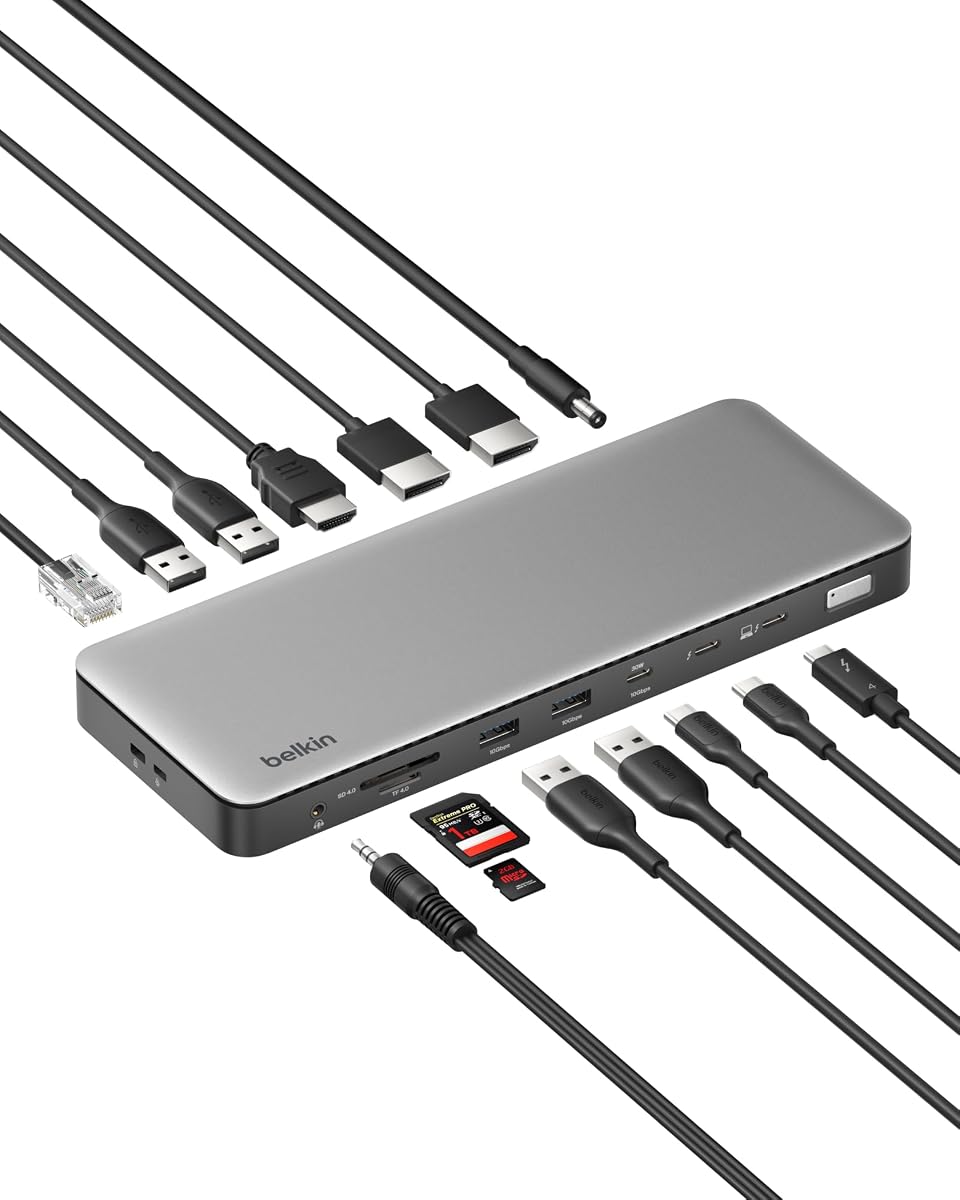
The Belkin Thunderbolt 4 Docking Station Triple Display 96W 14-in-1 is not a true 10GbE product, but it is a strong general-purpose Thunderbolt dock for buyers whose network needs top out at 2.5Gbps. It earns the highest listed rating in this guide at 4.6 and combines expansive connectivity, triple-display support, and generous host charging.
We may earn a commission when you buy through this link, at no additional cost to you.
Its Thunderbolt 4 connection supports up to 40Gbps data transfer, and the dock can drive up to three extended 4K displays at 60Hz. The 96W power delivery output keeps a compatible laptop charged while displays, storage, and peripherals operate. Fourteen total ports make it a credible one-cable workstation solution, while daisy chaining can add Thunderbolt accessories through the host.
The network limitation is important. Its 2.5GbE Ethernet is faster than standard gigabit and remains excellent for many office and home networks, but it cannot sustain a genuine 10Gbps local link. The 40Gbps Thunderbolt fabric also does not turn the RJ45 port into a 10GbE port. Buyers should choose this model for display and peripheral expansion rather than for NAS workflows that require full 10GbE.
A Kensington lock and Belkin's six-point safety system add value for shared or managed spaces. For a desk centered on multiple monitors, charging, and mixed peripherals, the dock is highly versatile. For high-speed storage or a multi-gig LAN, however, a dedicated 10GbE adapter remains the more technically appropriate recommendation.
The combination of displays, 96W charging, high-speed USB expansion, Ethernet, and daisy chaining reduces desk clutter. It is aimed at users who want a complete Thunderbolt 4 station rather than a single-purpose networking accessory.
The 2.5GbE port is well matched to many fast home and office connections, large downloads, calls, and standard shared storage. It is not appropriate when transferring sustained multi-gigabyte files between 10GbE hosts on a local network.
We may earn a commission when you buy through this link, at no additional cost to you.
The SABRENT NT-P10G is a direct 10GbE upgrade for Thunderbolt 3, Thunderbolt 4, Thunderbolt 5, and USB4 computers. Its 3.6 rating reflects a practical product with clear capabilities rather than a flawless user experience, but the core proposition is strong: a bus-powered RJ45 adapter that negotiates 10GbE, 5GbE, 2.5GbE, 1GbE, and 100Mbps.
We may earn a commission when you buy through this link, at no additional cost to you.
The adapter is intended for NAS access, servers, video editing, and multi-gig networks. A full 10G link requires a 10GbE router, switch, or NAS at the other end, along with Cat 6a or better cabling. macOS and many Thunderbolt 4 or USB4 systems work with plug-and-play setup, while Windows and Linux may require the Marvell AQC113 driver.
Thermal behavior deserves attention. The aluminum housing serves as the heatsink and may become warm during sustained 10G transfers, so it should be left in open air rather than trapped under a laptop, inside a bag, or in a closed drawer. The product's status LEDs use green for a 10GbE link, amber for lower speeds, and flashing to show activity.
This adapter makes sense for users who primarily need a fast Ethernet port but do not want a full dock. Wake-on-LAN and PXE boot add value for remote access and IT deployment. Setup may involve a few advanced settings, but buyers who need full 10Gbps and understand the cooling requirement get a focused and flexible solution.
A passive aluminum chassis depends on airflow, so the adapter should not be covered during long transfers. Keeping it exposed lets the controller dissipate heat effectively and supports the stability claimed for sustained 10G workloads.
Most users can begin with a direct connection, but full-speed environments may benefit from jumbo frames, larger receive buffers, and Energy-Efficient Ethernet being disabled in Windows adapter settings. These are optional tuning steps rather than substitutes for capable network equipment.
We may earn a commission when you buy through this link, at no additional cost to you.
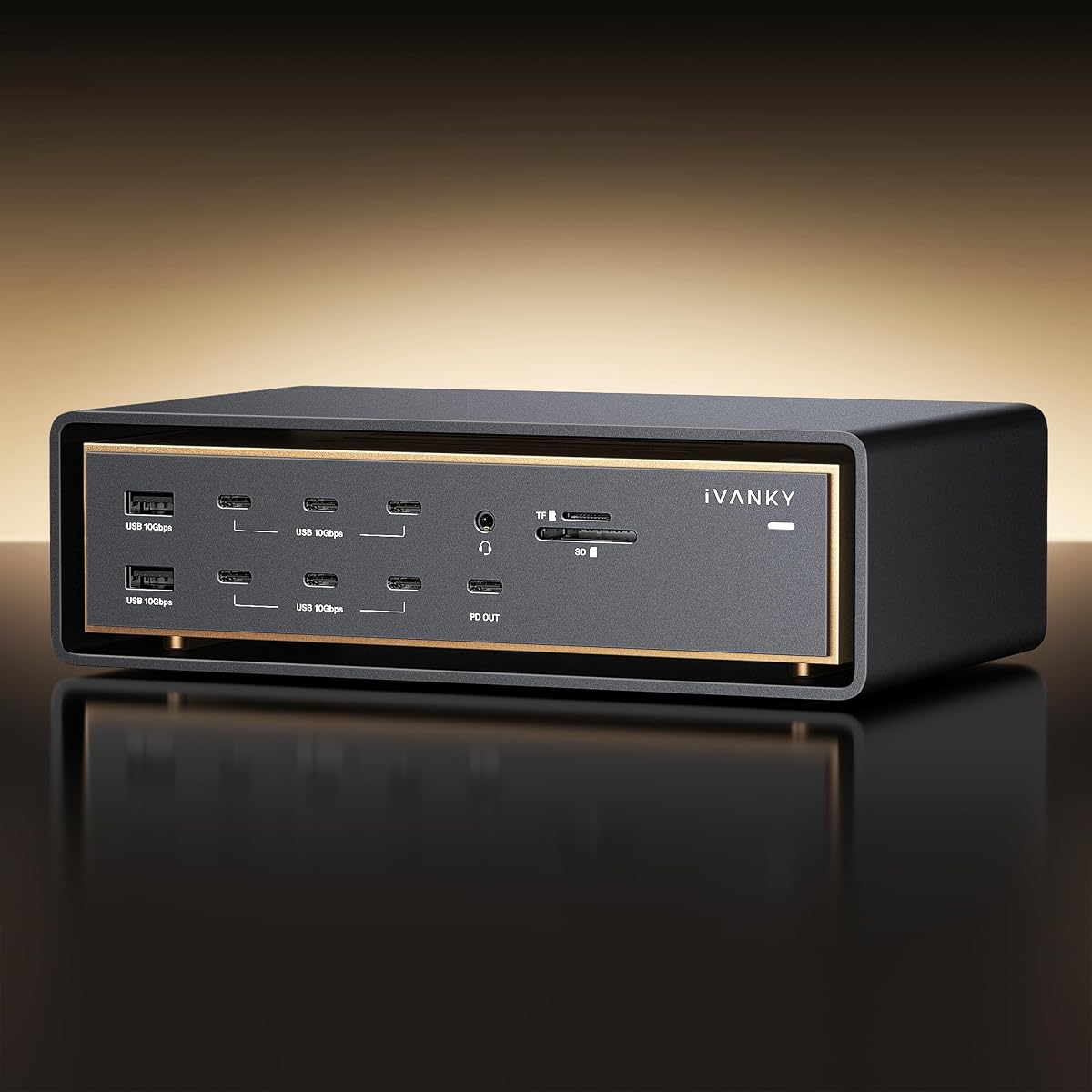
The iVANKY FusionDock Ultra is a Mac-specific workstation that combines a genuine 10GbE port with an unusually broad set of connections. Its 4.2 rating reflects a capable product, although users should read the linked compatibility documentation because display arrangements vary across MacBook models and macOS configurations.
We may earn a commission when you buy through this link, at no additional cost to you.
The dock uses a dual-chip architecture with advertised 80Gbps to 120Gbps bandwidth and provides four downstream 80/120Gbps USB-C ports, each listed at 15W. Its 10Gbps RJ45 port targets server access and production environments, while 140W host charging supports a demanding MacBook Pro setup. The 26-port selection includes storage, media, network, power, and display connections.
Display support is a defining feature. It can drive up to two 8K displays at 60Hz or four 6K displays at 60Hz when the MacBook Pro configuration supports it. An advanced thermal system combines an NTC-controlled fan, internal copper heat sinks, and a floating chassis intended to create airflow. This active cooling is more elaborate than the passive approach used by many compact adapters.
The main limitation is platform focus. This is not a general Windows or Linux dock, and even Mac users need to verify the exact model and display arrangement. For a high-end Mac production desk that needs networking, multiple high-resolution displays, extensive peripherals, and substantial charging in one unit, it is a compelling specialized solution.
The dual-chip design and Mac-focused configuration are intended to maximize bandwidth in macOS workflows. This specialization can be advantageous for Mac studios, but it eliminates the cross-platform flexibility of general Thunderbolt docks.
Support for multiple 6K and 8K displays makes the dock relevant to high-end media and post-production desks. Display output still depends on the host Mac's capabilities, so buyers should consult the compatibility guide before assuming a particular four-screen layout will work.
We may earn a commission when you buy through this link, at no additional cost to you.
The Anker Prime TB5 is a broad Thunderbolt 5 dock designed for fast data, displays, charging, and everyday connectivity. Its 4.2 rating reflects a well-rounded product, but the Ethernet port operates at 2.5Gbps rather than 10Gbps, making this a comparison option rather than a true match for the central networking requirement.
We may earn a commission when you buy through this link, at no additional cost to you.
Its host interface is Thunderbolt 5, accompanied by two downstream Thunderbolt 5 ports, two USB-C ports, three USB-A ports, SD and TF card readers, an audio jack, and an HDMI 2.1 or DisplayPort 2.1 connection. The product data highlights a claimed ability to move a 150GB file in 25 seconds through the Thunderbolt 5 path, illustrating the substantial data bandwidth available for storage.
Power delivery reaches 140W through the upstream port, while the two front USB-C ports share 45W. Display configurations include one 8K display at 60Hz or dual 8K displays at 60Hz with compatible Thunderbolt 5 Windows laptops. An active cooling system is designed to preserve performance under sustained loads.
Choose the Anker when a user needs premium dock expansion and exceptional Thunderbolt 5 throughput but does not require full 10GbE LAN performance. It would be a good desk complement to a dedicated 10GbE adapter, but buying it for 10Gbps networking would be a mismatch. The clear distinction is network speed versus overall dock capability.
The dock's strongest feature is its high-bandwidth Thunderbolt 5 fabric for external storage and media workflows. It is particularly attractive when fast local data movement matters more than the maximum speed of the wired network port.
Up to 140W host charging supports demanding laptops, while SD and TF readers add day-to-day convenience for photographers and video editors. The included Thunderbolt 5 cable and AC power cable help complete the desk setup.
We may earn a commission when you buy through this link, at no additional cost to you.
The Belkin USB-C 8-in-1 Hub is a straightforward desktop accessory for users who want displays, charging, USB expansion, and basic wired internet through one USB-C connection. It carries a 4.4 rating and focuses on practical convenience rather than the extreme throughput associated with Thunderbolt 5 or 10GbE networking.
We may earn a commission when you buy through this link, at no additional cost to you.
The port selection includes HDMI, Ethernet, and USB connections, with support for two displays at 4K resolution and 60Hz. Up to 100W of power delivery can charge a compatible laptop while the attached peripherals operate. Data transfers over USB can reach 10Gbps, allowing up to three hard drives to be used for file movement, photo and video workflows, or backups.
A dedicated monitor privacy button turns connected displays off or on, which can be useful during presentations or in shared work areas. Belkin's six-point safety system covers over-voltage, overload, overcurrent, over-temperature, short-circuit protection, and fire-resistant materials. The housing uses 75% post-consumer recycled materials and the packaging is plastic-free.
This hub makes the most sense for ordinary home and office connectivity where 1Gb Ethernet is sufficient. It is not suitable for a 10GbE local network, even though its USB data path is much faster. Buyers should treat it as a convenient display and charging hub rather than a high-speed network adapter, with the Belkin 14-in-1 Thunderbolt 4 model being the more logical choice within this brand for expanded dock functionality.
The hub includes the essentials most users need for a fixed desk: display output, wired internet, charging, and multiple USB connections. It simplifies a laptop setup without requiring a more specialized Thunderbolt dock.
The 10Gbps figure applies to compatible USB data transfers, not the Ethernet connection. The RJ45 port is limited to 1GbE, so network-heavy storage users should look for a multi-gig or 10GbE adapter instead.
We may earn a commission when you buy through this link, at no additional cost to you.
The Belkin Connect Thunderbolt 4 Docking Station is a compact core hub for users who need high-speed Thunderbolt expansion without a large collection of ports. It has a 3.8 rating, offers up to 40Gbps data transfer, supports 96W power delivery, and includes a Thunderbolt 4 cable and power supply.
We may earn a commission when you buy through this link, at no additional cost to you.
Its five-port arrangement uses three upstream and one downstream Thunderbolt 4 USB-C connection, and the product description states that as many as six devices can be daisy-chained. Display support includes one 8K display at 30Hz or two high-resolution displays at 4K and 60Hz. Certified overcurrent protection helps guard connected equipment.
The supplied information does not explicitly identify the Ethernet port or claim 10GbE support. For that reason, this dock should not be considered a reliable match for a buyer specifically seeking a 10GBE hub. A Thunderbolt 4 host has ample bandwidth, but the actual network speed depends on the Ethernet controller fitted in the dock, and that specification is not provided here.
The Belkin is worth considering for a minimal desk that prioritizes charging, one or two displays, and fast peripheral connections. Its included accessories simplify setup, while the compact design avoids the clutter of a full docking station. Buyers seeking genuine 10Gbps networking should choose an adapter with explicitly listed 10GbE support and then confirm its host compatibility.
The five-port approach is attractive for users who need a display, power, and a few high-speed connections rather than a broad collection of legacy ports. It can also serve as a starting point for a daisy-chained Thunderbolt setup.
Thunderbolt 4 bandwidth does not guarantee 10GbE Ethernet, and the supplied product data does not state a network speed. Buyers whose main priority is 10Gbps should treat that missing specification as decisive and select a product that explicitly identifies a 10GbE RJ45 port.
We may earn a commission when you buy through this link, at no additional cost to you.
The right choice depends on whether you need a dedicated network adapter or a complete workstation dock, plus the speed of the network you actually own. Consider host interfaces, Ethernet generation, bandwidth, cooling, charging, displays, and expansion together before making a selection.
A product described as a Thunderbolt hub may provide only 1GbE or 2.5GbE, and Thunderbolt link speed does not determine the Ethernet port's rated speed. Look specifically for a 10GbE or 10GBASE-T RJ45 port and verify that it negotiates at 10Gbps. The OWC adapter, OWC dual-network dock, WAVLINK adapter, Sonnet Solo10G T5, SABRENT NT-P10G, and iVANKY FusionDock Ultra explicitly provide 10GbE in the supplied information.
The Ethernet adapter must negotiate with the host's physical port and controller. Thunderbolt 5, Thunderbolt 4, USB4, and Thunderbolt 3 systems can support appropriate 10GbE adapters, but ordinary USB 3.x ports cannot provide the necessary host bandwidth. macOS support is generally straightforward, while Windows and Linux may require manufacturer drivers. Review the product's operating-system and version requirements before installation.
The fastest adapter cannot exceed a slower router, switch, NAS, server, Ethernet cable, or network interface. Full 10Gbps usually requires Cat 6a or better cable, with the connected endpoint and switch also supporting 10GbE. A 10Gbps internet package only guarantees an external connection speed; it does not make the local path between two computers 10Gbps.
A dedicated adapter focuses on networking and usually remains compact, portable, and bus-powered. A full docking station adds displays, USB ports, card readers, audio, and host charging, but it occupies more desk space and may require an external power supply. Choose an adapter when 10GbE is the principal need; choose a dock when your workstation requires broader peripheral expansion.
Network speed and display performance are separate considerations. Full docks may support multiple 4K or 8K outputs, but actual resolution, refresh rate, and number of displays depend on the host, dock, cables, operating system, and display capabilities. Laptop charging is also not automatic: check the stated wattage, power supply, and compatibility with the specific computer.
A 10GbE controller can generate meaningful heat during sustained transfers. Passive adapters need unobstructed airflow, while larger docks may use fans, heat sinks, or a floating chassis. Rugged aluminum enclosures can improve durability and heat dissipation. For mobile work, note that an exposed adapter should not be placed under a laptop or sealed inside a bag during heavy transfers.
Wake-on-LAN, PXE boot, AVB, checksum offloading, flow control, and jumbo-frame support can distinguish professional adapters from basic ones. These features help with remote access, managed deployments, low CPU usage, and synchronized media workflows. They are not essential for every user, but they may be decisive in studios, server rooms, and enterprise IT environments.
Count the peripherals you need today and those likely to arrive later. A full dock may include multiple USB-A and USB-C ports, card readers, audio, and display connectors, while a compact adapter may leave you adding separate dongles. Thunderbolt daisy chaining can extend a setup, but it consumes ports and can reduce immediate flexibility. Build a realistic port budget rather than choosing only by the advertised total.
Begin by confirming that the computer has the required Thunderbolt or USB4 port, the operating system is supported, and the destination router, switch, NAS, or server offers 10GbE. Install any required Marvell AQtion driver before troubleshooting performance. Connect the adapter or dock directly to the host when possible, and use Cat 6a or better Ethernet cabling for a full 10Gbps link.
After connecting, allow the network interface to initialize and verify the negotiated rate rather than assuming the maximum is active. If throughput is below expectations, test with a shorter or higher-grade cable, confirm that every network endpoint supports 10GbE, and consider jumbo frames, hardware offloading, and receive-buffer settings. On Windows, stable 10G performance may also require disabling Energy-Efficient Ethernet in the adapter's advanced settings.
For long transfers, keep passive adapters in open air and avoid covering them. Do not leave a heated adapter beneath a laptop, inside a closed carrying case, or in a drawer while it is under sustained load. Clean ports gently with dry, lint-free methods, inspect cables for damage, and keep the Thunderbolt host connection secure. If a link becomes unstable, reconnect the cable, check thermal conditions, and retest at a lower negotiated speed.
No. Thunderbolt 5 describes the connection between the computer and dock, not the speed of the dock's Ethernet controller. A Thunderbolt 5 dock may include 1GbE, 2.5GbE, or 10GbE, so the product specifications must be checked directly. A fast Thunderbolt link cannot overcome a slower Ethernet port.
A full 10Gbps link generally cannot be achieved through a USB 3.x host because that connection does not provide the required host bandwidth. The WAVLINK and SABRENT products specifically require USB4, Thunderbolt 3, Thunderbolt 4, or Thunderbolt 5 connections. Look for the Thunderbolt or USB4 symbol on the host port.
Cat 6a or better is the practical choice for a full 10GbE connection, and Sonnet supports Cat 6 up to 55 meters or Cat 6A up to 100 meters. The OWC adapter also lists Cat 6a for 10G runs up to 100 meters. Cable quality, length, and installation all affect whether a stable 10Gbps link is negotiated.
The bottleneck may be a slower router, switch, NAS, server, host interface, or Ethernet cable. Operating-system drivers, Energy-Efficient Ethernet, flow control, receive buffers, and jumbo-frame settings can also affect results. Confirm the negotiated link rate and test each part of the path before concluding that the adapter is faulty.
No. A multi-gig adapter can negotiate at 2.5GbE, 1GbE, or 100Mbps and remain useful on slower networks. Full 10Gbps is available only when the connected router, switch, storage device, server, cabling, and host all support the complete path. This makes the adapters more adaptable than fixed-speed 10G-only designs.
No. The WAVLINK adapter includes native macOS drivers, but Windows 10/11 and Linux require manual installation of the Marvell AQtion driver. The SABRENT product states that macOS and many Thunderbolt 4 or USB4 systems can be plug-and-play, while Windows and Linux may require the AQC113 driver. Check the manual and manufacturer download page before use.
Passive adapters should remain in open air because their aluminum housing acts as a heatsink. Sustained 10G transfers can make the surface warm, and enclosing the adapter can increase thermal stress. Larger docks with active cooling may handle sustained loads better, but their airflow requirements should still be respected.
Choose a dedicated adapter if the primary requirement is NAS access, shared storage, server access, or fast local file transfers. Choose a full dock when you also need multiple displays, USB expansion, card readers, audio, or substantial laptop charging. A full dock with only 2.5GbE may suit general office work, but it will not satisfy a strict 10GbE networking requirement.
The WAVLINK USB4 to 10Gbps Ethernet Adapter is the leading value choice for a focused and compact 10GbE upgrade, while the OWC Thunderbolt 4 10G Ethernet Adapter is the strongest general recommendation thanks to its broad compatibility, automatic multi-gig negotiation, enterprise features, and stated real-world speed. For users building a more elaborate professional desk, Sonnet's Solo10G T5 provides a rugged and portable premium networking solution.
Prioritize the complete networking path rather than the Thunderbolt label alone. Confirm that the product actually contains a 10GbE RJ45 port, that the host has a compatible Thunderbolt or USB4 connection, and that the switch, router, storage device, server, and cabling can sustain the target rate. Add display, charging, cooling, and port requirements only after the networking fundamentals are settled.
Finally, verify the current product listing, compatibility documentation, driver situation, warranty terms, and included accessories before ordering. Hardware revisions and product details can change, and current customer feedback can add practical context that is not present in the supplied specifications.