
chenyang SATA 90 Degree UP Adapter
4.4Editor score
Up-angle connector
Power and data support
Works with 2.5-inch drives
A 90 degree SATA adapter changes the direction of a storage connection so cables can fit in a compact desktop case without an awkward bend. The most useful models support the right SATA interface, maintain reliable data and power connections, and provide enough clearance for nearby components.
This guide compares ten right-angle SATA adapters based on their connector configurations, bend direction, stated SATA compatibility, intended equipment, and practical cable-management benefits. It covers both 7-pin data adapters and 22-pin combined power-and-data adapters, along with up-angle, down-angle, and mixed-orientation options.
The recommendations show how each adapter is best suited to a particular drive, motherboard port, or case layout, while noting important limitations such as data-only construction. Product availability and prices can change, so readers should verify the current listing and connector requirements before buying.
4.4Editor score

4.6Editor score
4.6Editor score
As an Amazon Associate we earn from qualifying purchases.
The table below compares all ten adapters by connector format, orientation, supported devices, and transfer capability, making it easier to match an adapter to a specific drive and case.


The CERRXIAN up-angle 7-pin adapter combines a well-established 4.6 rating with a straightforward solution for crowded desktop interiors. It changes a conventional SATA data connection from a vertical orientation to a horizontal one, giving a drive cable more room to sit without being forced into a sharp bend.
We may earn a commission when you buy through this link, at no additional cost to you.
Its main strength is a practical combination of clear orientation and broad drive compatibility. The listing states SATA III compliance, transfer rates up to 6 Gbit/s, and backward compatibility with SATA I and II rates. It can be used with internal hard drives, SSDs, and optical drives when the remaining connection is the appropriate 7-pin data interface.
The important limitation is that this is a data-only adapter. It does not provide power, so a 2.5-inch SSD or 3.5-inch hard drive still needs a separate SATA power connection. It is also intended specifically for the situation in which an up or front-facing bend provides the necessary clearance, rather than for changing the orientation of a full 22-pin power-and-data lead.
This is a strong general recommendation for a builder who has confirmed a 7-pin motherboard data port and needs an up-angle route. The included pair adds convenience for systems with multiple storage devices or a useful replacement option, while the stated SATA generations make it suitable for a broad range of desktop storage hardware.
The right-angle profile changes the point at which the data cable leaves the motherboard connection. That change can preserve cable shape, reduce strain near the plug, and make it easier to route the lead around a drive cage, fan, or power supply.
Support for SATA I, SATA II, and SATA III data rates means the adapter can serve older hard drives as well as modern SATA SSDs. Actual drive performance still depends on the connected device and host controller.
We may earn a commission when you buy through this link, at no additional cost to you.
This CERRXIAN dual-port adapter is intended for low-profile desktop installations where one standard SATA data cable does not provide enough routing freedom. Its 4.5 rating reflects a generally favorable reception, and the dual-female design gives builders an option that differs from conventional one-port adapters.
We may earn a commission when you buy through this link, at no additional cost to you.
The product redirects a SATA 7-pin connection vertically to horizontally, reducing the amount of space consumed by a cable bend. The listing identifies SATA III compliance and transfer speeds up to 6 Gbit/s, with backward compatibility for SATA 1.0 and 2.0 ports. It is also presented as a way to maintain tidy wiring in particularly confined cases.
Its specialized form makes compatibility more important than with a basic angle adapter. A builder must have a SATA 7-pin connection and the corresponding dual-female arrangement available in the cable path or adapter setup. It should not be confused with a 22-pin adapter for a combined power-and-data drive lead, and the package includes two right-angle pieces for replacement or multiple installations.
For a compact desktop with more than one SATA data connection in a difficult routing area, this is a practical option. Its strongest case is a system where the standard straight cable forces excessive bending or interferes with another component. Confirm the case design and cable arrangement first, because the unusual dual-port format is less universally useful than a standard 7-pin adapter.
Low-profile cases often leave very little clearance between a motherboard port and a nearby drive, fan, or expansion card. The right-angle profile redirects the cable sooner and can make the installation less crowded.
The two-adapter package provides enough hardware for a multi-drive desktop or a spare. The dual female ends also offer a practical way to organize closely grouped SATA data connections when the connected hardware supports that arrangement.
We may earn a commission when you buy through this link, at no additional cost to you.
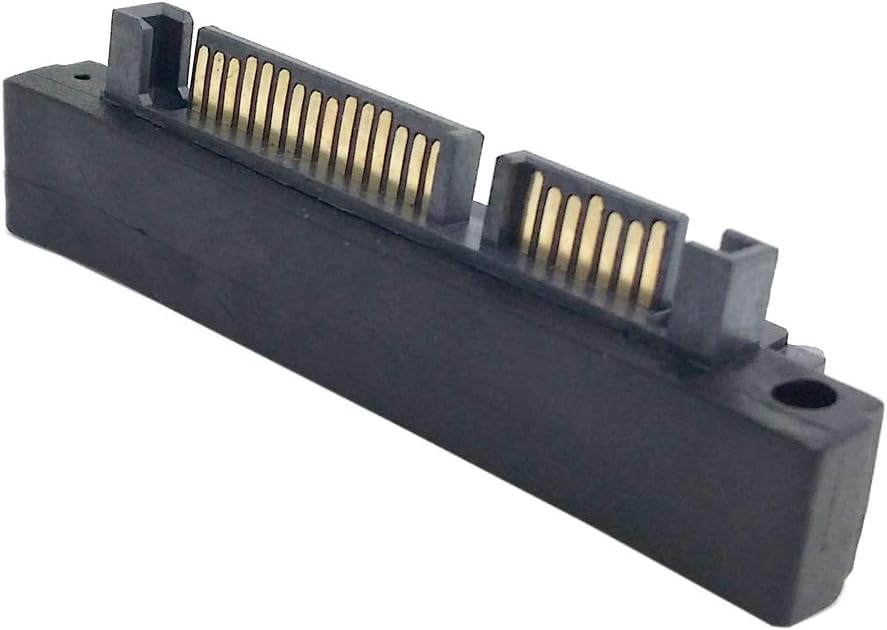
The chenyang up-angle adapter is a cost-conscious choice for desktop builders who need to redirect a full SATA power-and-data cable. It carries a 4.4 rating and its 22-pin male-to-female format distinguishes it from data-only 7-pin products in this roundup.
We may earn a commission when you buy through this link, at no additional cost to you.
The adapter supports both 5V and 12V power alongside data transfer up to 6 Gbps, according to the supplied product information. It works with 2.5-inch and 3.5-inch hard disk drives and changes the cable's direction without altering the defined interface or intended transfer speed. The up angle is particularly useful when a drive sits above a port and the cable needs to turn outward rather than rise into a crowded area.
The main trade-off is connector specificity. A 22-pin adapter requires a combined SATA power-and-data cable and cannot be used with a standalone seven-contact data lead. Up-angle orientation can also be the wrong choice in a case where the cable must turn beneath the drive, so measuring the available space and observing the existing cable route is essential.
This adapter is best for a user who wants a simple way to improve a 2.5-inch or 3.5-inch drive installation while retaining both power and data in one cable. It is a particularly useful budget solution when the full SATA lead has an awkward vertical bend and there is room for the connector to approach from above.
A combined 22-pin connection preserves the normal SATA cable arrangement instead of separating power and data. That can make installation more convenient and keep the area around the drive less busy.
The up-angle geometry changes the lead's direction at the drive, improving clearance above a connector. This is especially helpful in cases where the drive sits directly above its motherboard storage port.
We may earn a commission when you buy through this link, at no additional cost to you.
The CY down-angle 22-pin adapter solves the opposite clearance problem from an up-angle model. With a 4.4 rating, it is a solid choice when a drive or drive cage is positioned above the SATA connection and the cable needs to route downward.
We may earn a commission when you buy through this link, at no additional cost to you.
Its 22-pin male end connects to a SATA female port, while the opposite female end accepts a standard 22-pin SATA lead. The product information states that it transfers 12V and 5V power as well as data at up to 6 Gbps. It can be used with 2.5-inch and 3.5-inch drives, making it a general option for conventional desktop storage.
As with any directional adapter, the deciding factor is physical clearance. A down angle creates useful overhead room but can conflict with a lower component, the case floor, or a drive positioned beneath the port. It also has no value for a user with a seven-pin data-only cable, so checking the existing connector count is mandatory.
This is a good recommendation for desktop builders with an overhead drive and a standard combined SATA cable. It keeps the familiar power-and-data arrangement, supports common drive sizes, and makes the wiring more orderly. A compact case drawing or a quick look at the installed drive will usually make the required direction obvious.
Downward routing is valuable when a drive occupies the area immediately above a SATA socket. The adapter allows the plug to turn away from the drive instead of forcing the cable into a tight upward curve.
The 22-pin format includes the combined SATA power and data contacts. Stated support for 5V, 12V, and data up to 6 Gbps makes it suitable for standard internal SATA storage equipment.
We may earn a commission when you buy through this link, at no additional cost to you.
The cablecc right-angle adapter is a compact combined-connector solution with a strong 4.6 rating. It is best suited to a conventional SATA power-and-data cable that cannot bend comfortably in a tightly packed desktop enclosure.
We may earn a commission when you buy through this link, at no additional cost to you.
Its defining feature is the 90-degree right-angle housing between a 22-pin male end and a 22-pin female end. That structure changes the direction of the standard desktop SATA lead, letting it sit more neatly against the drive or motherboard. The black finish also helps it blend into the usual dark interior of a PC case.
The supplied information confirms the connector configuration but provides fewer detailed performance claims than several competing listings. Buyers should not assume unstated features, particularly regarding specific power or transfer specifications. The practical reason to choose this adapter is geometry: it removes the need for a sharply folded cable and can improve access in a constrained installation.
For a builder who has confirmed that the existing lead is a 22-pin SATA cable, this model is a focused and attractive solution. It is less versatile than the four-piece mixed-angle sets, but the simple one-piece format and strong rating make it a solid premium choice for a single well-matched installation. Measuring the case and checking the cable's connector shape before ordering is still important.
The connector body takes the sharp turn instead of forcing the flexible cable to do so. This can reduce strain at the plug and make the cable easier to tuck behind a drive.
The 7+15 male and female arrangement is the conventional form used by internal desktop SATA power-and-data leads. It is intended to preserve that familiar connection while changing its direction.
We may earn a commission when you buy through this link, at no additional cost to you.
The xiwai mixed-angle set is a versatile option for users who may need either an upward or downward route for a seven-pin SATA data cable. Its 4.3 rating and two-piece package make it particularly interesting for builders who want both orientations available during assembly.
We may earn a commission when you buy through this link, at no additional cost to you.
Each adapter changes the direction of a 7-pin disk cable, redirecting it from a vertical path to a horizontal one. The product information specifically identifies limited-height chassis as a use case. Because the package contains an up-angle and a down-angle adapter, the installer can select the version that aligns with the drive and nearby case geometry.
This is a data adapter, not a combined power-and-data adapter. A connected hard drive or SSD must therefore still receive power through a separate SATA power connector. As with other seven-pin products, the adapter is useful only where the relevant data connection is female and the mating lead has the appropriate male plug.
This set is well suited to a desktop builder who wants flexibility without committing to one orientation in advance. It can be especially helpful in a compact case where a hard drive can be mounted above or below the motherboard connection. Confirm that the existing data cable is seven-pin and inspect the available space before installation.
Including both up-angle and down-angle versions allows the installer to respond to the actual drive position. This is useful when a case offers several mounting locations and the cable direction may not be obvious beforehand.
A short desktop enclosure may not provide enough room for a conventional vertical SATA plug. Turning the data connection horizontally makes it easier to fit a drive and route its cable within a narrow chassis.
We may earn a commission when you buy through this link, at no additional cost to you.
The chenyang down-angle adapter is built for desktop cases where a SATA drive sits above its connection and the cable needs to turn downward. It has a 4.3 rating and uses the familiar combined 22-pin SATA format, covering both power and data in one connection.
We may earn a commission when you buy through this link, at no additional cost to you.
According to the supplied listing, the adapter works with 2.5-inch and 3.5-inch hard disk drives. It transfers 5V and 12V power and data at up to 6 Gbps while changing only the physical connection direction. That makes it useful for systems where the original cable would otherwise need a tight bend near the top of the drive.
Downward routing introduces its own physical requirement: there must be open space beneath the port. A bottom-mounted power supply, expansion card, or lower drive can prevent the connector from seating properly. Since the adapter changes a full 22-pin connection, it is also incompatible with a seven-pin data cable unless the rest of the cable arrangement includes the appropriate combined connector.
This model suits a builder who understands the drive's position and wants to route a standard combined SATA lead cleanly beneath it. It is a practical alternative to the up-angle chenyang model, and choosing between them should be based on the case layout rather than on drive performance.
The down-angle design turns the lead away from the upper surface of a drive. This can create valuable clearance in a case where the storage device is mounted directly over its SATA socket.
Because the adapter carries both power and data contacts, the drive can continue using one standard SATA cable. That keeps the visible wiring relatively simple while changing the connector angle.
We may earn a commission when you buy through this link, at no additional cost to you.
The Right Angle SATA 7 Pin Female to Male Adapter stands out with a 5.0 rating and a feature set focused on contact quality and flexible device support. It is a right-angle solution for standard SATA data leads in compact desktop builds.
We may earn a commission when you buy through this link, at no additional cost to you.
Gold-plated contacts are one of its most attractive construction details, intended to support dependable signal transmission and durability. The adapter supports SATA III data transfer up to 6 Gbps and is listed as compatible with hard drives, solid-state drives, optical drives, and motherboards equipped with seven-pin SATA data ports.
The key caveat is that it carries data only. A hard drive or SSD still needs a separate power lead, and a 3.5-inch drive generally needs power from the system PSU rather than the motherboard. Its 5.0 rating is favorable, but a newer product can have a smaller review history than established listings, so the rating should be considered in that context.
For a compact system that needs a clean right-angle seven-pin data route, this adapter combines useful compatibility claims with a particularly strong customer rating. It is best chosen when the connector ends have already been verified and the primary goal is a tidy installation with reliable contact surfaces.
Gold-plated contacts are intended to maintain a stable electrical connection through repeated installation and removal. The construction also emphasizes durable signal transmission for internal desktop storage use.
The listed compatibility covers common categories of SATA equipment, including hard drives, SSDs, and optical drives. As with any adapter, the existing cable and motherboard port must use the matching seven-pin configuration.
We may earn a commission when you buy through this link, at no additional cost to you.
The Four-Piece Mixed-Angle Set is designed for desktop builders who want several seven-pin right-angle adapters and flexibility in both cable directions. It includes two up-angle and two down-angle units, making it suitable for multi-drive systems, staged upgrades, or keeping spares close at hand.
We may earn a commission when you buy through this link, at no additional cost to you.
The two styles have slightly different listed dimensions, but both are compact enough to suit a crowded PC interior. The product supports standard SATA interface rates such as 3 Gbps and 6 Gbps when the connected drive and motherboard permit them. Its plug-and-play format means no tools or complicated installation process are required.
This listing has no available customer rating, so it cannot be compared on the same rating basis as the nine products with feedback. Buyers should place greater emphasis on connector fit, stated dimensions, and the inclusion of both orientations. The adapter is also limited to data connections, so every attached drive still requires separate power.
For a workstation with several SATA drives, the four-piece format can be more useful than a single adapter. The mix of orientations lets a builder match drives mounted above and below their ports. Verify the cable and port configuration carefully, especially because no user rating is available to support the purchase.
Four included adapters reduce the need to make separate purchases for several storage devices. They also provide spares for future upgrades or replacement after repeated installation.
The up-angle and down-angle pieces support different drive positions. This is particularly helpful in a compact workstation where storage devices may be arranged both above and below their motherboard connections.
We may earn a commission when you buy through this link, at no additional cost to you.
The chenyang CY down-angle adapter is a straightforward seven-pin solution for redirecting motherboard SATA data cables in a space-conscious desktop. It carries a 4.4 rating and includes two matching down-angle adapters in the package.
We may earn a commission when you buy through this link, at no additional cost to you.
The product is designed to change a 7-pin disk cable from a vertical to a horizontal installation direction. The listing specifically references limited-height chassis, where a standard plug may not have enough room to sit without bending the cable sharply. The stated 6 Gbps capability aligns with SATA III data performance.
It is a data-only adapter, so the attached drive must receive power separately. The package offers two units but only the down-angle orientation, making it less flexible than mixed sets. The main installation question is whether the space below the motherboard port is open; a lower expansion card, drive, or power supply could prevent the adapter from fitting.
This is a sensible choice for a desktop builder with one or two seven-pin data connections that need to turn downward. The two-piece package provides value for multiple drives or a spare, while the down-angle profile addresses a specific routing issue. Checking the available underside clearance and confirming the seven-pin data format is the best way to avoid an incompatible purchase.
The adapter turns the data lead at the motherboard port, allowing a gentler path into the drive connection. This is useful in a limited-height enclosure where a vertical plug can place unnecessary stress on the cable.
Two matching adapters support a desktop with multiple data connections or provide a replacement for a second drive. Both pieces use the same down-angle geometry for consistent routing.
We may earn a commission when you buy through this link, at no additional cost to you.
The right adapter depends primarily on the existing SATA connector, required bend direction, and available case clearance. Reviewing these factors before purchasing helps prevent an incompatible or ineffective installation.
SATA data connectors use seven pins, while standard internal SATA power-and-data cables use a combined 22-pin arrangement consisting of seven data contacts and 15 power contacts. An adapter designed for one format cannot physically replace the other. A system that uses separate motherboard data leads and SATA power cables needs a seven-pin adapter, while a drive attached through one combined lead generally needs a 22-pin adapter. Count the contacts and inspect the cable end before ordering, rather than relying only on the word SATA in the listing.
An up-angle adapter turns the connection so the cable extends outward toward the top of a drive, while a down-angle adapter directs it beneath the drive. The correct direction depends on where the storage device is mounted and what occupies the space above or below its socket. A drive cage may leave no usable room for an upward plug, while a case floor or power supply may block a downward plug. Mixed sets offer the greatest flexibility, and a two-piece up-and-down set is useful when the case can be rebuilt in more than one configuration.
Seven-pin SATA adapters are generally data-only because a motherboard's SATA data port does not provide drive power. The drive must then use a separate SATA power connection, which is normal for 2.5-inch SSDs and many 3.5-inch hard drives. A 22-pin adapter can carry both power and data, preserving a one-cable setup. Some 3.5-inch hard drives also require both Molex and SATA power, so even a combined SATA cable may not be the only power connection required by the drive.
SATA III supports data rates up to 6 Gbit/s, and many adapters are also backward compatible with SATA II and SATA I. Compatibility is important if the system contains older optical drives or hard disks, although the speed of the overall connection will always be limited by the slowest participating device. The product listing should state the relevant generations clearly. The adapter itself does not make a SATA I drive faster, and advertised transfer capability does not guarantee that a connected device will operate at the maximum rate.
A right-angle connector solves cable strain only when it has enough room to seat without forcing the plug sideways. Measure the space around the drive, the distance from the motherboard port, and the position of nearby fans or expansion cards. Also consider the thickness of the SATA cable and the bend radius required beyond the adapter. A down-angle adapter can save overhead space but need room underneath, while an up-angle adapter can conflict with a drive mounted close above the port.
The connector should make a secure, straight connection without visible gaps, loose contacts, or excessive play. Gold-plated contacts are advertised by one option in this guide and are intended to support reliable electrical performance. A well-finished housing also helps protect the connection from accidental movement. Although a small adapter is inexpensive compared with a drive or motherboard, a poor connection can cause instability, so the user rating, product construction, and warranty information remain useful points of comparison.
Some listings include two adapters, while others appear to include a single unit. A two-pack is useful for a system with two difficult SATA connections, for a planned storage expansion, or simply as a spare. It is not automatically the better choice if the case only needs one connection and the desired bend direction is unclear. Confirm that both included pieces have the same orientation, because some mixed packages provide one up-angle and one down-angle adapter rather than two identical pieces.
The right-angle adapter should make the lead easier to route, not create a new obstruction. Follow the cable from the port to the drive and look for sharp folds, tension, or interference with cooling components. A 90-degree connector can reduce strain because the cable no longer has to make the entire direction change by itself. In a performance system, the improved route may also help maintain unobstructed airflow. The best placement is the one that leaves the cable relaxed, the connector fully seated, and nearby fans free to operate.
Begin with the PC powered off and disconnected from the power supply. If the system is open, use an antistatic wrist strap and avoid touching exposed circuitry. Identify whether the connection you are changing is a seven-pin data port or a 22-pin power-and-data lead, then compare it directly with the adapter's male and female ends. Never force a connector that does not align or match.
For a seven-pin adapter, attach it to the appropriate motherboard or controller connection, then connect the existing data cable to the adapter's female end. For a 22-pin model, disconnect the combined SATA lead from the drive, attach the adapter, and reconnect the lead so both power and data reach the drive. Keep the adapter straight and seat the plug fully without pulling on the wire.
After connecting the adapter, check for clearance around the drive, fans, and expansion cards. Secure the cable so it does not tug against the adapter, but avoid tying it so tightly that the insulation is deformed. Restore power, verify that the storage device appears in the system interface, and confirm that a basic drive check completes before transferring important data.
A 90 degree SATA adapter changes the direction of a SATA connection so the cable can fit in a tight space without an extreme bend. It is especially useful inside compact desktop cases where a straight plug conflicts with a drive, fan, power supply, or expansion card. The correct model depends on whether the existing connection is seven-pin data or a combined 22-pin power-and-data lead.
No. A seven-pin adapter carries SATA data contacts and requires a separate drive power connection. A 22-pin adapter carries the combined 15-pin power and seven-pin data interface used by standard internal SATA leads. The connector shapes differ, so each should be used only with the matching cable and port.
No. A seven-pin SATA adapter is a data-only connection because the motherboard's SATA data port does not supply drive power. The SSD or hard drive must be connected to SATA power separately. A combined 22-pin adapter can carry both power and data when used with a standard internal SATA power-and-data cable.
Choose an up-angle adapter when the cable needs to turn toward the top of a drive and there is more open space above the connection. Choose a down-angle adapter when the drive sits above the port and the cable should pass underneath. If the available clearance is uncertain, a set containing both orientations is more flexible.
A properly designed adapter should preserve the SATA interface and support the advertised generation of the connection. Several products in this guide state support for data rates up to 6 Gbps, although actual performance is limited by the connected drive, cable, and host controller. Poor contact, excessive force, or a damaged connector can cause instability, so the adapter should seat fully and remain undamaged.
Yes, most of the listed adapters are suitable for internal SATA SSDs, hard drives, and some optical drives, depending on their connector format. A seven-pin model is appropriate for SATA data connections, while a 22-pin model supports combined power-and-data cables. Always check whether the drive requires additional power beyond the connector shown.
No. An angled adapter is only necessary when the case lacks clearance for a conventional straight plug or when the cable would otherwise need an overly sharp bend. In a spacious case, a standard SATA cable may be easier to route and requires fewer additional components.
Compare the connector count and gender, then measure the available space around the drive and motherboard port. An adapter cannot compensate for a connector mismatch, and a down-angle plug still needs room below while an up-angle plug needs room above. Checking the case layout and existing cable before ordering is the simplest way to prevent a return.
The CERRXIAN up-angle 7-pin adapter is the strongest all-around choice for users who need a standard SATA data connection redirected in a crowded desktop. The chenyang up-angle 22-pin adapter is a useful budget option for a full power-and-data lead, while the cablecc right-angle model is the top premium pick for a clean combined-connector installation.
Prioritize connector format before anything else. Choose a 7-pin adapter for separate SATA data routing and a 22-pin adapter for a conventional combined power-and-data cable. After that, confirm the bend direction, measure the available clearance, and check whether the included quantity and orientation match your build or future expansion needs.
Product listings and prices can change, so review the current details before purchasing. Verify that the connector type, orientation, package contents, and compatibility statements still match your system, especially for adapters whose listings provide little information about construction or customer feedback.