
0.96-inch ST7735 IPS LCD
4.8Editor score
0.96-inch full-color IPS
80×160 SPI resolution
Two-module pack
Optoelectronic displays turn electrical data into readable visual information, making them essential components for embedded systems, maker projects, industrial controls, and connected devices. A useful display must balance screen technology, resolution, interface compatibility, touch capability, physical size, and the processing power available in the surrounding system.
The products in this guide were compared using their stated specifications, including display type, dimensions, resolution, color capability, controller hardware, communication interfaces, touch support, and expansion options. The list covers small character modules, compact color screens, round TFT displays, touch panels, and complete ESP32 human-machine interface systems.
Each pick reveals what a particular display is best suited to, from simple sensor readouts and Arduino demonstrations to responsive touch interfaces and wireless prototypes. Ratings and specifications reflect the supplied listings, while prices and availability can change, so readers should confirm the current listing before purchasing.
4.8Editor score

4.5Editor score

5.0Editor score
As an Amazon Associate we earn from qualifying purchases.
This side-by-side comparison organizes all ten displays by their most important characteristics, including display technology, physical size, resolution, interface, and principal use case.



This compact ST7735 module combines a 0.96-inch IPS color screen with an 80×160 resolution, earning a 4.8 rating in the supplied data. It is a practical choice for Arduino DIY projects that need more visual information than a monochrome character display but do not require a large touch interface.
We may earn a commission when you buy through this link, at no additional cost to you.
The IPS panel is described as producing vivid colors, while the adjustable screen direction can accommodate different mounting orientations. Communication uses SPI, and the module accepts a 3.3V operating voltage with power input listed as 3.3 to 5V. A 65K full-color palette and adjustable backlight make it useful for status indicators, menus, animated graphics, and small sensor dashboards.
Its limitations are dictated mainly by size and resolution. The active display area is only 10.8 by 21.696 millimeters, so detailed text, touch input, and elaborate interfaces will be constrained. The specifications also contain inconsistent pin-count references, so buyers should examine the physical board and pin labels carefully before wiring it.
This is a strong budget selection for beginners, compact controllers, wearable-inspired projects, and anyone who wants a reliable color module without the complexity of a powered ESP32 display system. It also includes two modules, allowing simultaneous readouts or a two-screen dashboard. For those needs, it offers an unusually capable combination of compactness, color, and flexibility.
The small footprint makes this display practical for projects where screen area is limited. Its SPI connection also helps preserve microcontroller input pins compared with a parallel graphics interface.
The 65K color capability and adjustable display direction suit rotating enclosures, compact instrument clusters, and prototype interfaces that need more expressive graphics than a character-only module.
We may earn a commission when you buy through this link, at no additional cost to you.
The Hosyond 1602 module provides two lines of 16 characters through an I2C serial interface, and it carries a 4.3 rating. Its straightforward output makes it a familiar platform for displaying sensor values, messages, times, temperatures, and status information without requiring a graphics library.
We may earn a commission when you buy through this link, at no additional cost to you.
The package includes three modules, each with a built-in potentiometer for backlight adjustment and a stated I2C address of 0x27. Wiring is uncomplicated: ground, 5V power, SDA, and SCL are assigned to GND, VCC, A4, and A5 respectively. Compatibility is listed for Arduino, Raspberry Pi, Tinkerboard, Nano Pi, Banana Pi, and STM32 boards.
A 16×02 screen cannot provide the color depth, resolution, animation, or touch response of a larger TFT or OLED. The fixed address could also matter in a project with several I2C devices, although the address can sometimes be changed through compatible backpack hardware. None of these constraints is unusual for a basic character LCD.
Choose this display when dependable text output matters more than graphics. It is especially suitable for classroom demonstrations, temperature stations, internet-of-things prototypes, and beginner projects where the display must remain easy to program. The included three-pack adds useful flexibility for multi-screen installations or spare components.
Two lines of 16 characters are sufficient for common readouts such as temperature, humidity, status, timestamps, and short scrolling prompts. Character displays also tend to be straightforward to integrate.
The I2C backpack uses serial communication rather than a large parallel interface. This reduces wiring demands and leaves more GPIO resources available for sensors, buttons, and other peripherals.
We may earn a commission when you buy through this link, at no additional cost to you.
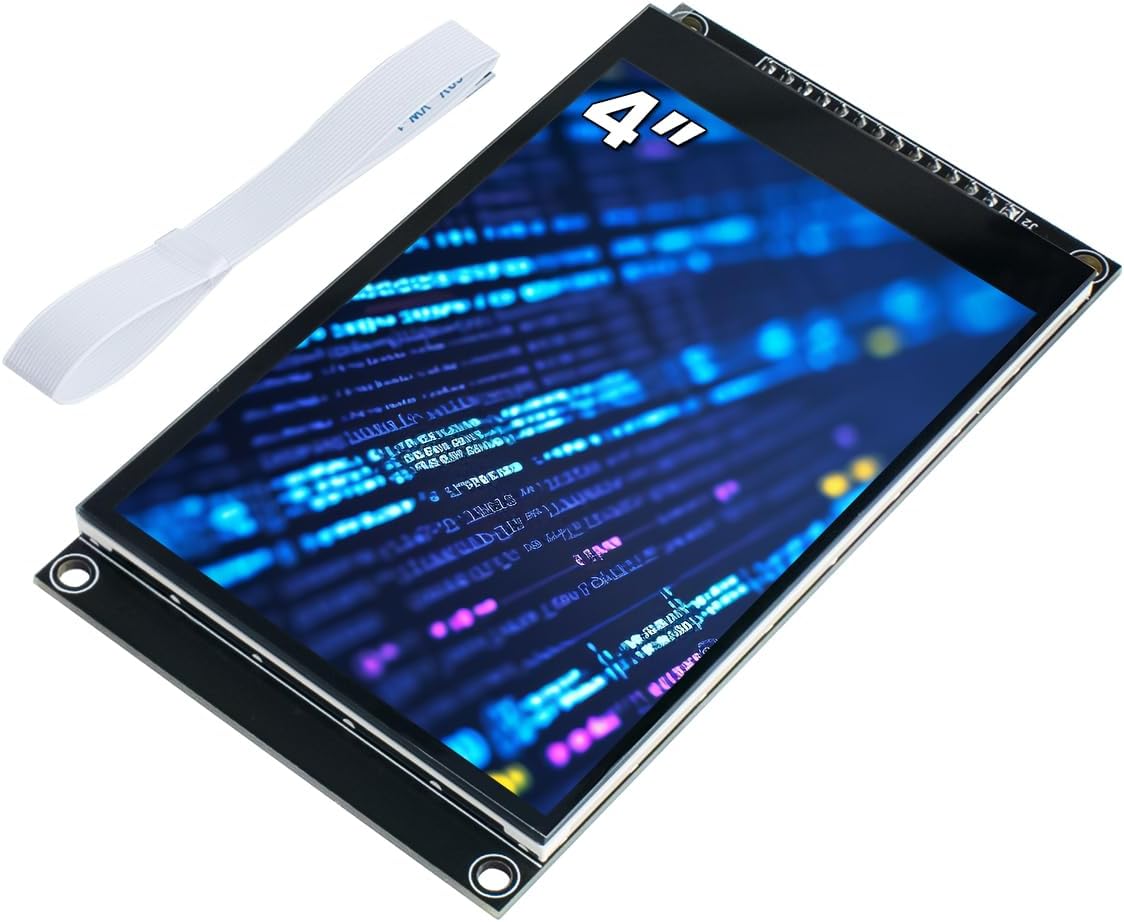
This Hosyond module combines a 4-inch 320×480 color LCD with capacitive touch and an ST7796S driver, receiving a 4.0 rating. It targets Arduino R3, Mega2560, and ESP32 projects that need a responsive graphical interface without requiring a full ESP32 HMI system.
We may earn a commission when you buy through this link, at no additional cost to you.
Capacitive touch is more convenient and accurate than resistive input, according to the listed specifications. The board includes level-conversion circuitry for compatibility with 5V and 3.3V microcontrollers, while four-wire SPI reduces the number of required I/O pins. A micro TF card slot supports expanded storage, and both 2.54-pin and FPC extension interfaces are provided.
The panel is specified as TN rather than IPS, which may mean less favorable viewing-angle behavior than the larger IPS alternatives in this guide. It is also a driver module rather than a self-contained computer, meaning the connected microcontroller must handle rendering, touch input, and application logic. The listed brightness is 300 cd/m2.
This display is a sensible option for touchscreen controllers, configurable instruments, learning projects, and prototypes that benefit from a 4-inch canvas. Its capacitive panel, storage slot, and included sample programs make it approachable. Buyers should verify their controller's supported driver libraries and pin requirements before committing to the interface.
Capacitive touch provides a more modern interaction method than a pressure-based resistive panel. It is well suited to menus, icon controls, and frequently accessed configuration screens.
Onboard level conversion broadens microcontroller compatibility, while the TF card slot offers a convenient way to retain fonts, images, configuration files, or application data.
We may earn a commission when you buy through this link, at no additional cost to you.
The 7-inch ESP32 display integrates a complete processing platform with a 800×480 capacitive IPS touchscreen, and it holds a 4.5 rating. Its large viewing area, 178-degree viewing angle, and integrated ESP32-S3 controller make it the most capable general-purpose HMI in the selection.
We may earn a commission when you buy through this link, at no additional cost to you.
Inside, the ESP32-S3 uses a dual-core 32-bit Xtensa LX7 processor reaching 240 MHz, alongside 512KB SRAM, 8MB PSRAM, and 16MB flash. Wi-Fi and Bluetooth 5.0 are built in, while a microphone and speaker support voice-command interaction, recognition, and speech synthesis. The display works with Arduino IDE, Espressif IDF, PlatformIO, and LVGL.
This is a complete embedded display system rather than a bare panel. That convenience brings complexity, greater power requirements, and a learning curve for users who only need a simple output. The acrylic case also makes the assembly bulkier than the smaller modules, which may matter for portable builds.
The module is a strong fit for smart-home controllers, industrial panels, information kiosks, connected instruments, and educational ESP32 demonstrations. It is the pick for buyers who want a large touchscreen and integrated wireless computing without assembling the processor, housing, interface board, and software stack separately.
The 7-inch IPS display provides 800×480 resolution across a broad 178-degree viewing angle. This makes it useful for shared dashboards, wall-mounted controls, and operator-facing systems.
Integrated Wi-Fi and Bluetooth 5.0 allow the display to operate as a connected embedded system. The same platform can also accept replaceable wireless modules for additional protocol options.
A built-in microphone and speaker support voice command, recognition, and speech synthesis features. These capabilities can enrich smart-assistant prototypes and hands-free interfaces.
We may earn a commission when you buy through this link, at no additional cost to you.
This 0.96-inch SSD1306 OLED is a compact 128×64 monochrome display with a 4.6 rating. It is a natural fit for projects that need crisp text, icons, or simple graphics without the complexity of a color graphics controller.
We may earn a commission when you buy through this link, at no additional cost to you.
Because OLED pixels produce their own light, no backlight is required. The listing describes ultra-high contrast, clear dots, readability with small fonts, and a viewing angle greater than 160 degrees. The module uses I2C and therefore needs only two I/O connections, while accepting supply voltages from 3.3 to 5V DC.
Power consumption is listed at 0.04W during normal operation and 0.08W with the full screen lit, making this type of screen attractive for battery-operated devices. The package contains five modules, but all are monochrome. In addition, no fonts are embedded in the controller, so custom font generation software is needed for many projects.
Choose this OLED for compact meters, status indicators, wearable-style prototypes, sensor dashboards, and readable menus. It offers an excellent balance of simplicity, contrast, and low wiring demand for compatible development boards, including Arduino and Raspberry Pi systems.
Self-emissive pixels create strong contrast and keep illuminated elements sharply defined. This is useful for sparse information displays where dark background pixels should visually disappear.
The I2C interface minimizes connection requirements and leaves microcontroller pins available. Compatibility with 3.3 and 5V systems also broadens the range of supported boards.
We may earn a commission when you buy through this link, at no additional cost to you.
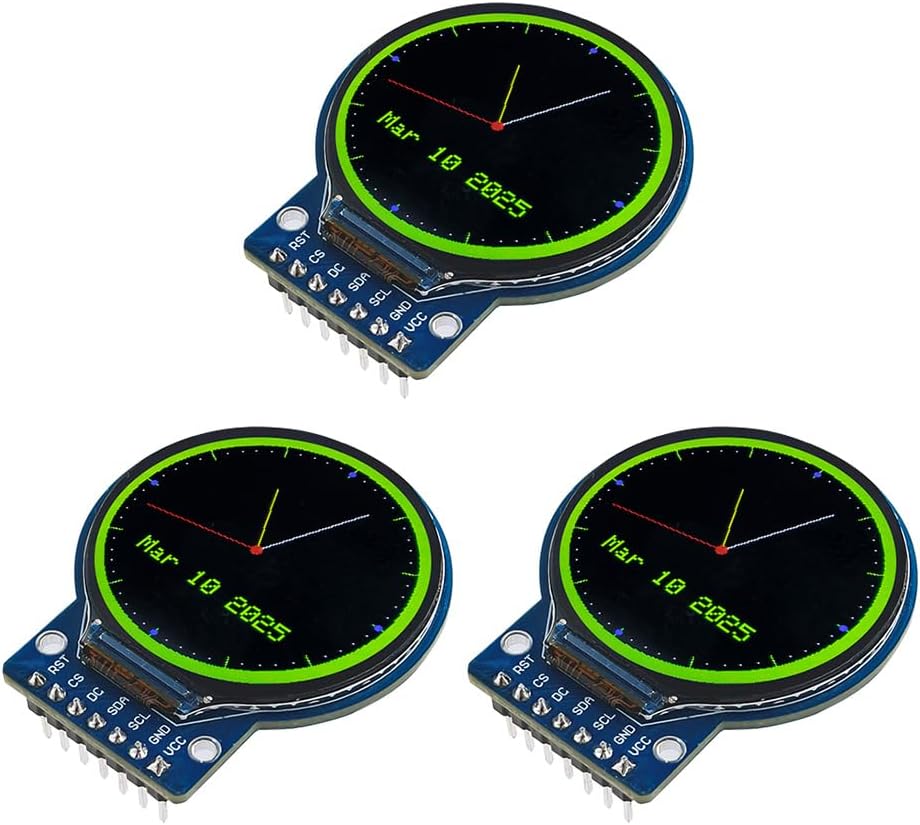
The Teyleten Robot module uses a 1.28-inch round IPS TFT with a 240×240 resolution and GC9A01 controller, earning a 4.7 rating. Its unusual shape and full-color output make it particularly attractive for compact gauges, robotics interfaces, wearables, and decorative embedded devices.
We may earn a commission when you buy through this link, at no additional cost to you.
Four-wire SPI carries the display data, while a 3-to-5V driving range makes it suitable for many common development boards. The visible area measures 32.4 by 32.4 millimeters, and the full module is only 38 by 45.5 by 3.2 millimeters. The stated operating range is minus 20 to 70 degrees Celsius.
The circular canvas naturally encourages radial graphics, gauges, icons, and centered text rather than desktop-style layouts. It does not include touch input, so interaction must come from buttons, controls, or another input mechanism. Developers also need a library or driver compatible with the GC9A01 controller and their chosen platform.
This display is a strong choice for creators who want more visual personality than a rectangular character module or monochrome OLED. The included three-module pack supports multiple prototypes, while the compact full-view IPS panel and vivid RGB output support attractive dashboard and indicator designs.
The round screen gives compact projects a recognizable instrument-like appearance. It is especially effective for radial gauges, status rings, and centered information layouts.
The IPS full-viewing perspective is useful when the display may be viewed from different positions. Full RGB output supports smoother icons, charts, and animated indicators than a monochrome module.
We may earn a commission when you buy through this link, at no additional cost to you.
This Hosyond 4-inch module combines a 480×320 TFT color screen, touch functionality, and an ST7796S driver, with a 4.2 rating. It is intended for Arduino R3, Nano, and Mega projects that need a moderate-sized graphical and interactive canvas.
We may earn a commission when you buy through this link, at no additional cost to you.
The display supports 65K colors and communicates through a four-wire SPI bus, which keeps GPIO consumption relatively low. Its resolution is higher than the 320×480 option elsewhere in the guide, although the 480×320 aspect ratio is better suited to wider interfaces. A micro SD card slot and included touch pen support expanded functionality.
The listing confirms touch support but does not identify whether the panel uses capacitive or resistive technology. That distinction affects feel, accuracy, and calibration, so buyers should verify the product documentation and images. As a driver module, it also relies on the attached Arduino-compatible controller for graphics and input processing.
This screen is a practical choice for educational controllers, configuration panels, robotics interfaces, and projects needing touch plus a larger area than the 0.96-inch modules. Rich sample programs and underlying driver support reduce the setup burden for developers comfortable with the Arduino ecosystem.
A 480×320 canvas offers more room for labels, icons, charts, and touch targets. The wider resolution also makes it useful for dashboards that would feel cramped on a tiny screen.
Touch input turns the display into an active control surface rather than a passive output. The SD card slot can hold fonts, graphics, data, or project files without relying entirely on microcontroller memory.
We may earn a commission when you buy through this link, at no additional cost to you.
The 5-inch ESP32 TFT Touch Display pairs an 800×480 touchscreen with an ESP32-S3-WROOM-1-N4R8 module and received the highest stated rating in the selection at 5.0. It offers a balanced combination of screen size, processing capability, and physical integration for serious embedded interfaces.
We may earn a commission when you buy through this link, at no additional cost to you.
Its controller uses a dual-core 32-bit LX6 processor capable of reaching 240 MHz and integrates Wi-Fi and Bluetooth. Development is supported through Arduino IDE, Espressif IDF, PlatformIO, and MicroPython, with compatibility for the LVGL graphics library. A TF card slot, USB interface, speaker interface, battery interface, and other peripheral connections support expansion.
The listing identifies the panel drivers as EK9716BD3 and EK73002ACGB, but it does not provide the same extensive viewing-angle or color-fidelity details listed for the seven-inch IPS alternative. The acrylic case makes the unit more substantial than a bare display module, and applications must account for the power demands of the screen and ESP32.
This system is well suited to automotive-style human-machine interfaces, medical equipment concepts, smart-home controllers, home automation, industrial control, and connected IoT devices. It is the premium pick for users who want a self-contained 800×480 interface with wireless capabilities and a broad software toolchain.
The display, controller, wireless connectivity, enclosure, and touch interface operate as one platform. This reduces the need to design a custom controller board around a separate screen.
Support for Arduino IDE, Espressif IDF, PlatformIO, MicroPython, and LVGL accommodates different development preferences. It also allows the same hardware to be adapted to prototypes, connected controls, and specialized interfaces.
TF card, USB, speaker, battery, and multiple peripheral interfaces create room for storage, accessories, and wired peripherals. These features are particularly useful when a project must evolve beyond a bare demonstration.
We may earn a commission when you buy through this link, at no additional cost to you.
This four-digit LED board is built around the TM1637 controller and has a 4.6 rating. It is a specialized display for counters, clocks, temperature readings, prices, and other projects where large, unmistakable digits matter more than graphics.
We may earn a commission when you buy through this link, at no additional cost to you.
The controller allows an MCU to operate four eight-segment digits using only a data line and a clock line. The complete module uses four pins for ground, power, data, and clock. It works at 3.3 or 5V DC, uses red illumination, and offers eight brightness levels for adapting output to ambient conditions.
The listed working currents are 30 and 80 mA, so power planning and suitable supply capacity remain important. A segmented screen also has obvious limitations: it cannot reproduce arbitrary graphics, detailed text, curves, or touch input. The value lies in its clarity and simplicity.
Choose this board for kitchen timers, workshop counters, temperature instruments, scoreboards, and embedded numeric panels. Its five-board pack supports several independent displays, while the small wiring burden makes it an approachable option for first-time display projects and Arduino-based educational kits.
Large red seven-segment digits remain easy to interpret at a distance and in bright environments. The format is immediately familiar for clocks, counters, and instrument readouts.
Two signal lines control the display, preserving microcontroller GPIO capacity. This makes the board useful in compact projects where every available pin matters.
We may earn a commission when you buy through this link, at no additional cost to you.
The Hosyond 1.28-inch GC9A01 display is a round 240×240 TFT module with a 4.4 rating. It combines full-color RGB output with a high-brightness backlight, making it a compelling choice for compact dashboard-style projects, smart-watch concepts, and embedded instruments.
We may earn a commission when you buy through this link, at no additional cost to you.
Its vertical-stripe RGB arrangement is described as bright, high-contrast, and clear. Two white LED backlights support readability in outdoor conditions, while the full-viewing-angle TFT technology is intended to maintain useful visibility from different positions. The GC9A01 controller and four-wire SPI interface make it similar to other round controller-based displays.
The package contains three screens, but the module has no touch panel. Interaction must be handled with buttons, rotary controls, capacitive sensors, or another external mechanism. SPI also demands several microcontroller connections and compatible graphics software, making the display less convenient than a fully integrated ESP32 HMI.
This display suits makers who value a distinctive round form factor, strong color, and enhanced backlight. It can work particularly well in mini dashboards, wearable-inspired prototypes, robotics indicators, and compact embedded controllers. Its three-module pack also makes it easier to build a coordinated set of related instruments.
The dual white LED backlight provides illumination when ambient light alone is insufficient. This makes the screen more practical for vehicle dashboards, workshop indicators, and outdoor devices.
The round 240×240 canvas creates a natural appearance for gauges and circular status indicators. Full-color RGB output enables more expressive graphics than a basic numeric display.
We may earn a commission when you buy through this link, at no additional cost to you.
The right optoelectronic display depends on the information you need to present, the controller you already use, available wiring, power limits, viewing environment, and expected interaction style. These factors help narrow a broad category into a practical shortlist.
LCD modules are broadly available, energy-conscious choices for conventional status displays and larger graphical interfaces. Character LCDs are especially simple for fixed text, while color TFT modules support icons, charts, and animated content. OLED screens provide self-emissive light and excellent contrast, making them effective for compact monochrome readouts. LED seven-segment boards remain the clearest solution when the content is limited to large numeric values.
Resolution determines how much information can appear before scrolling or simplifying becomes necessary. The 80×160 module suits icons and short labels, 128×64 OLEDs are useful for small text and meters, and 240×240 screens provide roomier radial graphics. Larger 320×480, 480×320, and 800×480 panels are better for dashboards, menus, settings, and information-dense interfaces. More pixels also require more memory, processing, and efficient software support.
A touch display can provide a more intuitive interface, but it adds cost, complexity, and often more processing demand. Capacitive panels generally offer a lighter touch experience, while resistive panels can work with a stylus and may suit different control environments. The supplied 4-inch touch options do not both specify their touch technology, so confirming that detail is important. Displays without touch often pair well with physical controls and cost less to program.
A display can be electrically compatible yet difficult to use if its controller and development environment are not well supported. I2C modules generally need only a data and clock connection, SPI uses several signal lines but supports faster graphics transfer, and integrated ESP32 displays include a processor and wireless connectivity. Check the logic voltage, available pins, driver library, board model, and whether the controller can manage the intended resolution before buying.
Screen size should follow the viewing distance and purpose. A 0.96-inch display works well for close-up wearable or sensor readouts, one-inch round screens suit compact instruments, and four-inch modules work at arm's length. Five- and seven-inch systems are better for control panels, kiosks, and dashboards. Also consider viewing angle, backlight brightness, enclosure space, glare, and whether the panel will be read outdoors.
Bare modules need an external Arduino, Raspberry Pi, STM32, ESP32, or other microcontroller, which provides flexibility but adds wiring and development work. Integrated ESP32 HMI systems include a processor, wireless connectivity, touch hardware, and an enclosure, allowing faster progress on complete interfaces. Their larger size and power requirements can be drawbacks for compact or battery-sensitive projects. Evaluate the entire system rather than comparing screens only by diagonal size.
Expansion features can determine whether a display remains useful as a project grows. TF card slots support fonts, images, configuration data, and file storage, while USB, UART, I2C, battery, and speaker connections can add functions. Large color interfaces may need external storage for assets. A display with several interfaces may save redesign work, but it can also consume more board space and power than a focused module.
Driver examples, library support, and accessible documentation can save substantial development time. Character and OLED modules usually have widely available I2C libraries, while ST7735, ST7796S, and GC9A01 displays require suitable graphics drivers and initialization code. Integrated ESP32 products support major embedded toolchains and LVGL, but their larger software surface may be less approachable. Check whether the needed examples match the user's preferred language and platform.
Begin by verifying the controller voltage, pin arrangement, interface type, and display driver before making connections. Connect ground and supply power according to the board documentation, use level shifting where required, and confirm that the microcontroller library matches the ST7735, ST7796S, GC9A01, SSD1306, or TM1637 controller. Testing one display at a time reduces troubleshooting complexity.
Power the display gradually and inspect for loose wiring, incorrect polarity, or an inadequate supply. Set a conservative brightness or backlight level during initial setup, particularly for OLED and LED products, and avoid leaving a fully illuminated screen at maximum brightness when the project is battery powered. Embedded ESP32 systems may need a more capable power source because the processor, display, wireless radio, and audio hardware can operate together.
For long-term use, secure cables so they cannot pull against the screen, leave adequate ventilation around the controller, and keep the panel away from moisture, excessive heat, and direct prolonged sunlight. Handle touch surfaces and acrylic cases gently, clean them with a soft dry cloth, and update firmware and display libraries as needed. Back up any custom fonts, images, and interface data stored on removable cards before changing the project.
The 16×02 I2C character LCD is often the easiest starting point because it displays letters and numbers through a simple four-wire arrangement. The 0.96-inch OLED is also beginner-friendly when crisp monochrome graphics are preferred. A touchscreen or integrated ESP32 system offers more capability but introduces additional hardware and software complexity.
An LCD uses a backlight to illuminate pixels, while an OLED produces light from its own pixels. OLED modules generally offer strong contrast and do not require a backlight, but they are often monochrome in this selection. LCD options range from simple blue character screens to larger color TFT panels suitable for graphical interfaces.
They can often be used on the same development board, but they require different pins, wiring, and software libraries. I2C needs data and clock connections, while SPI generally uses additional control lines. Always check the board's available pins, voltage levels, and the library support for the display controller.
Several products explicitly list Raspberry Pi compatibility, including the 1602 I2C LCD, SSD1306 OLED, and GC9A01 modules. Actual operation also depends on the operating system's I2C or SPI configuration and the availability of a suitable driver. The ESP32-based products use their own integrated controller and do not require a separate Raspberry Pi.
A 480×320 or 800×480 panel provides a useful balance for dashboards, menus, and configuration screens. The 240×240 round modules suit compact gauges, while 320×480 screens are appropriate for taller layouts. Resolution should be matched to the amount of text and graphics rather than chosen solely by screen size.
No. The 5-inch and 7-inch ESP32 products include their own processing controller, wireless connectivity, display hardware, and enclosure. They can be programmed through supported embedded development environments such as Arduino IDE, Espressif IDF, PlatformIO, or MicroPython. The other modules in the guide generally require an external controller.
Touch displays suit projects where the screen itself must provide menus, controls, or direct data entry. Non-touch modules are often simpler, less demanding, and more effective for fixed readouts, button-controlled gadgets, and basic instruments. Confirm whether a touch panel is capacitive or resistive when that distinction affects the desired interaction.
Yes, but reusable hardware should be disconnected carefully and stored in an anti-static environment. Keep pin labels and the controller type documented so it can be identified later. Because the supplied listings include multi-packs for several modules, builders can retain spares or prototype multiple interfaces at the same time.
The 0.96-inch ST7735 IPS LCD stands out as the best budget starting point, combining vivid color, adjustable orientation, and a compact footprint in a two-module pack. For complete interface development, the 7-inch ESP32 IPS Touch Display offers a large screen, integrated wireless computing, and extensive expansion, while the 5-inch ESP32 TFT Touch Display provides a polished premium alternative with a 800×480 interface.
The right choice for everyone else depends on the task. Character and seven-segment displays remain ideal for simple text and numbers, OLED modules suit sharp compact readouts, round TFTs add distinctive instrument styling, and 4-inch touch LCDs serve Arduino projects needing an interactive canvas. Prioritize controller compatibility, driver support, electrical requirements, and physical fit before focusing on resolution alone.
Product listings, ratings, availability, and prices can change over time, and technical revisions may alter included accessories or documentation. Before purchasing, confirm the current product details, pinout, voltage, supported development platform, and any required libraries. That final check helps ensure the selected optoelectronic display integrates smoothly with the project and remains useful as its requirements grow.